
KLH KL-300i
KLH AUDIO KL-300i Nostalgia 5-n-1 System
Model: KL-300i
Вовед
Ви благодарам за купувањетоasing the KLH AUDIO KL-300i Nostalgia 5-n-1 System. This integrated audio system combines classic and modern audio playback capabilities, including a turntable, CD player, cassette player, AM/FM radio, and an iPod dock. This manual provides essential information for setting up, operating, and maintaining your system to ensure optimal performance and longevity.
Информации за безбедност
Внимателно прочитајте ги сите безбедносни упатства пред да го користите овој производ. Зачувајте го ова упатство за во иднина.
- Извор на енергија: Поврзувајте го уредот само со штекер за наизменична струја со наведената јачина на звукtage.
- Вентилација: Обезбедете соодветна вентилација. Не ги блокирајте отворите за вентилација.
- Вода и влага: Не го изложувајте уредот на дожд или влага. Не ставајте предмети полни со течности, како што се вазни, врз уредот.
- Топлина: Не го поставувајте уредот во близина на извори на топлина како што се радијатори, грејни тела, шпорети или други апарати (вклучувајќи ampлајфикатори) кои произведуваат топлина.
- Чистење: Исклучете го уредот од штекерот пред чистење. Користете само сува крпа.
- Сервисирање: Не обидувајте се сами да го сервисирате овој производ. Пренесете ги сите сервиси на квалификуван сервисен персонал.
Содржина на пакетот
Проверете дали сите артикли наведени подолу се вклучени во пакетот:
- KLH AUDIO KL-300i Main Unit
- Далечински управувач
- Помошен влезен кабел
- AM/FM Antenna Wire
- Упатство за употреба (овој документ)
Производот завршиview
Familiarize yourself with the various components and controls of your KLH AUDIO KL-300i system.
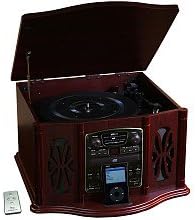
This image displays the KLH AUDIO KL-300i Nostalgia 5-n-1 System. The unit features a dark wood finish. The top lid is open, revealing a turntable. Below the turntable, the front panel includes controls for the CD player, AM/FM radio tuner, and an iPod dock. A small remote control is visible to the left of the main unit.
Контроли на предниот панел:
- Копче за вклучување: Го вклучува или исклучува уредот.
- Избирач на функции: Switches between Phono, CD, Radio, iPod, and Aux modes.
- Копче за јачина на звук: Го прилагодува нивото на главната јачина на звук.
- Контроли на CD плеер: Пушти/Пауза, Стоп, Прескокни напред/назад.
- Радио приемник: AM/FM band selector, Tuning knob.
- iPod Dock: Connector for iPod devices.
- Aux-In приклучок: 3.5 мм влез за надворешни аудио уреди.
- Jackек за слушалки: 3.5 мм излез за приватно слушање.
Највисок панел:
- Тркалезна плоча: For playing vinyl records.
- Капак: Protects the turntable when not in use.
Страничен панел:
- Палуба со касети: For playing audio cassette tapes.
Поставување
Follow these steps for initial setup of your audio system.
- Поставување: Place the unit on a stable, flat surface away from direct sunlight, heat sources, and excessive dust or moisture. Ensure there is adequate space around the unit for ventilation.
- Поврзете ја антената: For optimal AM/FM radio reception, connect the supplied antenna wire to the antenna terminal on the rear of the unit. Extend the wire fully for better reception.
- Поврзување за напојување: Приклучете го кабелот за напојување со наизменична струја во стандарден ѕиден штекер.
- Почетно вклучување: Press the Power button on the front panel to turn on the unit.
Упатства за работа
Општа операција:
- Вклучување/исклучување: Притиснете го копчето за вклучување/исклучување за да го вклучите или исклучите уредот.
- Избор на функција: Use the Function Selector knob or buttons to choose your desired audio source (Phono, CD, Radio, iPod, Aux).
- Прилагодување на јачината на звукот: Вртете го копчето за јачина на звук за да го зголемите или намалите нивото на звук.
Работа на грамофон:
- Lift the lid of the unit.
- Ставете винил плоча на плочата за грамофон.
- Select the appropriate speed (33 1/3, 45, or 78 RPM) using the speed selector switch. For 45 RPM records, place the included adapter on the spindle if needed.
- Gently lift the tonearm and position the stylus over the desired starting groove of the record.
- Полека спуштете го тонот на плочата. Репродукцијата ќе започне автоматски.
- За да ја запрете репродукцијата, нежно подигнете ја тонерачката и вратете ја во мирување.
Работа со CD плеер:
- Press the Function Selector to CD mode.
- Press the Eject button to open the CD tray.
- Ставете го ЦД-то со страната со етикетата свртена нагоре во фиоката.
- Press the Eject button again to close the tray. The CD will begin playing automatically or display the track count.
- Use the Play/Pause, Stop, and Skip buttons to control playback.
Работа со касетофон:
- Вметнете касетна лента во отворот за касети на страната од уредот.
- Притиснете го копчето Play за да започнете со репродукција.
- Use the Fast Forward (FF) button to advance the tape quickly.
- To stop playback, press the Stop/Eject button. Pressing it halfway will eject the tape.
Работа со AM/FM радио:
- Press the Function Selector to Radio mode.
- Select either AM or FM band using the band selector switch.
- Rotate the Tuning knob to search for radio stations.
- Adjust the antenna wire for best reception.
iPod Dock Operation:
- Press the Function Selector to iPod mode.
- Carefully place your compatible iPod device onto the iPod dock connector.
- Use your iPod's controls to select and play music. Audio will be routed through the KLH AUDIO system's speakers.
Aux-In Operation:
- Press the Function Selector to Aux mode.
- Connect an external audio device (e.g., MP3 player, smartphone) to the Aux-In jack on the front panel using the supplied 3.5mm auxiliary cable.
- Play audio from your external device. The sound will be played through the KLH AUDIO system's speakers.
Употреба на далечински управувач:
The remote control primarily operates the CD player functions (Play, Pause, Stop, Skip). Note that the remote cannot turn the unit on or off.
Одржување
Proper care will ensure the longevity of your system.
- Чистење на единицата: Избришете ја надворешноста на уредот со мека, сува крпа. Не користете абразивни средства за чистење, восоци или растворувачи.
- Грижа за игла: Handle the turntable stylus with extreme care. Clean the stylus periodically with a soft brush, brushing from back to front.
- Грижа за ЦД/касета: Чувајте ги ЦД-ата и касетите чисти и без прашина. Чувајте ги во нивните кутии кога не се во употреба.
Решавање проблеми
If you experience issues with your system, refer to the following common problems and solutions.
| Проблем | Можна причина | Решение |
|---|---|---|
| Нема моќ | Кабелот за напојување не е безбедно приклучен. | Проверете го поврзувањето на кабелот за напојување со уредот и ѕидниот штекер. |
| Нема звук | Јачината на звукот е прениска; Избрана е неточна функција; Поврзани се слушалки. | Increase volume; Select correct function; Disconnect headphones. |
| Плочата не се врти | Unit not powered on; Belt dislodged. | Ensure unit is on; Contact service if belt issue suspected. |
| Лош радио прием | Антената не е исправена или правилно позиционирана. | Extend and adjust the antenna wire for better signal. |
| ЦД-то не се репродуцира | CD inserted incorrectly; CD is scratched or dirty. | Ensure CD is label-side up; Clean or replace CD. |
Спецификации
| Карактеристика | Спецификација |
|---|---|
| Извор на енергија | AC 120V ~ 60Hz |
| Димензии (Ш x Д x В) | Приближно 17" x 17" x 10.5" (43.2 см x 43.2 см x 26.7 см) |
| Брзини на грамофон | 33 1/3, 45, 78 вртежи во минута |
| Опсег на радиофреквенција | AM: 530-1710 kHz, FM: 88-108 MHz |
| Компатибилност со ЦД | CD, CD-R/RW |
| Док за iPod | Compatible with older generation iPods (30-pin connector) |
Гаранција и поддршка
This product is covered by a limited manufacturer's warranty. For specific warranty terms and conditions, please refer to the warranty card included with your purchase or contact KLH customer support. If you require technical assistance or have questions not covered in this manual, please contact KLH customer service through their official webстраницата или информациите за контакт дадени со вашиот производ.
Ask a question about this manual
Ask about setup, troubleshooting, compatibility, parts, safety, or missing instructions. Manuals+ will review the question and use this page’s manual context to help answer it.