
Вовед
The Nokia Bluetooth Stereo Headset BH-905 is designed to provide a superior audio experience with active noise cancellation and wide compatibility. This manual provides instructions for setting up, operating, and maintaining your headset to ensure optimal performance.
The headset features 10 microphones: 8 dedicated to capturing ambient noise for cancellation and 2 for capturing speech in noisy environments. It offers versatile connectivity, supporting both wireless Bluetooth and wired connections with various devices.
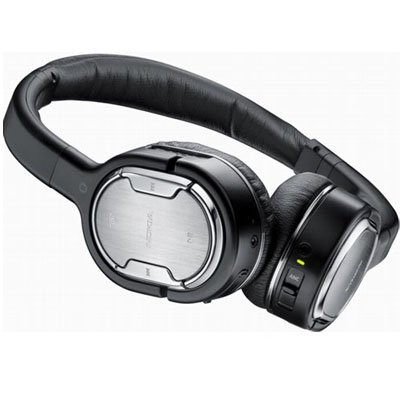
Image: The Nokia Bluetooth Stereo Headset BH-905, showcasinнеговиот елегантен дизајн и перничињата за преку уши.
Клучни карактеристики
- Активно поништување на шум (ANC): Significantly reduces ambient noise for an immersive listening experience.
- 10 микрофони: Utilizes 8 microphones for noise capture and 2 for clear speech transmission in loud surroundings.
- Широка компатибилност: Connects wirelessly via Bluetooth or wired to a variety of mobile phones, music players, and other audio devices.
- Беспрекорна контрола: Intuitive controls allow for easy switching between music and calls without needing to look at the device.
Поставување
Bluetooth спарување
- Ensure your headset is charged and powered off.
- Активирајте Bluetooth на вашиот мобилен уред.
- Press and hold the power button on the headset until the indicator light flashes blue rapidly, indicating pairing mode.
- On your device, search for Bluetooth devices and select "Nokia BH-905" from the list.
- If prompted, enter the passcode (usually "0000").
- Откако ќе се спари, индикаторското светло ќе свети постојано сино или ќе трепка бавно.
Wичен приклучок
For devices without Bluetooth or when battery is low, use the provided audio cables. The headset includes plugs for standard audio jacks and airplane adapters for versatile use.
- Connect one end of the audio cable to the headset's audio input port.
- Connect the other end to your audio source (e.g., mobile phone, MP3 player, airplane entertainment system).
Упатства за работа
Вклучување/исклучување
- За да го вклучите, притиснете и држете го копчето за вклучување додека не светне индикаторската ламба.
- За да го исклучите, притиснете и задржете го копчето за вклучување додека индикаторската ламба не се изгасне.
Активно откажување на бучавата (ANC)
The BH-905 features advanced Active Noise Cancellation technology. With 8 dedicated microphones, it captures ambient low-frequency noise and generates an inverse sound wave, effectively canceling out unwanted sounds. This allows for a clearer audio experience, especially in noisy environments like airplanes or busy streets.
- To activate ANC, locate the ANC switch on the headset and slide it to the 'On' position. A green indicator light will confirm activation.
- To deactivate ANC, slide the switch to the 'Off' position.
Управување со повици
The headset is equipped with 2 microphones specifically designed for speech. These microphones not only capture your voice clearly but also work to cancel out ambient noise, ensuring that the person you are speaking with hears you, not your surroundings.
- Одговарање / завршување на повици: Use the dedicated call button on the headset.
- Switching between Music and Calls: The headset allows for seamless transitions between listening to music and taking calls. When a call comes in, your music will pause, and you can answer the call directly from the headset.
Репродукција на музика
Control your music directly from the headset using the intuitive buttons. The design supports "blind usage," meaning you can operate the controls by feel without needing to look at them.
- Пушти/Пауза: Use the play/pause button.
- Прескокни ги патеките: Use the forward/backward track buttons.
- Контрола на јачината на звукот: Прилагодете ја јачината на звукот користејќи ги наменските копчиња за јачина на звук.
Video: An official Nokia video demonstrating the features and technology behind the BH-905 headset, including its active noise cancellation and multi-microphone system for clear audio and calls.
Одржување
- Редовно чистете ги слушалките со мека, сува крпа.
- Избегнувајте изложување на слушалките на екстремни температури, влага или директна сончева светлина.
- Store the headset in its protective case when not in use to prevent damage.
- Не обидувајте се да ги расклопите или модифицирате слушалките, бидејќи тоа ќе ја поништи гаранцијата.
Решавање проблеми
- Без моќност: Проверете дали слушалките се целосно наполнети.
- Не може да се спари: Make sure the headset is in pairing mode and within range of your device. Try restarting both devices.
- Нема звук/Лош квалитет на звук: Check volume levels on both the headset and your connected device. For wired connections, ensure cables are securely plugged in. For Bluetooth, ensure a stable connection.
- ANC не работи ефикасно: Ensure the ANC switch is in the 'On' position.
- Callers Cannot Hear Me Clearly: Ensure the headset's microphones are not obstructed.
If issues persist, refer to the Nokia support webлокација или контактирајте ја службата за корисници за дополнителна помош.
Спецификации
| Карактеристика | Спецификација |
|---|---|
| Бренд | Nokia |
| Број на модел | 02716J5 |
| Форма фактор | Over-ear (two_ear) |
| Контрола на бучава | Активно поништување на шум |
| Технологија за поврзување | Bluetooth, жичен |
| Технологија на безжична комуникација | Bluetooth |
| Дополнителни карактеристики | Microphone; Stereo |
| Тип на контрола | Контрола на медиуми |
| Тежина на ставката | 0.32 фунти |
| UPC | 758478021477 |
| GTIN | 758478021477 |
Гаранција и поддршка
The Nokia Bluetooth Stereo Headset BH-905 comes with a 12-месечна гаранција од датумот на купување. Оваа гаранција ги покрива производствените дефекти при нормална употреба. Ве молиме задржете го доказот за купување за гаранциски барања.
For technical support, warranty service, or additional information, please visit the official Nokia support website or contact your local Nokia customer service center.