
1. Вовед
Ви благодарам за купувањетоasing the Caliber RMD 068-2 Car Radio USB/SD Player. This manual provides detailed instructions for the installation, operation, and maintenance of your new car radio. Please read this manual thoroughly before using the product to ensure proper functionality and safety. Keep this manual for future reference.
2. Информации за безбедност
- Инсталација: Ensure the unit is installed by a qualified technician to prevent damage to the vehicle's electrical system. Incorrect wiring can cause fire or electrical shock.
- Напојување: Connect the unit only to a 12V DC car battery with a negative ground.
- Осигурувачи: Always replace fuses with new ones of the specified rating. Using an incorrect fuse can cause damage to the unit or vehicle.
- Ниво на гласност: Do not operate the unit at excessively high volume levels, as this may impair your ability to hear external traffic sounds and could be dangerous.
- Чистење: Користете мека, сува крпа за чистење. Не користете абразивни средства за чистење или растворувачи.
- Влага: Не го изложувајте уредот на влага или вода.
3. Содржина на пакетот
Проверете дали сите предмети се присутни:
- Caliber RMD 068-2 Car Radio Unit
- Одвојувачки преден панел
- Опрема за жици ISO
- Рамка за монтирање
- Disassembly Keys (2 pcs)
- Упатство за употреба (овој документ)
4. Производот завршиview
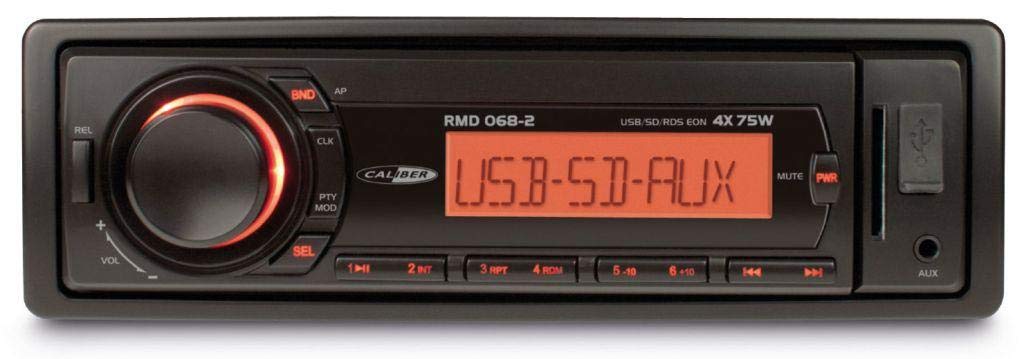
Слика 1: Предна страна view of the Caliber RMD 068-2 Car Radio. This image shows the main unit with its detachable front panel, including the display, control buttons, USB port, and SD card slot.
4.1 Контроли на предниот панел
- POWER/MODE Button: Press to turn on/off. Short press to switch between Radio, USB, SD, AUX modes.
- Копче за ВОЛУМ: Rotate to adjust volume. Press to access audio settings (Bass, Treble, Balance, Fader).
- ПРИКАЗ: Shows current time, radio frequency, track information, etc.
- USB порта: Поврзете USB флеш дискови за репродукција на медиуми.
- Слот за SD-картичка: Вметнете SD картички за репродукција на медиуми.
- AUX влез (3.5 мм приклучок): Поврзете надворешни аудио уреди.
- Копче BAND/AMS: In radio mode, press to select radio band (FM1, FM2, FM3). Long press for Automatic Memory Store.
- PRESET Buttons (1-6): Store and recall radio stations. In USB/SD mode, use for direct track selection.
- Копче PLAY/PAUSE: Пушти или паузирај репродукција на медиуми.
- FORWARD/BACKWARD Buttons: Skip tracks or tune radio frequency.
- Копче за исфрлање: Release the detachable front panel.
4.2 Задни врски
The rear of the unit features standard ISO connectors for power and speakers, along with an antenna input.
- ISO Power Connector: For connecting to the vehicle's power supply (constant 12V, ignition 12V, ground).
- ISO Speaker Connector: For connecting to the vehicle's speakers (Front Left, Front Right, Rear Left, Rear Right).
- Влез на антена: За поврзување на радио антената на автомобилот.
5. Поставување
5.1 Инсталација
- Исклучете ја батеријата: Before starting, disconnect the negative terminal of your car battery to prevent short circuits.
- Отстранете ја старата единица: Внимателно отстранете го постоечкото радио во автомобилот од контролната табла.
- Инсталирајте ја рамката за монтирање: Insert the supplied mounting frame into the dashboard opening and bend the tabs to secure it.
- Поврзете жици: Refer to the wiring diagram in section 5.2. Connect the ISO wiring harness to the car's wiring and then to the Caliber RMD 068-2 unit. Connect the antenna cable.
- Slide Unit In: Carefully slide the Caliber RMD 068-2 unit into the mounting frame until it clicks into place.
- Повторно поврзете ја батеријата: Reconnect the negative terminal of your car battery.
- Прикачете го предниот панел: Прикачете го одвојливиот преден панел на главната единица.
5.2 Дијаграм за поврзување
The Caliber RMD 068-2 uses standard ISO connectors. Ensure correct connections as shown below. If your vehicle does not have ISO connectors, an adapter may be required.
| Пин бр. | Боја на жица (типична) | Функција |
|---|---|---|
| 4 | Жолта | Постојана 12V (батерија) |
| 7 | Црвено | Префрли 12V (палење) |
| 8 | Црното | Земјата |
| 5 | Сино | Antenna Remote Out |
| Пин бр. | Боја на жица (типична) | Функција |
|---|---|---|
| 1 | Виолетова | Заден десен (+) |
| 2 | Виолетова/Црна | Заден десен (-) |
| 3 | Зелена | Задна лева страна (+) |
| 4 | Зелено/Црно | Задна лева страна (-) |
| 5 | Греј | Предна десна (+) |
| 6 | Сиво/Црно | Предна десна (-) |
| 7 | Бело | Предна лева страна (+) |
| 8 | Бело/Црно | Предна лева страна (-) |
Note: Wire colors may vary depending on vehicle manufacturer. Always consult your vehicle's wiring diagram.
6. Упатства за работа
6.1 Основни функции
- Вклучување/исклучување: Притиснете го Енергија / режим копче за вклучување или исклучување на уредот.
- Контрола на јачината на звукот: Завртете го ВОЛУМЕН копчето во насока на стрелките на часовникот за зголемување на јачината на звукот, спротивно од стрелките на часовникот за намалување.
- Избор на режим: Кратко притиснете го Енергија / режим button to cycle through available modes: Radio (FM), USB, SD, AUX.
- Аудио поставки: Притиснете го ВОЛУМЕН knob to enter audio settings. Rotate the knob to select settings like BASS, TREBLE, BALANCE, FADER. Press the knob again to confirm or move to the next setting.
6.2 Работа со радио
- Избор на бенд: Во радио режим, притиснете го копчето БЕНД/АМС копче за префрлување помеѓу опсезите FM1, FM2 и FM3.
- Рачно подесување: Кратко притиснете го НАПРЕД/НАЗАД копчиња за фино подесување на фреквенцијата.
- Автоматско пребарување: Долго притиснете го НАПРЕД/НАЗАД копчиња за автоматско пребарување на следната станица со силен сигнал.
- Поставки за складирање: Tune to your desired station. Long press one of the PRESET (1-6) buttons until you hear a beep. The station is now stored.
- Потсетете ги претходно поставените поставки: Short press one of the PRESET (1-6) копчиња за да повикате зачувана станица.
- Automatic Memory Store (AMS): Долго притиснете го БЕНД/АМС копче за автоматско скенирање и складирање на најсилните станици во претходно поставените станици на тековниот опсег.
6.3 USB/SD репродукција
- Вметни медиум: Вметнете USB флеш-меморија во USB-портата или SD-картичка во слотот за SD-картичка. Уредот автоматски ќе се префрли во USB/SD режим и ќе започне со репродукција.
- Пушти/Пауза: Притиснете го PLAY/PAUSE копче за паузирање или продолжување на репродукцијата.
- Прескокни ја песната: Кратко притиснете го НАПРЕД/НАЗАД копчиња за прескокнување на следната или претходната песна.
- Брзо напред/назад: Долго притиснете го НАПРЕД/НАЗАД копчиња за брзо премотување напред или назад во рамките на песна.
- Навигација низ папките: Користете го ПОСТАВЕНИ 5 и ПОСТАВЕНИ 6 buttons to navigate between folders on your USB/SD media.
6.4 Влез AUX
- Поврзете го уредот: Connect your external audio device (e.g., smartphone, MP3 player) to the 3.5mm AUX input jack on the front panel using an audio cable.
- Изберете AUX режим: Притиснете го Енергија / режим button repeatedly until "AUX" is displayed.
- Контрола на репродукција: Control playback (play, pause, skip) directly from your connected external device. The car radio will control the volume.
7. Одржување
- Чистење на единицата: Use a soft, dry cloth to wipe the front panel and display. Do not use harsh chemicals, cleaning sprays, or abrasive cloths, as these can damage the surface.
- Detachable Front Panel: When detaching the front panel, handle it carefully. Store it in a protective case (if supplied) to prevent scratches or damage.
- USB/SD порти: Keep the USB port and SD card slot free from dust and debris.
8 Смена на проблеми
| Проблем | Можна причина | Решение |
|---|---|---|
| Нема моќ | Blown fuse; Incorrect wiring; Loose connection | Check and replace fuse; Verify wiring connections (Yellow to constant 12V, Red to ignition 12V, Black to ground); Ensure front panel is securely attached. |
| Нема звук | Volume too low; Mute activated; Incorrect speaker wiring; Damaged speakers | Increase volume; Check if mute is active; Verify speaker connections; Test with known good speakers. |
| Лош радио прием | Antenna not connected; Damaged antenna; Weak signal area | Ensure antenna is securely connected; Check antenna for damage; Try tuning to a stronger station or move to a different location. |
| USB/SD не се репродуцира. | Неподдржано file format; Corrupted media; Incorrectly inserted media; Max capacity exceeded | Обезбедете files are MP3/WMA format; Try a different USB/SD card; Reinsert media correctly; Check media capacity (max 32GB recommended). |
| Front panel cannot be detached | Eject button not fully pressed; Mechanism jammed | Press the EJECT button firmly; Do not force the panel. |
If the problem persists after trying these solutions, please contact your dealer or a qualified service center.
9. Спецификации
- Модел: Caliber RMD 068-2
- Излезна моќност: 4 x 75 Watts Max
- Напојување: 12V DC (10.8V-15.6V), Negative Ground
- Осигурувач: 10 А
- Поддржани аудио формати: MP3, WMA (via USB/SD)
- USB/SD Compatibility: До 32GB (FAT32 формат)
- FM приемник: RDS, 18 Presets
- Влез AUX: 3.5 мм стерео приклучок
- Detachable Front Panel: Да
- Тежина: Приближно 0.95 kg (2.09 lbs)
10. Гаранција и поддршка
This Caliber product is covered by a warranty in accordance with applicable European laws. For detailed warranty terms and conditions, please refer to the warranty card included with your product or visit the official Caliber website. For technical support, troubleshooting assistance, or service inquiries, please contact your authorized Caliber dealer or the customer service department in your region. Please have your product model number (RMD 068-2) and proof of purchase ready when contacting support.
Note: Specifications and design are subject to change without notice for improvement.