
Вовед
This manual provides essential instructions for setting up, operating, and maintaining your Canon PowerShot ELPH 310 HS digital camera. Please read this manual thoroughly to ensure proper use and to maximize your camera's performance.
Што има во кутијата
По распакувањето, проверете дали се вклучени сите следни ставки:
- Canon PowerShot ELPH 310 HS Camera
- Пакет батерии NB-4L
- Полнач за батерии CB-2LV
- Ремен за зглоб
- USB кабел
- CD-ROM (Software/Drivers)
Поставување
1. Полнење на батеријата
Insert the Battery Pack NB-4L into the Battery Charger CB-2LV. Plug the charger into a power outlet. The charging indicator light will show the charging status. Once fully charged, remove the battery.
2. Вметнување на батеријата и мемориската картичка
Open the battery/card compartment cover on the camera. Insert the charged battery pack, ensuring correct orientation. Insert a compatible SD/SDHC/SDXC memory card into the card slot until it clicks into place. Close the compartment cover securely.

Слика: напред view of the Canon PowerShot ELPH 310 HS digital camera, showcasing its silver finish and lens.
Ракување со камерата
1. Вклучување/исклучување
Притиснете го ВКЛУЧЕНО/ИСКЛУЧЕНО button located on the top or side of the camera to power it on or off. The lens will extend when powered on.
2. Основна фотографија
- Фокусирање: Gently press the shutter button halfway down to focus. The camera will emit a beep and display a green frame when focus is achieved.
- Сликање: Притиснете го копчето за бленда целосно надолу за да ја снимите сликата.
- Зумирајте: Use the zoom lever around the shutter button to adjust the optical zoom (8x).
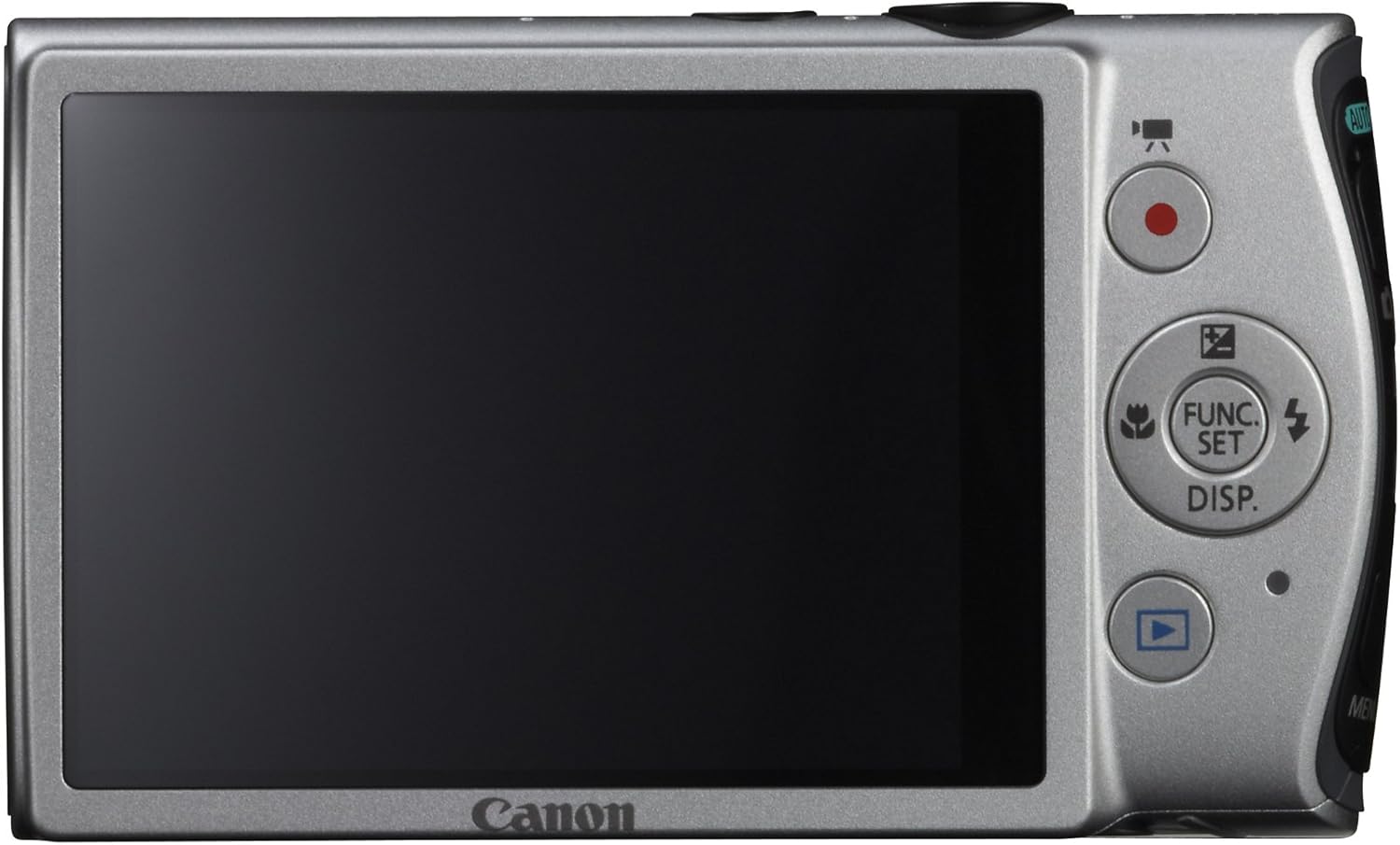
Слика: Заден дел view of the Canon PowerShot ELPH 310 HS, displaying the 3.0-inch LCD screen and various control buttons for navigation and function selection.
3. Режими на фотографирање
The PowerShot ELPH 310 HS offers various shooting modes to suit different situations. Use the mode dial or menu to select:
- Smart AUTO: Automatically detects scenes and applies optimal settings for point-and-shoot simplicity.
- Програма (П): Allows for automatic aperture/shutter speed selection based on conditions, with some user control.
- Movie Digest: Records a short video clip before each still image, combining them into a daily video.
- Рафал со голема брзина: Captures rapid action at approximately 8.7 frames per second.
- Супер забавен филм: Records video at high frame rates (up to 240 fps) for slow-motion playback.
- Режими на специјални сцени: Includes options like Handheld Night Scene, Portrait, Beach, Snow, Fireworks, Fisheye Effect, Miniature Effect, Toy Camera Effect, and more for specific photographic effects.
4. Снимање видео
To record videos, press the dedicated movie button. The camera supports Full HD 1080p video at 24 fps and 720p HD video at 30 fps. The iFrame movie format is also supported for easier editing.
5. Image Stabilization (Intelligent IS)
The camera features Intelligent IS, which automatically selects the best shake correction method for your shooting situation. This includes modes for stills (Normal, Panning, Macro, Tripod) and videos (Dynamic, Powered, Macro, Tripod) to ensure steady images and footage.
Одржување
1. Чистење на камерата
- Објектив: Користете мека крпа без влакненца, специјално дизајнирана за објективи на фотоапаратот. Избегнувајте директно допирање на објективот со прсти.
- LCD екран: Нежно избришете со мека, сува крпа. Не користете абразивни средства за чистење.
- Тело на камерата: Use a soft, dry cloth to wipe away dust and smudges.
2. Нега на батерии
- Чувајте ги батериите на ладно и суво место кога не ги користите.
- Избегнувајте често целосно празнење на батеријата за да го продолжите нејзиниот век на траење.
- Не ги изложувајте батериите на екстремни температури.
3. Складирање
Кога го складирате фотоапаратот подолг период, извадете ја батеријата и мемориската картичка. Чувајте го фотоапаратот на суво место без прашина, по можност во торба или футрола за фотоапаратот.
Решавање проблеми
| Проблем | Можна причина / решение |
|---|---|
| Камерата не се вклучува. | Battery may be depleted or incorrectly inserted. Ensure battery is charged and inserted correctly. |
| Сликите се матни. | Camera shake, subject movement, or incorrect focus. Ensure proper grip, use Intelligent IS, or check focus settings. |
| Грешка со мемориската картичка. | Memory card may be full, corrupted, or incompatible. Try formatting the card (this will erase all data) or use a different card. |
| Блицот не свети. | Flash may be set to OFF or Red-Eye Reduction mode. Check flash settings in the menu. |
| Не може да се снима видео. | Memory card may be full or too slow. Ensure sufficient space and use a high-speed memory card. |
Спецификации
| Карактеристика | Детал |
|---|---|
| Име на моделот | Canon PowerShot ELPH 310 HS |
| Сензор за слика | 12.1 мегапиксели CMOS |
| Процесор за слика | ДИГИК 4 |
| Оптички зум | 8x |
| Леќа | 28mm Wide-Angle (35mm equivalent: 28-224mm) |
| Стабилизација на слика | Optical (Intelligent IS) |
| Снимање видео | Full HD 1080p (24 fps), HD 720p (30 fps) |
| LCD екран | 3.0-inch PureColor LCD (461,000 dots) |
| Медиуми за складирање | SD, SDHC, SDXC мемориски картички |
| Поврзување | HDMI, USB |
| Батерија | NB-4L Lithium-ion Battery Pack |
| Тежина | Approx. 0.31 Pounds (including battery and memory card) |
Гаранција и поддршка
For warranty information and technical support, please refer to the documentation included with your product or visit the official Canon webлокација. Чувајте ја сметката како доказ за купување за гаранциски побарувања.
Поддршка од Canon Webсајт: www.usa.canon.com/support