
1. Вовед
The D-Link Wireless N300 Dual Band PCI Express Desktop Adapter (DWA-566) provides high-speed wireless connectivity for your desktop computer. Utilizing Wireless N technology, it maximizes the speed and range of your wireless signal, offering superior performance compared to Wireless G devices. The dual-band capability supports both 2.4GHz and 5GHz wireless signals, allowing for flexible network usage, such as browsing on 2.4GHz and HD streaming or gaming on the clearer 5GHz band.
This adapter is designed to fit into any standard PCI Express slot, offering a higher performance interface than legacy PCI. It supports secure wireless networks with WPA or WPA2 encryption.

Figure 1.1: D-Link DWA-566 Wireless N300 Dual Band PCI Express Desktop Adapter with antennas.
2. Карактеристики
The DWA-566 adapter includes the following key features:
- IEEE 802.11n, 802.11g, and 802.11a Compliant
- Dual Band Technology for Superior Wireless Performance (2.4GHz or 5GHz)
- Access secure wireless networks using advanced WPA or WPA2 encryption
- Fits into any standard PCI Express slot
- PCI Express Interface provides higher performance than a legacy PCI interface
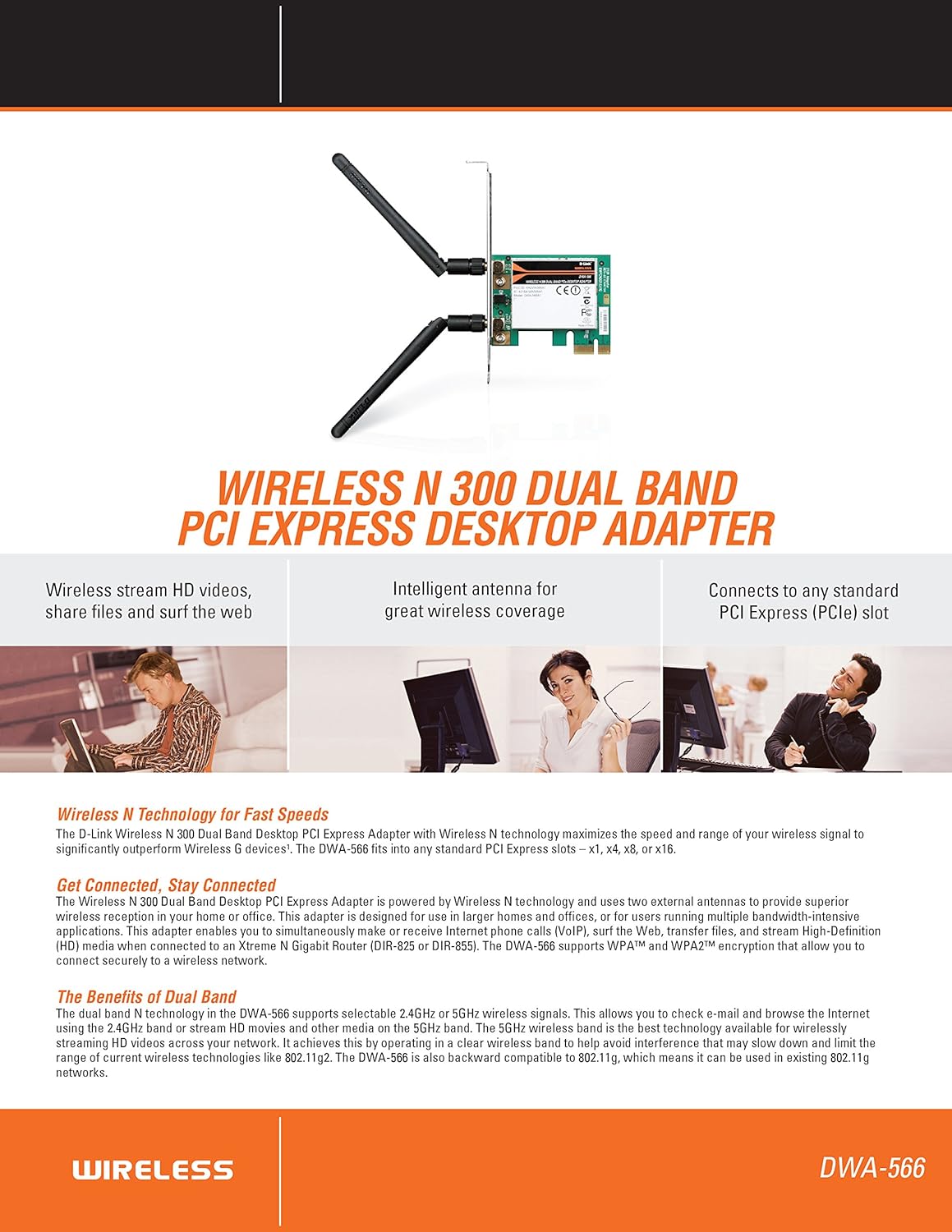
Слика 2.1: Готовоview of DWA-566 features and benefits.
3. Содржина на пакетот
Потврдете дека вашиот пакет ги содржи следниве ставки:
- Wireless N 300 Dual Band PCI Express Adapter (DWA-566)
- Two detachable antennas
- Ниско-проfile држач за монтирање
- Водич за брзо инсталирање
- CD-ROM with:
- Менаџер за безжична конекција на D-Link
- Возачи
- Документација на производот
4. Системски барања
Before installing the DWA-566, ensure your system meets the following minimum requirements:
- Computer with an available PCI Express slot
- Windows operating system (Windows XP, Vista, 7, 8, 10)
- CD-ROM drive (for driver installation from included CD)
- Internet Explorer 7 or Firefox 3.0 and above (for viewing documentation)
- Претплата со давател на интернет услуги (ISP)
For optimal performance, a D-Link Wireless N router (DIR-655 or DIR-825) is recommended.

Figure 4.1: Detailed technical specifications, minimum requirements, and network diagram.
5. Поставување и инсталација
5.1 Инсталација на хардвер
- Исклучете го компјутерот: Исклучете го компјутерот и исклучете го кабелот за напојување.
- Отворено куќиште за компјутер: Remove the computer case cover.
- Лоцирајте го PCI Express слотот: Find an available PCI Express slot on your motherboard.
- Вметнете го адаптерот: Carefully insert the DWA-566 adapter into the PCI Express slot, ensuring it is seated firmly.
- Безбеден адаптер: Secure the adapter with a screw to the computer chassis.
- Прикачете антени: Screw the two included antennas onto the connectors on the adapter.
- Затворете го куќиштето и вклучете го: Replace the computer case cover, plug in the power cord, and power on your computer.

Figure 5.1: DWA-566 adapter with antennas attached, ready for installation.
5.2 Инсталација на софтвер
After hardware installation, proceed with driver and utility installation:
- Вметнете го инсталациското ЦД: Insert the DWA-566 installation CD into your computer's CD-ROM drive. The setup wizard should launch automatically. If not, navigate to the CD drive and run the 'Setup.exe' file.
- Следете ги упатствата на екранот: Follow the prompts of the D-Link setup wizard to install the drivers and the D-Link Wireless Connection Manager utility.
- Рестартирајте го компјутерот: Откако ќе заврши инсталацијата, рестартирајте го компјутерот кога ќе бидете известени.
Забелешка: For Windows 7/8 64-bit systems, ensure you are using the latest drivers available from the official D-Link support website to avoid potential compatibility issues.
6. Упатства за работа
Once the drivers are installed, you can connect to a wireless network:
- Launch Connection Manager: Open the D-Link Wireless Connection Manager utility or use the built-in Windows wireless network utility.
- Скенирај за мрежи: The utility will scan for available wireless networks in your area.
- Изберете мрежа: Choose your desired wireless network (SSID) from the list.
- Внесете го безбедносниот клуч: If the network is secured, enter the correct WPA/WPA2 security key or passphrase.
- Поврзете се: Кликнете на „Поврзи се“ за да воспоставите безжична врска.
A successful connection will be indicated by a strong signal strength and internet access.
7. Одржување
За да обезбедите оптимални перформанси и долготрајност на вашиот адаптер DWA-566:
- Држете ги драјверите ажурирани: Периодично проверувајте ја поддршката на D-Link website for the latest drivers and firmware updates.
- Обезбедете правилна вентилација: Make sure your computer case has adequate airflow to prevent overheating of internal components, including the wireless adapter.
- Позиционирање на антената: Adjust the antennas for the best possible signal reception.
- Фактори на животната средина: Avoid placing your computer near large metal objects or other devices that may cause wireless interference.
8 Смена на проблеми
Доколку наидете на проблеми со вашиот адаптер DWA-566, разгледајте го следново:
8.1 Нема безжична конекција
- Verify Hardware Installation: Ensure the adapter is correctly seated in the PCI Express slot and antennas are securely attached.
- Check Drivers: Confirm that the drivers are installed correctly. Check Device Manager for any error symbols next to the network adapter. Reinstall drivers if necessary.
- Статус на рутерот: Ensure your wireless router is powered on and broadcasting a signal.
- Безбедносен клуч: Double-check that the correct wireless security key (WPA/WPA2 passphrase) is entered.
- Поставки на заштитен ѕид: Temporarily disable your computer's firewall to see if it is blocking the connection. If it resolves the issue, configure your firewall to allow the D-Link utility.
8.2 Slow Connection Speed or Frequent Disconnections
- Прилагодување на антената: Try repositioning the antennas for better signal reception.
- Пречки: Move the computer away from potential sources of interference (e.g., cordless phones, microwaves, Bluetooth devices).
- Близина на рутерот: Ensure the computer is within the effective range of your wireless router.
- Употреба на двоен опсег: If your router supports it, try connecting to the 5GHz band for less interference and potentially higher speeds, especially for streaming or gaming.
- Ажурирање на возачот: Update the adapter drivers to the latest version from the D-Link webсајт.
9. Спецификации
| Карактеристика | Спецификација |
|---|---|
| Бренд | Д-Линк |
| Број на модел | DWA-566 |
| Хардверски интерфејс | PCI Express |
| Протокол за врска со податоци | IEEE 802.11n, 802.11g, 802.11a |
| Стапка на пренос на податоци | До 300 мегабити во секунда |
| Фреквентен опсег | 2.4 GHz / 5 GHz (двоен опсег) |
| Безбедност | WPA, WPA2 |
| Компатибилни уреди | Десктоп компјутери |
| Тежина на ставката | 0.4 фунти (приближно 181 грама) |
| Сертификација за надворешно тестирање | FCC B, IC B, CE, C-Tick |
10. Гаранција и поддршка
The D-Link Wireless N300 Dual Band PCI Express Desktop Adapter (DWA-566) comes with a 1-годишна ограничена гаранција. For specific terms and conditions, please refer to the warranty documentation included with your product or visit the official D-Link webсајт.
D-Link provides 24/7 Basic Installation Support to assist with initial setup and configuration. For technical assistance, driver downloads, and further product information, please visit the D-Link support webсајт или контактирајте со нивната служба за корисници.
Поддршка за D-Link Webсајт: https://support.dlink.com/