
Вовед
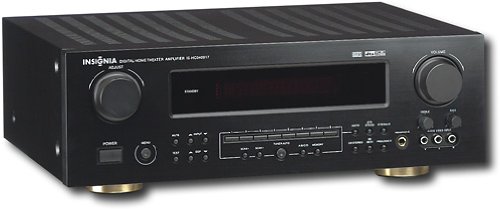
This manual provides essential instructions for the setup, operation, maintenance, and troubleshooting of your Insignia 6.1-Channel 600W Digital Home Theater Receiver, model IS-HC040917. Please read this manual thoroughly before using the receiver to ensure proper and safe operation.
Важни безбедносни инструкции
- Не ги блокирајте отворите за вентилација. Инсталирајте во согласност со упатствата на производителот.
- Не инсталирајте во близина на извори на топлина како што се радијатори, топлински регистри, шпорети или други апарати (вклучувајќи ampлајфикатори) кои произведуваат топлина.
- Заштитете го кабелот за напојување од одење или стискање, особено на приклучоците, приклучните приклучоци и местото каде што тие излегуваат од апаратот.
- Користете само додатоци/додатоци наведени од производителот.
- Исклучете го овој апарат од струја за време на громови или кога не го користите подолг временски период.
- Пренесете ги сите сервиси на квалификуван сервисен персонал. Сервисирањето е потребно кога апаратот е оштетен на кој било начин.
Водич за поставување
1. Отпакување
Carefully remove the receiver and all accessories from the packaging. Ensure all components are present:
- Insignia IS-HC040917 Receiver
- Далечински управувач
- AM јамка антена
- Антена за FM жица
- Упатство за употреба (овој документ)
2. Поврзување на звучници
The IS-HC040917 receiver supports a 6.1-channel speaker configuration. Connect your speakers to the corresponding terminals on the rear panel. Ensure correct polarity (+ to + and - to -) for each speaker.
- Напред лево/десно: За главен стерео звук.
- Центар: For dialogue.
- Surround Left/Right: For ambient sound effects.
- Опкружувачки грб: For additional rear channel effects in 6.1 setups.
- Subwoofer (Pre-out): Connect to a powered subwoofer's LFE input.
Note: The receiver is designed for speakers with an impedance of 8 ohms.
3. Поврзување на аудио/видео извори
Connect your external devices (e.g., DVD player, Blu-ray player, game console, cable box) to the appropriate input jacks on the receiver.
- HDMI: Use HDMI cables for high-definition audio and video signals. The receiver has 3 HDMI input ports.
- Дигитален аудио (оптички/коаксијален): For digital audio from devices like CD players or set-top boxes.
- Аналоген аудио (RCA): For standard stereo audio connections from devices like VCRs or older CD players.
- С-видео: For video signals from compatible devices.
4. Поврзување со антена
Connect the supplied AM loop antenna and FM wire antenna to their respective terminals on the rear panel for radio reception.
5. Поврзување за напојување
Once all audio/video and speaker connections are made, plug the receiver's power cord into a standard AC wall outlet.
Слика: Rear panel of the Insignia IS-HC040917 receiver, showing various input and output connections for speakers, audio/video sources (HDMI, RCA, S-Video, Digital), and antenna terminals. This diagram is crucial for correctly wiring the home theater system.
Упатства за работа
1. Вклучување/исклучување
Притиснете го МОЌ копчето на предната плоча или на далечинскиот управувач за да го вклучите или исклучите приемникот.
2. Избор на влез
Користете го ИЗБОР НА ВЛЕЗИ knob/buttons on the front panel or the remote control to choose the desired audio/video source (e.g., HDMI 1, DVD, CD, Tuner).
3. Контрола на јачината на звукот
Прилагодете ја главната јачина на звук користејќи го големиот ВОЛУМЕН копчето на предниот панел или на Волумен +/- копчиња на далечинскиот управувач.
4. Аудио режими
The receiver supports various audio modes, including 6.1-channel surround sound. Use the РЕЖИМ or ДСП buttons on the remote to cycle through available sound modes (e.g., Stereo, Dolby Digital, DTS, Pro Logic).
5. Tuner Operation (AM/FM Radio)
Select the "Tuner" input. Use the БЕНД button to switch between AM and FM. Use the ПРЕСУДА +/- buttons to manually tune to stations or ПРЕДХОДНО ПОСТАВЕНО +/- to select stored stations. Refer to the remote control for specific tuner functions.
Одржување
1. Чистење
Wipe the exterior of the receiver with a soft, dry cloth. Do not use liquid cleaners or aerosol sprays, as they may damage the finish or internal components. Ensure the unit is unplugged before cleaning.
2. Вентилација
Ensure that the ventilation openings on the top and sides of the receiver are not blocked. Proper airflow is essential to prevent overheating and ensure long-term performance.
3. Управување со кабли
Periodically check all cable connections to ensure they are secure. Loose connections can lead to poor audio or video quality.
Решавање проблеми
| Проблем | Можна причина | Решение |
|---|---|---|
| Нема моќ | Кабелот за напојување е исклучен; штекерот не е активен. | Проверете го поврзувањето на кабелот за напојување; обидете се со друг штекер. |
| Нема звук | Избран е неточен влез; жиците на звучникот се лабави; јачината на звукот е прениска; исклучено е звукот. | Select correct input; check speaker connections; increase volume; deactivate mute. |
| Нема видео | Incorrect input selected; video cables loose or incorrect. | Select correct input; check video cable connections (HDMI, S-Video, RCA). |
| Далечинскиот управувач не работи | Батериите се испразнети; пречка помеѓу далечинскиот управувач и приемникот; неправилен режим на далечинскиот управувач. | Replace batteries; remove obstructions; ensure remote is in the correct operating mode. |
Спецификации
- Модел: IS-HC040917
- Бренд: ИНСИГНИЈА
- Излезна моќност: 600 вати
- Број на канали: 6.1 канали
- Режим за излез на звук: Опкружувачки
- Вкупно HDMI порти: 3
- Видови конектори: 3.5mm Jack, HDMI, RCA, USB
- Компатибилни уреди: Говорник
- Контролен метод: Далечински
- Боја: Црното
- UPC: 799530659962
- ASIN: B0075C3DN2
Гаранција и поддршка
For warranty information and customer support, please refer to the warranty card included with your product or visit the official Insignia webсајт. Чувајте ја вашата потврда за купување за барања за гаранција.
For further assistance, you may contact Insignia customer service. Contact details are typically available on the manufacturer's webлокацијата или во пакувањето на производот.