1. Важни безбедносни инструкции
Please read these instructions carefully before operating the unit and retain them for future reference. Following these guidelines will ensure safe and proper use of your GPX R602B radio.
- Вода и влага: Do not use this apparatus near water. Avoid exposure to rain or moisture.
- Извори на топлина: Не инсталирајте во близина на извори на топлина како што се радијатори, топлински регистри, шпорети или други апарати (вклучувајќи ampлајфикатори) кои произведуваат топлина.
- Вентилација: Обезбедете соодветна вентилација. Не блокирајте никакви отвори за вентилација.
- Извори на енергија: Работете само од типот на извор на енергија наведен на етикетата за означување.
- Чистење: Чистете само со сува крпа.
- Прилози: Користете само додатоци/додатоци наведени од производителот.
- Сервисирање: Целото сервисирање упатете го на квалификуван сервисен персонал. Сервисирањето е потребно кога апаратот е оштетен на кој било начин, како што е оштетен кабелот за напојување или приклучокот, течноста е истурена или предмети паднале во апаратот, апаратот бил изложен на дожд или влага, не работи нормално , или е исфрлен.
Безбедност на батеријата
- Не мешајте стари и нови батерии.
- Не мешајте алкални, стандардни (јаглерод-цинк) или батерии што се полнат (никел-кадмиум).
- Insert batteries correctly, observing the + and - polarities.
- Отстранете ги истрошените батерии веднаш.
- Фрлете ги батериите правилно. Не спалувајте.
2. Карактеристики
The GPX R602B Portable AM/FM Radio offers a range of features designed for convenience and versatility:
- Portable AM/FM radio with a built-in handle for easy transport.
- Integrated speakers with analog volume control and durable metal grills.
- Digital clock with user-friendly setting buttons.
- Operates using the built-in AC power cable.
- Can also be powered by 3 C batteries (sold separately) for portable use.
- 3.5mm audio line input jack for connecting external audio devices.
- Telescopic antenna for improved FM reception.
- Stereo headphone jack for private listening.

Figure 2.1: Key features and connection points of the GPX R602B radio.
3. Содржина на пакетот
Upon unpacking your GPX R602B radio, please ensure all the following items are present:
- GPX R602B Portable AM/FM Radio Unit
- Сопственик прирачник
- Built-in AC Power Adapter
4. Контроли и индикатори
Familiarize yourself with the controls and indicators on your radio for optimal operation.
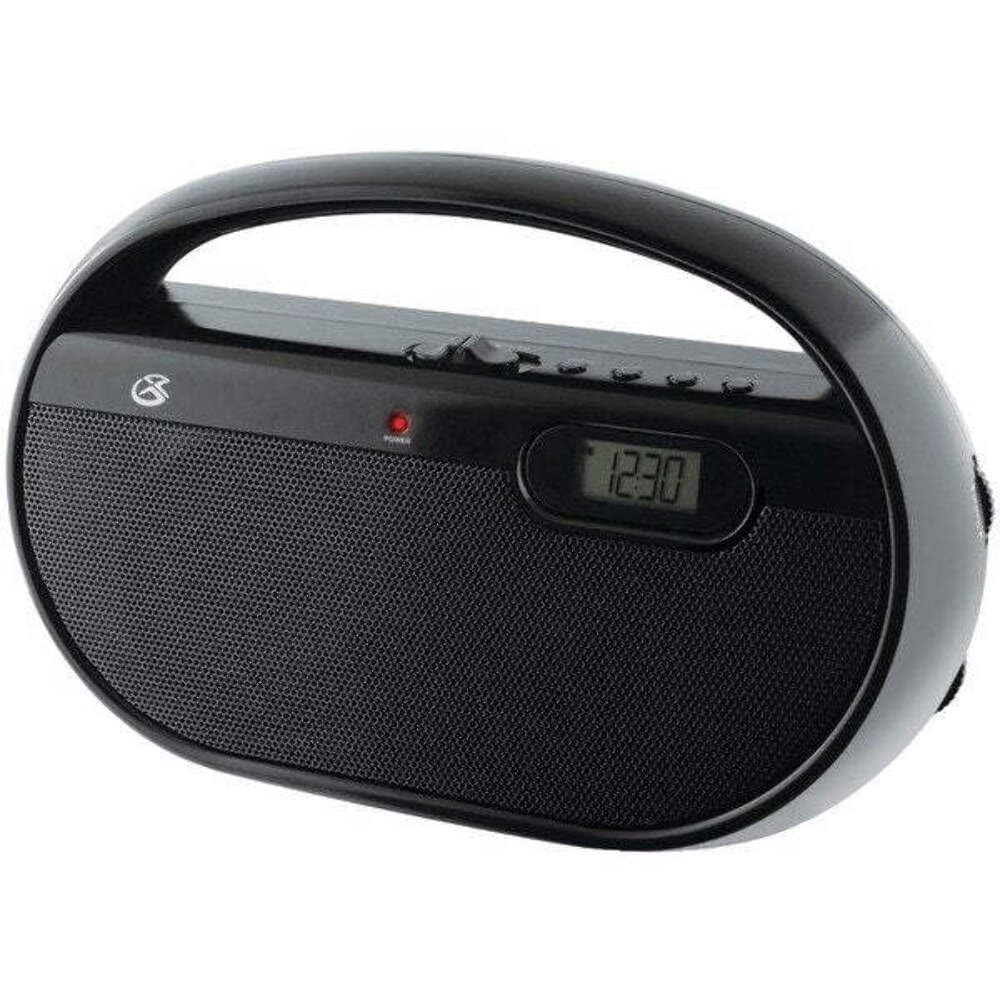
Слика 4.1: Предна страна view of the GPX R602B radio.
Распоред на контролите (видете ја Слика 4.1)
- Копче за напојување/гласност: Rotates to turn the unit ON/OFF and adjust the volume level.
- Копче за подесување: Rotates to select AM or FM radio stations.
- Прекинувач за избор на опсег: Slides to select between AM and FM radio bands.
- Дигитален екран: Shows the current time or radio frequency.
- Копче за поставување време: Used in conjunction with H/M buttons to set the clock.
- H/M Buttons: Used to adjust hours and minutes when setting the clock.
- Display Time Button: Briefly shows the time when the radio is playing.
- Aux In Jack (3.5mm): Поврзете надворешни аудио уреди.
- Приклучок за слушалки (3.5 мм): Поврзете слушалки за приватно слушање.
- Телескопска FM антена: Extend and adjust for optimal FM reception.
5. Напојување на единицата
The GPX R602B radio can be powered by either AC power or batteries.
Работа на наизменична струја
- Locate the built-in AC power cord. This cord is typically stored in the battery compartment when not in use.
- Plug the AC power cord into a standard wall outlet (120V AC, 60Hz).
- Единицата сега е подготвена за работа.
Работа со батерија
For portable use, the radio requires 3 'C' size batteries (not included).
- Отворете го капакот на одделот за батерии што се наоѓа на задниот дел од уредот.
- Insert 3 'C' size batteries, ensuring the correct polarity (+ and -) as indicated inside the compartment.
- Добро затворете го капакот на преградата за батерии.
- The unit is now ready for battery-powered operation.

Figure 5.1: Power options for the GPX R602B radio.
6. Поставување и основно работење
Почетно поставување
- Поврзување за напојување: Connect the radio to AC power or insert batteries as described in Section 5.
- Прилагодување на антената: For FM reception, extend the telescopic antenna fully. For AM reception, the unit has a built-in antenna, so no external adjustment is needed. Position the unit for best AM reception.
Работење со радио
- Вклучи: Rotate the Power/Volume knob clockwise until it clicks and the unit powers on.
- Изберете опсег: Slide the Band Selector switch to either AM or FM.
- Намести ја станицата: Rotate the Tuning knob to find your desired radio station. The frequency will be displayed on the digital screen.
- Прилагодете ја јачината на звукот: Rotate the Power/Volume knob to adjust the sound level.
- Исклучи: Rotate the Power/Volume knob counter-clockwise until it clicks and the unit powers off.
Using the Line Input (Aux In)
You can connect external audio devices, such as smartphones or MP3 players, to play audio through the radio's speakers.
- Connect a 3.5mm audio cable (not included) from the headphone jack or line-out jack of your external device to the Aux In jack on the radio.
- Turn on the radio and your external device.
- Adjust the volume on both the radio and your external device for optimal sound.

Figure 6.1: Devices compatible with the Aux In feature.
Користење на слушалки
For private listening, plug standard 3.5mm headphones (not included) into the Headphone Jack. The internal speakers will automatically mute.
Поставување на дигитален часовник
The digital clock can be set when the radio is turned off.
- Ensure the radio is turned OFF using the Power/Volume knob.
- Притиснете и задржете ги двете Поставете време копчето и H/M копчето истовремено.
- Додека го држите Поставете време button, repeatedly press the H/M button to adjust the hour and then the minutes.
- Ослободете го Поставете време button once the desired time is set.
- На view the time while the radio is playing, press the Време на прикажување button. The time will appear briefly on the digital display.
7. Одржување
Proper care and maintenance will ensure the longevity of your GPX R602B radio.
- Чистење: Избришете ја надворешноста на уредот со мека, сува крпа. Не користете абразивни средства за чистење, восоци или растворувачи.
- Замена на батерија: If using batteries, replace all three 'C' batteries when the unit's performance diminishes. Always replace with new batteries of the same type.
- Складирање: If storing the unit for an extended period, remove the batteries to prevent leakage and corrosion.
8 Смена на проблеми
If you encounter issues with your GPX R602B radio, refer to the following common problems and solutions:
| Проблем | Можна причина | Решение |
|---|---|---|
| Нема моќ | AC cord not plugged in; Batteries exhausted or incorrectly inserted. | Ensure AC cord is securely plugged into a live outlet. Replace batteries with new ones, checking polarity. |
| Лош радио прием | Antenna not extended (FM); Unit poorly positioned (AM); Weak signal. | Extend and adjust the telescopic FM antenna. For AM, rotate the unit for better reception. Try moving the radio to a different location. |
| Нема звук од звучници | Јачината на звукот е прениска; поврзани се слушалки. | Increase the volume using the Power/Volume knob. Disconnect headphones if not desired. |
| Clock not setting correctly | Неточен редослед на копчиња. | Ensure the radio is OFF. Press and hold both 'Set Time' and 'H/M' buttons simultaneously, then repeatedly press 'H/M' to adjust. Release 'Set Time' when done. |
| Звукот е искривен или нејасен | Volume too high; Poor reception; External device volume too high. | Lower the volume. Adjust antenna or unit position for better reception. If using Aux In, adjust volume on the external device. |
9. Спецификации
Detailed technical specifications for the GPX R602B Portable AM/FM Radio:
- Број на модел: R602B
- Димензии на производот (Д x Ш x В): 9.62 x 3.74 x 6.3 инчи (24.43 x 9.50 x 16.00 см)
- Тежина на ставката: 1.76 фунти (0.80 кг)
- Извор на енергија: AC 120V, 60Hz or 3 x 'C' size batteries (not included)
- Технологија на тјунер: AM/FM
- Поддржани радио бендови: 2-опсежен (AM/FM)
- Технологија за поврзување: Radio, 3.5mm Aux In
- Посебни карактеристики: Built-In AM Antenna, Built-In Clock, Portable, Telescopic FM Antenna, 3.5mm Headphone Jack
- Боја: Црното
- Производител: Digital Products International, Inc.
- Прво достапен датум: 5 јуни 2012 година
10. Гаранција и поддршка
For warranty information and customer support regarding your GPX R602B radio, please refer to the warranty card included with your purchase or visit the official GPX webлокација. Чувајте ја сметката за купување како доказ за какви било гаранциски побарувања.
If you require technical assistance or have questions not covered in this manual, please contact GPX customer service directly. Contact details are typically available on the manufacturer's webлокацијата или во пакувањето на производот.


