
ATI 100-505746
Упатство за користење на графичката картичка ATI AMD FirePro W600
Модел: 100-505746
1. Вовед
This user manual provides comprehensive instructions for the installation, operation, and maintenance of your ATI AMD FirePro W600 2GB GDDR5 6Mini DisplayPort PCI-Express Video Card. The FirePro W600 is designed for professional graphics applications, offering high performance and multi-display capabilities. Please read this manual thoroughly before installing and operating the graphics card to ensure proper functionality and safety.
2. Информации за безбедност
Секогаш почитувајте ги следниве безбедносни мерки на претпазливост за да спречите оштетување на производот или повреда на себе.
- Пред инсталацијата, проверете дали вашиот компјутерски систем е исклучен од струја и исклучен од штекерот.
- Discharge any static electricity from your body by touching a grounded metal object (e.g., the computer chassis) before handling the graphics card.
- Handle the graphics card by its edges; avoid touching the components or gold-plated connectors.
- Не ја изложувајте графичката картичка на влага или екстремни температури.
- Only use the card in a well-ventilated computer case to prevent overheating.
3. Содржина на пакетот
Проверете дали сите артикли се присутни во вашиот пакет:
- ATI AMD FirePro W600 Graphics Card
- Водич за брз почеток (доколку е вклучен)
- Driver CD (if included, otherwise download from manufacturer's webсајт)
- Mini DisplayPort to DVI adapters (quantity may vary, often sold separately)
4. Поставување и инсталација
4.1 Системски барања
- PCI-Express x16 slot available on motherboard.
- Sufficient power supply (consult your system's power supply specifications).
- Compatible operating system (e.g., Windows 7/8/10, Linux).
- Minimum 2GB system memory.
4.2 Инсталација на хардвер
- Подгответе го вашиот компјутер: Исклучете го компјутерот и извадете го кабелот за напојување. Отворете го куќиштето на компјутерот.
- Locate an available PCI-Express x16 slot: Identify an empty PCI-Express x16 slot on your motherboard. Remove the corresponding expansion slot cover from the computer case.
- Инсталирајте ја графичката картичка: Carefully align the graphics card with the PCI-Express x16 slot. Press down firmly and evenly until the card is securely seated in the slot. Secure the card with the screw or latch mechanism of your computer case.
- Connect power (if applicable): The FirePro W600 typically does not require additional power connectors beyond the PCIe slot, but always verify your specific model's requirements.
- Close the computer case: Once the card is securely installed, close your computer case and reconnect all cables.
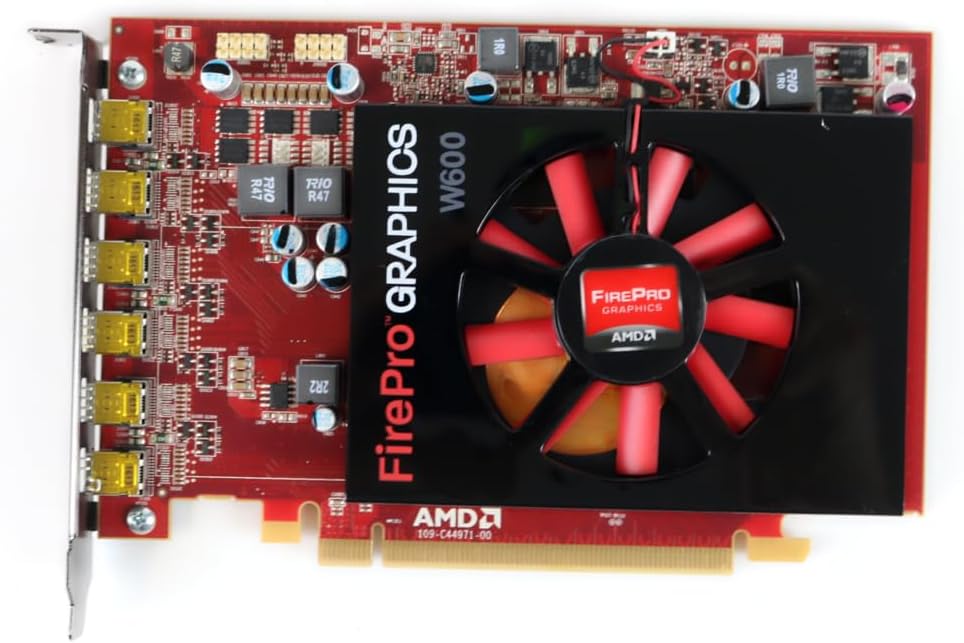
Слика 1: Предна страна view of the ATI AMD FirePro W600 graphics card, showing the cooling fan and the FirePro Graphics branding.

Слика 2: Заден дел view of the ATI AMD FirePro W600 graphics card, displaying the intricate circuitry and components on the back of the PCB.
4.3 Инсталација на драјвери
- Power on your computer: Boot your computer. The operating system may automatically detect the new hardware and install a basic driver.
- Download the latest drivers: For optimal performance and stability, it is highly recommended to download the latest professional drivers directly from the AMD official website. Navigate to the support section and search for "FirePro W600" drivers.
- Install the drivers: Run the downloaded driver installer and follow the on-screen prompts. You may need to restart your computer after installation.
5. Ракување со графичката картичка
5.1 Поврзување на дисплеи
The ATI AMD FirePro W600 features six Mini DisplayPort outputs. You will need Mini DisplayPort cables or Mini DisplayPort to DVI/HDMI/VGA adapters (active adapters are recommended for multi-monitor setups, especially for AMD Eyefinity features) to connect your monitors.
- Connect your Mini DisplayPort cables or adapters to the Mini DisplayPort outputs on the graphics card.
- Connect the other end of the cables to your monitors.
- Power on your monitors.

Figure 3: Detail of the six Mini DisplayPort outputs on the FirePro W600, indicating its multi-display capability.
5.2 Configuring Multi-Monitor Setups (AMD Eyefinity)
The FirePro W600 supports AMD Eyefinity technology, allowing you to combine multiple displays into a single large desktop or create independent display groups.
- After driver installation, right-click on your desktop and select "AMD Radeon Settings" or "AMD Catalyst Control Center" (depending on driver version).
- Navigate to the "Display" or "Eyefinity" section.
- Follow the on-screen instructions to detect and configure your connected displays. You can arrange displays, set resolutions, and create Eyefinity display groups for a panoramic viewискуство.
- For optimal performance with Eyefinity, ensure you are using active Mini DisplayPort adapters for any non-DisplayPort monitors.
6. Одржување
Редовното одржување помага да се обезбеди долготрајност и оптимални перформанси на вашата графичка картичка.
- Отстранување прашина: Periodically clean dust from the graphics card's fan and heatsink using compressed air. Ensure the computer is powered off and unplugged before cleaning. Hold the fan blades gently to prevent over-spinning during cleaning.
- Ажурирања на возачот: Keep your graphics drivers updated by regularly checking the AMD official webстраница за најновите верзии.
- Системска вентилација: Ensure your computer case has adequate airflow to prevent the graphics card from overheating.
7 Смена на проблеми
Доколку наидете на проблеми со вашата графичка картичка, погледнете ги следните вообичаени проблеми и решенија:
| Проблем | Можна причина / решение |
|---|---|
| Нема приказ на екранот по инсталацијата. |
|
| Driver installation failure. |
|
| Only some monitors are detected in a multi-monitor setup. |
|
| Системот се урива или замрзнува за време на задачи што бараат интензивна графика. |
|
8. Спецификации
| Карактеристика | Детал |
|---|---|
| Чипсет | AMD FirePro W600 |
| Часовник на моторот | 600 MHz |
| Меморија | 2 GB GDDR5 |
| Мемориски интерфејс | 128-битни |
| Макс. Резолуција | 4096 x 2304 |
| Конектори | 6x Mini DisplayPorts |
| Интерфејс | PCI-Express x16 |
| Тежина на ставката | 7 унци |
| Димензии на производот (ДxШxВ) | 1.57 x 4.21 x 6.45 инчи |
9. Информации за гаранцијата
For detailed warranty information regarding your ATI AMD FirePro W600 graphics card, please refer to the warranty card included with your product or visit the official ATI/AMD support website. Warranty terms and conditions may vary by region and retailer. Keep your proof of purchase for warranty claims.
10. Поддршка
For technical support, driver downloads, and frequently asked questions, please visit the official AMD support webсајт:www.amd.com/en/support
You may also contact your retailer or point of purchase for assistance.