
1. Вовед
The D-Link GO-SW-5G is a 5-Port Unmanaged Gigabit Desktop Switch designed for home and small office environments. This device provides a simple and cost-effective solution to expand your network connectivity, offering high-speed Gigabit Ethernet ports for reliable data transfer. It incorporates D-Link's Green Technology for energy efficiency, reduced heat generation, and extended product lifespan.
This switch is a plug-and-play device, requiring no complex configuration or software installation, making it easy to integrate into an existing network.
2. Содржина на пакетот
Ве молиме проверете дали сите артикли наведени подолу се вклучени во вашиот пакет:
- D-Link GO-SW-5G 5-Port Gigabit Desktop Switch
- Адаптер за напојување
- Водич за брзо инсталирање
Доколку недостасуваат или се оштетени некои предмети, ве молиме контактирајте го вашиот продавач за помош.
3. Упатства за поставување
The D-Link GO-SW-5G switch is designed for easy plug-and-play installation. Follow these steps to set up your device:
3.1. Поврзете го адаптерот за напојување
- Locate the power input port on the side of the D-Link GO-SW-5G switch.
- Поврзете го испорачаниот адаптер за напојување на овој порт.
- Вклучете го другиот крај на адаптерот за напојување во стандарден електричен штекер.
- The power LED on the front of the switch will illuminate, indicating that the device is receiving power.

Слика 1: Страна view of the D-Link GO-SW-5G switch with the power input port.
3.2. Поврзете се на вашата мрежа
- Using a standard Ethernet cable (RJ45), connect one end to an available LAN port on your router (not your modem).
- Connect the other end of this Ethernet cable to any of the five available ports on the back of the D-Link GO-SW-5G switch.
- The corresponding LED on the front of the switch will light up, indicating an active connection.
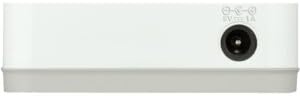
Слика 2: Заден дел view of the D-Link GO-SW-5G switch with five Ethernet ports.
3.3. Connect Network Devices
- Connect your network devices (e.g., computers, gaming consoles, network printers, smart TVs) to the remaining available Ethernet ports on the D-Link GO-SW-5G switch using Ethernet cables.
- Each connected device will have its corresponding LED on the front of the switch illuminate, confirming a successful connection.

Слика 3: Предна страна view of the D-Link GO-SW-5G switch showing active port LEDs.
4. Упатства за работа
The D-Link GO-SW-5G is an unmanaged switch, meaning it operates automatically without requiring user configuration. Once connected as described in the Setup section, it will begin forwarding network traffic between connected devices.
- Automatic Negotiation: The switch automatically detects the network speed (10/100/1000 Mbps) and duplex mode (half/full) of connected devices and adjusts accordingly.
- Автоматски MDI/MDIX: All ports support automatic MDI/MDIX crossover, eliminating the need for crossover cables when connecting to other switches or hubs.
- LED индикатори: Each port has an LED indicator on the front panel. A lit LED indicates an active link, and blinking indicates network activity.
5. Одржување
To ensure optimal performance and longevity of your D-Link GO-SW-5G switch, consider the following maintenance guidelines:
- Поставување: Place the switch in a cool, dry location away from direct sunlight, heat sources, and excessive moisture. Ensure adequate ventilation around the device.
- Чистење: Use a soft, dry cloth to clean the exterior of the switch. Avoid using liquid or aerosol cleaners, as they may damage the device.
- Управување со кабли: Keep Ethernet cables neatly organized to prevent tangles and accidental disconnections.
- Циклус на напојување: If you experience network issues, a simple power cycle (unplugging the power adapter for 10 seconds and then plugging it back in) can often resolve minor problems.
6 Смена на проблеми
If you encounter issues with your D-Link GO-SW-5G switch, refer to the following common troubleshooting steps:
- Нема LED диода за напојување:
- Осигурајте се дека адаптерот за напојување е безбедно поврзан и со прекинувачот и со функционален електричен штекер.
- Проверете дали електричниот штекер работи со вклучување на друг уред.
- No Link/Activity LED for a Connected Device:
- Проверете дали Ethernet кабелот е безбедно приклучен и во портата на прекинувачот и во мрежниот уред.
- Обидете се со друг Ethernet кабел за да исклучите неисправен кабел.
- Осигурајте се дека поврзаниот уред е вклучен и дека неговиот мрежен адаптер работи правилно.
- Обидете се да го поврзете уредот со друга порта на прекинувачот.
- Бавна брзина на мрежата:
- Verify that all connected devices and cables support Gigabit Ethernet (1000 Mbps) for optimal performance. The switch will operate at the lowest common speed.
- Ensure your router and internet service provider (ISP) plan support the desired speeds.
- Perform a power cycle on the switch and your router.
- Наизменично поврзување:
- Проверете дали има лабави врски со кабелот.
- Ensure the switch is not overheating; provide adequate ventilation.
- Тестирајте со различни Ethernet кабли.
7. Спецификации
| Бренд | Д-Линк |
| Број на модел | GO-SW-5G/B |
| Број на пристаништа | 5 |
| Тип на прекинувач | Неуправувано |
| Стапка на пренос на податоци | 1 Gigabits Per Second (10/100/1000 Mbps) |
| Интерфејс | RJ45 |
| Боја | Бело |
| Тежина на ставката | 0.22 фунти |
| Voltage | 100-240 волти |
| Компатибилни уреди | PC, Mac, and other Ethernet-enabled devices |
| Преклопна ткаенина | 10 Gbps |
| UPC | 790069365669 |
8. Гаранција и поддршка
Ограничена гаранција: The D-Link GO-SW-5G switch comes with a 3-year limited warranty. For detailed terms and conditions, please refer to the warranty information included in your package or visit the official D-Link webсајт.
Техничка поддршка: For technical assistance, product registration, or to download the latest firmware and documentation, please visit the Поддршка за D-Link Webсајт или контактирајте ја службата за корисници на D-Link.