
1. Вовед
Ви благодарам за купувањетоasing the KLH R5100 Surround Sound Receiver. This receiver is designed to provide high-quality audio and video performance for your home entertainment system. It features multiple audio and video inputs, surround sound processing, and a powerful amplifier to deliver an immersive listening experience. Please read this manual thoroughly before operating the unit to ensure proper setup and optimal performance.
2. Важни безбедносни информации
За да го намалите ризикот од електричен удар, пожар или оштетување на уредот, ве молиме почитувајте ги следниве безбедносни мерки на претпазливост:
- Извор на енергија: Connect the unit only to an AC 120V, 60Hz power supply.
- Вентилација: Обезбедете соодветна вентилација. Не ги блокирајте отворите за вентилација. Оставете доволно простор околу уредот за правилен проток на воздух.
- Вода и влага: Не го изложувајте уредот на дожд, влага или прекумерна влажност. Не ставајте предмети полни со течности, како што се вазни, врз уредот.
- Топлина: Држете го уредот подалеку од извори на топлина како што се радијатори, грејни тела, шпорети или други апарати (вклучувајќи ampлајфикатори) кои произведуваат топлина.
- Чистење: Исклучете го уредот од штекерот пред чистење. Користете сува крпа за чистење.
- Сервисирање: Не обидувајте се сами да го сервисирате овој уред. Сите сервиси обратете се на квалификуван сервисен персонал.
- Кабли: Заштитете го кабелот за напојување од одење или стискање, особено на приклучоците, приклучните приклучоци и местото каде што излегуваат од уредот.
3. Содржина на пакетот
Ве молиме проверете дали вашиот пакет ги содржи следниве артикли:
- KLH R5100 Surround Sound Receiver
- Единица за далечинско управување
- Упатство за употреба
- Аудио/видео кабли (тип RCA)
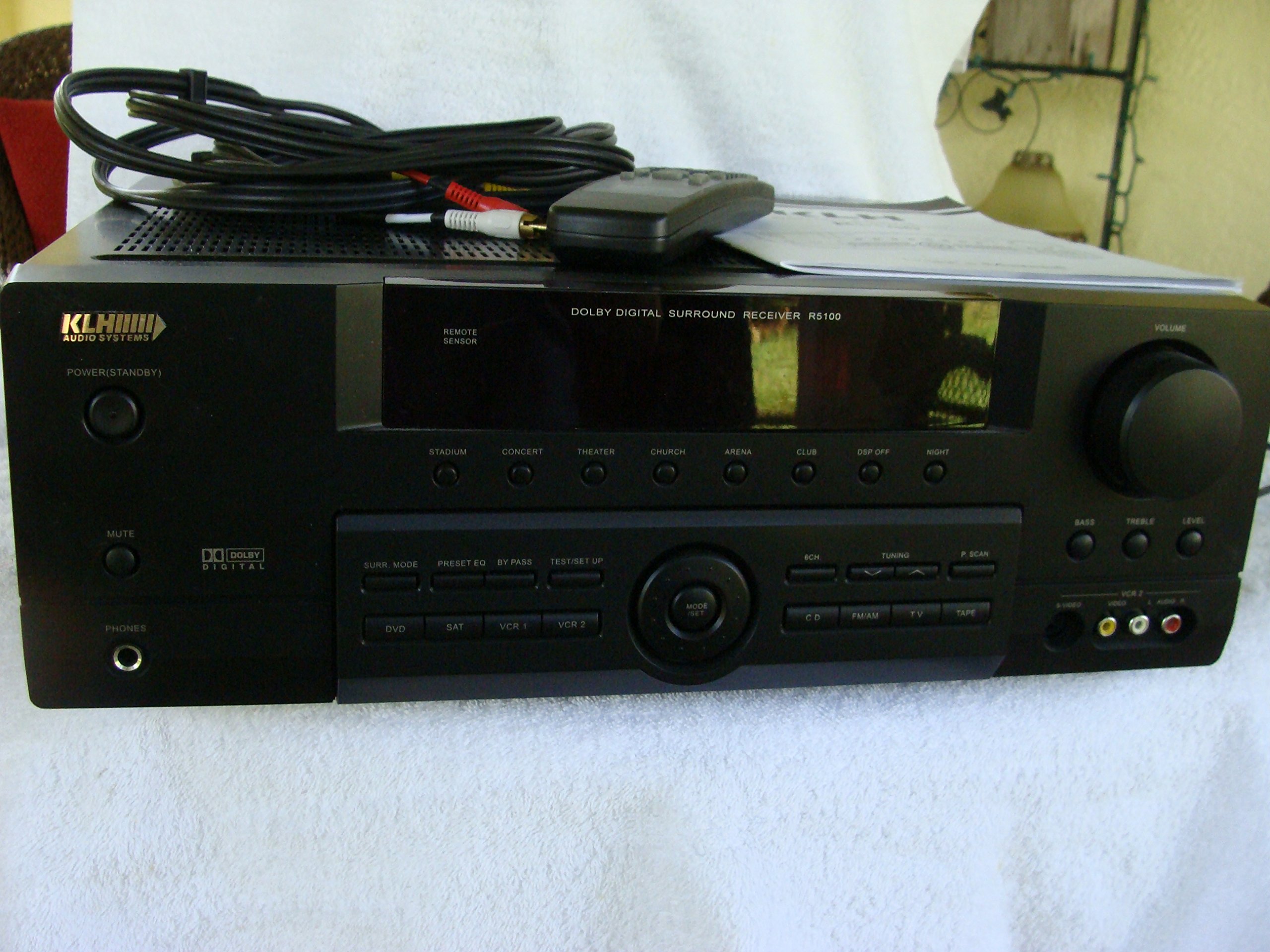
Image: The KLH R5100 receiver, its remote control, user manual, and included audio/video cables.
4. Производот завршиview
4.1 Контроли на предниот панел
The front panel provides access to essential controls and indicators for daily operation.

Слика: Детална view of the receiver's front panel, highlighting the display, volume control, and input selection buttons.
- Копче за вклучување: Го вклучува или исклучува ресиверот.
- Влезни избирачи: Buttons for DVD, SAT, VCR 1, VCR 2, CD, FM/AM, TV, TAPE to choose your audio/video source.
- Копче за јачина на звук: Ја прилагодува вкупната излезна јачина на звук.
- Surround Mode Buttons: Select various sound fields like Stadium, Concert, Theater, Church, Arena, Club, DSP Off, Night.
- Bass/Treble/Level: Controls for adjusting audio tone and individual channel levels.
- Jackек за слушалки: За приватно слушање.
4.2 Приклучоци на задниот панел
The rear panel houses all input and output terminals for connecting your audio and video components, as well as speakers.

Image: The full rear panel of the receiver, displaying all connection ports for audio, video, and speakers.
- Терминали за звучници: Connections for Main (Front Left/Right), Center, and Rear (Surround Left/Right) speakers.
- Аудио влезови (RCA): For connecting CD players, tape decks, VCRs, TVs, and other stereo audio sources.
- Video Inputs/Outputs (RCA/S-Video): For connecting video sources like DVD players, VCRs, and TVs.
- Дигитални аудио влезови (оптички/коаксијални): For connecting digital audio sources like DVD players or set-top boxes.
- 6CH Direct Input: For connecting external multi-channel decoders or players with 5.1 analog outputs.
- Излез на сабвуфер: RCA излез за поврзување на активен сабвуфер.
- Антенски терминали: For FM and AM antennas.
4.3 Единица за далечинско управување
The remote control provides convenient access to all receiver functions from your listening position.

Слика: Крупен план view of the remote control unit, detailing its buttons for various functions.
- Вклучување/исклучување: Го вклучува или исклучува ресиверот.
- Влезни избирачи: Dedicated buttons for each input source (DVD, CD, TV, etc.).
- Јачина на звук нагоре/намалување: Ја прилагодува главната јачина на звук.
- Исклучи звук: Привремено го замолчува аудио излезот.
- Опкружувачки режим: Cycles through available surround sound modes.
- Level/Test: For adjusting individual speaker levels and running a test tone.
- Контроли на тјунер: For FM/AM station tuning and memory functions.
5. Поставување
5.1 Поврзување на вашите звучници
Ensure the receiver is unplugged from the power outlet before making any connections.
- Предни звучници: Connect your main left and right speakers to the 'MAIN SPEAKERS (8Ω)' terminals. Ensure correct polarity (+ to + and - to -).
- Централен звучник: Connect your center channel speaker to the 'CENTER SPEAKER (8Ω)' terminals.
- Задни звучници: Connect your surround left and right speakers to the 'REAR SPEAKERS (8Ω)' terminals.
- Сабвуфер: Connect an active subwoofer to the 'SUBWOOFER OUT' RCA jack using a single RCA cable.

Слика: Детална view of the speaker connection terminals on the rear panel.
5.2 Поврзување на аудио/видео извори
Use appropriate cables (RCA, Optical, Coaxial) to connect your source components to the receiver.
- ДВД плеер: Connect the audio output of your DVD player to the 'DVD' audio input jacks (RCA) on the receiver. For digital audio, use either the 'DIGITAL IN OPTICAL' or 'DIGITAL IN COAXIAL' input. Connect the video output to the 'DVD' video input.
- ЦД плеер: Connect the audio output of your CD player to the 'CD' audio input jacks (RCA).
- TV/Cable Box: Connect the audio output of your TV or cable box to the 'TV' audio input jacks (RCA). Connect video output to the 'TV' video input.
- Други уреди: Use 'SAT', 'VCR 1', 'VCR 2', or 'TAPE' inputs for other audio/video components as needed.

Image: A close-up of the digital audio inputs (Coaxial, Optical) and the 6-channel direct input section on the rear panel.
5.3 Антенско поврзување
Поврзете ги испорачаните FM и AM антени со нивните соодветни терминали на задниот панел за радио прием.
6. Упатства за работа
6.1 Основно работење
- Вклучување: Press the Power button on the front panel or remote control.
- Изберете влез: Press the desired input selector button (e.g., 'DVD', 'CD') on the front panel or remote control to choose your source.
- Прилагодете ја јачината на звукот: Turn the Volume knob on the front panel or use the Volume Up/Down buttons on the remote control.
6.2 Surround Sound Modes
The R5100 offers various sound modes to enhance your listening experience:
- Стадион: Simulates the acoustics of a large stadium.
- Концерт: Creates a concert hall ambiance.
- Театар: Optimized for movie playback, enhancing dialogue and effects.
- Црква: Replicates the spaciousness of a church.
- Arena: Provides a wide, open sound field.
- Клуб: Simulates a lively club environment.
- DSP Off: Disables digital sound processing for a direct stereo signal.
- Ноќ: Reduces dynamic range for late-night listening without disturbing others.
Press the 'SURR. MODE' button on the remote or front panel to cycle through these modes.
6.3 Контрола на тонови
Use the BASS and TREBLE controls on the front panel or remote to adjust the low and high frequency response. The LEVEL controls allow for fine-tuning of individual speaker output levels.
6.4 Работа со тјунерот
To listen to radio:
- Press the 'FM/AM' input selector.
- Use the 'TUNING' buttons on the front panel or remote to find stations.
- Press 'MEMORY' to store favorite stations, and 'P.SCAN' to scan through presets.
7. Одржување
To ensure the longevity and optimal performance of your KLH R5100 receiver, follow these maintenance guidelines:
- Чистење: Wipe the exterior surfaces with a soft, dry cloth. Do not use abrasive cleaners, waxes, or solvents as they may damage the finish.
- Вентилација: Regularly check that the ventilation openings are not obstructed by dust or debris. Use a soft brush or vacuum cleaner to gently remove any build-up.
- Кабел за напојување: Inspect the power cord periodically for any signs of damage. If damaged, discontinue use and contact qualified service personnel.
- Складирање: Доколку го складирате уредот подолг временски период, исклучете го од штекерот и покријте го за да го заштитите од прашина.
8 Смена на проблеми
If you encounter problems with your receiver, refer to the following common issues and solutions before seeking professional service.
| Проблем | Можна причина | Решение |
|---|---|---|
| Нема моќ | Power cord unplugged; Power outlet not active | Проверете дали кабелот за напојување е безбедно вклучен; проверете го штекерот со друг уред |
| Нема звук | Incorrect input selected; Speakers not connected properly; Volume too low; Mute function active | Select correct input source; Check speaker connections and polarity; Increase volume; Deactivate Mute |
| Далечинскиот управувач не работи | Batteries depleted; Obstruction between remote and receiver; Remote sensor blocked | Replace batteries; Remove any obstructions; Ensure remote sensor on receiver is clear |
| Лош радио прием | Антената не е поврзана или е лошо позиционирана | Connect antennas securely; Adjust antenna position for better reception |
| Искривен звук | Input signal too high; Speaker impedance mismatch; Damaged cables | Reduce source volume; Ensure speakers match 8Ω impedance; Check and replace damaged cables |
9. Спецификации
The following are the technical specifications for the KLH R5100 Surround Sound Receiver:
- Број на модел: R5100
- Димензии на производот: 16.88 x 6.88 x 15.75 инчи
- Тежина на ставката: 24.2 фунти
- Извор на енергија: AC 120V, 60Hz
- Потрошувачка на енергија: 320 W
- Режим за излез на звук: Опкружувачки
- Конфигурација на каналот за сараунд звук: 5.1
- Технологија за поврзување: RCA, 3.5mm Jack, Optical, Coaxial
- Компатибилни уреди: Звучници
- Тип на контролор: Далечински
- Специјална карактеристика: Advanced Room Calibration (as per product listing, though specific details may vary)
- Боја: Црното
10. Гаранција и поддршка
For warranty information and customer support, please refer to the documentation included with your purchase or contact KLH customer service directly. Keep your proof of purchase for any warranty claims.