
Вовед
This manual provides detailed instructions for the installation, operation, and maintenance of your VTech VTCS6619 DECT 6.0 Expandable Speakerphone with Caller ID. Please read this manual thoroughly before using your new telephone system to ensure proper functionality and to take full advantagе од неговите карактеристики.
Содржина на пакетот
Потврдете дека вашиот пакет ги содржи следниве ставки:
- Cordless Phone with Caller ID/Call Waiting
- Telephone Base Unit
- Адаптер за напојување со наизменична струја
- Кабел за телефонска линија
- Батерија што може да се полни за мобилен телефон
- Капак за слушалката
Поставување
Follow these steps to set up your VTech VTCS6619 telephone system.
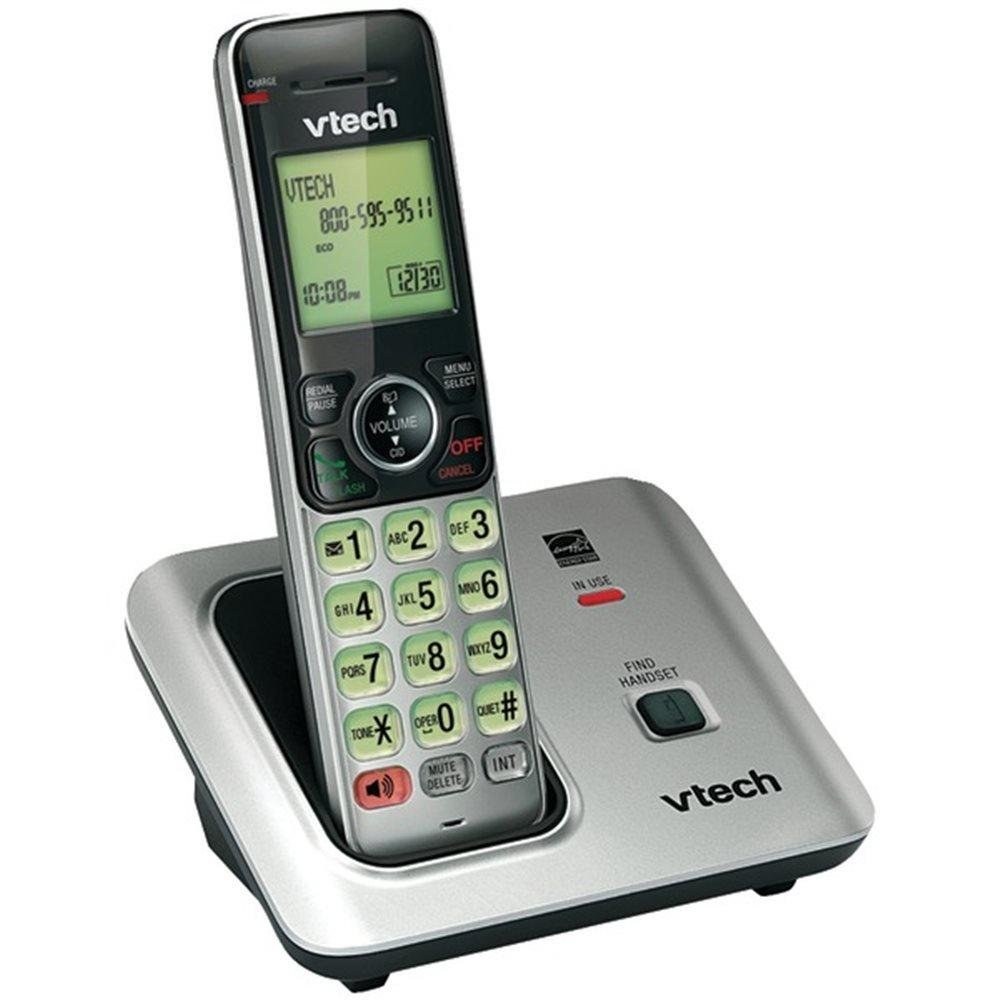
Image: The VTech VTCS6619 DECT 6.0 Cordless Speakerphone with Caller ID, showing the black handset and base unit.
1. Инсталација на батерија
- Отворете го капакот на преградата за батерии на задниот дел од слушалката.
- Цврсто поврзете го приклучокот на батеријата во приклучокот во внатрешноста на преградата.
- Place the battery pack with the label UP and tuck the wires neatly inside the compartment.
- Затворете го капакот на преградата за батерии.
2. Поврзување со основната единица
- Plug the small end of the AC power adapter into the power jack on the back of the telephone base.
- Plug the large end of the AC power adapter into a wall outlet not controlled by a wall switch.
- Приклучете го едниот крај од телефонскиот кабел во приклучокот TEL LINE на задната страна од телефонската основа.
- Вклучете го другиот крај од телефонскиот кабел во телефонски ѕиден приклучок.
3. Полнење на телефон
Once the battery is installed and the base unit is connected, place the handset on the telephone base. The CHARGE light on the handset will illuminate, indicating that the battery is charging. Allow the handset to charge for at least 10 hours before initial use.
Упатства за работа
This section details the basic functions and features of your VTech VTCS6619 phone.
Упатување и примање повици
- За да остварите повик: Притиснете Зборувајте / трепкајте or ЗВУЧНИК, потоа бирајте го телефонскиот број.
- За да одговорите на повик: Кога телефонот ringsвони, притиснете Зборувајте / трепкајте or ЗВУЧНИК.
- За да завршите повик: Притиснете ИСКЛУЧЕНО/ЧИСТИ or place the handset back on the telephone base.
Функција за звучник
За да го активирате звучникот за време на повик, притиснете го копчето ЗВУЧНИК копче. Притиснете го повторно за да се вратите на слушалката на слушалката.
ID на повикувач и чекање повик
The phone displays the caller's name and number (if available) before you answer. If you subscribe to Call Waiting service, the phone will alert you to an incoming call while you are on another call. Press БЛЕС за префрлање помеѓу повици.
Конференциско повикување
The VTech VTCS6619 supports 3-way conference calls. While on a call, you can add a third party by pressing the БЛЕС button, dialing the new number, and then pressing БЛЕС повторно за да ги поврземе сите страни.
Дигитален систем за одговарање
The integrated digital answering system records incoming messages when you are unavailable. Access messages by pressing the ИГРАЈ/СТОП button on the base or through the handset menu. Refer to the full user guide for detailed instructions on setting up your outgoing message and managing messages.
Одржување
Proper care ensures the longevity of your telephone system.
Чистење
Исчистете го телефонот и базата со мека, дamp cloth. Do not use cleaning sprays or liquid cleaners, as they may damage the finish or electrical components.
Нега на батерии
To maintain optimal battery performance, avoid exposing the handset to extreme temperatures. If the phone will not be used for an extended period, remove the battery to prevent leakage.
Решавање проблеми
If you experience any issues with your phone, refer to the following common problems and solutions:
| Проблем | Решение |
|---|---|
| Нема тон за бирање | Ensure the telephone line cord is securely plugged into both the base unit and the wall jack. Check if the AC power adapter is properly connected. |
| Лош квалитет на звукот | Move the handset closer to the base unit. Check for interference from other electronic devices. Ensure the battery is fully charged. |
| Слушалката не се полни | Verify the handset is correctly placed on the base unit. Clean the charging contacts on both the handset and base with a dry cloth. Check the power connection to the base unit. |
| Идентификацијата на повикувачот не се прикажува | Ensure you have subscribed to Caller ID service from your telephone service provider. The feature may not work if the caller has blocked their number. |
Спецификации
- Бренд: VTech
- Модел: VTCS6619
- Тип телефон: Безжичен
- Боја: Црното
- Број на батерии: Потребни се 1 AAA батерии (вклучени)
- Материјал: Пластика
- Извор на енергија: Напојува со батерија
- Тип на бирач: Тон
- Димензии на ставката (Д x Ш x В): 6.9 x 5.2 x 6.7 инчи
- Тип на одговорен систем: Дигитален
- Тежина на ставката: 1 фунта
- Компатибилни уреди: VTech CS6619 handsets, basic answering machines
- Способност за конференциски повик: 3-насочен
- Операција со повеќе линии: Операција со една линија
- Време на мирување на телефонот: 7200 минути
- ID на повикувач: Да
Гаранција и поддршка
Your VTech VTCS6619 telephone system is covered by a 1-годишна Ограничена гаранција from the date of purchase. This warranty covers defects in material and workmanship under normal use. For warranty service or technical support, please refer to the contact information provided in your product packaging or visit the official VTech webстраница за детали за корисничка поддршка.
Ве молиме зачувајте ја вашата сметка како доказ за купување за гаранциски побарувања.