
Sungale PF1501
Упатство за користење на дигитална фоторамка Sungale PF1501 од 14 инчи
Модел: PF1501
1. Вовед
This manual provides detailed instructions for the setup, operation, and maintenance of your Sungale PF1501 14-Inch Digital Photo Frame. This device is designed to display digital photos, play videos, and play music, offering a versatile way to enjoy your media.
Please read this manual thoroughly before using the product to ensure proper functionality and to maximize your user experience.
2. Содржина на пакетот
Проверете дали сите артикли наведени подолу се вклучени во вашиот пакет:
- Sungale PF1501 14-Inch Digital Photo Frame
- Адаптер за напојување со наизменична струја
- Далечински управувач
- Водич за брз почеток
- Limited Warranty Card
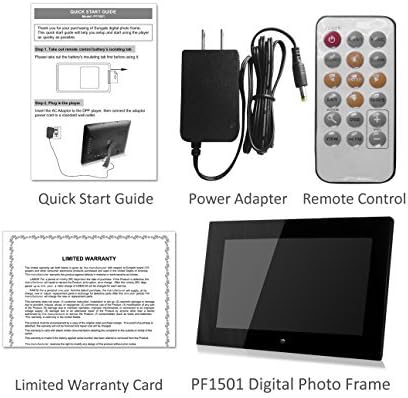
Image 2.1: Included accessories and the digital photo frame.
3. Производот завршиview
3.1 фронт View

Слика 3.1: напред view of the digital photo frame.
3.2 Заден дел View и порти

Слика 3.2: Задна страна view with labeled ports and controls.
The rear of the frame features various ports and controls for connectivity and operation:
- Функциски копчиња: Buttons for navigation and control (Enter, Left, Right, Up, Down, Exit).
- Wall-mountable: Mounting points for wall installation.
- Вграден звучник: За репродукција на аудио.
- Приклучок за напојување со DC 12V: Поврзете го адаптерот за наизменична струја тука.
- Removable Bracket: Stand for desktop placement.
- Копче за вклучување: To turn the frame on or off.
- USB-домаќин приклучок: За поврзување на USB флеш драјвови.
- Слот за SD/SDHC картичка: For inserting SD or SDHC memory cards.
- USB порт за уред: За поврзување со компјутер.
4. Поставување
4.1 Почетно вклучување
- Поврзете напојување: Insert the AC power adapter into the DC 12V Power Port on the back of the frame. Plug the other end into a standard electrical outlet.
- Вклучување: Press the Power button located on the back of the frame. The frame will power on and display the initial setup screen or default content.
4.2 Вметнување мемориски картички или USB уреди
The frame supports SD/SDHC cards and USB flash drives (up to 32GB). It also has 4GB of internal memory.
- For SD/SDHC Card: Gently insert an SD or SDHC card into the SD/SDHC Card Slot until it clicks into place. Ensure the card is inserted in the correct orientation.
- For USB Flash Drive: Insert a USB flash drive into the USB Host Port.
The frame should automatically detect the inserted media and begin displaying content or prompt you to select a source.
4.3 Монтирање на ѕид (опционално)
The frame can be wall-mounted using the designated mounting points on the rear. Ensure appropriate wall anchors and screws are used for secure installation.
5. Упатства за работа
The digital photo frame can be operated using the function keys on the back or the included remote control.
5.1 Функции на далечинскиот управувач
The remote control provides convenient access to all features. Point the remote control directly at the frame's sensor.
5.2 Навигација низ менито
Use the directional buttons (Up, Down, Left, Right) to navigate through menu options. Press the "Enter" button to confirm a selection. The "Exit" button typically returns to the previous screen or the main menu.
5.3 Прикажување фотографии
The frame supports JPG and BMP photo file формати.
- Изберете извор: From the main menu, select the desired media source (Internal Memory, SD Card, or USB Drive).
- Choose Photo Mode: Select "Photo" to enter photo display mode.
- Слајдшоу: The frame can automatically start a slideshow of all photos on the selected source. You can adjust transition effects and interval times in the settings.
- Single Photo Display: Navigate to a specific photo and press "Enter" to display it individually.
- Зумирај и ротирај: Use the remote control or function keys to zoom in/out or rotate displayed photos.
5.4 Репродукција на видеа
The frame supports video playback. Note that some users have reported compatibility primarily with .AVI video files.
- Изберете извор: From the main menu, select the desired media source.
- Choose Video Mode: Select "Video" to enter video playback mode.
- Select Video: Одете до саканото видео file and press "Enter" to begin playback.
5.5 Репродукција на музика
The frame can play background music during photo slideshows or as standalone audio.
- Изберете извор: From the main menu, select the desired media source.
- Choose Music Mode: Select "Music" to enter music playback mode.
- Изберете Аудио File: Navigate to the desired audio file and press "Enter" to begin playback.
- Музика во заднина: In photo settings, you can enable background music to play during slideshows.
5.6 Calendar and Alarm Clock
Access the calendar and alarm clock functions through the main menu. Follow on-screen prompts to set the date, time, and alarm preferences.
6. Одржување
6.1 Чистење на екранот
- Turn off and unplug the frame before cleaning.
- Користете мека крпа без влакненца, како што е микрофибер крпа, за нежно да го избришете екранот.
- За тврдокорни дамки, лесно протријтеampИзмијте ја крпата со вода или со раствор за чистење екран специјално дизајниран за електроника. Не прскајте течност директно врз екранот.
- Avoid using abrasive cleaners, solvents, or alcohol-based solutions, as these can damage the screen surface.
6.2 Општа нега
- Keep the frame away from direct sunlight, heat sources, and excessive moisture.
- Избегнувајте испуштање или изложување на рамката на силни удари.
- Do not block the ventilation openings on the back of the frame.
- Unplug the frame during lightning storms or when unused for extended periods.
7 Смена на проблеми
Доколку наидете на проблеми со вашата дигитална фоторамка, погледнете ги следните вообичаени проблеми и решенија:
| Проблем | Можна причина / решение |
|---|---|
| Рамката не се вклучува. |
|
| "File not supported" error or media not displaying. |
|
| Далечинскиот управувач не работи. |
|
| Photos are stretched or distorted. |
|
| Slideshow not playing randomly. |
|
8. Спецификации
| Карактеристика | Детал |
|---|---|
| Број на модел | PF1501 |
| Големина на екранот | 14 инчи |
| Резолуција | 1366x768 пиксели |
| Внатрешна меморија | 4 GB |
| Поддршка за надворешна меморија | SD/SDHC Card (up to 32GB), USB Flash Drive (up to 32GB) |
| Поддржани формати на фотографии | JPG, BMP |
| Поддржани видео формати | Primarily AVI (as reported by users) |
| Аудио излез | 2 Channel Stereo Speakers |
| Димензии на производот | 13.8 x 1 x 9.5 инчи |
| Тежина на ставката | 2 фунти |
| Боја | Црното |
| Производител | Сунгале |
9. Гаранција и поддршка
9.1 Ограничена гаранција
This product comes with a Limited Warranty. Please refer to the "Limited Warranty Card" included in your package for detailed terms and conditions, including coverage period and claim procedures. Keep your proof of purchase for warranty claims.
9.2 Поддршка за корисници
For technical assistance, troubleshooting beyond this manual, or warranty inquiries, please contact Sungale customer support.
- Производител: Сунгале
- Webсајт: Visit the Sungale Store on Amazon (за општи информации за брендот)
- Specific contact information (phone, email) may be found on the warranty card or the official Sungale webсајт.