
Вовед
This manual provides essential information for setting up, operating, and maintaining your Nokia 114 Dual SIM mobile phone. Please read these instructions carefully to ensure proper use and to maximize the device's performance and longevity.
Поставување
1. Инсталација на SIM картичка
The Nokia 114 supports two Mini SIM cards. Follow these steps to install your SIM cards:
- Turn off the phone and remove the back cover.
- Locate the SIM card slots. The phone features an Easy Swap function for convenient SIM management.
- Insert your Mini SIM cards into the designated slots, ensuring the gold contacts face downwards and the cut corner aligns correctly.
- Заменете го задниот капак.

Image: Nokia 114 with two Mini SIM cards being inserted.
2. Инсталација на батерија
За да ја инсталирате батеријата:
- With the back cover removed, align the Nokia BL-5C 1020 mAh Lithium-Ion battery with the battery compartment.
- Нежно притиснете ја батеријата на своето место додека не се намести безбедно.
- Заменете го задниот капак.
3. Полнење на батеријата
Before first use, fully charge the battery using the provided Nokia Charger AC-11.
- Поврзете го полначот со приклучокот за полнење на телефонот.
- Приклучете го полначот во ѕиден штекер.
- Индикаторот за батерија на екранот ќе го покаже напредокот на полнењето.
- Откако ќе се наполни целосно, исклучете го полначот.
Упатства за работа
1. Вклучување/исклучување
- To power on, press and hold the Power key until the phone vibrates and the screen lights up.
- To power off, press and hold the Power key, then select 'Power off' from the options.
2. Повици и испраќање пораки
- Use the keypad to dial a number and press the Call key to initiate a call.
- To send a message, navigate to the 'Messages' menu, select 'Create message', type your text using the keypad, and send it to the desired recipient.
3. Приказ и навигација
The Nokia 114 features a 1.8-inch portrait QVGA LCD transmissive display with 128 x 160 pixels resolution. Navigation is primarily done using the physical keypad.
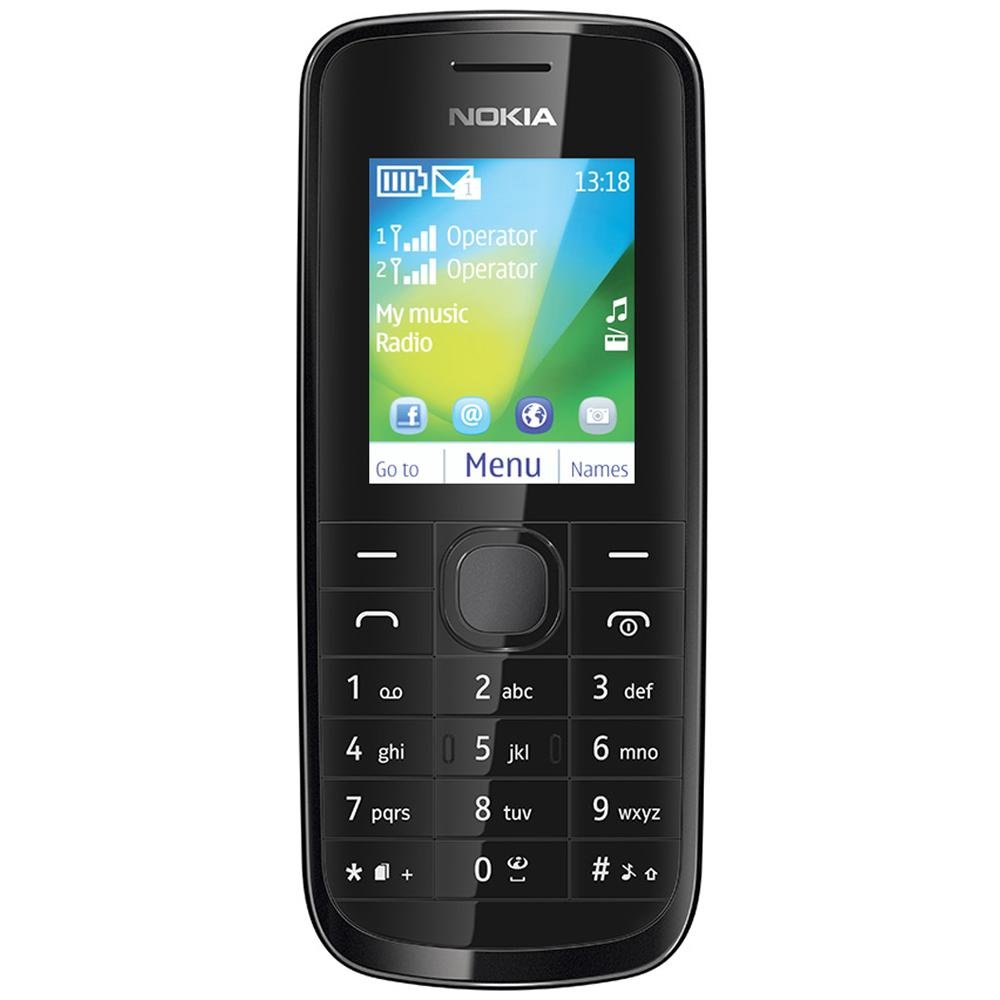
Слика: напред view of the Nokia 114 mobile phone.
4. Употреба на камера
The phone is equipped with a 0.3 MP rear camera. It supports basic photography features:
- Image Editor: Basic editing functions for captured photos.
- 4x дигитален зум: Magnify subjects before capturing.
- Надомест на експозиција: Прилагодете ги нивоата на осветленост.
- Ориентација на пејзаж: Capture photos in a wider format.
- The screen acts as a full-screen viewпронаоѓач
5. Меморија и складирање
The Nokia 114 has 16 MB of internal memory and supports expandable memory up to 32 GB via a microSD card (not included). This allows for storage of photos, music, and other files.
6. Поврзување
The device supports 2G networks for calls and basic internet access. It does not support 3G or Wi-Fi connectivity.
7. Посебни карактеристики
- Е-пошта: Access your email accounts on the go.
- ФМ радио: Слушајте ги вашите омилени радио станици.
- Video Player & Music Player: Enjoy multimedia content.
- Internet & Facebook: Основни web browsing and social media access.
- Игри: Pre-installed games for entertainment.
Одржување
1. Општа нега
- Чувајте го телефонот сув. Врнежите, влажноста и сите видови течности или влага може да содржат минерали што ќе ги кородираат електронските кола.
- Do not use or store the phone in dusty or dirty areas.
- Не го чувајте телефонот на високи температури. Високите температури можат да го скратат животниот век на електронските уреди, да ги оштетат батериите и да искриват или стопат одредени пластики.
- Не го чувајте телефонот на ниски температури. Кога телефонот ќе се врати на нормална температура, во него може да се формира влага и да ги оштети електронските плочки.
- Do not attempt to open the phone other than as instructed in this manual.
- Не го испуштајте, не удирајте и не го тресете телефонот. Грубото ракување може да ги скрши внатрешните плочки и фините механика.
- Не користете груби хемикалии, растворувачи за чистење или силни детергенти за чистење на телефонот.
2. Нега на батерии
- Only use original Nokia batteries and chargers.
- Не ја поврзувајте батеријата со краток спој.
- Не ја изложувајте батеријата на екстремни температури.
Решавање проблеми
If you encounter issues with your Nokia 114, try the following basic troubleshooting steps:
- Телефонот не се вклучува: Ensure the battery is correctly installed and charged. Try charging the phone for at least 30 minutes before attempting to power it on again.
- Лош квалитет на повикот: Check your network signal strength. Move to an area with better reception. Ensure the earpiece/speaker is not obstructed.
- Keypad auto-locks: This is a standard feature. To unlock, follow the on-screen instructions, usually by pressing a specific key combination.
- Dual SIM not functioning: Verify both SIM cards are correctly inserted and activated by your service provider. Check SIM settings in the phone menu.
- Телефонот се замрзнува или не реагира: Remove the battery, wait a few seconds, and then reinsert it and power on the phone.
For more complex issues, refer to the visual user guide included in the box or contact Nokia customer support.
Спецификации
| Карактеристика | Детал |
|---|---|
| Бренд | Nokia |
| Модел | 114 |
| Приказ | 1.8-inch QVGA LCD (128 x 160 pixels) |
| Камера | Задна камера од 0.3 MP |
| Memory (Internal) | 16 MB |
| Меморија што може да се прошири | До 32 GB (микроSD) |
| Број на слотови за SIM картичка | Dual SIM (Mini) |
| Мобилна технологија | 2G (GSM) |
| Оперативен систем | Nokia Series 40 Asha |
| Капацитет на батеријата | Литиум-јон од 1020 mAh |
| Време за разговор | До 10.5 часа (630 минути) |
| Димензии (Д x Ш x В) | 11 x 4.6 x 1.5 cm |
| Тежина | 80 грама |
| Човечки интерфејс | Тастатура |
| Материјал | Пластика |
Што има во кутијата
Your Nokia 114 package includes the following items:
- Нокиа 114 мобилен телефон
- Nokia Charger AC-11
- Nokia Battery BL-5C 1020 mAh
- Nokia Stereo Headset WH-102
- Visual User Guide
Производот завршиview Видео
Погледнете го ова видео за брз прегледview of the Nokia 114's features and contents.
Видео: Краток прегледview of the Nokia 114 mobile phone, highlighting its display, camera, memory, connectivity, operating system, special features, and included accessories.
Гаранција и поддршка
The Nokia 114 comes with a 1-year manufacturer warranty for the device and a 6-month manufacturer warranty for in-box accessories, including batteries, from the date of purchase. For warranty claims or technical support, please refer to the contact information provided in your visual user guide or visit the official Nokia support webсајт.