
Вовед
This manual provides essential instructions for setting up, operating, maintaining, and troubleshooting your Sony KDL-32W655A 32-inch Full HD Smart TV. Please read this manual thoroughly before using your television to ensure proper and safe operation. Keep this manual for future reference.

Figure 1: Sony KDL-32W655A Smart TV (Front View)
Информации за безбедност
Секогаш почитувајте ги следниве безбедносни мерки на претпазливост кога го користите телевизорот:
- Не ги блокирајте отворите за вентилација. Обезбедете доволно простор околу телевизорот за правилен проток на воздух.
- Не го поставувајте телевизорот на нестабилна количка, постоље, статив, држач или маса.
- Заштитете го кабелот за напојување од одење или штипкање.
- Исклучете го телевизорот од струја за време на грмотевици или кога не се користи подолг период.
- Целото сервисирање упатете го на квалификуван сервисен персонал.
Поставување
1. Отпакување
Carefully remove the TV and all accessories from the packaging. Retain the packaging materials for potential future transport or service.
2. Склоп на штандот
Attach the desktop stand to the television. Ensure all screws are securely fastened. Refer to the diagram below for proper assembly.

Figure 2: TV with Desktop Stand Attached
Alternatively, the TV can be wall-mounted using a compatible VESA wall mount (sold separately). Consult a professional for wall-mounting installation.
3. Поврзување периферни уреди
Connect your external devices to the TV's ports. Ensure the TV is unplugged before making any connections.
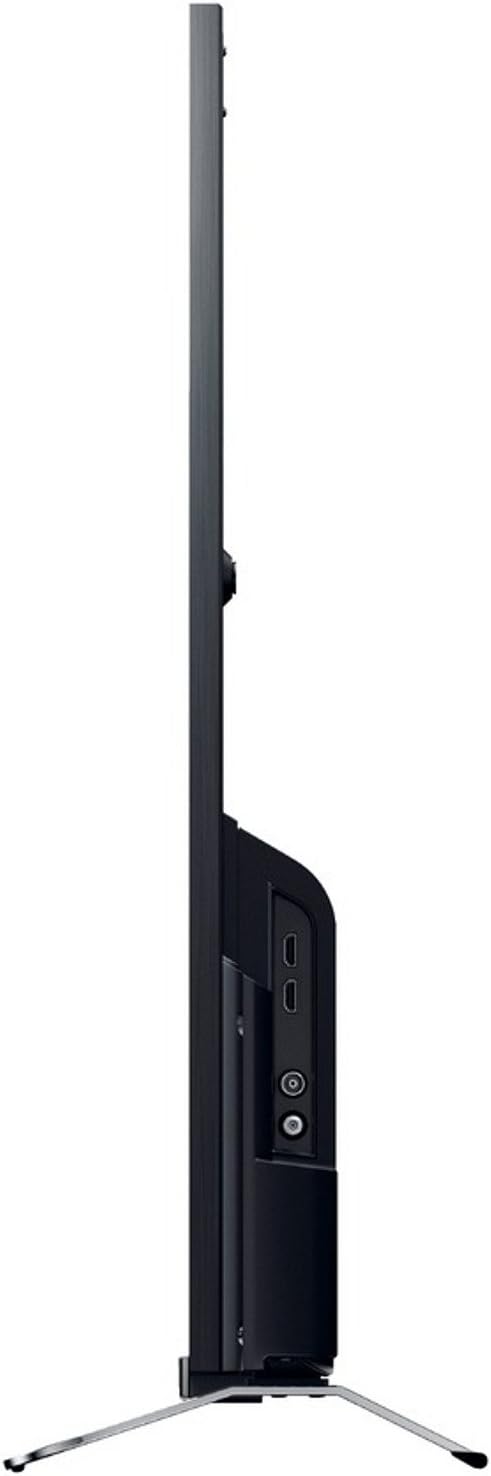
Слика 3: Страна View with Connection Ports
- Моќност: Connect the power cord to the AC inlet on the TV and then to a wall outlet.
- HDMI: Use an HDMI cable to connect devices like Blu-ray players, game consoles, or set-top boxes to the HDMI 1 or HDMI 2 пристаништа.
- USB: Connect USB storage devices for media playback or DVR functionality to the USB 2.0 пристаниште.
- Етернет (LAN): For a wired internet connection, connect an Ethernet cable to the LAN пристаниште.
- Антена/кабел: Connect your antenna or cable TV feed to the RF внесување.
- Component Video (YPbPr/YCbCr): Connect older video devices using component cables to the dedicated input.
- Композитно видео: Connect legacy video devices using a composite video cable to the dedicated input.
- Дигитален аудио излез (оптички): For connecting to a soundbar or home theater system with an optical input.
- Слушалки: Поврзете слушалки за приватно слушање.
4. Волшебник за почетно поставување
After connecting all cables, plug in the TV and press the power button on the remote control. The initial setup wizard will guide you through:
- Избор на јазик.
- Избор на регион/земја.
- Channel scanning (for DVB-C, DVB-S, DVB-T).
- Network setup (Wi-Fi or wired Ethernet).
- Поставки за време и датум.
Упатства за работа
1. Функции на далечински управувач
The included remote control allows you to access all TV functions. Insert the provided batteries into the remote control, observing polarity.
- Копче за вклучување: Го вклучува или исклучува телевизорот.
- Канал нагоре/надолу: Менува ТВ канали.
- Јачина на звук нагоре/намалување: Прилагодување на нивото на звук.
- Влез/Извор: Selects the input source (HDMI, USB, etc.).
- Дома/Паметен телевизор: Пристапува до интерфејсот на Smart TV.
- Navigation Buttons (Arrows, Enter): Се движи низ менијата и ги потврдува изборите.
- Назад/Враќање: Се враќа на претходниот екран или мени.
- Опции: Прикажува опции чувствителни на контекст.
2. Карактеристики на паметниот телевизор
Your Sony KDL-32W655A is equipped with Smart TV capabilities, allowing access to internet content and applications.
- Интернет врска: Connect to your home network via Wi-Fi or Ethernet. Navigate to the Network Settings menu to configure.
- Интернет ТВ: Access various online streaming services and content directly from your TV.
- Апликации: The TV supports lifestyle applications such as Skype. An Opera browser is also available for web прелистување
- DLNA Certified: Стримувајте медиуми од компатибилни уреди на вашата домашна мрежа.
3. Media Playback and Recording
- Репродукција на медиуми преку USB: Insert a USB storage device into the USB port. The TV will detect the device, allowing you to browse and play supported media files (JPG, MPO for images; 3GP, AVCHD, AVI, M-JPEG, MKV, MOV, MP4, MPEG1, MPEG2, TS, XVID for video).
- Дигитален видео рекордер (DVR): Record digital TV broadcasts to a connected USB hard drive. Consult the on-screen menu for DVR setup and scheduling.
4. Поставки за слика и звук
Прилагодете ја вашата viewing and listening experience through the TV's settings menus.
- Режими на слика: Select from predefined picture modes such as Кино, Игра, Фотографија, Спорт, и Живописно to optimize display settings for different content types.
- Motionflow 200 Hz: This technology enhances motion clarity for fast-moving scenes.
- Поставки за звук: Adjust bass, treble, and other audio parameters using the 6-band equalizer. The TV features 2 built-in speakers with a total RMS power of 10W.
- Формат на екран: Adjust the aspect ratio (16:9, 14:9, Auto, Zoom) to fit your content.
5. Дополнителни карактеристики
- Електронски програмски водич (EPG): View upcoming TV programs and schedule recordings.
- Слика-во-слика (PiP): Display two different sources simultaneously.
- Sleep Timer/On/Off Timer: Set the TV to automatically turn off or on at specified times.
Одржување
1. Чистење на телевизорот
- Екран: Нежно избришете го екранот со мека крпа што не остава влакненца. За тврдокорни дамки, малку избришете гоampИзмијте ја крпата со вода или со специјализирано средство за чистење екрани. Не прскајте течност директно врз екранот.
- Кабинет: Избришете го куќиштето на телевизорот со мека, сува крпа. Избегнувајте употреба на абразивни средства за чистење или растворувачи.
- Вентилација: Ensure the ventilation openings on the back of the TV remain clear of dust and obstructions.
2. Софтверски ажурирања
Periodically check for software updates to ensure your TV has the latest features and performance improvements. Updates can usually be performed via the network connection in the TV's settings menu.
Решавање проблеми
Пред да контактирате со корисничката поддршка, обидете се со следниве решенија за вообичаени проблеми:
| Проблем | Можна причина / решение |
|---|---|
| Нема моќ |
|
| Нема слика / Црн екран |
|
| Нема звук |
|
| Не може да се поврзе со Wi-Fi |
|
| Далечинскиот управувач не работи |
|
If the problem persists after trying these steps, please contact Sony customer support.
Спецификации
| Карактеристика | Детал |
|---|---|
| Модел | KDL-32W655A |
| Големина на екранот | 32 инчи (81.3 см) |
| Технологија на прикажување | LED |
| Резолуција | Full HD (1920 x 1080 пиксели) |
| Подобрување на движењето | Motionflow 200 Hz |
| Сооднос на аспект | 16:9 |
| Карактеристики на паметна телевизија | Yes (Internet TV, Skype, Opera Browser, DLNA) |
| Wi-Fi | Да |
| Етернет (LAN) | 1 пристаниште |
| HDMI порти | 2 |
| USB 2.0 порти | 1 |
| SCART Ports | 1 |
| Компонентен видео влез | 1 |
| Композитен видео влез | 1 |
| RF влез | 1 |
| Дигитален аудио излез (оптички) | 1 |
| Излез за слушалки | 1 |
| Тип на тјунер | Analog & Digital (DVB-C, DVB-S, DVB-S2, DVB-T) |
| Звучници | 2 (Вградено) |
| RMS номинална моќност | 10 W |
| Потрошувачка на енергија (работа) | 41 W |
| Потрошувачка на енергија (Во мирување) | 0.45 W |
| Годишна потрошувачка на енергија | 57 kWh |
| Класа за енергетска ефикасност | A |
| Димензии (Ш x В x Д) без држач | 725 mm x 438 mm x 69 mm |
| Тежина без стоење | 6.8 кг |
| Тежина со штанд | 7.8 кг |
| Боја | Црното |
Белешка: Спецификациите може да се променат без претходна најава.
Гаранција и поддршка
Your Sony KDL-32W655A television comes with a limited warranty. Please refer to the warranty card included in your product packaging for detailed terms and conditions, including the warranty period and coverage.
For technical assistance, product registration, or to find authorized service centers, please visit the official Sony support website or contact Sony customer service in your region. Keep your purchase receipt and product serial number handy when contacting support.
Поддршка преку Интернет: https://www.sony.com/electronics/support


