
1. Вовед
This manual provides detailed instructions for the installation, operation, and maintenance of your Axis P1355 Surveillance/Network Camera. The Axis P13 series offers high-performance fixed cameras designed for both indoor and outdoor surveillance, delivering superb image quality with H.264 compression. These models support HDTV 720p/1080p video and are equipped with features like Wide Dynamic Range and Day/Night functionality for clear imaging in various lighting conditions. Specific models within the P13 series, including HDTV 720p, incorporate Axis Lightfinder technology for enhanced low-light sensitivity, while HDTV 1080p and 5-megapixel cameras feature P-iris control for optimized depth of field and lens resolution.
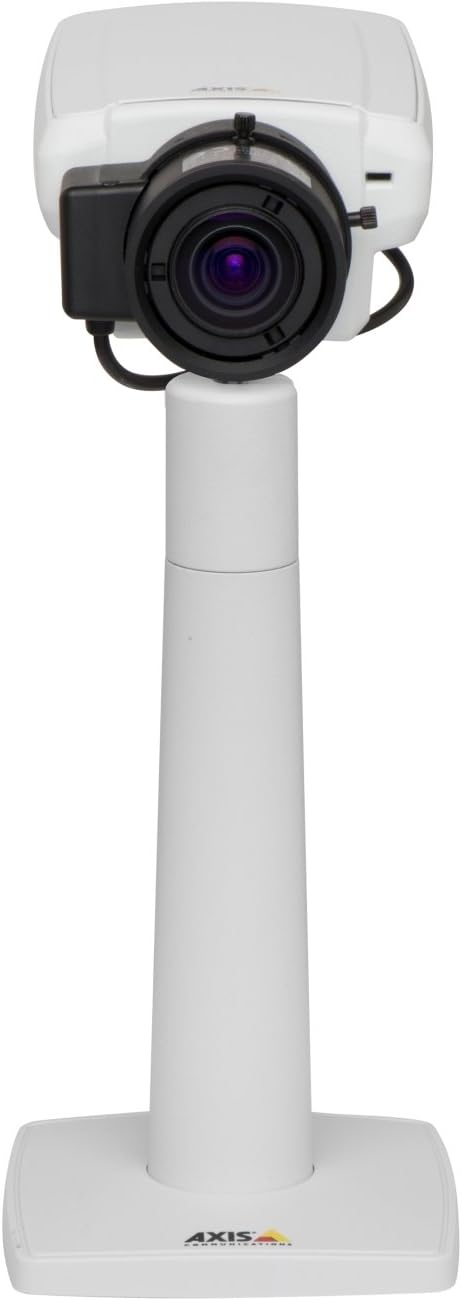
Слика 1: The Axis P1355 Surveillance Camera shown mounted on its stand. This image illustrates the camera's physical appearance and typical mounting configuration.
2. Информации за безбедност
Please read all safety instructions before installing or operating the camera.
- Ensure the power source matches the camera's requirements to prevent electrical hazards.
- Инсталацијата треба да ја изврши квалификуван персонал во согласност со локалните електрични прописи.
- Не го изложувајте фотоапаратот на екстремни температури, влажност или корозивни средини.
- Avoid direct exposure of the lens to strong light sources, such as the sun, as this may damage the image sensor.
- Disconnect power before cleaning or servicing the camera.
3. Поставување и инсталација
The Axis P1355 camera is designed for both indoor and outdoor use and supports various mounting options.
3.1 Монтирање
The camera is typically designed for wall mount installation. Ensure the mounting surface is strong enough to support the camera's weight (approximately 2 pounds). Use appropriate screws and anchors for the chosen surface.
- Select a suitable location for optimal surveillance coverage.
- Безбедно прицврстете го држачот за монтирање на ѕидот.
- Mount the camera onto the bracket, ensuring it is firmly in place.
- Adjust the camera's angle for the desired field of view.
3.2 Врски
The Axis P1355 camera primarily uses wired connectivity for reliable data transmission and power.
- Поврзување за напојување: Connect the provided power adapter to the camera's power input and then to a suitable electrical outlet. The camera operates on a corded electric power source.
- Мрежна конекција: Connect an Ethernet cable from the camera's network port to your network switch or router. This provides wired connectivity for video streaming and control.
- Wireless Connectivity (Optional/Configuration): While primarily wired, the camera supports Wi-Fi for certain configurations. Refer to the Axis product documentation for specific wireless setup instructions if applicable to your model variant.
4. Упатства за работа
Once installed and connected, the Axis P1355 camera can be configured and operated via a network interface.
4.1 Првичен пристап и конфигурација
- Use the Axis IP Utility or a similar network discovery tool to find the camera's IP address on your network.
- Отвори a web прелистувачот и внесете ја IP адресата на камерата за да пристапите до неа web интерфејс.
- Log in using the default credentials (refer to Axis documentation for default username/password, typically 'root' and 'pass' or similar, which should be changed immediately).
- Следете ги упатствата на екранот за да ги поставите основните мрежни поставки, датумот/времето и корисничките сметки.
4.2 Video Monitoring and Features
- Во живо View: Пристапете до видео преносот во живо преку web interface or compatible video management software.
- Резолуција: The camera supports video capture resolutions up to 720p and effective video resolutions of 1080 pixels, with effective still resolution of 2 MP.
- Color and Monochrome Modes: The camera can operate in both color and monochrome (black and white) modes, automatically switching based on light conditions or configured manually.
- Ноќно гледање: Utilize the integrated night vision capabilities for surveillance in low-light or complete darkness.
- Оптички зум: Adjust the optical zoom for detailed views of specific areas.
- P-Iris Control: For models equipped with P-iris, this feature allows precise control over the iris position to optimize depth of field and lens resolution, enhancing image sharpness. This can be configured via the web интерфејс.
- Формат на видео: Video is typically captured in MP4 format.
- Далечински управувач: The camera supports remote control for various settings and adjustments.
5. Одржување
Regular maintenance ensures optimal performance and longevity of your Axis P1355 camera.
- Чистење: Нежно исчистете го објективот и куќиштето на камерата со мека, дamp крпа. Избегнувајте абразивни средства за чистење или растворувачи.
- Ажурирања на фирмверот: Periodically check the Axis Communications webстраница за ажурирања на фирмверот. Ажурирањето на фирмверот овозможува пристап до најновите функции, безбедносни закрпи и подобрувања на перформансите.
- Инспекција на кабел: Regularly inspect all cables for signs of wear or damage, especially for outdoor installations.
- Проверка на животната средина: Осигурајте се дека работната средина на камерата останува во рамките на наведените опсези на температура и влажност.
6 Смена на проблеми
This section addresses common issues you might encounter with your Axis P1355 camera.
- Без моќност:
- Проверете дали адаптерот за напојување е безбедно поврзан и со камерата и со функционален штекер.
- Проверете го кабелот за напојување за каква било штета.
- Нема мрежна конекција:
- Ensure the Ethernet cable is properly connected to the camera and the network switch/router.
- Check network switch/router status.
- Confirm the camera has a valid IP address and is on the same network segment as your viewинг уред.
- Лош квалитет на сликата:
- Исчистете ја леќата на камерата.
- Adjust focus and zoom settings via the web интерфејс.
- Check lighting conditions; enable night vision or adjust exposure settings if necessary.
- Ensure P-iris control is correctly configured for optimal sharpness (if applicable).
- Не може да се пристапи Web Интерфејс:
- Verify the camera's IP address.
- Проверете дали вашиот компјутер е на истата мрежа како и камерата.
- Try restarting the camera and your network equipment.
7. Спецификации
| Карактеристика | Детал |
|---|---|
| Бренд | Axis Communications |
| Број на модел | ОКСИС П1355 |
| Внатрешна/надворешна употреба | Затворен, Надворешен |
| Технологија за поврзување | Wired (Wi-Fi capable for certain configurations) |
| Специјална карактеристика | Ноќна визија |
| Извор на енергија | Електричен кабел (7.1 вати) |
| Резолуција за снимање видео | 720 стр |
| Ефективна видео резолуција | 1080 пиксели |
| Ефективна сепак резолуција | 2 MP |
| Тип на зумирање | Optical Zoom (2.9x Optical) |
| Тип на контролер | Iris (P-iris control) |
| Тип на монтирање | Монтирање на ѕид |
| Димензии на производот (Д x Ш x В) | 3.07 x 5.94 x 1.69 инчи |
| Тежина на ставката | 2 фунти |
| Оценка за меѓународна заштита | IP54 |
| Формат за снимање видео | MP4 |
8. Гаранција и поддршка
For detailed warranty information and technical support, please refer to the official Axis Communications webстраницата или директно контактирајте ја нивната служба за корисници.
Производител: AXIS COMMUNICATION INC.
Webсајт: www.axis.com (Ве молиме посетете ја официјалната website for the most current support resources, drivers, and documentation.)