1. Вовед
This manual provides essential instructions for the safe operation and maintenance of your QFX PBX-410204BTD PA Speaker. Please read this manual thoroughly before using the device and retain it for future reference.
1.1. Производот завршиview
The QFX PBX-410204BTD is a versatile battery-powered PA speaker system featuring dual 10-inch woofers and dual 1-inch tweeters. It includes multiple audio input options such as Bluetooth, USB, SD card, FM radio, and DVD playback. Additional features include a disco light and karaoke functionality, making it suitable for various entertainment and public address applications. The unit operates on a 12V 12AH rechargeable battery and supports AC 100-240V input.
1.2. Инструкции за безбедност
- Извор на енергија: Осигурете се дека напојувањето одговара на јачината на звукотtage requirements (AC 100-240V or DC 12V).
- Вентилација: Не ги блокирајте отворите за вентилација. Одржувајте доволен простор околу уредот за правилен проток на воздух.
- Вода и влага: Do not expose the unit to rain, moisture, or liquids.
- Извори на топлина: Држете го уредот подалеку од извори на топлина како што се радијатори, грејни тела, шпорети или други апарати што произведуваат топлина.
- Чистење: Disconnect the power before cleaning. Use a dry cloth.
- Сервисирање: Не обидувајте се сами да го сервисирате овој производ. Пренесете ги сите сервиси на квалификуван сервисен персонал.
- Батерија: The unit contains a rechargeable battery. Follow proper disposal guidelines for batteries. Do not expose to excessive heat.
2. Содржина на пакетот
Ве молиме проверете го пакувањето за следните ставки:
- QFX PBX-410204BTD PA Speaker Unit
- Адаптер/кабел за напојување
- Далечински управувач (ако е вклучен)
- Микрофон (ако е вклучен)
- Упатство за употреба (овој документ)
3. Контроли и функции
Familiarize yourself with the various controls and connection ports on your PA speaker.
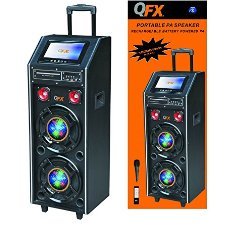
Слика 1: Предна страна view of the QFX PBX-410204BTD PA Speaker. This image displays the speaker's front panel, including the dual 10-inch woofers, the central control panel with various buttons and knobs, and the integrated disco light.
3.1. Контролен панел е надview
- Прекинувач: Го вклучува/исклучува уредот.
- Контрола на јачината на звукот: Ја прилагодува главната јачина на звук.
- Влез за микрофон: Connects a wired microphone.
- Echo/Mic Volume: Adjusts microphone volume and echo effect.
- USB порта: За репродукција од USB флеш-уред.
- Слот за SD-картичка: За репродукција на SD картичка.
- Копче за режим: Switches between input modes (Bluetooth, USB, SD, FM, DVD).
- Копче за репродукција/пауза: Ја контролира репродукцијата на медиумите.
- Копчиња за претходна/следна песна: Navigates media tracks or FM stations.
- FM антена: За подобрен прием на FM радио сигнали.
- Disco Light Switch: Turns the disco light ON/OFF.
- ДВД плеер: Integrated DVD disc slot and controls.
- AC влез: Connects the power adapter for charging and AC operation.
- DC 12V Input/Output: For external 12V power source or output.
4. Поставување
4.1. Почетно полнење
Before first use, fully charge the internal battery. Connect the power adapter to the AC input on the speaker and plug it into a standard wall outlet. The charging indicator will illuminate. Charging typically takes several hours. The indicator will change or turn off once fully charged.
4.2 Поставување
Place the speaker on a stable, flat surface. Ensure there is adequate space around the unit for ventilation. Avoid placing it near direct sunlight, heat sources, or areas with high humidity.
5. Упатства за работа
5.1. Вклучување/исклучување
To power on the unit, toggle the Power Switch to the "ON" position. To power off, toggle it to "OFF".
5.2. Поврзување со Bluetooth
- Turn on the speaker and press the "Mode" button until "Bluetooth" mode is selected.
- Enable Bluetooth on your mobile device or audio player.
- Пребарај за "QFX PBX-410204BTD" (or similar name) in your device's Bluetooth settings.
- Select the speaker to pair. A confirmation tone will sound upon successful connection.
- Сега можете да репродуцирате аудио од вашиот уред преку звучникот.
5.3. Репродукција од USB/SD картичка
- Вметнете USB флеш-меморија или SD-картичка во соодветниот слот.
- Press the "Mode" button to select "USB" or "SD" mode. The unit will automatically begin playing compatible audio files.
- Користете ги копчињата Пушти/Пауза, Претходно и Следно за да ја контролирате репродукцијата.
5.4. FM радио
- Press the "Mode" button to select "FM" mode.
- Extend the FM antenna for better reception.
- Press and hold the Play/Pause button to auto-scan and save available FM stations.
- Use the Previous/Next buttons to navigate through saved stations.
5.5. Репродукција на ДВД
- Insert a DVD disc into the DVD slot.
- Press the "Mode" button to select "DVD" mode.
- Use the integrated DVD controls or the remote control to manage playback.
5.6. Караоке функција
- Connect a microphone to the Microphone Input jack.
- Adjust the Microphone Volume and Echo controls to your preference.
- Play music from any source (Bluetooth, USB, SD, DVD) and sing along.
5.7. Disco Light
Toggle the Disco Light Switch to activate or deactivate the integrated disco light feature.
6. Одржување
6.1. Чистење
Wipe the exterior of the unit with a soft, dry cloth. Do not use abrasive cleaners, waxes, or solvents. Ensure the unit is powered off and unplugged before cleaning.
6.2. Нега на батерии
To prolong battery life, fully charge the unit before storing it for extended periods. Recharge the battery at least once every 3 months if not in regular use. Avoid completely draining the battery frequently.
6.3. Складирање
Чувајте го звучникот на ладно и суво место, подалеку од директна сончева светлина и екстремни температури.
7 Смена на проблеми
| Проблем | Можна причина | Решение |
|---|---|---|
| Нема моќ | Unit not plugged in; Power switch off; Battery drained. | Check power connection; Turn power switch ON; Charge the battery. |
| Нема звук | Јачината на звукот е прениска; Неточен режим на внесување; Уредот не е спарен (Bluetooth). | Зголемување на јачината на звукот; Изберете го точниот режим на внесување; Повторно спарете го Bluetooth уредот. |
| Bluetooth не се поврзува | Звучникот не е во Bluetooth режим; Уредот е предалеку; Пречки. | Осигурајте се дека звучникот е во Bluetooth режим; Приближете го уредот; Избегнувајте пречки. |
| USB/SD не се репродуцира. | Неточно file format; USB/SD card corrupted; Incorrect mode. | Обезбедете files are compatible (e.g., MP3); Try another USB/SD card; Select correct mode. |
| Слаб прием на FM радио | Антената не е продолжена; Слаб сигнал. | Fully extend the FM antenna; Try repositioning the unit. |
8. Спецификации
- Модел: PBX-410204BTD
- Тип на звучник: Звучник на батерии
- Големина на вуфер: 2 x 10 инчи
- Големина на високотонец: 2 x 1 инчи
- Поврзување: Bluetooth, USB, SD, FM Radio, DVD
- Посебни карактеристики: Disco Light, Karaoke
- Батерија: 12V 12AH Rechargeable
- AC влез: 100-240 V
- DC Input/Output: 12V
- Излезен Ватtage: 346 вати
- Димензии на парцелата: 100.33 x 43.18 x 43.18 cm (39.5 x 17 x 17 инчи)
- Тежина на ставката: 29.94 кг (66 фунти)
9. Гаранција и поддршка
For warranty information and technical support, please refer to the warranty card included with your product or contact QFX customer service directly. Keep your purchase receipt as proof of purchase.
Забелешка: Специфичните гарантни услови може да се разликуваат во зависност од регионот и продавачот.