
1. Вовед
This manual provides detailed instructions for the proper use, setup, and maintenance of your Genius HS-920BT Bluetooth Headset. Please read this manual thoroughly before using the device to ensure optimal performance and longevity.
The Genius HS-920BT is a versatile Bluetooth headset designed for wireless audio streaming and hands-free communication with compatible devices such as smartphones, tablets, and PCs.
2. Содржина на пакетот
Проверете дали сите артикли се присутни во вашиот пакет:
- Genius HS-920BT Bluetooth Headset
- USB кабел за полнење
- Multi-language User Manual (this document)
3. Производот завршиview
The HS-920BT headset features an adjustable headband and comfortable earcups, integrating controls for audio playback and call management.
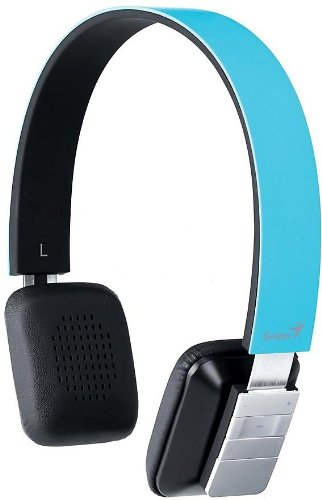
Figure 1: Genius HS-920BT Bluetooth Headset (Blue)
This image displays the Genius HS-920BT Bluetooth Headset in blue, viewed from an angle, highlighting its adjustable headband and earcup design.
Клучни карактеристики:
- Wireless Bluetooth connectivity for audio and calls (A2DP support)
- Integrated rechargeable Lithium-Ion battery
- Вграден микрофон за комуникација без раце
- On-ear controls for volume adjustment, track skipping (AVRCP support)
- Прилагодлива лента за глава за удобно вклопување
- 40 mm driver units for clear sound
4. Поставување
4.1 Полнење на слушалките
Before initial use, fully charge the headset. Use the provided USB charging cable.
- Поврзете го малиот крај од USB кабелот за полнење со приклучокот за полнење на слушалките.
- Connect the larger end of the USB cable to a powered USB port (e.g., computer, USB wall adapter).
- The LED indicator on the headset will illuminate during charging and change color or turn off when fully charged. Refer to the headset's LED behavior for specific indications.
Целосното полнење обично трае приближно 2-3 часа.
4.2 Спарување со Bluetooth уред
To use the HS-920BT wirelessly, you must pair it with your Bluetooth-enabled device.
- Вклучување: Press and hold the Power button on the headset until the LED indicator flashes, usually alternating blue and red, indicating pairing mode.
- Активирајте Bluetooth: On your smartphone, tablet, or PC, enable Bluetooth functionality.
- Пребарај за Уреди: In your device's Bluetooth settings, search for available devices. The headset should appear as "HS-920BT".
- Изберете и спарете: Select "HS-920BT" from the list. If prompted for a passcode, enter "0000" (four zeros).
- Потврда: Once paired, the headset's LED indicator will typically flash blue slowly, and your device will confirm the connection.
The headset will automatically attempt to reconnect to the last paired device when powered on, if that device's Bluetooth is active and within range.
5. Упатства за работа
The HS-920BT features intuitive controls located on the earcup.

Figure 2: Earcup Controls of HS-920BT
This image shows a close-up of the right earcup of the Genius HS-920BT Bluetooth Headset, detailing the control buttons for power, volume, and track navigation.
5.1 Вклучување/исклучување
- Вклучување: Притиснете го и држете го копчето за вклучување приближно 3 секунди додека LED индикаторот не трепка сино.
- Исклучено: Притиснете го и задржете го копчето за вклучување приближно 3 секунди додека LED индикаторот не се исклучи.
5.2 Репродукција на музика
- Пушти/Пауза: Притиснете го копчето Play/Pause еднаш.
- Следна песна: Press the "Next Track" button (usually marked with a forward arrow).
- Претходна песна: Press the "Previous Track" button (usually marked with a backward arrow).
5.3 Управување со повици
- Одговори/заврши повик: Press the Multi-function button (often the same as Play/Pause) once during an incoming call to answer, or once during a call to end it.
- Одбијте го повикот: Притиснете го и држете го копчето за повеќе функции приближно 2 секунди за време на дојдовен повик.
- Повторно бирајте последен број: Притиснете двапати на копчето за повеќе функции кога не сте на повик.
5.4 Контрола на јачината на звукот
- Зголемете ја јачината на звукот: Press the Volume Up button (+).
- Намалување на јачината на звукот: Press the Volume Down button (-).
6. Одржување
Proper care ensures the longevity of your headset.
- Чистење: Користете мека, сува крпа за чистење на слушалките. Не користете абразивни средства за чистење или растворувачи.
- Складирање: Чувајте ги слушалките на ладно и суво место, подалеку од директна сончева светлина и екстремни температури.
- Нега на батеријата: За да го зачувате животниот век на батеријата, избегнувајте често целосно празнење на батеријата. Полнете ги слушалките редовно, дури и ако не се користат подолг период.
- Изложеност на вода: Слушалките не се водоотпорни. Избегнувајте изложување на вода или прекумерна влага.
7 Смена на проблеми
If you encounter issues with your HS-920BT headset, refer to the following common solutions:
| Проблем | Можно решение |
|---|---|
| Слушалките не се вклучуваат. | Ensure the battery is charged. Connect the headset to a power source using the USB cable. |
| Не може да се спарат слушалките со уред. |
|
| Нема звук или има ниска јачина на звук. |
|
| Квалитетот на повикот е слаб. |
|
8. Спецификации
| Име на модел: | HS-920BT |
| Безжична технологија: | Bluetooth |
| Возачки единици: | 40 мм |
| Батерија: | Вградена литиум-јонска батерија за повторно полнење |
| Тип на контрола: | Volume Control, Track Navigation, Call Management |
| Микрофон: | Вграден |
| Поддржан Проfiles: | A2DP, AVRCP |
| Хардверска платформа: | Компјутер, паметен телефон, таблет |
| Тежина на ставката: | 110 грама |
| Димензии (ДxШxВ): | 13.6 x 17.3 x 2.9 cm |
9. Гаранција и поддршка
За информации за гаранцијата и техничка поддршка, ве молиме погледнете ја гарантната картичка што е вклучена во вашиот производ или посетете ја официјалната страница на Genius. webстраница. Чувајте ја сметката за купување како доказ за купување.
For further assistance, you may contact Genius customer service through their official channels.