1. Вовед
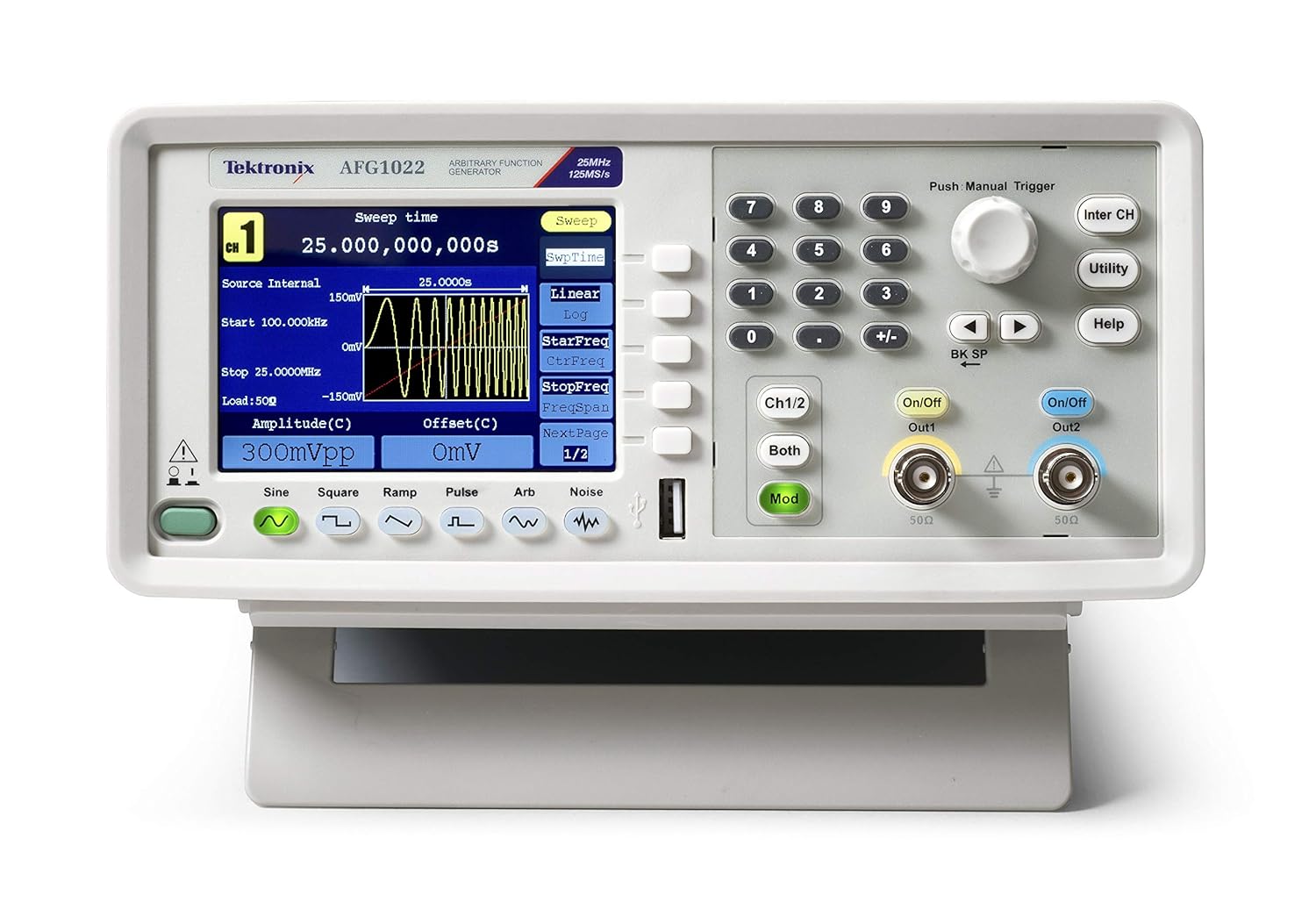
The Tektronix AFG1022 Arbitrary Function Generator is a versatile instrument designed for generating various waveforms required in laboratory and testing environments. With a bandwidth of 25 MHz or 60 MHz and dual output channels, it provides an output amplitude ranging from 1 mVpp to 10 Vpp across its full bandwidth. This device offers a comprehensive set of features for waveform generation, making it a valuable tool for a wide range of applications.
Главните карактеристики вклучуваат:
- Dual-channel operation with 25 MHz bandwidth.
- Излез amplitude from 1 mVpp to 10 Vpp.
- 14-bit vertical resolution and 1 µHz frequency resolution.
- 50 built-in arbitrary waveforms.
- Support for continuous, modulation, sweep, and burst modes.
- Dedicated 3.95-inch TFT LCD display for clear visualization.
- User-friendly front panel and menu navigation.
2. Информации за безбедност
Before operating the Tektronix AFG1022, please read and understand all safety instructions to prevent injury and avoid damage to the instrument or other connected equipment. This device is designed for use by qualified personnel only.
Општи безбедносни мерки на претпазливост:
- Заземјување: Always ensure the instrument is properly grounded. The power cord provided has a three-prong plug for this purpose. Do not defeat the grounding-type plug.
- Извор на енергија: Connect the instrument to a power source that is within the specified voltage range (100-240V AC, 50/60 Hz). Verify the line selector switch on the rear panel is set correctly for your local voltage.
- Вентилација: Ensure proper ventilation around the instrument. Do not block ventilation openings. Overheating can cause damage.
- Животна средина: Operate the instrument in a clean, dry environment. Avoid exposure to moisture, extreme temperatures, or corrosive gases.
- Сервисирање: Refer all servicing to qualified service personnel. Do not attempt to service the instrument yourself unless you are qualified to do so.
- Кабли и конектори: Use only specified cables and connectors. Ensure all connections are secure before applying power.
- Чистење: Исклучете го напојувањето пред чистење. Користете мека, сува крпа. Не користете течни или аеросолни средства за чистење.
3. Што има во кутијата
Upon unpacking your Tektronix AFG1022 Arbitrary Function Generator, please verify that all the following items are included:
- Tektronix AFG1022 Arbitrary Function Generator Unit
- Изјава за усогласеност
- CD (containing software and documentation)
- Упатство за употреба (овој документ)
- Fuse (2 pieces, spare)
- Cables (3 pieces, including USB and BNC cables)
- Сертификат за калибрација
- Кабел за напојување
If any items are missing or damaged, please contact your Tektronix supplier or customer support immediately.
4. Поставување
Follow these steps to set up your AFG1022 Arbitrary Function Generator for initial use.
4.1 Отпакување и проверка
- Carefully remove the instrument and all accessories from the packaging.
- Inspect the instrument for any signs of physical damage that may have occurred during transit. If damage is found, contact your supplier.
- Retain the original packaging materials for future transport or storage.
4.2 Поврзување за напојување
- Locate the power inlet on the rear panel of the AFG1022.
- Потврдете го Селектор на линија прекинувачот на задниот панел е поставен на точната јачина на звукtage for your region (110V AC or 220V AC). Adjust if necessary.
- Connect the provided power cord to the instrument's power inlet and then to a grounded AC power outlet.

4.3 Поврзување на излези
- Identify the two output channels (Out1 and Out2) on the front panel. These are BNC connectors.
- Connect appropriate BNC cables from the desired output channel(s) to your test circuit or device under test.
- Ensure the impedance setting on the AFG1022 matches the impedance of your load (typically 50Ω or high impedance).
5. Упатства за работа
Овој дел обезбедува надview of the basic operation of the Tektronix AFG1022. For detailed instructions on specific functions, refer to the comprehensive user manual provided on the included CD.
5.1 Вклучување и почетен екран
- Press the power button located on the front panel to turn on the instrument.
- The display will show the Tektronix logo and then transition to the main waveform generation interface.
5.2 Основно генерирање на бранови форми
The AFG1022 can generate various standard waveforms and arbitrary waveforms.
- Selecting Waveform Type: Use the dedicated buttons below the display (Sine, Square, Ramp, Pulse, Arb, Noise) to select the desired waveform.
- Setting Frequency: Use the numeric keypad and the rotary knob to input the desired frequency. The display will update in real-time.
- Поставување Amplitude and Offset: Прилагодете го amplitude (Vpp) and DC offset (V) using the corresponding soft keys and the rotary knob.
- Овозможување на излез: Притиснете го Вклучено/Исклучено button for Channel 1 (Out1) or Channel 2 (Out2) to enable the waveform output. The button will illuminate when the output is active.

5.3 Напредни функции
- Модулација: Притиснете го Мод button to access modulation settings (AM, FM, PM, FSK, PWM).
- Метење: Configure frequency sweeps by pressing the Изметете мек клуч.
- Рафал: Generate burst waveforms by pressing the Пукна мек клуч.
- Произволни бранови форми: The AFG1022 supports user-defined arbitrary waveforms. Refer to the full manual for instructions on creating and loading custom waveforms.
6. Одржување
Proper maintenance ensures the longevity and optimal performance of your Tektronix AFG1022.
6.1 Чистење
- Always disconnect the power cord before cleaning the instrument.
- Use a soft, dry cloth to wipe the exterior surfaces. For stubborn dirt, a cloth lightly dampened with mild detergent and water may be used.
- Do not use abrasive cleaners, solvents, or strong chemicals, as these can damage the plastic parts and labels.
- Избегнувајте прскање течности директно врз инструментот.
6.2 Замена на осигурувачите
If the instrument does not power on, check the fuse located in the power inlet on the rear panel. Ensure the replacement fuse matches the specified type and rating (e.g., 250V, 2A). Refer to the full manual for detailed instructions on fuse replacement.
6.3 Калибрација
For continued accuracy, periodic calibration by qualified service personnel is recommended. Refer to the calibration certificate for the recommended calibration interval.
7 Смена на проблеми
This section provides solutions to common issues you might encounter with your AFG1022. If the problem persists, contact Tektronix customer support.
| Проблем | Можна причина | Решение |
|---|---|---|
| Уредот не се вклучува. | No power, faulty power cord, blown fuse. | Check power cord connection. Verify power outlet. Check and replace fuse if necessary. Ensure line selector is correct. |
| Нема излез на бранови форми. | Output channel not enabled, incorrect amplitude/offset settings, faulty cable, incorrect load impedance. | Press the On/Off button for the desired channel. Verify amplitude and offset settings. Check BNC cable connections. Ensure load impedance matches instrument setting. |
| Екранот е празен или замрзнат. | Software error, internal fault. | Power cycle the instrument (turn off, wait 10 seconds, turn on). If issue persists, contact support. |
| Incorrect waveform shape/frequency. | Incorrect settings, external interference. | Double-check all waveform parameters (frequency, amplitude, offset, modulation settings). Ensure proper shielding of cables. |
8. Спецификации
The following table lists the key specifications for the Tektronix AFG1022 Arbitrary Function Generator. All specifications are typical unless otherwise noted.
| Параметар | Вредност |
|---|---|
| Име на моделот | AFG1022 |
| Пропусен опсег | 25 MHz |
| Канали | Двоканален |
| Излез Ampживост | 1 mVpp до 10 Vpp |
| Вертикална резолуција | 14-битни |
| Резолуција за фреквенција | 1 µHz |
| Built-in Waveforms | 50 Arbitrary Waveforms |
| Приказ | 3.95-инчен TFT LCD |
| Извор на енергија | Electricity Powered |
| Voltage | 100-240V AC (selectable) |
| Тежина на ставката | 4.9 килограми (10.8 фунти) |
| Димензии на пакетот | 17.2 x 14 x 11.4 инчи |
| Производител | Тектроникс |
| Датум прв на располагање | 15 јули 2015 година |
9. Гаранција и поддршка
Tektronix products are designed for reliability and performance. For specific warranty terms and conditions applicable to your AFG1022, please refer to the warranty information provided with your purchase or visit the official Tektronix webсајт.
Поддршка за корисници:
If you require technical assistance, have questions about your instrument, or need to arrange for service, please contact Tektronix customer support. Support contact information can typically be found on the Tektronix webстраницата или во документацијата вклучена со вашиот производ.
When contacting support, please have your instrument's model number (AFG1022) and serial number ready. The serial number is located on the rear panel of the instrument.
For the latest information, drivers, software, and additional resources, please visit the official Tektronix webсајт: www.tek.com