
Вовед
This manual provides detailed instructions for the setup, operation, and maintenance of your Homtime C12PRO Docking Station Speaker. The C12PRO integrates a Bluetooth speaker, FM radio, alarm clock, and dual USB charging capabilities, designed for convenient everyday use.
Содржина на пакетот
Ве молиме проверете дали сите артикли наведени подолу се вклучени во вашиот пакет:
- 1 x Homtime C12PRO Speaker Unit
- 1 x адаптер за напојување
- 1 x Упатство за употреба
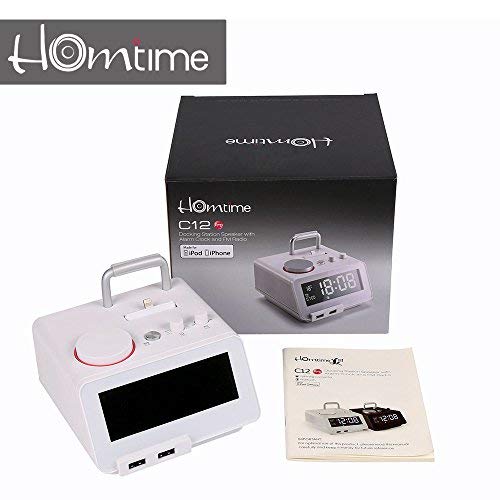
Слика: Contents of the Homtime C12PRO package, showing the main speaker unit, power adapter, and the user manual.
Производот завршиview
Familiarize yourself with the various components and controls of your C12PRO unit.

Слика: Предна страна view of the Homtime C12PRO with an iPhone docked. The large digital display shows time and temperature, and the front features dual USB charging ports.

Слика: Предна страна view of the Homtime C12PRO without a phone docked. This image clearly shows the digital display, the docking connector, and the control buttons on the top surface.
Преден панел и дисплеј
- Large 4.2-inch LCD Display: Shows time, alarm status, and room temperature (Celsius or Fahrenheit). Brightness is adjustable.
- Двојни USB порти за полнење: Located at the front base for convenient charging of external devices.
Контроли на врвните панели
- Приклучен конектор: Apple Certified Lightning connector for iPod/iPhone.
- Control Buttons/Knobs: For setting time, alarm, volume, mode selection, and FM radio tuning.
Врски на задниот панел
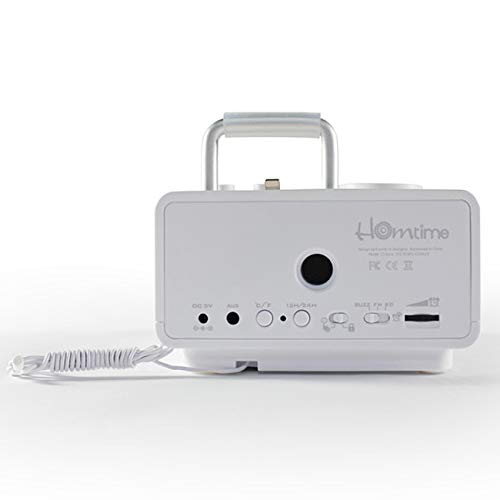
Слика: Заден дел view of the Homtime C12PRO. This image displays the DC 9V power input, AUX-in port, 12H/24H time format button, and other rear controls.
- DC 9V Влез за напојување: Поврзете го испорачаниот адаптер за напојување тука.
- AUX-влез порт: 3.5 мм приклучок за поврзување на надворешни аудио извори.
- 12H/24H Button: Toggles between 12-hour and 24-hour time display formats.
- Други контроли: May include snooze/dimmer, alarm on/off, and FM antenna connection.
Поставување
- Отпакувајте ја единицата: Carefully remove the C12PRO speaker and all accessories from the packaging.
- Поврзете напојување: Insert the DC plug of the power adapter into the DC 9V input port on the rear of the unit. Plug the power adapter into a standard wall outlet. The display will illuminate.
- Почетно поставување на времето:
- Притиснете и задржете го ВРЕМЕ СЕТ button (location may vary, typically on top or rear).
- Користете го +/- buttons or rotary knob to adjust the hour. Press ВРЕМЕ СЕТ повторно да се потврди.
- Прилагодете ги минутите користејќи го +/- buttons or rotary knob. Press ВРЕМЕ СЕТ за да потврдите и да излезете од режимот за поставување време.
- За да префрлате помеѓу 12-часовен и 24-часовен формат, притиснете го копчето 12ч/24ч копче на задниот панел.
- Прилагодете ја осветленоста на екранот: Притиснете го СНОЗИ / ДИМЕР button (often combined) repeatedly to cycle through brightness levels.
- Поставете температурна единица: Доколку е применливо, притиснете го ° C / ° F button to switch between Celsius and Fahrenheit display for room temperature.
Упатства за работа
Вклучување/исклучување
Притиснете го МОЌ button to turn the unit on or off. When off, the clock display remains active.
Поставување на алармот
- Притиснете и задржете го СЕТ ЗА АЛАРМ button. The alarm hour will flash.
- Користете го +/- buttons or rotary knob to adjust the alarm hour. Press СЕТ ЗА АЛАРМ да се потврди.
- Прилагодете ја минутата на алармот. Притиснете СЕТ ЗА АЛАРМ да се потврди.
- Select the alarm source (Buzzer, FM Radio, or Docked Device). Use +/- or rotary knob and press СЕТ ЗА АЛАРМ да се потврди.
- За да го активирате/деактивирате алармот, притиснете го копчето Вклучено / исклучено аларм button. An alarm icon will appear on the display when active.
- Кога ќе се огласи алармот, притиснете на СНОЗА button to temporarily silence it for a few minutes. Press МОЌ за да го исклучите алармот за денот.
Работа на FM радио
- Притиснете го РЕЖИМ копчето додека на екранот не се појави „FM“.
- For automatic station scanning, press and hold the PLAY/PAUSE копче (или наменско СКЕНИРАЊЕ button). The radio will scan and save available stations.
- За рачно дотерување, користете го ПРЕДМЕТ/СЛЕДНО buttons or rotary knob to adjust the frequency.
- To select a saved station, press the ПОСТАВЕНИ копчето и потоа користете ПРЕДМЕТ/СЛЕДНО да се движите.
- Прилагодете ја јачината на звукот со помош на ВОЛУМЕН knob or buttons.
Bluetooth спарување
- Притиснете го РЕЖИМ button until "BT" or "Bluetooth" appears on the display. The Bluetooth indicator will flash, indicating pairing mode.
- На вашиот мобилен уред, овозможете Bluetooth и пребарајте нови уреди.
- Select "Homtime C12PRO" from the list of available devices.
- Once paired, the Bluetooth indicator on the C12PRO will stop flashing and remain solid. You can now play audio wirelessly from your device.
- Adjust volume on both the C12PRO and your connected device.
Користење на приклучната станица
The C12PRO features an Apple Certified Lightning connector for compatible iPod/iPhone devices.
- Carefully align your iPhone/iPod with the Lightning connector on the top of the unit.
- Gently push down until the device is securely seated.
- The C12PRO will automatically charge your device and can play audio from it.
- Притиснете го РЕЖИМ button to select the docking station as the audio source.
USB полнење
The unit includes dual USB ports for charging other devices.
- Connect your USB charging cable to one of the USB ports on the front of the C12PRO.
- Connect the other end of the cable to your device (e.g., Android phone, tablet).
- The C12PRO will provide power to charge your device.
AUX-влез конекција
Connect external audio players via the 3.5mm AUX-in port.
- Connect a 3.5mm audio cable (not included) from your external audio device's headphone jack to the AUX-in port on the rear of the C12PRO.
- Притиснете го РЕЖИМ копчето додека на екранот не се појави „AUX“.
- Play audio from your external device. Adjust volume on both the C12PRO and the external device.
Одржување
- Чистење: Disconnect the power adapter before cleaning. Use a soft, dry cloth to wipe the exterior surfaces. Do not use abrasive cleaners, waxes, or solvents.
- Складирање: Доколку го складирате уредот подолг период, исклучете го од струја и складирајте го на ладно и суво место, подалеку од директна сончева светлина и екстремни температури.
- Батерија: The unit contains a CR2 battery (included) for clock memory backup. This battery is not user-replaceable for general operation and should only be replaced by qualified service personnel if necessary.
Решавање проблеми
| Проблем | Можна причина | Решение |
|---|---|---|
| Нема напојување/екранот е исклучен | Адаптерот за напојување не е поврзан или штекерот е неисправен. | Осигурајте се дека адаптерот за напојување е безбедно вклучен во уредот и во функционален ѕиден штекер. |
| Нема звук од звучникот | Volume too low; incorrect source selected; device not connected properly. | Зголемете ја јачината на звукот. Притиснете РЕЖИМ to select the correct audio source (BT, FM, Dock, AUX). Reconnect Bluetooth device or docked phone. |
| Спарувањето со Bluetooth не успеа | C12PRO not in pairing mode; device too far; interference. | Ensure C12PRO is in BT mode and flashing. Move device closer. Turn off other Bluetooth devices. |
| FM радио статичен/лош прием | Слаб сигнал; антената не е продолжена. | Extend the FM antenna fully. Reposition the unit for better reception. Perform auto-scan again. |
| Алармот не се огласува | Alarm not activated; alarm volume too low. | Ensure the alarm icon is visible on the display. Check alarm volume settings. |
| Device not charging via USB/Dock | Проблем со кабелот; уредот не е компатибилен; уредот не е напојуван. | Try a different USB cable. Ensure the C12PRO is powered on. Verify device compatibility with the Lightning dock. |
Спецификации

Слика: A table detailing the specifications of the Homtime C12PRO, including driver units, S/N ratio, Bluetooth version, range, radio frequency, power, and dimensions.
| Модел | C12 Pro |
| Возачки единици | 2х40мм |
| Сооднос S/N | > 70 dB |
| Bluetooth верзија | 2.1 + EDR |
| Опсег на Bluetooth | 10 М |
| Опсег на радиофреквенција | 87.5 MHz - 108 MHz |
| Компатибилни уреди | iPad, iPhone, Android, Windows Phone, Computer |
| Адаптер за напојување | AC100-240V, 50/60Hz, DC 5V 3A |
| Излезна моќност | 3W + 3W (6 Watts total) |
| Димензии (ДxШxВ) | 12.8 x 12.9 x 10.7 cm |
| Тежина на ставката | 800 гр |
| Аудио извори | Apple Lightning, USB, Bluetooth, Aux-in |
| Тип на дисплеј | Digital LCD (4.2 inches) |
| Батерии | 1 CR2 battery required (included for clock memory) |
Гаранција и поддршка
Информации за гаранцијата
The Homtime C12PRO comes with a 1-годишна Ограничена гаранција from the date of purchase. This warranty covers manufacturing defects in materials and workmanship under normal use. It does not cover damage caused by misuse, accidents, unauthorized modifications, or external causes.
Ве молиме чувајте го вашиот доказ за купување за барањата за гаранција.
Поддршка за корисници
For technical assistance, troubleshooting not covered in this manual, or warranty inquiries, please contact Homtime customer support. Refer to the contact information provided with your product packaging or visit the official Homtime webстраница за најактуелни детали за поддршка.