
Aja V2ANALOG
AJA V2Analog HD/SD-SDI to Component/Composite Analog Mini-Converter User Manual
Model: V2ANALOG
1. Вовед
The AJA V2Analog is a compact, high-quality mini-converter designed to convert HD/SD-SDI signals to analog component or composite video. This device is engineered for professional video workflows, providing reliable signal conversion for various applications.
Its versatility allows for complete integration into any workflow, making it a valuable asset in any video production environment.

Слика 1: Предна и странична view of the AJA V2Analog Mini-Converter, highlighting input and output ports.
2. Информации за безбедност
Внимателно прочитајте ги сите безбедносни упатства пред да го користите уредот. Зачувајте го ова упатство за во иднина.
- Не го изложувајте уредот на дожд, влага или екстремни температури.
- Обезбедете соодветна вентилација за да спречите прегревање.
- Use only the specified power supply (5-20 VDC).
- Avoid dropping or subjecting the unit to severe impacts.
- Целото сервисирање упатете го на квалификуван сервисен персонал.
3. Поставување и врски
Follow these steps to set up your AJA V2Analog converter:
- Поврзување за напојување: Connect the appropriate power supply (5-20 VDC) to the "POWER" input on the converter.
- Влез за SDI: Connect your HD/SD-SDI source to the "SDI IN" BNC connector.
- Аналоген излез: Connect the Y/G, Pb/B, and Pr/R BNC outputs to your analog component or composite display/device. Ensure correct color component matching (Y/G for Luminance/Green, Pb/B for Blue Difference, Pr/R for Red Difference).
- USB конекција (опционално): For firmware updates or configuration, connect a USB cable from the "USB" port on the converter to your computer.
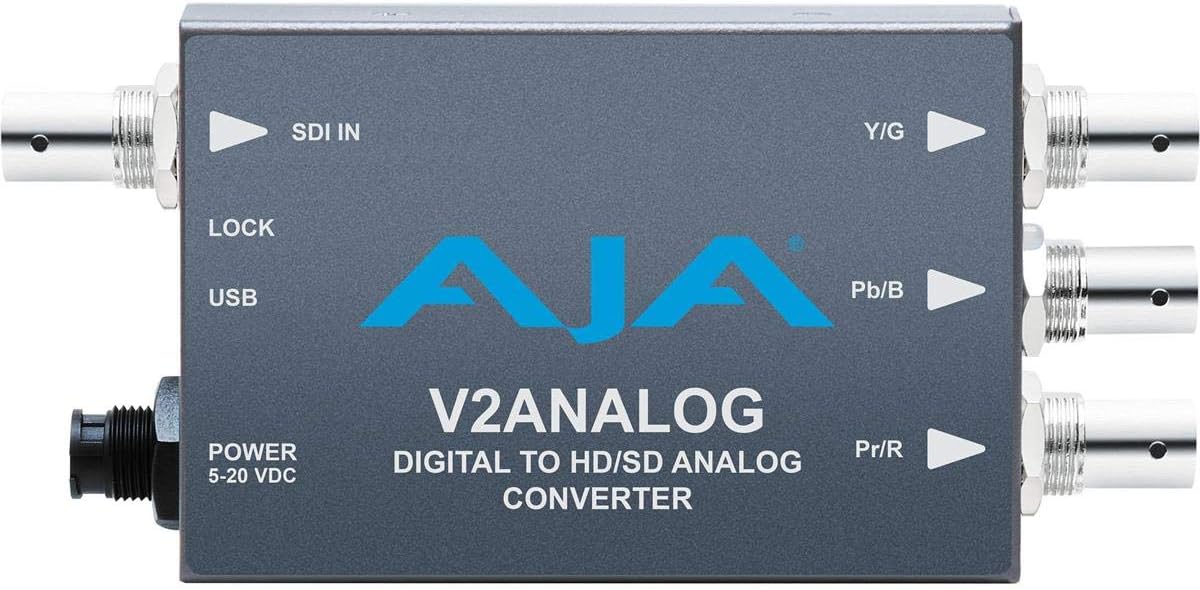
Слика 2: Врв view of the AJA V2Analog Mini-Converter, illustrating port labels for connection.
4. Упатства за работа
Once all connections are made, power on the device. The V2Analog will automatically detect the incoming SDI signal format and convert it to the appropriate analog output. The "LOCK" LED indicator will illuminate when a stable SDI signal is detected and locked.
4.1. Signal Compatibility
The V2Analog supports various HD and SD SDI formats. It is designed to convert these digital signals to standard analog component (YPbPr) or composite (CVBS) outputs.
4.2. Конфигурација (Напредно)
Advanced configuration options, such as output format selection or color space adjustments, may be available via AJA's Mini-Config software, accessible through the USB port. Refer to the AJA website for the latest software and detailed configuration guides.
5. Одржување
The AJA V2Analog is designed for reliable operation with minimal maintenance. Follow these guidelines:
- Чистење: Користете мека, сува крпа за чистење на надворешноста на уредот. Не користете течни или аеросолни средства за чистење.
- Ажурирања на фирмверот: Periodically check the AJA website for firmware updates. Keeping the firmware current ensures optimal performance and compatibility.
- Складирање: Кога не го користите подолго време, чувајте го уредот на ладно и суво место, подалеку од директна сончева светлина и екстремни температури.
6 Смена на проблеми
If you encounter issues with your V2Analog, refer to the following common problems and solutions:
| Проблем | Можна причина | Решение |
|---|---|---|
| Нема видео излез | No power; Incorrect SDI input; Incorrect analog output connection; No signal lock. | Check power supply; Verify SDI source is active and connected to "SDI IN"; Ensure Y/G, Pb/B, Pr/R are connected correctly to display; Check "LOCK" LED. |
| Distorted or colored video | Incorrect analog output format; Loose connections. | Ensure display is set to correct input type (component/composite); Tighten all BNC connections. |
| "LOCK" LED not illuminated | No valid SDI input signal. | Verify SDI source is active and sending a compatible signal. Check SDI cable integrity. |
If the problem persists, contact AJA Technical Support for further assistance.
7. Спецификации
| Карактеристика | Детал |
|---|---|
| Модел | V2ANALOG |
| Бренд | АЈА |
| Влез | HD/SD-SDI (BNC) |
| Излез | Component (Y/G, Pb/B, Pr/R BNC), Composite (selectable) |
| Тип на интерфејс | USB, SDI, Component |
| Моќ | 5-20 VDC |
| Димензии (Д x Ш x В) | 7.2 x 5.7 x 4.2 инчи |
| Тежина | 1.35 фунти |
| UPC | 091131246023 |
8. Поддршка и гаранција
For technical support, product registration, or warranty information, please visit the official AJA webлокација или контактирајте го нивниот оддел за корисничка поддршка. Специфичните услови за гаранција може да се разликуваат во зависност од регионот и датумот на купување.
АЈА Webсајт: www.aja.com
Ask a question about this manual
Ask about setup, troubleshooting, compatibility, parts, safety, or missing instructions. Manuals+ will review the question and use this page’s manual context to help answer it.