
UNIC UC30 (IDSP-004)
Упатство за користење на UNIC UC30 LED мини проектор
Model: UC30 (IDSP-004)
1. Вовед
The UNIC UC30 LED Mini Projector is a compact and versatile multimedia device designed for home theater projection. It supports a wide range of input sources and file formats, making it suitable for various entertainment and presentation needs.
Главните карактеристики вклучуваат:
- Multiple Input Interfaces: AV, VGA, HDMI, USB, SD, and TV input.
- Опширен File Format Support: Compatible with various video, audio, image, and e-book formats.
- Keystone Correction: Adjusts image distortion for optimal viewинг.
- Integrated Speaker: Built-in 2.0W *2 stereo speakers for audio output.
- Flexible Projection: Supports front and rear projection models.

Слика 1: Предна страна view of the UNIC UC30 LED Mini Projector, showcasing неговиот компактен дизајн и објектив.
2. Поставување
2.1 Отпакување и поставување
Carefully remove the projector and all accessories from the packaging. Place the projector on a stable, flat surface. Ensure adequate ventilation around the unit to prevent overheating.
2.2 Поврзување за напојување
- Поврзете го адаптерот за напојување со влезниот приклучок за напојување на проекторот.
- Приклучете го адаптерот за напојување во соодветен штекер.
2.3 Поврзување на влезни уреди
The UC30 projector offers multiple input options. Connect your desired source device (e.g., laptop, DVD player, game console, USB drive) to the corresponding port on the projector.

Слика 2: Заден дел view of the white UNIC UC30 projector, showing various input ports including AV, VGA, HDMI, and USB.
- HDMI: За дигитално видео и аудио со висока дефиниција.
- VGA: For connecting computers or laptops.
- АВ: For standard definition video and stereo audio (using the included 3-in-1 AV cable).
- USB: За репродукција на медиуми fileдиректно од USB флеш драјв.
- SD-картичка: За репродукција на медиуми files directly from an SD memory card.
- ТВ: For connecting to a TV signal source (if applicable to your region/model).
2.4 Фокус и корекција на трапезоидот
After powering on the projector, adjust the focus ring around the lens until the projected image is clear. Use the keystone correction feature (usually a dial or button on the projector) to correct any trapezoidal distortion in the image, ensuring a rectangular projection.
3. Упатства за работа
3.1 Вклучување/исклучување
Притиснете го копчето за вклучување на проекторот или на далечинскиот управувач за да го вклучите или исклучите уредот. Оставете неколку секунди проекторот да се загрее или олади.
3.2 Избор на влезен извор
Use the "Source" button on the projector or remote control to cycle through the available input options (HDMI, VGA, AV, USB, SD, TV) until your desired source is displayed.
3.3 Репродукција на медиуми (USB/SD)
When a USB drive or SD card is inserted, the projector's media player interface will typically appear. Navigate through the menus using the directional buttons on the projector or remote to select and play your desired files.
- Поддржани видео формати: AVI, MOV, VOB, DAT, MPEG, MPG, RM, RMVB (encoding: MPEG1/MPEG2/MPEG4/DivX/Xvid).
- Поддржани аудио формати: MP3, WMA, WAV.
- Поддржани формати на слики: JPEG, BMP, GIF, PNG.
- Поддржан формат на е-книга: TXT.

Figure 3: The UNIC UC30 projector displaying a video of a man in a soccer jersey, demonstrating its video playback capability.
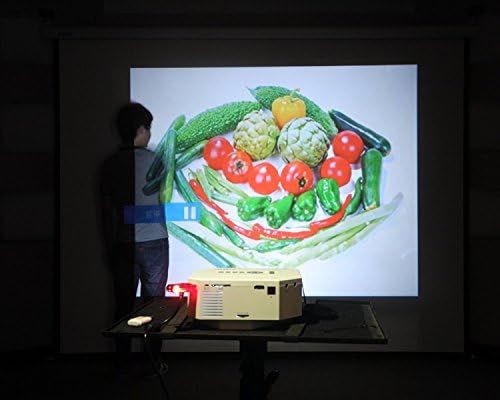
Figure 4: The UNIC UC30 projector displaying a vibrant image of vegetables, showcasing its image display quality.
3.4 Аудио излез
The projector has built-in stereo speakers. For private listening or connecting to external audio systems, use the stereo earphone output terminal.
3.5 Projection Model
The projector supports both front and rear projection. This setting can typically be adjusted in the projector's menu to suit your setup (e.g., projecting from behind a translucent screen).
4. Одржување
4.1 Чистење на објективот
Користете мека крпа без влакненца, специјално дизајнирана за оптички леќи, за нежно да ја избришете леќата на проекторот. Избегнувајте употреба на абразивни средства за чистење или прекумерна сила, бидејќи може да ја изгребат леќата.
4.2 Чистење на куќиштето на проекторот
Избришете ја надворешноста на проекторот со мека, сува крпа. За тврдокорни дамки, малкуamp Може да се користи крпа, но осигурајте се дека течноста не влегува во отворите за вентилација.
4.3 Вентилација
Ensure the projector's ventilation ports are clear of dust and obstructions. Proper airflow is crucial for maintaining optimal operating temperature and extending the lifespan of the LED lamp.
5 Смена на проблеми
5.1 Нема слика или порака „Нема сигнал“
- Check if the projector is powered on and the power indicator light is active.
- Verify that the input cable (HDMI, VGA, AV) is securely connected to both the projector and the source device.
- Ensure the correct input source is selected on the projector (use the "Source" button).
- If using a computer, ensure its display output is enabled (e.g., press Fn + F8 or similar key combination).
5.2 Заматена слика
- Adjust the focus ring around the projector lens until the image is sharp.
- Осигурајте се дека растојанието на проекција е во рамките на препорачаниот опсег (1-3.5 метри).
- Исчистете го објективот на проекторот ако изгледа валкан.
5.3 Нема звук
- Проверете го нивото на јачина на звук и на проекторот и на изворниот уред.
- Ако користите HDMI, проверете дали изворниот уред испраќа аудио преку HDMI.
- If using AV, ensure the red and white audio cables are correctly connected.
- Доколку се поврзани надворешни звучници, проверете дали се вклучени и дека работат правилно.
5.4 Image Distortion (Trapezoid Shape)
- Adjust the keystone correction feature on the projector to square the image.
- Ensure the projector is placed on a level surface and is as perpendicular to the screen as possible.
6. Спецификации
Below are the detailed technical specifications for the UNIC UC30 LED Mini Projector:
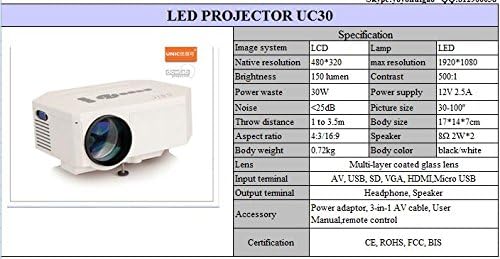
Figure 5: Official specification table for the UNIC UC30 LED Mini Projector, detailing its technical characteristics.
| Карактеристика | Детал |
|---|---|
| Систем за слика | LCD екран |
| Мајчин резолуција | 480 x 320 пиксели |
| Поддршка за максимална резолуција | 1920 x 1080 (Full HD) |
| Осветленост | 150 LUX (150 lumen) |
| Сооднос на контраст | 500:1 |
| Потрошувачка на енергија | 30 W |
| Напојување | 12V 2.5A |
| Ниво на бучава | <25 dB |
| Растојание за фрлање | 1 до 3.5 метри |
| Големина на слика | 30-120 инчи |
| Сооднос на аспект | 4:3 / 16:9 |
| Телесна тежина | 0.72 кг |
| Големина на телото | 17 x 14 x 7 cm |
| Говорник | 2.0W *2 Stereo |
| Леќа | Multi-layer coated glass lens |
| Влезни терминали | AV, USB, SD, VGA, HDMI, Micro USB |
| Излезни терминали | Stereo Earphone, Speaker |
| Вклучени додатоци | Power adapter, 3-in-1 AV cable, User Manual, Remote control |
| Сертификати | CE, ROHS, FCC, BIS |
7. Гаранција и поддршка
For information regarding warranty coverage, technical support, or service, please refer to the warranty card included with your product or contact the retailer or manufacturer directly. Keep your purchase receipt as proof of purchase.
Ask a question about this manual
Ask about setup, troubleshooting, compatibility, parts, safety, or missing instructions. Manuals+ will review the question and use this page’s manual context to help answer it.