
UNIC UC46 IDSP-011
UNIC UC46 Mini Projector User Manual
Model: UC46 IDSP-011
1. Вовед
This user manual provides detailed instructions for the operation, setup, and maintenance of your UNIC UC46 Mini Projector. Please read this manual thoroughly before using the product to ensure proper and safe operation. Keep this manual for future reference.
Информации за безбедност
- Не гледајте директно во објективот на проекторот кога lamp е вклучено.
- Ensure proper ventilation around the projector to prevent overheating. It is recommended to rest the projector after 4-5 hours of continuous operation.
- Држете го проекторот подалеку од вода или било какви течности.
- Користете го само адаптерот за напојување што е испорачан со проекторот.
- Не обидувајте се сами да го расклопите или поправите проекторот. Контактирајте квалификуван сервисер за помош.
- This projector is designed for home entertainment and is not suitable for professional teaching, meetings, or business presentations.
2. Карактеристики на производот
- Преносен дизајн: Compact and lightweight, ideal for home use, camping, and outdoor parties.
- Висока осветленост: 1200 lumens LED lamp for clear and vibrant images.
- Матична резолуција: 800x480 pixels, supporting up to 1920x1080 (Full HD) via input.
- Голема проекција: Проектира слики од 34 до 130 инчи.
- Повеќе опции за поврзување: HDMI, VGA, USB, AV, SD Card, and IR.
- Безжична поврзаност: Supports WiFi, Miracast, and DLNA for seamless smartphone integration (iOS, Android, Windows).
- Долг животен век на LED: Lamp живот од околу 20,000 часа.
3. Содржина на пакетот
Ве молиме означете го полето за следните ставки:
- UNIC UC46 Mini Projector
- Кабел за напојување
- 3-во-1 AV кабел
- Далечински управувач
- Упатство за употреба (овој документ)
4. Производот завршиview
Familiarize yourself with the different parts and controls of your UNIC UC46 Mini Projector.
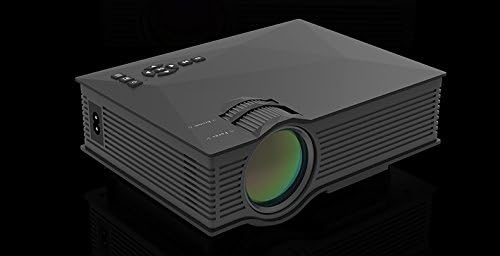
Слика 4.1: Предна и странична страна View of the UNIC UC46 Mini Projector. Shows the main lens, focus wheel, and ventilation grilles.

Слика 4.2: Заден дел View of the Projector. Displays various input ports including HDMI, USB, AV, SD card slot, and audio output.

Слика 4.3: Врв View of the Projector. Shows the control panel buttons for navigation, power, and input selection.

Figure 4.4: Lens Focus and Keystone Adjustment Diagram. Illustrates the location of the lens focus and keystone correction wheels, along with a diagram of the remote control functions.
5. Поставување
5.1 Поставување
Place the projector on a stable, flat surface. Ensure there is adequate space around the projector for ventilation. The projection distance will determine the screen size. Refer to the specifications for recommended distances.
5.2 Поврзување за напојување
- Connect the power cable to the projector's AC power input port.
- Вклучете го другиот крај од кабелот за напојување во стандарден електричен штекер (100-240V, 50/60Hz).
- Индикаторското светло за напојување на проекторот ќе светне.
5.3 Почетно вклучување
- Притиснете го копчето за вклучување на проекторот или на далечинскиот управувач за да го вклучите уредот.
- The projector will display the startup screen.
5.4 Прилагодување на сликата
- Фокус: Rotate the focus wheel (located near the lens) until the projected image is clear and sharp.
- Корекција на клучниот камен: If the image appears trapezoidal, adjust the keystone correction wheel (usually next to the focus wheel) to square the image.
6. Упатства за работа
6.1 Поврзување на уреди
The UNIC UC46 projector supports various input sources:
- HDMI: Connect a PC, laptop, DVD player, game console (PS3, PS4), or Smart TV box using an HDMI cable. Select "HDMI" as the input source.
- VGA: Connect a PC or laptop using a VGA cable. Select "VGA" as the input source.
- USB: Вметнете USB флеш-уред за репродукција на медиуми files (videos, photos, music, text). Select "USB" as the input source and navigate through the files.
- АВ: Use the included 3-in-1 AV cable to connect devices with AV output (e.g., older DVD players, VCRs). Select "AV" as the input source.
- SD-картичка: Insert an SD card into the slot to play media files. Select "SD" as the input source.
6.2 Безжична поврзаност (WiFi)
The projector supports WiFi connectivity for screen mirroring from smartphones (iOS, Android, Windows) and DLNA.
- Go to the "WiFi" or "Wireless" menu on the projector.
- Select your WiFi network and enter the password to connect the projector to your home network.
- For screen mirroring (Miracast/AirPlay):
- Ensure your smartphone and the projector are connected to the same WiFi network.
- On your smartphone, enable screen mirroring (e.g., "Screen Mirroring," "Smart View," "AirPlay," "Wireless Display").
- Изберете го проекторот од листата на достапни уреди.
- For DLNA:
- Ensure your smartphone and the projector are connected to the same WiFi network.
- Use a DLNA-compatible app on your smartphone to stream media to the projector.
6.3 Аудио излез
The projector has a built-in speaker. For enhanced audio, you can connect external speakers or a sound system via the 3.5mm audio output port.
7. Одржување
7.1 Чистење на објективот
Use a soft, lint-free cloth specifically designed for optical lenses to gently wipe the projector lens. Do not use abrasive cleaners or solvents.
7.2 Чистење на куќиштето на проекторот
Избришете ја надворешноста на проекторот со мека, сува крпа. За тврдокорна нечистотија, малкуamp може да се користи крпа, а потоа сува крпа.
7.3 Вентилација
Regularly check that the ventilation grilles are not blocked by dust or debris. Use a soft brush or compressed air to clean them if necessary. Proper airflow is crucial for preventing overheating and extending the projector's lifespan.
7.4 лamp Животот
LED lamp has an estimated life of 20,000 hours. To maximize lamp life, avoid frequent on/off cycles and allow the projector to cool down properly after use.
8 Смена на проблеми
| Проблем | Можна причина | Решение |
|---|---|---|
| Не е проектирана слика | Power cable not connected; Projector not turned on; Incorrect input source selected; Input device not connected or powered on. | Check power connection; Press power button; Select correct input source (HDMI, VGA, USB, AV, SD); Ensure input device is connected and powered on. |
| Сликата е матна | Lens out of focus; Incorrect projection distance. | Adjust the focus wheel; Adjust the projection distance. |
| Сликата е трапезоидна | Проекторот не е нормален на екранот. | Adjust the keystone correction wheel. |
| Нема звук | Volume too low; Muted; External audio device not connected or powered on; Audio format not supported. | Increase volume; Unmute; Check external audio connection; Ensure audio format is supported. |
| Далечинскиот управувач не работи | Batteries dead or incorrectly inserted; Obstruction between remote and IR receiver. | Заменете ги батериите; Обезбедете јасен поглед на IR приемникот на проекторот. |
| Overheating / Shuts down automatically | Блокирана вентилација; Продолжена употреба. | Ensure ventilation grilles are clear; Allow projector to rest after 4-5 hours of use. |
9. Спецификации

Figure 9.1: Detailed Specifications of the UNIC UC46 Mini Projector.
| Карактеристика | Детал |
|---|---|
| Систем за слика | LCD екран |
| Lamp | LED |
| Мајчин резолуција | 800 x 480 пиксели |
| Поддржана максимална резолуција | 1920 x 1080 пиксели (Full HD) |
| Осветленост | 1200 лумени |
| Сооднос на контраст | 800:1 |
| Потрошувачка на енергија | 50-55 вати |
| Напојување | 100-240V, 50/60Hz |
| Ниво на бучава | <25 dB |
| Големина на проекција | 34 - 130 инчи |
| Растојание за фрлање | 1.07 до 3.8 метри (3.51 до 12.47 стапки) |
| Сооднос на аспект | 4:3 / 16:9 |
| Нето Тежина | 1 кг |
| Леќа | Multi-layer coated glass lens |
| Влезни терминали | USB, SD, HDMI, AV, VGA, IR |
| Излезен терминал | Слушалки, звучник |
| Безжичен | WiFi 2.4G |
| Димензии на производот | 201 mm x 153 mm x 67.5 mm |
10. Гаранција и поддршка
За информации за гаранцијата и техничка поддршка, ве молиме погледнете го пакувањето на производот или контактирајте го вашиот продавач. Зачувајте ја сметката како доказ за купување.
Ask a question about this manual
Ask about setup, troubleshooting, compatibility, parts, safety, or missing instructions. Manuals+ will review the question and use this page’s manual context to help answer it.