
1. Вовед
This manual provides instructions for the proper use and maintenance of your Casio GX-12B Value Series Desk Top/Compact Desk Type Calculator. Please read this manual thoroughly before using the calculator to ensure optimal performance and longevity.
Клучни карактеристики:
- Extra Large 12-Digit Display
- Two-Way Power (Solar and Battery)
- 2 Independent Memories
- Item Counter Function
- Mark-up Percentagд Функција
- Durable Plastic Keys
- Compact Desk Type Design
2. Поставување и напојување
Извор на енергија:
The Casio GX-12B calculator operates on a two-way power system, utilizing both solar power and a single LR44 button-cell battery. For optimal performance, ensure the solar panel is exposed to sufficient light. In low-light conditions, the battery automatically takes over.
Инсталација/замена на батерија:
- Осигурајте се дека калкулаторот е исклучен.
- Пронајдете го капакот на преградата за батерии на задната страна од калкулаторот.
- Using a small screwdriver, carefully remove the screw and open the battery compartment cover.
- Remove the old LR44 battery (if replacing) and insert a new LR44 battery with the positive (+) side facing up.
- Вратете го капакот на преградата за батерии и прицврстете го со завртката.
- Притиснете го AC (All Clear) button to reset the calculator.
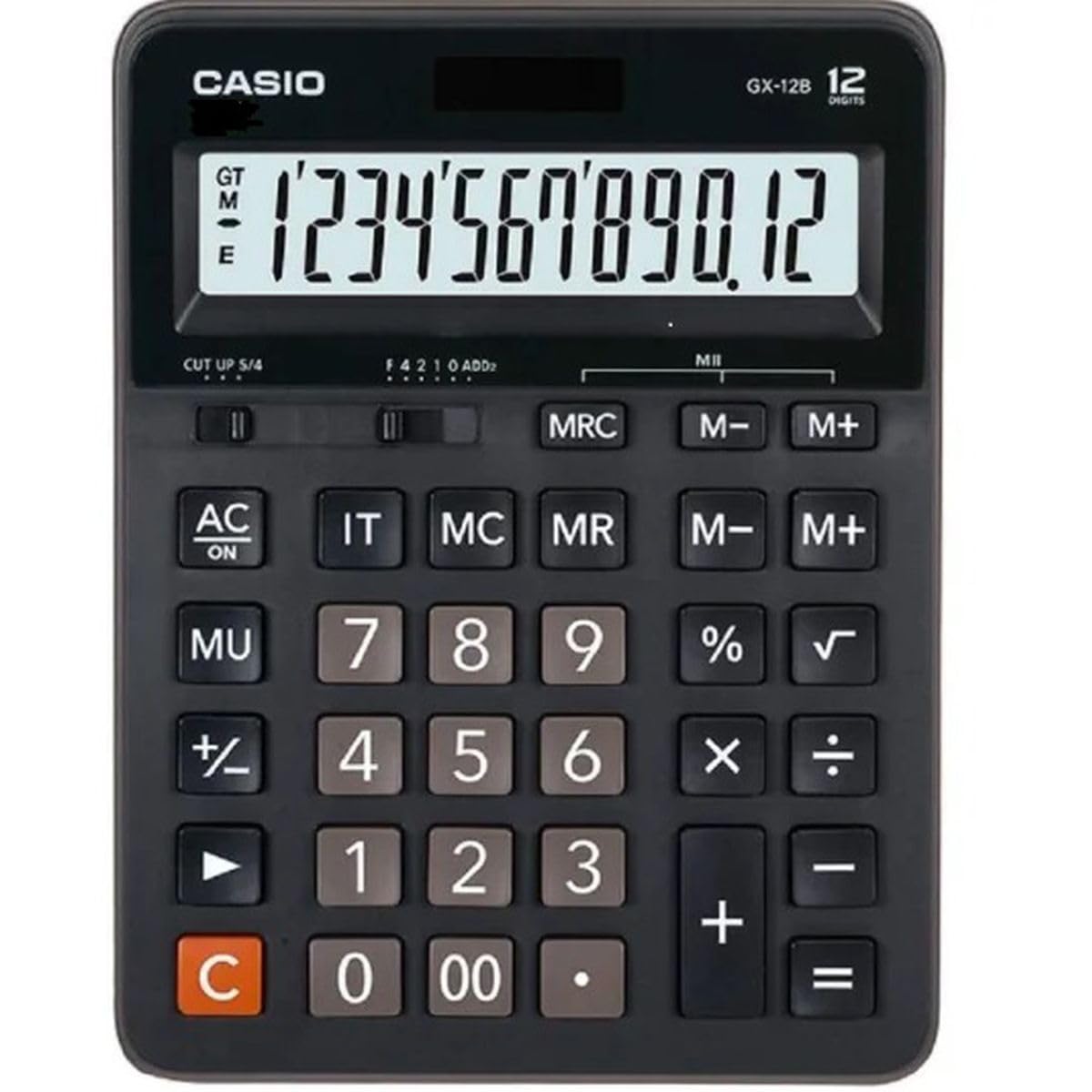
This image displays the Casio GX-12B calculator, highlighting its approximate length of 8.8 inches (22 cm) for scale. The calculator features a large display and clearly labeled keys.
3. Основни операции
Familiarize yourself with the key functions to perform calculations efficiently.
Клучните функции завршијаview:
- AC: All Clear. Clears all values and operations, resetting the calculator.
- C: Clear Entry. Clears the last entered number.
- + / - / × / ÷: Basic arithmetic operations.
- =: Executes the pending calculation.
- %: Процентtage key. Used for percentage calculations (e.g., 100 + 10% = 110).
- MU: Mark-up key. Used for profit margin calculations.
- M+: Adds the displayed value to the memory.
- M-: Subtracts the displayed value from the memory.
- МРЦ: Memory Recall/Clear. Press once to recall the memory value. Press twice to clear the memory.
- IT: Item Counter. Counts the number of entries in a series of calculations.
Example Calculations:
- Додаток: To calculate 123 + 456:
- Притиснете AC
- Внесете 123
- Притиснете +
- Внесете 456
- Притиснете = (Result: 579)
- Персенtage: To add 10% to 200:
- Притиснете AC
- Внесете 200
- Притиснете +
- Внесете 10
- Притиснете % (Result: 220)
- Функција на меморија: To calculate (5 × 3) + (8 × 2):
- Притиснете AC
- Внесете 5 × 3 M+ (15 is added to memory)
- Внесете 8 × 2 M+ (16 is added to memory)
- Притиснете МРЦ (Result: 31)
- Притиснете МРЦ again to clear memory.
4. Нега и одржување
- Чистење: Избришете го калкулаторот со мека, сува крпа. За тврдокорна нечистотија, користете крпа што нежно се брише.ampened with water and a mild detergent, then wipe dry immediately. Avoid using strong solvents or abrasive cleaners.
- Складирање: Чувајте го калкулаторот на ладно и суво место, подалеку од директна сончева светлина и екстремни температури.
- Избегнувајте влијание: Do not drop or subject the calculator to strong impacts, as this can damage internal components or the display.
- Траење на батеријата: If the display becomes dim or unresponsive, replace the LR44 battery.
5 Смена на проблеми
| Проблем | Можна причина | Решение |
|---|---|---|
| Екранот е празен или затемнет. | Недоволна светлина за соларниот панел или слаба батерија. | Move the calculator to a brighter area. Replace the LR44 battery if the issue persists. |
| Неточни резултати од пресметката. | Incorrect key input, or memory not cleared. | Притиснете AC to clear all operations and memory, then re-enter the calculation. Ensure correct order of operations. |
| Копчињата не реагираат. | Low battery, or internal malfunction. | Replace the LR44 battery. If the problem continues, contact customer support. |
6. Спецификации
- Модел: GX-12B
- Прикажи: 12-Digit Extra Large LCD
- Извор на енергија: Two-Way Power (Solar and 1 x LR44 Battery)
- Димензии (Д x Ш): Приближно 20.8 cm x 15.9 cm (8.2 инчи x 6.3 инчи)
- Тежина: Приближно 0.32 kg (0.7 lbs)
- Материјал: Пластика
- Функции: Basic arithmetic, Percentage, Mark-up, Memory (M+, M-, MRC), Item Counter
7. Информации за гаранцијата
This Casio product is covered by a Limited Warranty. For specific terms, conditions, and duration of the warranty, please refer to the warranty card included with your purchase or visit the official Casio webстраница. Зачувајте го доказот за купување за гаранциски побарувања.
8. Поддршка за корисници
If you encounter any issues not covered in this manual or require further assistance, please contact Casio customer support. Contact details can typically be found on the official Casio webна локацијата или на пакувањето на производот.