
Instapark PWT-07
Instapark PWT-07 Digital Programmable Water Timer User Manual
Model: PWT-07
Вовед
This manual provides detailed instructions for the setup, operation, maintenance, and troubleshooting of your Instapark PWT-07 Digital Programmable Water Timer. Please read this manual thoroughly before using the device to ensure proper function and longevity.
Информации за безбедност
- Use only 1.5V AA alkaline batteries. Do not mix old and new batteries, or different battery types.
- Ensure the battery compartment is securely closed to maintain the IP66 waterproof rating.
- Do not expose the timer to extreme temperatures or direct sunlight for prolonged periods, which may affect battery life and device performance.
- Disconnect the timer from the faucet and drain it before freezing temperatures to prevent damage.
- This device is designed for outdoor use with standard ¾” (GHS) threaded faucets.
Содржина на пакетот
Проверете дали сите артикли се присутни во пакувањето:
- Instapark PWT-07 Water Timer
- Упатство за употреба (овој документ)
- Гарантна картичка
Note: 2 AA alkaline batteries are required and not included.
Карактеристики на производот
- Single-station digital programmable faucet water timer.
- Impulse solenoid valve for reliable operation.
- Compatible with standard ¾” (GHS) threaded outdoor hose faucets.
- User-friendly interface with a single oversized rotary dial and 4 pushbuttons.
- Large, easy-to-read LCD display (2.1” x 1”).
- Водоотпорен рејтинг: IP66.
- Built-in rain delay function (24, 48, or 72 hours).
- Manual watering option without interrupting programmed schedules.
- Detachable battery compartment for easy battery replacement.
- Low power consumption, up to 4,000 on/off cycles per battery set.
Поставување
1. Инсталација на батерија
The Instapark PWT-07 requires two (2) 1.5V AA alkaline batteries (not included).
- Пронајдете го преградата за батерии на задната страна од тајмерот.
- Slide the battery compartment cover downwards to open.
- Вметнете две нови AA алкални батерии, внимавајќи на правилниот поларитет (+/-).
- Вратете го капакот на преградата за батерии на место додека не кликне безбедно.
- The LCD display should illuminate, indicating successful battery installation. If the display shows a low battery indicator, remove the batteries, wait for the screen to go completely dark, then reinsert them.
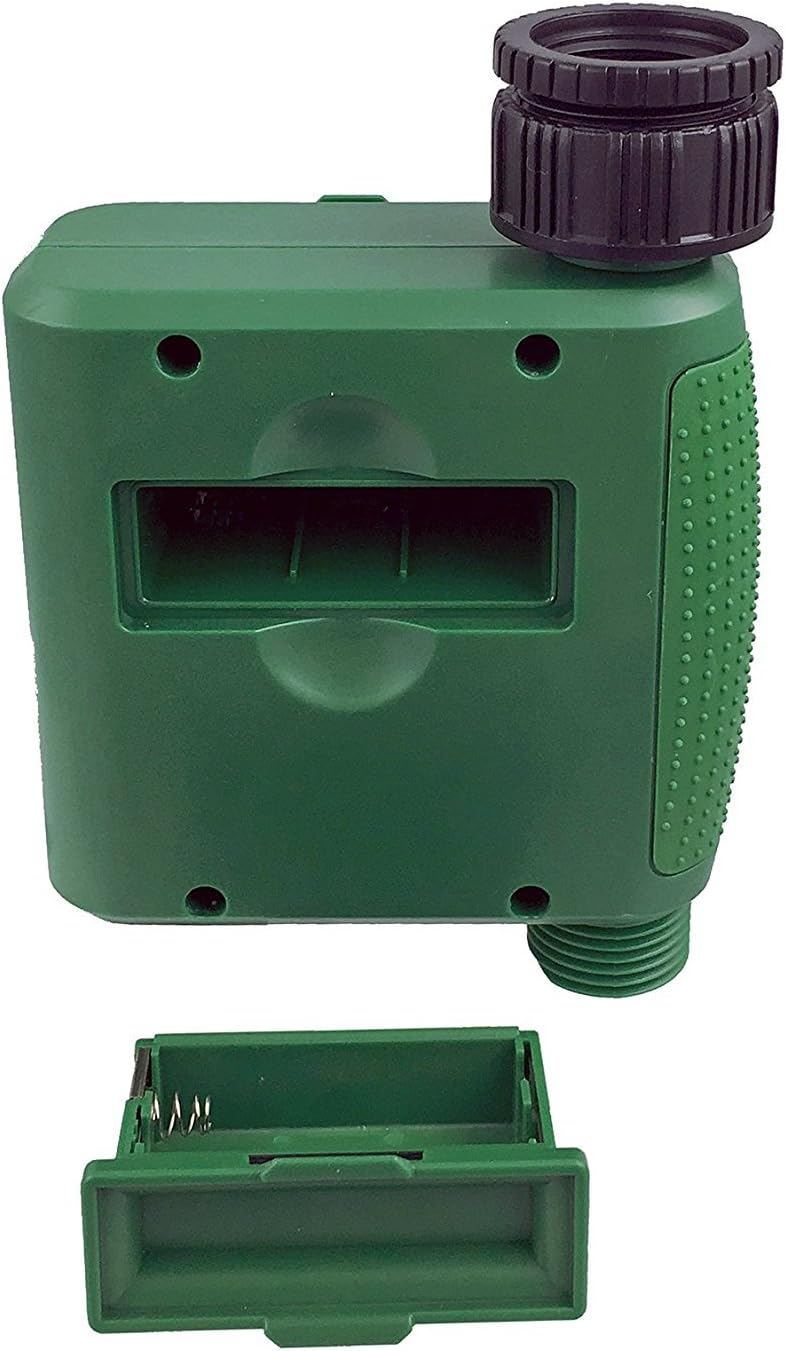
Слика 1: Преграда за батерии со отстранет капак.
2. Mounting the Timer
Attach the timer to your outdoor faucet:
- Осигурајте се дека чешмата е чиста и без остатоци.
- Screw the timer's inlet (top connector) onto a standard ¾” (GHS) outdoor hose faucet. Hand-tighten only to prevent damage. Do not overtighten.
- Connect your garden hose or irrigation system to the timer's outlet (bottom connector). Hand-tighten securely.
- Turn on the faucet fully. The timer is designed to operate under pressure.

Figure 2: Instapark PWT-07 mounted on a faucet.
Упатства за работа
The timer features a large rotary dial and four buttons: ПОСТАВЕТЕ, +, -, и ПРИРАЧНИК.

Figure 3: Control panel and LCD display.
1. Поставување на тековното време
- Свртете го вртливото копче на ПОСТАВЕТЕ ЧАСОВНИК.
- Користете го + и - копчиња за да го прилагодите тековниот час. Притиснете ПОСТАВЕТЕ да се потврди.
- Користете го + и - buttons to adjust the current minute. Press ПОСТАВЕТЕ да се потврди.
2. Programming Watering Schedule
The timer allows you to set a start time, duration, and frequency for watering.
Поставете време за почеток:
- Свртете го вртливото копче на ВРЕМЕ НА ПОЧЕТОК.
- Користете го + и - buttons to set the desired watering start hour. Press ПОСТАВЕТЕ да се потврди.
- Користете го + и - buttons to set the desired watering start minute. Press ПОСТАВЕТЕ да се потврди.
Set How Long (Duration):
- Свртете го вртливото копче на КОЛКУ ДОГО.
- Користете го + и - buttons to set the watering duration (from 5 seconds to 360 minutes). Press ПОСТАВЕТЕ да се потврди.
Set How Often (Frequency):
- Свртете го вртливото копче на КОЛКУ ЧЕСТО.
- Користете го + и - buttons to select the watering frequency (e.g., every 10 seconds, 30 seconds, 1 minute, 3 minutes, 5 minutes, 1 hour, 2 hours, 4 hours, 12 hours, 1 day, 2 days, 3 days, 4 days, 5 days, 6 days, 7 days). Press ПОСТАВЕТЕ да се потврди.
After setting all parameters, turn the rotary dial to ТРЧЕТЕ to activate the programmed schedule.
3. Рачно наводнување
To water manually without affecting your programmed schedule:
- Осигурајте се дека бројчаникот е поставен на ТРЧЕТЕ or ИСКЛУЧЕНО.
- Притиснете го ПРИРАЧНИК button. The display will show a default manual watering duration.
- Користете го + и - buttons to adjust the desired manual watering duration.
- Притиснете ПОСТАВЕТЕ to start manual watering. The timer will run for the selected duration and then automatically shut off.
- To stop manual watering prematurely, press the ПРИРАЧНИК копчето повторно.
4. Функција за одложување на дождот
The rain delay function allows you to pause your watering schedule for a set period without losing your program settings.
- Осигурајте се дека бројчаникот е поставен на ТРЧЕТЕ.
- Притиснете и задржете го - button for 3 seconds. The display will show "DELAY" and a default delay duration.
- Користете го + и - buttons to select a delay duration of 24, 48, or 72 hours.
- Притиснете ПОСТАВЕТЕ to activate the rain delay. The timer will resume its programmed schedule after the delay period ends.
- To cancel the rain delay, press and hold the - копчето повторно 3 секунди.
Одржување
- Замена на батерија: Replace batteries when the low battery indicator appears on the LCD. Always use new AA alkaline batteries.
- Чистење: Избришете го тајмерот со рекламаamp крпа. Не користете абразивни средства за чистење или растворувачи.
- Зимување: Before the first frost, disconnect the timer from the faucet. Remove the batteries and store the timer indoors in a dry, frost-free location. Failure to do so may result in damage from freezing water.
- Филтер на екранот: Periodically check the filter screen inside the inlet connector for debris. Clean if necessary to ensure proper water flow.
Решавање проблеми
| Проблем | Можна причина | Решение |
|---|---|---|
| Timer does not turn on / LCD is blank. | Мртви или неправилно инсталирани батерии. | Replace with new AA alkaline batteries, ensuring correct polarity. If still blank, remove batteries, wait for screen to fully clear, then reinsert. |
| Water does not turn on at scheduled time. |
|
|
| Water does not turn off. |
|
|
| Протекување на вода од приклучоците. |
|
|
| Low battery indicator flashes even with new batteries. | Firmware not booting correctly after battery change. | Remove batteries, wait for the LCD screen to go completely dark (may take a few minutes), then reinsert new batteries. |
Спецификации
| Модел | PWT-07 |
| Извор на енергија | 2 x 1.5V AA алкални батерии (не се вклучени) |
| Тип на вентил | Импулсен електромагнетниот вентил |
| Работен притисок на вода | 14.5 до 116 psi |
| Струја во мирување | <100 µA |
| Watering Frequency Settings | 10s, 30s, 1m, 3m, 5m, 1h, 2h, 4h, 12h, 1d, 2d, 3d, 4d, 5d, 6d, 7d (16 settings) |
| Watering Duration Settings | 5s, 10s, 15s, 20s, 25s, 30s, 35s, 40s, 45s, 50s, 55s, 1-360m |
| Формат за прикажување време | 24-часовен |
| Водоотпорен рејтинг | IP66 |
| Материјал | ABS пластика |
| Димензии на производот | 4.25" Д x 6" Ш x 2.6" В |
| Тежина на ставката | 14.2 унци |
Гаранција и поддршка
The Instapark PWT-07 Digital Programmable Water Timer is backed by a standard 1-year manufacturer's warranty from the date of purchase. This warranty covers defects in materials and workmanship under normal use.
For warranty claims, technical support, or any questions regarding your product, please contact Instapark customer service. Please have your purchase receipt and product model number (PWT-07) available when contacting support.
Contact information for Instapark customer service can typically be found on the manufacturer's webстраницата или вашата документација за купување.