
ARRIS C250 V2
ARRIS C250 V2 250mm RC Quadcopter FPV Racing Drone
Упатство за употреба
Вовед
This manual provides essential information for the safe and effective operation of your ARRIS C250 V2 250mm RC Quadcopter FPV Racing Drone. Please read this manual thoroughly before operating the drone to ensure proper setup, flight, and maintenance. The ARRIS C250 V2 is a high-performance FPV racing drone designed for experienced users.
Безбедносни упатства
- Always operate the drone in open areas, away from people, animals, buildings, and obstacles.
- Одржувајте безбедно растојание од дронот за време на летот.
- Do not fly near airports or in restricted airspace. Check local regulations before flying.
- Ensure the battery is fully charged and securely mounted before each flight.
- Inspect propellers for damage before each flight. Replace any damaged propellers immediately.
- Never attempt to catch the drone while its propellers are spinning.
- Избегнувајте летање при силни ветрови или лоши временски услови.
- Држете ги рацете и лицето подалеку од ротирачките пропелери.
- This product is not a toy and is intended for adult use only.
Производот завршиview и Компоненти
The ARRIS C250 V2 is an advanced FPV racing drone featuring a robust design and integrated electronics for optimal performance. Key components include:
- ARRIS C250 V2 Frame
- Radiolink AT9 Transmitter and Receiver
- ARRIS 4S 1500mAh LiPo Battery
- ARRIS X2205 2300KV Brushless Motors
- Flycolor S-Tower 4-in-1 ESC + F3 Flight Controller + OSD + PDB
- ARRIS 5042 3-blade Propellers
- ARRIS XAT700M FPV Mini Camera
- 5.8G FPV Video Transmitter (TX) and Antenna
- Сирена

Слика 1: Готовоview of the ARRIS C250 V2 FPV Racing Drone with key components labeled, including motors, propellers, battery, FPV camera, and video transmitter.

Слика 2: Детално view highlighting the XT60 Female Plug, 4-in-1 ESC with FC, PDB Tower, and the 5.8G FPV Racing TX Antenna.
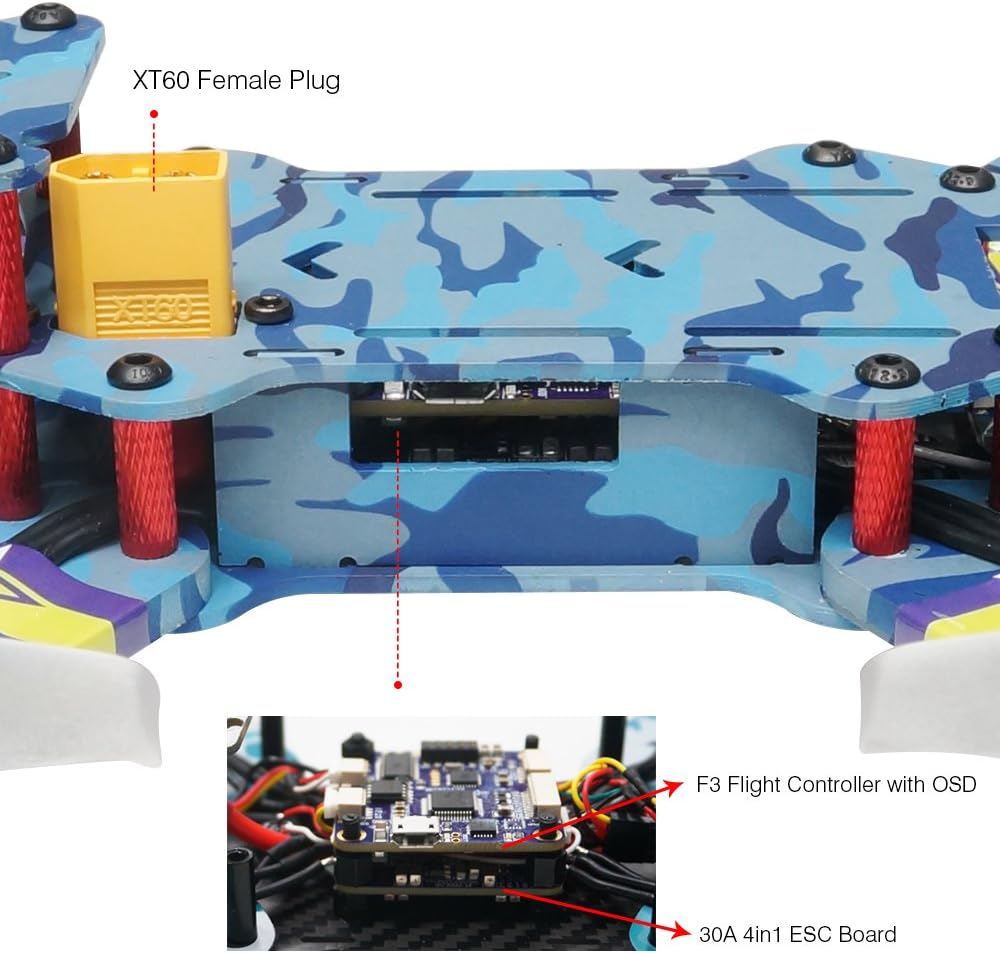
Figure 3: Close-up of the integrated Flycolor S-Tower, showing the F3 Flight Controller with On-Screen Display (OSD) and the 30A 4-in-1 ESC Board.
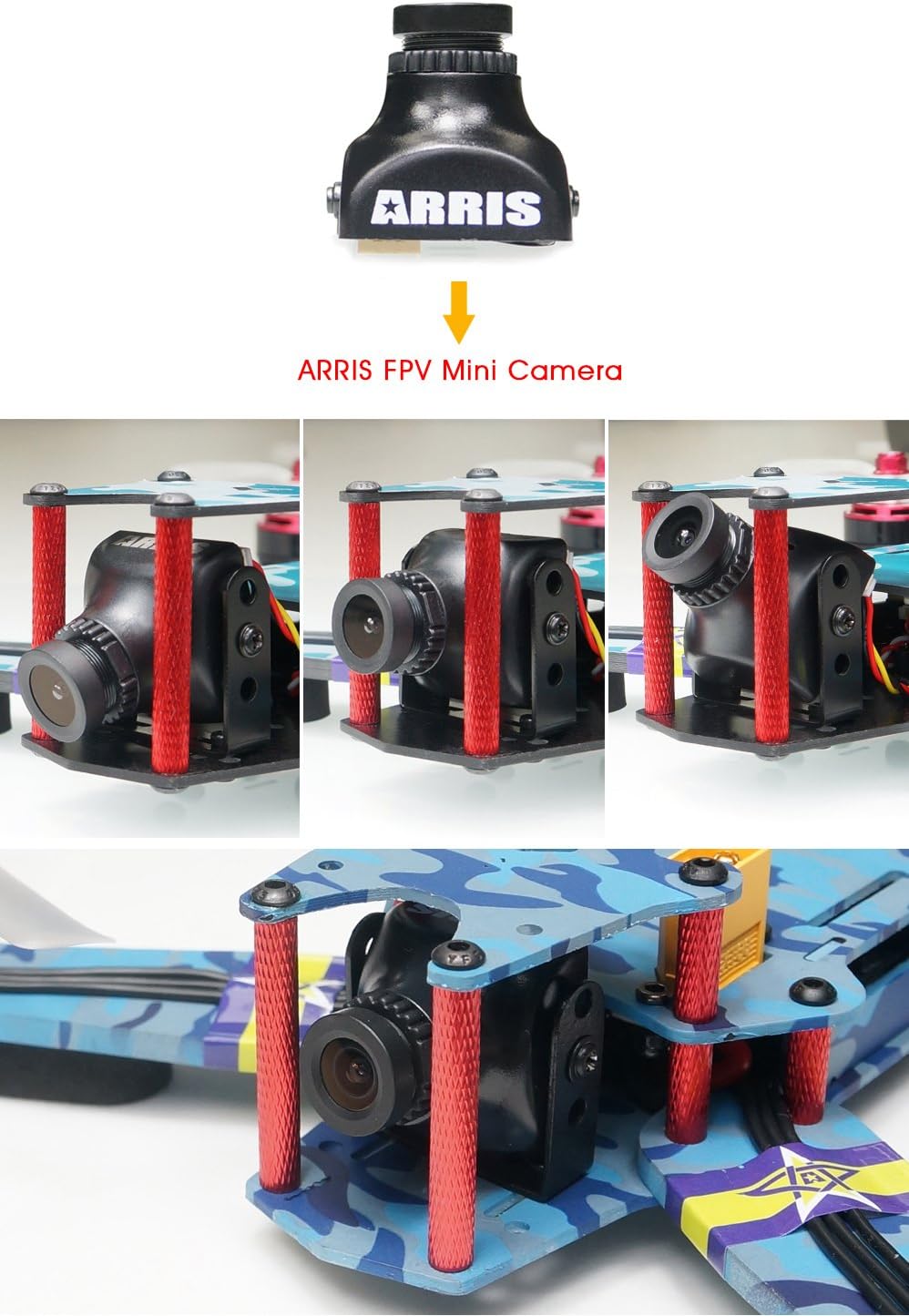
Figure 4: The ARRIS FPV Mini Camera, demonstrating its adjustable angle feature for optimal FPV viewинг.
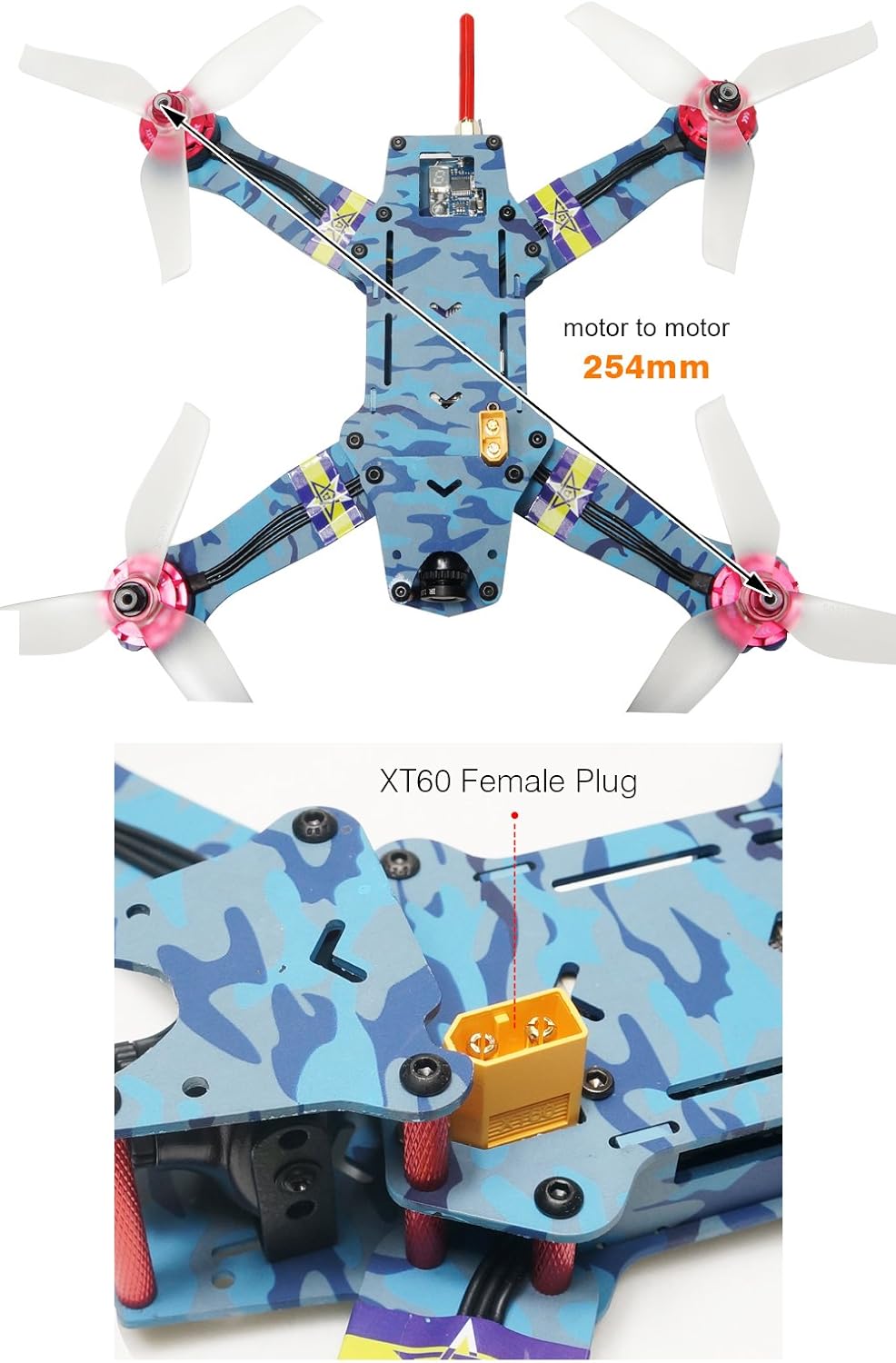
Слика 5: Од горе надолу view illustrating the 254mm motor-to-motor diagonal distance of the ARRIS C250 V2 frame.

Слика 6: Страна view highlighting the super narrow 23mm arms and the placement of the ARRIS FPV Racing 5.8G TX Antenna.

Слика 7: Преден и заден дел views of the assembled ARRIS C250 V2 drone, showcasing неговиот компактен дизајн.
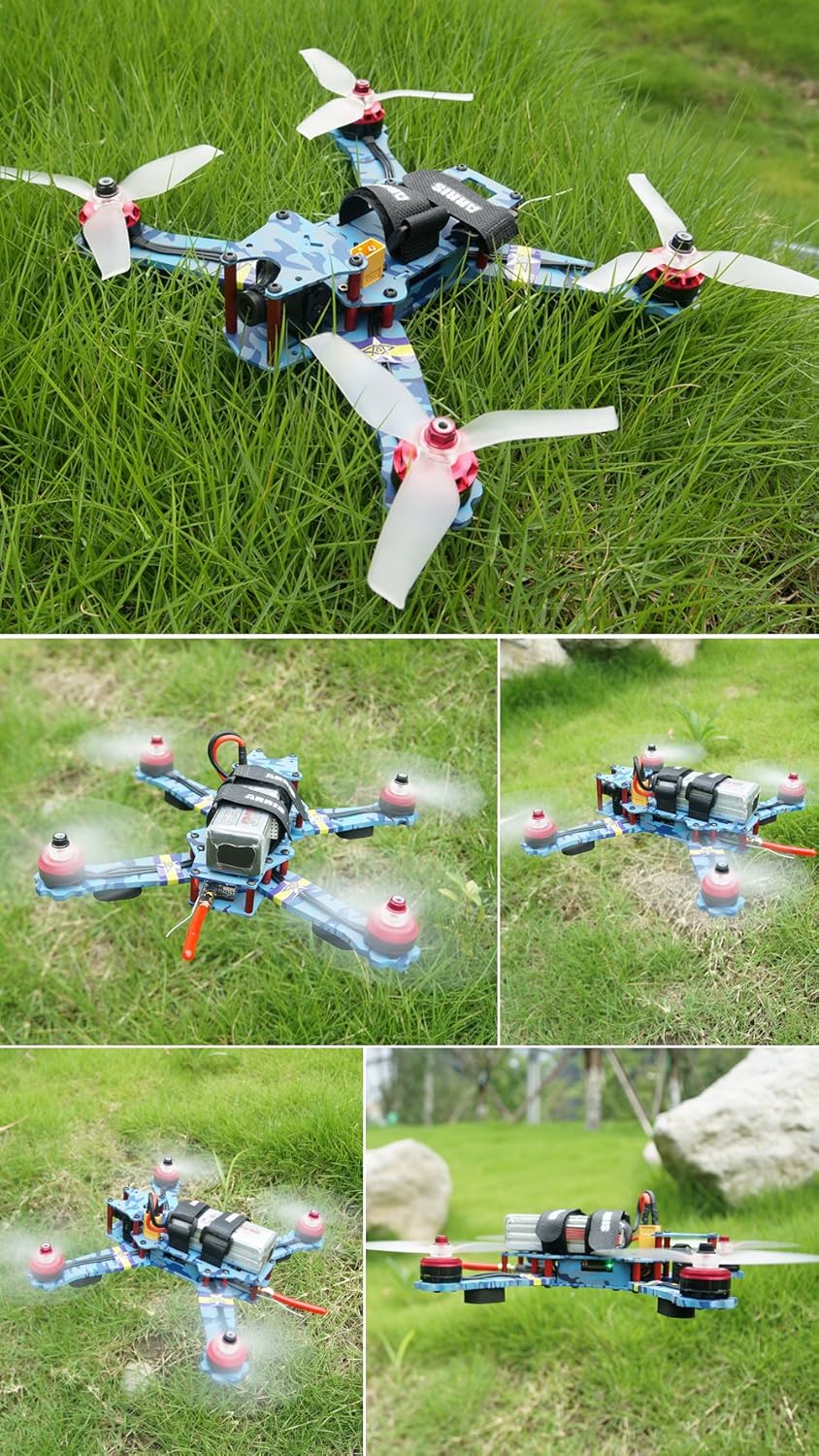
Figure 8: The ARRIS C250 V2 drone positioned in a grassy outdoor environment, ready for flight.

Figure 9: The complete package contents, including the ARRIS C250 V2 drone, Radiolink AT9 transmitter, 4S 1500mAh LiPo battery, and spare propellers.
Поставување
1. Полнење на батеријата
The ARRIS C250 V2 includes a 4S 1500mAh LiPo battery. A compatible LiPo battery charger (e.g., Skyrc Imax B6AC V2, not included) is required. Always charge the battery in a fire-safe location and never leave it unattended during charging. Follow the instructions provided with your battery charger for safe operation.
2. Transmitter Setup (Radiolink AT9)
Your drone comes pre-bound to the Radiolink AT9 transmitter. Familiarize yourself with the transmitter's controls and switches. The default configuration typically includes:
- Вооружување/разоружување: A three-way switch is usually assigned for arming the motors and switching between flight modes (e.g., Level, Acro).
- Зуи: A two-way switch may be assigned to activate the built-in buzzer for locating the drone after a crash.
Refer to the Radiolink AT9 manual for detailed programming and calibration instructions. While the drone is ready-to-fly (RTF), understanding your transmitter's capabilities is crucial for advanced control.
3. Инсталација на пропелер
Ensure propellers are installed correctly. Each motor has a specific rotation direction. Match the propellers (clockwise/counter-clockwise) to the corresponding motors as indicated by the motor rotation and propeller markings. Securely fasten the propellers to the motors. Incorrect propeller installation can lead to unstable flight or loss of control.
4. Проверки пред летот
- Проверете дали сите пропелери се безбедно прицврстени и неоштетени.
- Confirm the battery is fully charged and properly secured to the drone.
- Check that the FPV camera angle is set to your preference.
- Power on the transmitter first, then connect the drone's battery.
- Perform a range check of the radio control system in a safe area.
- Ensure the FPV video feed is clear and stable before takeoff.
Упатства за работа
1. Вооружување и разоружување
To arm the motors, move the designated arming switch on your Radiolink AT9 transmitter to the 'armed' position. The motors will typically spin slowly, indicating they are ready for flight. To disarm, move the switch back to the 'disarmed' position. Always disarm the drone immediately after landing or in case of an emergency.
2. Режими на летање
The ARRIS C250 V2 typically supports multiple flight modes, configurable via the F3 Flight Controller. Common modes include:
- Angle/Level Mode: Provides self-leveling assistance, making it easier for beginners to control.
- Acro/Rate Mode: Offers full manual control without self-leveling, preferred by experienced FPV pilots for racing and freestyle maneuvers.
Switch between modes using the assigned switch on your transmitter. Start with Angle mode if you are new to FPV racing drones.
3. Основни контроли за летање
The Radiolink AT9 transmitter uses standard RC control inputs:
- Гас (лев рачки нагоре/надолу): Ја контролира брзината и надморската височина на моторот.
- Yaw (Лев лост лево/десно): Rotates the drone horizontally.
- Pitch (Right Stick Up/Down): Tilts the drone forward/backward.
- Roll (Right Stick Left/Right): Tilts the drone left/right.
Practice these controls in a simulator or a safe, open area before attempting aggressive maneuvers.
4. FPV System Operation
Power on your FPV goggles or monitor after the drone is powered on. Ensure your FPV receiver is tuned to the correct 5.8GHz channel matching the drone's 5.8G 200mW TX. The OSD (On-Screen Display) integrated into the F3 Flight Controller will provide real-time flight data such as battery voltage, flight time, and current mode directly on your FPV feed.
Одржување
1. Чистење
Regularly clean your drone to remove dirt, grass, and debris from the frame, motors, and electronics. Use a soft brush or compressed air. Avoid using liquids directly on electronic components.
2. Замена на пропелер
Inspect propellers before and after each flight for cracks, bends, or chips. Damaged propellers can cause vibrations, reduce efficiency, and lead to unstable flight. Replace them with genuine ARRIS 5042 3-blade propellers.
3. Нега на батерии
- Store LiPo batteries in a cool, dry place, ideally in a LiPo-safe bag.
- Не преполнувајте или препразнувајте LiPo батерии.
- Never puncture or damage LiPo batteries.
- If a battery becomes puffed or damaged, discontinue use immediately and dispose of it safely according to local regulations.
4. Ажурирања на фирмверот
Periodically check the ARRIS official website or support forums for firmware updates for the F3 Flight Controller and Flycolor S-Tower. Keeping firmware updated can improve performance and add new features. Follow official instructions carefully when performing updates.
Решавање проблеми
- Drone does not arm: Ensure the transmitter is powered on, the drone battery is connected, and the arming switch is correctly engaged. Check for any error messages on the OSD or flight controller LEDs.
- Loss of signal/control: Ensure your transmitter antenna is properly oriented and not obstructed. Fly within the recommended range. Check for potential radio interference.
- Unstable flight/vibrations: Inspect propellers for damage or incorrect installation. Check motor mounts for looseness. Ensure the flight controller is securely mounted.
- No FPV video feed: Verify the FPV camera and video transmitter are powered on and connected. Ensure your FPV receiver (goggles/monitor) is on the correct channel. Check antenna connections on both the drone and receiver.
- Моторот не се врти: Check motor connections to the ESC. Inspect the motor for physical damage. If one motor is faulty, it may require replacement.
For more detailed troubleshooting or complex issues, consult online FPV forums, the ARRIS support website, or contact customer service.
Спецификации
| Карактеристика | Спецификација |
|---|---|
| Бренд | АРИС |
| Име на моделот | Arris C250 V2 |
| Број на дел | CA0059 |
| Возрасен опсег (опис) | Возрасен |
| Ниво на вештина | Професионален |
| Технологија за поврзување | Радио фрекфенција |
| Тип на контрола | Далечински управувач |
| Капацитет на батеријата | 1500 милиониamp Hours (4S LiPo) |
| Состав на батериски ќелии | Литиум полимер |
| Резолуција за снимање видео | 1080 стр |
| Формат за снимање видео | MP4 |
| Технологија на оптички сензор | CCD, CMOS |
| Материјал | Plastic (Frame is Carbon Fiber) |
| Вклучени компоненти | Camera, Propeller, Remote Control |
Гаранција и поддршка
For warranty information, technical support, or replacement parts, please refer to the official ARRIS website or contact your retailer. Keep your proof of purchase for warranty claims. Product specifications and features are subject to change without notice.
Ask a question about this manual
Ask about setup, troubleshooting, compatibility, parts, safety, or missing instructions. Manuals+ will review the question and use this page’s manual context to help answer it.