
Вовед
This manual provides detailed instructions for the setup, operation, maintenance, and troubleshooting of your Carlsbro CSD120 Electronic Drum Set. Please read this manual thoroughly before using the product to ensure proper function and longevity.

Image: The complete Carlsbro CSD120 Electronic Drum Set, showcasing the drum pads, cymbals, and module.
Компоненти на производот
The Carlsbro CSD120 Electronic Drum Set includes the following main components:
- Drum Module (Commander 120 brain)
- Drum Pads (Snare, Tom x3)
- Cymbal Pads (Hi-Hat, Crash, Ride)
- Педала за контрола на шапка
- Педалата со удар со тапан
- Drum Rack and Mounting Hardware
- Cables for connecting pads to module
- Адаптер за напојување
The drum module features 20 preset drum kits, 10 user preset kits, 250 drum and percussion samples, and 20 onboard songs.
Слика: Аголна view of the Carlsbro CSD120 Electronic Drum Set, highlighting the compact design.
Инструкции за поставување
- Отпакување: Carefully remove all components from the packaging. Verify that all parts listed in the "Product Components" section are present.
- Составете ја држачот за тапани: Follow the diagrams provided in the quick start guide (not included in this manual) to assemble the main drum rack frame. Ensure all clamps се безбедно затегнати.
- Монтирачки влошки и чинели: Attach the drum pads (snare, toms) and cymbal pads (hi-hat, crash, ride) to the drum rack using the provided mounting hardware. Position them ergonomically for comfortable playing.
- Инсталирајте педали: Place the kick drum pedal and hi-hat control pedal on the floor in their respective positions.
- Поврзете го модулот на барабанот: Mount the Commander 120 drum module to the rack.
- Кабелски врски: Connect each drum pad, cymbal pad, and pedal to the corresponding input on the drum module using the included cables. Refer to the module's rear panel for correct port identification.
- Поврзување за напојување: Connect the power adapter to the DC IN port on the drum module and then to a suitable power outlet.
- Аудио излез: For sound, connect headphones to the PHONES output or connect the OUTPUT (L/Mono, R) jacks to an ampлафијатор или PA систем.

Слика: Заден дел view of the Commander 120 drum module, showing various input and output ports for connections.

Слика: Крупен план view of the Commander 120 drum module's connection ports, including USB, MIDI IN/OUT, AUX IN, OUTPUT, PHONES, and DC IN.
Упатства за работа
Модулот за тапани надview
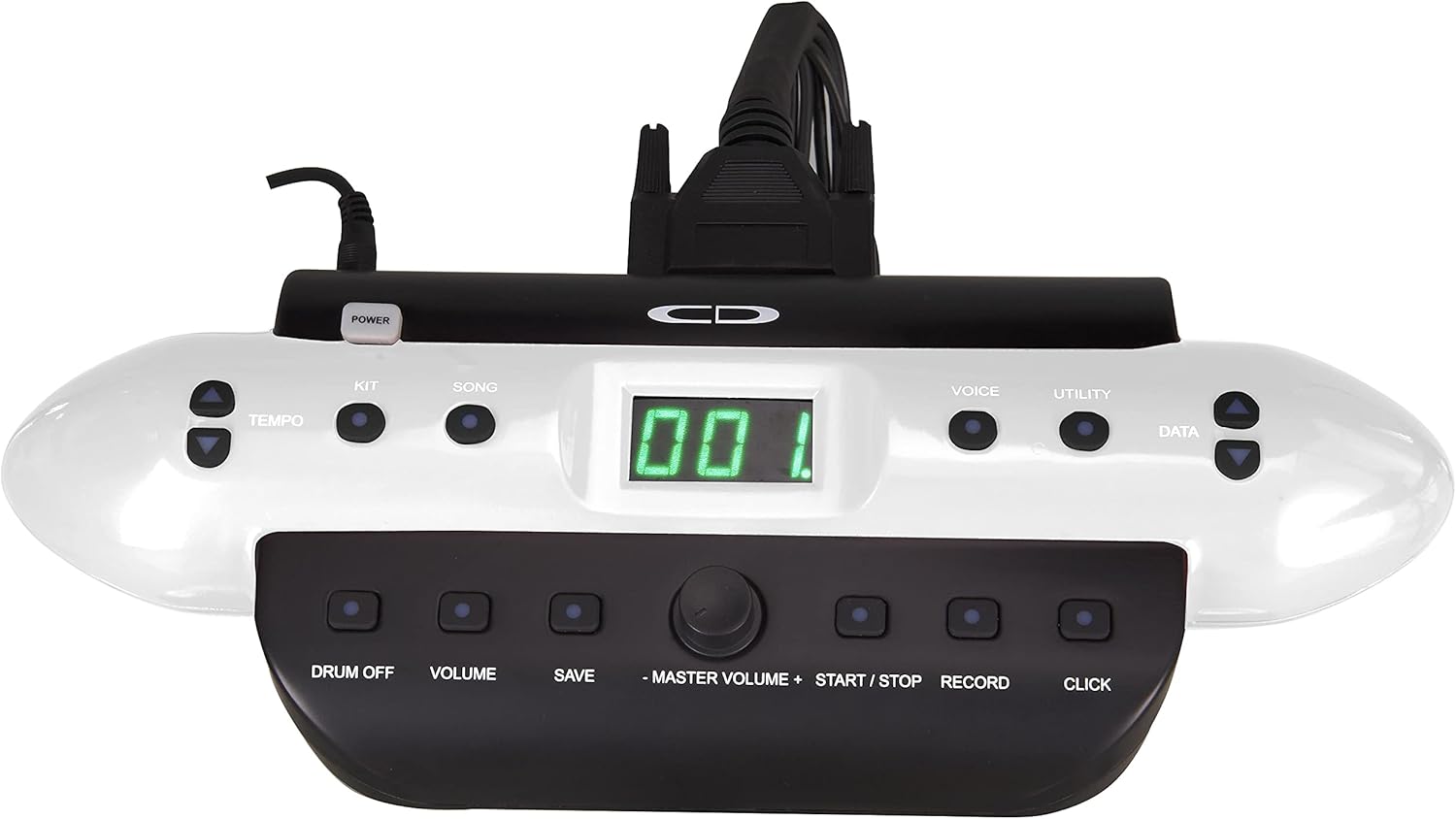
The Commander 120 drum module is the central control unit for your electronic drum set. It features a clear display and intuitive buttons for navigation and sound control.

Слика: напред view of the Commander 120 drum module, showing the display, control buttons, and master volume knob.
Основно работење
- Вклучување/исклучување: Притиснете го МОЌ button located on the module to turn the unit on or off.
- Главен волумен: Прилагодете ја вкупната излезна јачина на звук користејќи го големиот МАСТЕРСКИ ВОЛИМ копче.
- Избор на комплет: Притиснете го КОМПЛЕТ button to enter Kit selection mode. Use the ПОДАТОЦИ buttons (up/down arrows) or the master volume knob to scroll through the 20 preset kits or 10 user kits.
- Избор на глас: Притиснете го ГЛАС button to select individual drum or percussion sounds. Use the ПОДАТОЦИ buttons to choose a voice.
- Репродукција на песна: Притиснете го ПЕСНА button to access the onboard songs. Use the ПОДАТОЦИ buttons to select a song. Press СТАРТ/СТОП да игра или да паузира.
- Прилагодување на темпото: Притиснете го ТЕМПО копчето и користете го ПОДАТОЦИ buttons to adjust the tempo of songs or the metronome.
- Metronome (Click): Притиснете го КЛИКНИ button to activate or deactivate the metronome.
- Снимање: Притиснете го РЕКОРД button to start recording your performance. Press again to stop.
- Зачувување на поставките: After making changes to a user kit or other settings, press the ЗАЧУВАЈ button to store them. Follow the on-screen prompts.
- Корисни функции: Притиснете го КОМУНАЛНОСТ button to access advanced settings such as sensitivity, trigger curves, and MIDI parameters.
Одржување
- Чистење: Use a soft, dry cloth to clean the drum module, pads, and cymbals. For stubborn dirt, a slightly damp може да се користи крпа, а потоа сува крпа. Избегнувајте абразивни средства за чистење или растворувачи.
- Управување со кабли: Осигурајте се дека сите кабли се уредно поставени и не се под напнатост за да спречите оштетување.
- Складирање: Кога не го користите подолг период, чувајте го комплетот барабан на ладно и суво место, подалеку од директна сончева светлина и екстремни температури.
- Грижа за влошки: Avoid hitting the pads with excessive force, as this can reduce their lifespan.
Решавање проблеми
| Проблем | Можна причина | Решение |
|---|---|---|
| Нема звук од слушалките/звучниците. |
|
|
| Specific pad not triggering sound. |
|
|
| Double triggering or missed triggers. |
|
|
Спецификации
| Карактеристика | Детал |
|---|---|
| Име на моделот | CSD120 |
| Комплети за тапани | 20 Preset, 10 User |
| Звуци | 250 Drum & Percussion Sampлес |
| Вградени песни | 20 |
| Поврзување | USB, MIDI In/Out, Aux In, Output (L/Mono, R), Phones, DC In |
| Материјал | Пластика, метал |
| Боја | Црното |
| Тежина на ставката | 33 фунти (14.97 кг) |
| Димензии на производот (Д x Ш x В) | 20 x 8 x 17 инчи (50.8 x 20.32 x 43.18 см) |
| Производител | Самсон технологии |
Информации за гаранцијата
Carlsbro products are typically covered by a limited manufacturer's warranty. Please refer to the warranty card included with your product or visit the official Carlsbro website for specific terms and conditions, including warranty duration and coverage details. Keep your proof of purchase for warranty claims.
Поддршка за корисници
For technical assistance, spare parts, or further inquiries regarding your Carlsbro CSD120 Electronic Drum Set, please contact Carlsbro customer support through their official webстраница. Можете исто така да се обратите до продавачот каде што е купен производот за опции за поддршка.