
1. Вовед
The Focal Shape 50 is a versatile monitoring loudspeaker designed for professional audio environments. It offers extended low-frequency response and precise control, making it suitable for rooms up to 130 sq ft (12 sq m). This manual provides essential information for the proper setup, operation, and maintenance of your Shape 50 studio monitor.

Слика 1.1: Предна страна view of the Focal Shape 50 Studio Monitor, showcasing its dark walnut finish and speaker components.
2. Содржина на пакетот
Before proceeding with installation, please verify that all components are present in the packaging:
- Focal Shape 50 Studio Monitor (1 unit)
- Кабел за напојување
- Упатство за употреба (овој документ)
3. Поставување
3.1 Поставување
The Shape 50 monitor is designed to be placed near a wall due to its port-less design. For optimal listening, position the monitor at a distance of approximately 30 inches (80 cm) from your listening position. Ensure the monitors are placed symmetrically in your room to achieve a balanced stereo image.
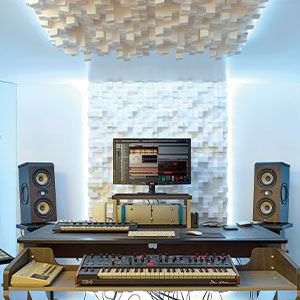
Слика 3.1: Прample of a studio setup with two Focal Shape 50 monitors positioned for optimal sound monitoring.
3.2 Врски
Connect your audio source to the Shape 50 monitor using an RCA cable. Ensure all connections are secure before powering on the unit.
- Аудио влез: Use the RCA input for connecting your audio interface or mixer.
- Моќност: Connect the provided power cord to the monitor's power inlet and then to a suitable electrical outlet.

Figure 3.2: Rear panel of the Focal Shape 50, showing the RCA input, power connection, and various adjustment controls.
3.3 Монтирање
The Shape 50 includes threads for ceiling and wall mount fastening. Mounting accessories are not supplied and must be purchased separately. Consult a professional for proper installation of wall or ceiling mounts.
4. Упатства за работа
4.1 Вклучување/исклучување
To power on the monitor, ensure all audio connections are made, then connect the power cord and flip the power switch located on the rear panel. To power off, reverse this process.
4.2 Прилагодување на поставките
The Shape 50 features numerous settings on its rear panel for optimal integration into various acoustic environments and for accurate control of sound reproduction. These include adjustments for high-frequency, mid-frequency, and low-frequency response, allowing you to tailor the sound to your specific room and preferences.
4.3 Flexible Listening Position
The monitor's low directivity tweeter design allows for a flexible listening position, providing consistent sound quality even when slightly off-axis from the monitor.
5. Одржување
To ensure the longevity and optimal performance of your Focal Shape 50 monitors, follow these maintenance guidelines:
- Чистење: Use a soft, dry cloth to clean the exterior surfaces of the monitor. Avoid abrasive cleaners or solvents.
- Вентилација: Ensure adequate airflow around the monitor to prevent overheating. Do not block the ventilation openings.
- Животна средина: Operate the monitor in a stable environment, away from extreme temperatures, humidity, and direct sunlight.
6 Смена на проблеми
If you encounter issues with your Focal Shape 50 monitor, refer to the following common troubleshooting steps:
- Нема звук:
- Check if the monitor is powered on and the power cord is securely connected.
- Verify that the audio source is active and connected correctly to the monitor's input.
- Ensure the volume levels on both the monitor and the audio source are appropriately set.
- Искривен звук:
- Reduce the input level from your audio source to prevent clipping.
- Проверете ги сите кабли за оштетување или лабави врски.
- Ensure the monitor's rear panel settings are not causing excessive boosting of certain frequencies.
- Звук на зуење или зуење:
- Ensure all audio cables are properly shielded.
- Try connecting the monitor to a different power outlet, preferably on a different circuit.
- Check for nearby electronic devices that might be causing interference.
If the issue persists after attempting these steps, please contact Focal customer support.
7. Спецификации
| Карактеристика | Спецификација |
|---|---|
| Бренд | Фокусна |
| Име на моделот | Облик 50 |
| Број на модел | 3544059801524DW001 |
| Тип на звучник | Монитор |
| Максимална излезна моќност на звучникот | 1000 вати |
| Фреквентен одговор | 35000 Hz |
| Технологија за поврзување | RCA |
| Режим за излез на звук | Стерео, Опкружувачки звук |
| Тип на монтирање | Wall Mount (accessories not supplied) |
| Материјал за куќиште | Орев |
| Дијаметар на сабвуфер | 5 инчи |
| Вуфер со дијаметар | 5 инчи |
| Боја | Темен орев |
| Димензии на ставката (Д x Ш x В) | 9.5" Д x 12.3" Ш x 7.5" В |
| Тежина на ставката | 14.33 фунти |
| Извор на енергија | Електричен со кабел |
| Број на аудио канали | 2.0 |
| Компатибилни уреди | Паметен телефон, таблет, MP3 плеер, десктоп, телевизор, проектор, лаптоп |
8. Информации за гаранцијата
The Focal Shape 50 Studio Monitor is covered by a 2-годишна гаранција од производителот од датумот на купување. Оваа гаранција ги покрива дефектите во материјалите и изработката при нормална употреба. Не ги покрива штетите предизвикани од злоупотреба, несреќи, неовластени модификации или неправилна инсталација.
Please retain your proof of purchase for warranty claims. For detailed warranty terms and conditions, refer to the official Focal webсајт или контактирајте со поддршката за корисници.
9. Поддршка
For technical assistance, troubleshooting beyond this manual, or warranty inquiries, please contact Focal customer support through their official webстраницата или информациите за контакт дадени во документацијата за вашиот производ.
Онлајн ресурси: Visit the official Focal webстраница за регистрација на производи, често поставувани прашања и дополнителни материјали за поддршка.