
1. Производот завршиview
The Homtime C1-PRO is a versatile music alarm clock designed to enhance your daily routine. It features a Bluetooth speaker for audio playback, dual USB ports for charging devices, a personalized alarm ring function, a built-in thermometer, and a 3-level dimmable display for optimal visibility.

Figure 1: Homtime C1-PRO with icons illustrating key features such as snooze, dual USB charging, melody alarm, time/alarm knob, Bluetooth, and thermometer.
Клучни карактеристики:
- Bluetooth звучник: Connect wirelessly to play audio from your devices.
- Двојни USB порти за полнење: Conveniently charge two devices simultaneously.
- Personalized Alarm Ring: Customize your alarm sound using a MicroSD card.
- Дигитален термометар: Displays ambient room temperature.
- 3-Level Dimmable Display: Adjust screen brightness for comfort.
- Функција за одложување: Temporarily pause the alarm.

Figure 2: Front panel controls and display elements, including time, alarm clock indicator, snooze on/off, Bluetooth on/off, temperature, and USB charging ports.
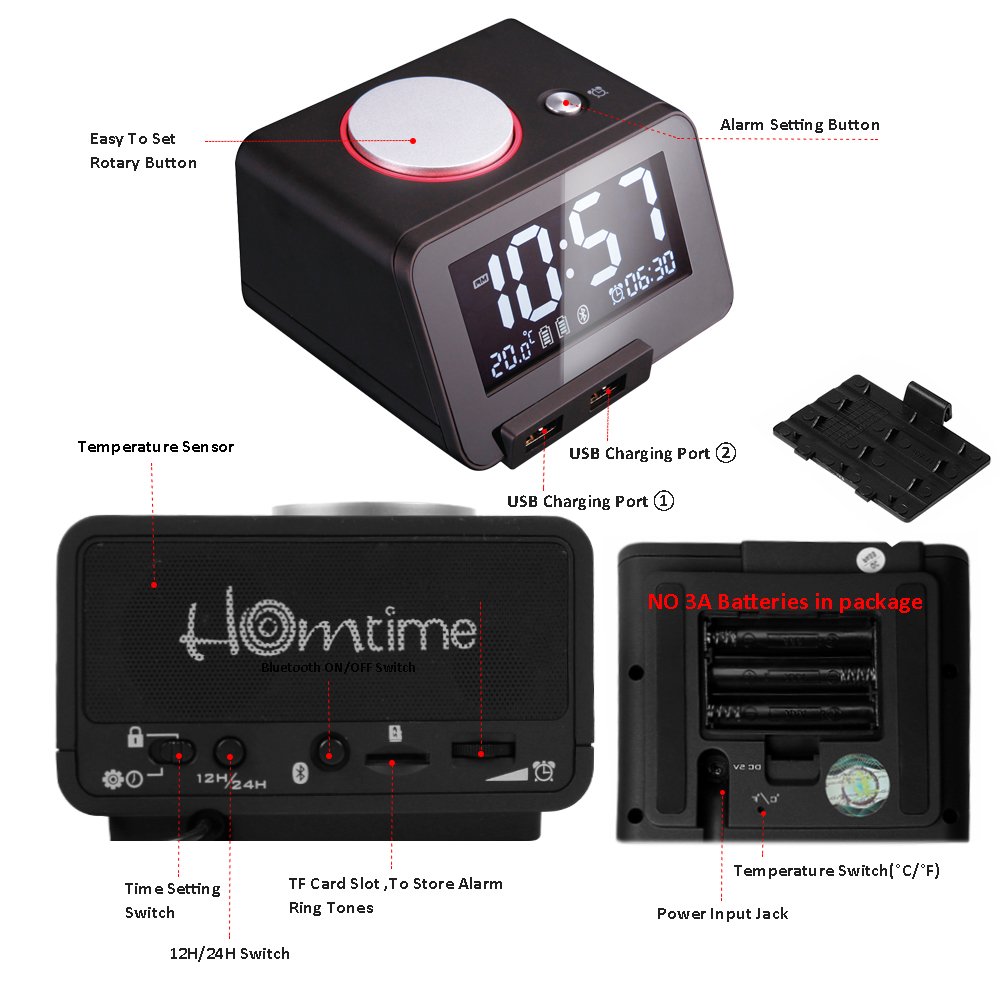
Figure 3: Rear panel controls, including the alarm set button, rotary dial for speaker volume, time set switch, time mode switch (12HR/24HR), Bluetooth on/off switch, MicroSD card slot for alarm personalization, and alarm volume control dial.

Figure 4: Bottom panel details, showing the temperature sensor, USB charging ports, power input jack, battery compartment for 3A batteries (not included), and temperature switch (°C/°F).
2. Поставување
2.1 Поврзување за напојување
- Connect the provided power adapter to the "Power Input Jack" located on the bottom of the unit (refer to Figure 4).
- Plug the adapter into a standard wall outlet. The display will illuminate.
2.2 Инсталација на резервна батерија (опционално)
The C1-PRO uses 3A batteries (not included) for backup power to retain time and alarm settings during a power outage. These batteries do not power the main functions of the clock.
- Locate the battery compartment on the bottom of the unit (refer to Figure 4).
- Отворете го капакот на преградата за батерии.
- Insert the required 3A batteries, ensuring correct polarity (+/-).
- Добро затворете го капакот на преградата за батерии.
2.3 Почетни поставки
- Time Format (12HR/24HR): Locate the "Time Mode Switch (12HR/24HR)" on the rear panel (refer to Figure 3). Slide the switch to your preferred time format.
- Единица за температура (°C/°F): Locate the "Temperature Switch (°C/°F)" on the bottom panel (refer to Figure 4). Slide the switch to select Celsius or Fahrenheit.
3. Упатства за работа
3.1 Поставување време
- Locate the "Time Set Switch" on the rear panel (refer to Figure 3).
- Slide the switch to the "SET" position. The hour digits will begin to flash.
- Rotate the "Knob for time and alarm-setting" (top center, refer to Figure 1) to adjust the hour.
- Press the knob once to switch to minute adjustment. The minute digits will flash.
- Завртете го копчето за да ги прилагодите минутите.
- Press the knob again or slide the "Time Set Switch" back to "LOCK" to confirm and exit time setting mode.
3.2 Поставување аларм
- Press the "Alarm Set Button" on the rear panel (refer to Figure 3). The alarm time will appear on the display, and the hour digits will flash.
- Rotate the "Knob for time and alarm-setting" to adjust the alarm hour.
- Press the knob once to switch to minute adjustment. The minute digits will flash.
- Rotate the knob to adjust the alarm minutes.
- Press the knob again to confirm the alarm time. The alarm icon will appear on the display, indicating the alarm is active.
- To deactivate the alarm, press the "Alarm Set Button" again. The alarm icon will disappear.
3.3 Personalized Alarm Ring (MicroSD Card)
You can use your own audio files as an alarm sound by inserting a MicroSD card.
- Insert a MicroSD card containing your desired MP3 audio files into the "MicroSD Card Slot for Alarm Personalization" on the rear panel (refer to Figure 3).
- When setting the alarm, after confirming the time, the clock will automatically use the first compatible audio file on the MicroSD card as the alarm sound.
- Обезбедете го аудиото fileсе во поддржан формат (на пр., MP3).
3.4 Функција за одложување
When the alarm sounds, press the large "Snooze/Dimmer Button" on the top of the unit (the large silver button, refer to Figure 1). The alarm will pause for approximately 9 minutes and then sound again. This can typically be repeated multiple times.
3.5 Работа со Bluetooth звучник
- Locate the "Bluetooth ON/OFF Switch" on the rear panel (refer to Figure 3). Slide it to the "ON" position.
- The Bluetooth icon on the display will flash, indicating it is in pairing mode.
- На вашиот мобилен уред, овозможете Bluetooth и побарајте достапни уреди.
- Select "Homtime C1-PRO" from the list to pair. Once paired, the Bluetooth icon on the clock's display will stop flashing and remain solid.
- You can now play audio from your device through the C1-PRO speaker.
- Adjust the speaker volume using the "Rotary Dial for Speaker Volume Control" on the rear panel (refer to Figure 3).
- To disconnect, turn off Bluetooth on your device or slide the "Bluetooth ON/OFF Switch" on the clock to "OFF".
3.6 USB полнење
The C1-PRO features two USB charging ports on the front of the unit (refer to Figure 2). Connect your USB charging cables to these ports to charge compatible devices such as smartphones or tablets.
- Ensure the clock is connected to power for the USB charging function to operate.
- The charging output is standard for most mobile devices.
3.7 Прилагодување на осветленоста на екранот
The display has 3 levels of brightness. To adjust, press the "Snooze/Dimmer Button" (large silver button on top, refer to Figure 1) when the alarm is not sounding. Each press will cycle through the brightness levels.
3.8 Alarm Volume Control
Adjust the alarm volume using the "Alarm Volume Control Dial" located on the rear panel (refer to Figure 3).
4. Одржување
- Чистење: Use a soft, dry cloth to clean the surface of the clock. Do not use liquid cleaners or abrasive materials.
- Складирање: If storing the device for an extended period, disconnect it from power and remove the backup batteries. Store in a cool, dry place.
- Замена на батерија: Replace backup batteries annually or when the clock fails to retain settings during a power interruption.
5 Смена на проблеми
| Проблем | Можна причина | Решение |
|---|---|---|
| Приказот на часовникот е исклучен или не работи. | Нема поврзување со струја. | Проверете дали адаптерот за напојување е безбедно вклучен во часовникот и во функционален ѕиден штекер. |
| Алармот не се огласува. | Alarm is not activated; volume is too low; MicroSD card issue. | Verify the alarm icon is displayed. Adjust the alarm volume dial. If using MicroSD, ensure the card is inserted correctly and contains compatible audio files. |
| Bluetooth не се спарува. | Bluetooth switch off; device too far; already paired with another device. | Ensure the Bluetooth switch on the clock is ON and flashing. Move your device closer. Disconnect from other Bluetooth devices. |
| USB полнењето не работи. | Clock not powered; faulty cable/device. | Ensure the clock is connected to its power adapter. Try a different USB cable or device to rule out external issues. |
| Изгубено време/поставки по исклучување на струјатаtage. | Резервните батерии не се инсталирани или се испразнети. | Install fresh 3A backup batteries (refer to Section 2.2). |
6. Спецификации
| Карактеристика | Детал |
|---|---|
| Бренд | Домаќин |
| Модел | C1-PRO |
| Боја | Црното |
| Тип на дисплеј | Дигитален |
| Посебни карактеристики | Alarm, USB Charging, Bluetooth, Thermometer, Dimmable Display |
| Извор на енергија | Electrical (with battery backup) |
| Материјал за рамка | Пластика |
| Технологија за поврзување | Bluetooth |
| Димензии на производот (ДxШxВ) | 10.92 x 10.92 x 6.35 см (приближно 4.3 x 4.3 x 2.5 инчи) |
| Тежина на ставката | 259 г (приближно 0.57 фунти) |
| Тип на батерија (резервна) | 3А (не е вклучено) |
7. Гаранција и поддршка
For warranty information and customer support, please refer to the documentation included with your purchase or visit the official Homtime webстраница. Зачувајте го доказот за купување за какви било гаранциски побарувања.