
1. Вовед
This manual provides essential information for the safe and efficient operation of your Rigol DS1104Z-S Plus 100 MHz Digital Oscilloscope. Please read this manual thoroughly before using the instrument to ensure proper functionality and to prevent damage. The Rigol DS1104Z-S Plus is a 4-channel digital storage oscilloscope designed for precise signal analysis with a 100 MHz bandwidth and a 1 GSa/s real-time sample стапка.
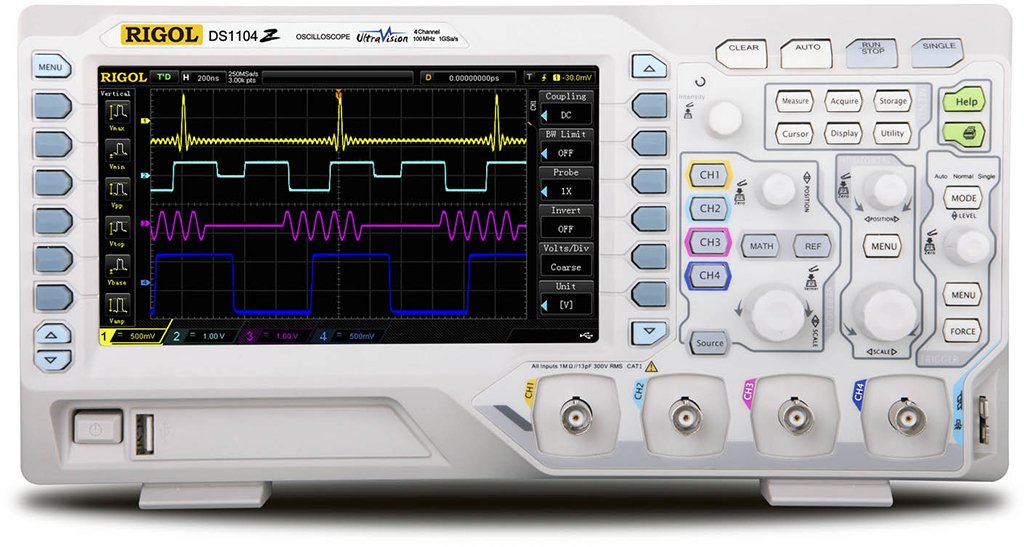
Figure 1: Rigol DS1104Z-S Plus Digital Oscilloscope. This image shows the front panel of the oscilloscope with its display, control knobs, and input channels.
2. Информации за безбедност
Секогаш почитувајте ги следниве безбедносни мерки за да спречите повреда и оштетување на инструментот:
- Извор на енергија: Поврзувајте го инструментот само на извор на енергија со наведената јачина на звук.tage и фреквенција.
- Заземјување: Осигурајте се дека инструментот е правилно заземјен за да спречите електричен удар.
- Вентилација: Do not block ventilation openings. Ensure adequate airflow around the instrument.
- Животна средина: Работете со осцилоскопот на суво, добро проветрено место, подалеку од директна сончева светлина, високи температури и прекумерна прашина.
- Сонди: Use only probes designed for the specified voltage и рејтингот на фреквенцијата.
- Сервисирање: Refer all servicing to qualified service personnel. Do not attempt to repair the instrument yourself.
- Чистење: Исклучете го напојувањето пред чистење. Користете мека, дamp крпа. Не користете абразивни средства за чистење или растворувачи.
3. Содржина на пакетот
Потврдете дека вашиот пакет ги содржи следниве ставки:
- Rigol DS1104Z-S Plus Digital Oscilloscope
- Кабел за напојување
- Passive Probes (4 units)
- USB кабел
- Брз водич
- Resource CD (User Manual, Programming Manual, Software)
4. Производот завршиview
The Rigol DS1104Z-S Plus features a user-friendly interface and robust design for various measurement applications.
4.1 Преден панел
The front panel includes the display, control knobs, function buttons, and input connectors for channels 1-4.
- Екран за прикажување: Shows waveforms, measurement results, and menu options.
- Вертикални контроли: Прилагодете го волtage per division and position for each channel.
- Хоризонтални контроли: Adjust time per division and horizontal position.
- Контроли за активирање: Set trigger level, mode, and type.
- Функциски копчиња: Access various menus such as Acquire, Measure, Storage, Utility, etc.
- Channel Inputs (CH1-CH4): BNC connectors for probe connection.
4.2 Заден панел
The rear panel provides power input, USB host/device ports, and LAN port for connectivity.
- Влез за напојување со наизменична струја: За поврзување на кабелот за напојување.
- USB-домаќин приклучок: За поврзување на USB уреди за складирање.
- USB порт за уред: For connecting to a PC.
- LAN порта: За мрежно поврзување и далечинско управување.
5. Поставување
5.1 Поврзување за напојување
- Осигурајте се дека прекинувачот за напојување на задниот панел е во положба OFF (ИСКЛУЧЕНО).
- Поврзете го испорачаниот кабел за напојување со влезот за наизменична струја на задниот панел на осцилоскопот.
- Вклучете го другиот крај од кабелот за напојување во заземјен штекер за наизменична струја.
5.2 Поврзување со сонда
- Connect the BNC connector of a passive probe to one of the input channels (CH1, CH2, CH3, or CH4) on the front panel.
- Connect the probe's ground clip to the circuit's ground reference.
- Set the attenuation ratio on the probe to match the setting on the oscilloscope (e.g., 1X or 10X).
5.3 Почетно вклучување
- Press the power switch on the rear panel to the ON position.
- The oscilloscope will perform a self-test and display the Rigol logo.
- After startup, the default waveform display will appear.
6. Упатства за работа
This section covers basic operations for acquiring and analyzing waveforms.
6.1 Основен приказ на бранови форми
- Вертикална скала (VOLTS/DIV): Use the vertical scale knob for the active channel to adjust the voltagчувствителност.
- Вертикална положба: Use the vertical position knob to move the waveform up or down on the screen.
- Хоризонтална скала (SEC/DIV): Use the horizontal scale knob to adjust the time base.
- Хоризонтална положба: Use the horizontal position knob to shift the waveform left or right.
6.2 Активирање
Активирањето ги стабилизира повторувачките бранови форми и ги доловува настаните од еден кадар.
- Ниво на активирање: Прилагодете го копчето за ниво на активирање за да ја поставите јачината на звукотtagточката во која се јавува активирањето.
- Trigger Menu: Притиснете го Trigger Menu button to configure trigger type (Edge, Pulse, Video, etc.), source, and slope.
- Режим на активирање: Select between Auto, Normal, and Single modes.
6.3 Мерни функции
The oscilloscope offers various automatic measurement functions.
- Притиснете го Мерка button to display the measurement menu.
- Select desired measurements such as Vpp, Vmax, Vmin, Freq, Period, Rise Time, etc.
- The results will be displayed on the screen.
6.4 Зачувување на податоци
Waveforms and settings can be saved to internal memory or a USB storage device.
- Притиснете го Складирање копче.
- Select the storage type (Waveform, Setup, Image) and destination (Internal, USB).
- Follow the on-screen prompts to save the data.
7. Одржување
7.1 Чистење
To maintain the instrument's appearance and performance:
- Исклучете го кабелот за напојување пред чистење.
- Користете мека крпа гampened with mild detergent and water to clean the exterior.
- Не користете абразивни средства за чистење, растворувачи или груби хемикалии.
- Осигурајте се дека течноста не влегува во инструментот.
7.2 Калибрација
The oscilloscope is factory calibrated. For optimal performance, periodic calibration by qualified service personnel is recommended, typically every 1-2 years, depending on usage.
7.3 Складирање
When not in use for extended periods, store the oscilloscope in a dry, dust-free environment within the specified operating temperature range.
8 Смена на проблеми
This section lists common problems and their solutions. If the problem persists, contact Rigol customer support.
| Проблем | Можна причина | Решение |
|---|---|---|
| Нема приказ по вклучувањето | Power cord not connected; Power switch off; Faulty power outlet | Check power cord connection; Ensure power switch is ON; Test power outlet with another device |
| Не е прикажан брановиот облик | Probe not connected; Incorrect channel settings; Trigger level incorrect; Input signal too small/large | Connect probe to active channel; Adjust vertical scale and position; Adjust trigger level; Check input signal source |
| Нестабилна бранова форма | Incorrect trigger settings; Noisy signal | Adjust trigger level and mode; Check signal source for noise; Use averaging acquisition mode |
| Cannot save data to USB | USB drive not formatted correctly; USB drive full; USB drive faulty | Format USB drive to FAT32; Delete unnecessary files; Try a different USB drive |
9. Спецификации
Key technical specifications for the Rigol DS1104Z-S Plus Digital Oscilloscope:
- Пропусен опсег: 100 MHz
- Канали: 4 Аналогни канали
- Во реално време Сample Стапка: Up to 1 GSa/s
- Длабочина на меморија: 12 Mpts (Standard), 24 Mpts (Optional)
- Стапка на снимање на бранови форми: Up to 30,000 wfms/s
- Прикажи: 7-inch TFT LCD (800x480 resolution)
- Вертикална чувствителност: 1 mV/div до 10 V/div
- Временски опсег на база: 2 ns/div to 50 s/div
- Trigger Types: Edge, Pulse, Video, Slope, Alternate, Runt, Window, Delay, Setup/Hold, Nth Edge
- Интерфејс: USB Host, USB Device, LAN, Pass/Fail, Trigger Out
- Извор на енергија: Електричен со кабел
- Тежина на ставката: 1 килограми
- Усогласеност: CE
10. Гаранција и поддршка
Rigol Technologies provides a standard warranty for its products. For detailed warranty terms and conditions, please refer to the warranty card included with your product or visit the official Rigol website. For technical support, service, or inquiries, please contact your local Rigol distributor or Rigol customer service. Contact information can typically be found on the Rigol website or in the documentation provided with your oscilloscope.
Службен Webсајт: www.rigol.com