
1. Вовед
This manual provides detailed instructions for the installation, operation, maintenance, and troubleshooting of your FSP 400W Micro ATX Power Supply (Model FSP400-60GHS(85)-R1). This power supply unit is designed for compact small form factor PC systems, offering 400 watts of power output with 80 Plus Bronze certification for high efficiency. It is compatible with Intel and AMD CPU systems and standard PC configurations.
Please read this manual thoroughly before installation and operation to ensure proper usage and to prevent damage to the unit or other components.
2. Информации за безбедност
ПРЕДУПРЕДУВАЊЕ: Power supplies contain high voltagкомпоненти. Не го отворајте напојувањето casing. Внатре нема делови што може да ги сервисира корисникот. Отворање на casing ќе ја поништи гаранцијата и претставува ризик од електричен удар.
- Пред инсталација или одржување, осигурајте се дека напојувањето е исклучено од штекерот за наизменична струја.
- Инсталирајте го напојувањето во добро проветрено место.
- Не го користете напојувањето во средини со висока влажност или екстремни температури.
- Користете само каблите што се испорачуваат со напојувањето.
- Ensure all cables are securely connected before powering on the system.
- Овој производ е дизајниран за употреба во персонални компјутери. Не го користете за друга намена.
3. Содржина на пакетот
Проверете дали сите артикли наведени подолу се присутни во вашиот пакет:
- FSP 400W Micro ATX Power Supply (FSP400-60GHS(85)-R1)
- Кабел за напојување со наизменична струја
- SFX to PS2 Bracket
- Упатство за употреба
- Mounting Screws (typically included with PC cases, but sometimes with PSUs)

Figure 3.1: Package Contents. Shows the power supply unit, user manual, various power cables, an AC power cord, and an SFX to PS2 adapter bracket.
4. Производот завршиview
The FSP400-60GHS(85)-R1 is a compact power supply designed for small form factor systems. Key features include an 80mm cooling fan with thermal sensing technology and an energy-saving 1-watt standby mode.
4.1 Физички распоред

Слика 4.1: Аголна view of the FSP 400W Micro ATX Power Supply, highlighting the fan grille, power switch, and AC power input.

Слика 4.2: Заден дел view of the power supply, detailing the main power switch and the AC power input socket.

Слика 4.3: Врв view of the power supply, showing the protective grille over the 80mm cooling fan.
4.2 Излезни конектори
The power supply includes various connectors to power your system components:
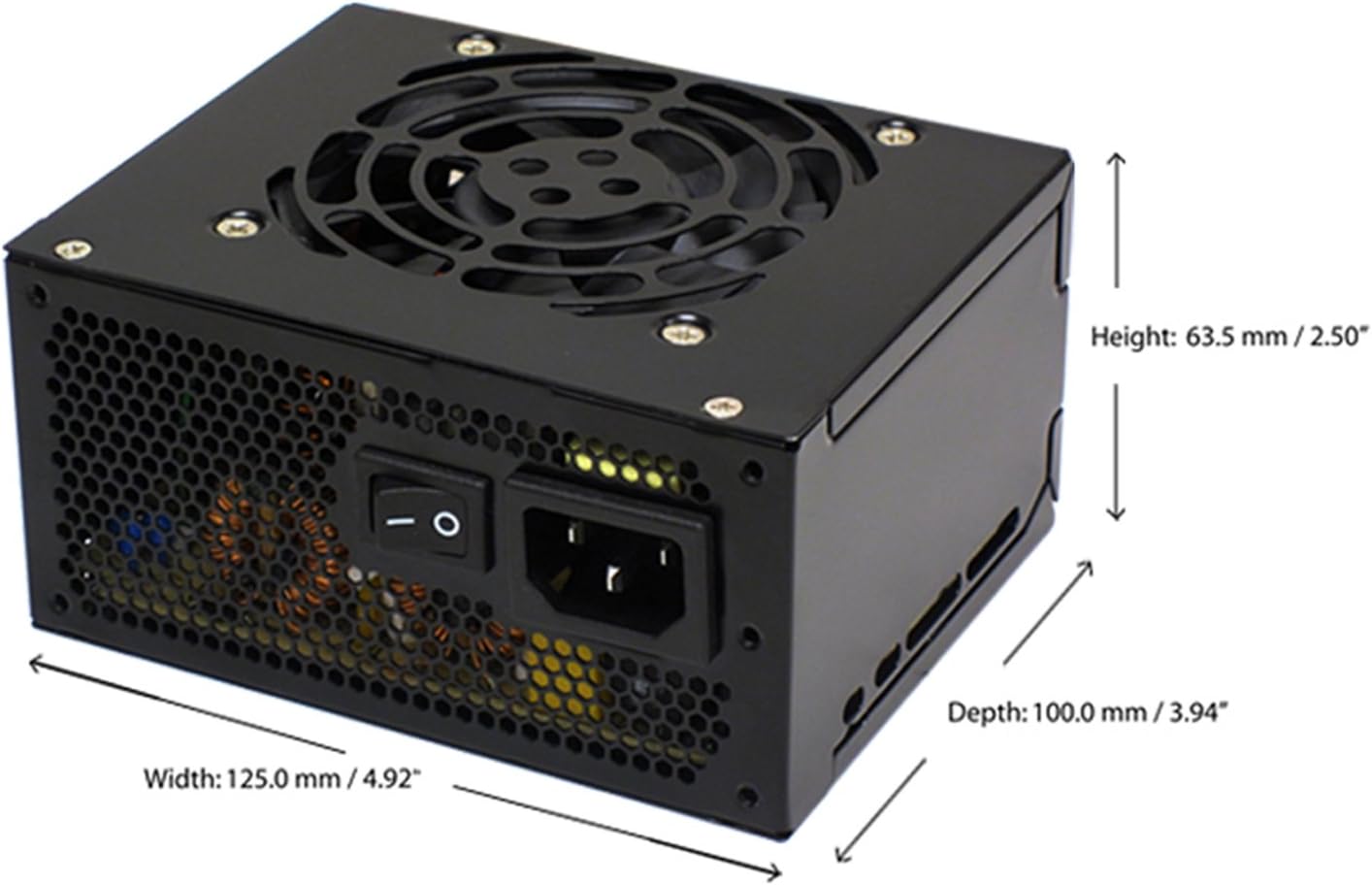
Figure 4.4: Diagram illustrating the types and quantities of output connectors available on the FSP400-60GHS(85)-R1 power supply.
- Main 24 Pin (1): For motherboard power.
- P4 | EPS 4+4 Pin (1): For CPU power.
- PCI-E 8 Pin (6+2) (1): За графички картички.
- Molex 4 Pin (3): For older peripherals and fans.
- Serial ATA 15 Pin (3): For SATA hard drives and SSDs.
- FDD 4 Pin (1): For floppy disk drives or other legacy devices.
5. Поставување и инсталација
Before beginning installation, ensure your computer system is powered off and disconnected from the AC power outlet. It is recommended to wear an anti-static wrist strap to prevent electrostatic discharge (ESD) damage to components.
5.1 Инсталирање на напојувањето
- Подгответе го случајот: Open your computer case. Identify the power supply mounting area.
- Монтирање на напојувањето:
- For SFX cases: Insert the FSP400-60GHS(85)-R1 directly into the SFX power supply bay and secure it with screws.
- For standard ATX cases: Attach the included SFX to PS2 bracket to the power supply. Then, mount the power supply with the bracket into the ATX power supply bay and secure it with screws.

Figure 5.1: The FSP 400W Micro ATX Power Supply shown with the SFX to PS2 adapter bracket installed, ready for mounting in a standard ATX case.

Figure 5.2: Illustration demonstrating how the SFX power supply fits into a PS2 (ATX) case using the provided adapter bracket.
5.2 Кабли за поврзување
Connect the appropriate cables to your motherboard and components. Refer to your motherboard and component manuals for specific connection points.
- Напојување на матичната плоча: Connect the 24-pin ATX connector to the corresponding socket on your motherboard.
- Моќност на процесорот: Connect the 4+4-pin EPS/ATX 12V connector to the CPU power socket on your motherboard.
- Моќност на графичката картичка: If your graphics card requires external power, connect the 6+2-pin PCI-E connector(s) to the graphics card.
- Уреди за складирање: Connect SATA power connectors to your SATA hard drives, SSDs, and optical drives.
- Периферни уреди: Use Molex 4-pin connectors for case fans or other legacy peripherals as needed.
- Управување со кабли: Уредно распоредете ги каблите за да обезбедите правилен проток на воздух во куќиштето.
Once all internal connections are made, close your computer case.
5.3 Надворешна врска
- Поврзете го кабелот за наизменична струја со влезот за наизменична струја на напојувањето.
- Plug the other end of the AC power cord into a grounded wall outlet or surge protector.
- Ensure the power switch on the back of the power supply is in the "OFF" (O) position before plugging it in.
6. Упатства за работа
6.1 Вклучување на вашиот систем
- After all connections are secure, flip the power switch on the back of the power supply to the "ON" (I) position.
- Притиснете го копчето за вклучување на куќиштето на компјутерот за да го стартувате системот.
6.2 Thermal Control System
The FSP400-60GHS(85)-R1 features an 80mm cooling fan with thermal sensing technology. This system automatically adjusts the fan speed based on the internal temperature of the power supply, optimizing cooling performance while minimizing noise.
6.3 Energy Saver Standby Mode
This power supply is designed with an energy-saving 1-watt standby mode, reducing power consumption when the system is in a low-power state or turned off but still connected to AC power.
7. Одржување
Правилното одржување обезбедува долготрајност и оптимални перформанси на вашето напојување.
- Чистење: Periodically clean the exterior of the power supply and its fan grille to prevent dust buildup. Use a soft, dry cloth or compressed air. Ensure the power supply is disconnected from AC power before cleaning.
- Вентилација: Ensure that the power supply's fan and ventilation openings are not obstructed. Good airflow is crucial for cooling.
- Интегритет на кабелот: Редовно проверувајте ги сите напојувачки кабли за какви било знаци на абење, кинење или оштетување. Веднаш заменете ги оштетените кабли.
Do not attempt to open the power supply unit for internal cleaning or repair. This will void the warranty and can be dangerous.
8 Смена на проблеми
Доколку наидете на проблеми со напојувањето, погледнете ги следните вообичаени проблеми и решенија:
8.1 Нема напојување во системот
- Проверете го наизменичниот напон: Осигурајте се дека кабелот за наизменична струја е безбедно вклучен и во напојувањето и во функционален ѕиден штекер.
- Прекинувач: Verify that the power switch on the back of the power supply is in the "ON" (I) position.
- Внатрешни врски: Confirm that the 24-pin ATX and 4+4-pin EPS/ATX 12V connectors are firmly seated in the motherboard.
- Краток спој: Disconnect all peripheral power cables (SATA, Molex, PCI-E) and attempt to power on. If the system powers on, a short circuit may exist in one of the connected components or cables. Reconnect them one by one to identify the faulty component.
8.2 System Instability or Random Shutdowns
- Преоптоварување: Ensure your system's power requirements do not exceed the 400W capacity of the power supply.
- Вентилација: Check for proper airflow within the case and ensure the power supply's fan is not obstructed. Overheating can cause instability.
- Кабелски врски: Re-check all power connections to ensure they are secure. Loose connections can lead to intermittent power delivery.
8.3 Прекумерна бучава на вентилаторот
- Составување прашина: Clean the fan grille and fan blades with compressed air.
- Опструкција: Ensure no cables or foreign objects are interfering with the fan's rotation.
- Опкружување за работа: High ambient temperatures can cause the thermal control system to increase fan speed. Ensure adequate room ventilation.
If troubleshooting steps do not resolve the issue, contact FSP customer support or your retailer for assistance.
9. Спецификации
Detailed technical specifications for the FSP400-60GHS(85)-R1 power supply:
| Име на моделот | FSP 400W Micro ATX Power Supply |
| Број на модел | FSP400-60GHS(85)-R1 |
| Бренд | ВМФ |
| Излезен Ватtage | 400 вати |
| 80 Plus Certification | 80 плус бронза |
| Форма фактор | Micro ATX (SFX with PS2 bracket) |
| Метод на ладење | Air (80mm fan with thermal control) |
| Дизајн на напојување | Немодуларен |
| Влез волуменtage | 100 - 265 волти (AC) |
| Димензии (Д x Ш x В) | 4.9 x 3.9 x 2.5 инчи (125.0 x 100.0 x 63.5 мм) |
| Тежина на ставката | 2.31 фунти |
| Компатибилни уреди | Personal Computer (AMD/Intel CPU systems) |
| Конектори | Main 24 Pin (1), P4 | EPS 4+4 Pin (1), PCI-E 8 Pin (6+2) (1), Molex 4 Pin (3), Serial ATA 15 Pin (3), FDD 4 Pin (1) |
| Усогласеност на животната средина | RoHS, Lead-Free, Green Product (G.P) |

Figure 9.1: Physical dimensions of the FSP 400W Micro ATX Power Supply.

Figure 9.2: Illustrative diagram showing typical cable lengths for the power supply connectors.
10. Информации за гаранцијата
The FSP 400W Micro ATX Power Supply (FSP400-60GHS(85)-R1) is covered by a 3-годишна гаранција од производителот. This warranty guarantees the quality and performance of the product for the specified period from the date of purchase.
The warranty covers defects in materials and workmanship under normal use. It does not cover damage resulting from improper installation, accidents, misuse, abuse, natural disasters, or unauthorized modifications or repairs. Opening the power supply casing ќе ја поништи гаранцијата.
For warranty claims or service, please retain your proof of purchase and contact FSP customer support.
11. Поддршка за корисници
If you require further assistance, have questions, or need to report an issue that cannot be resolved using the troubleshooting guide, please contact FSP customer support.
- ВМФ Webсајт: Visit the official FSP website for product information, FAQs, and support resources.
- Контакт информации: Refer to the FSP website or your product packaging for the most current customer service contact details (phone, email, or support portal).
When contacting support, please have your product model number (FSP400-60GHS(85)-R1) and proof of purchase readily available.