
BenQ EX3501R
BenQ EX3501R Ultrawide Curved Gaming Monitor User Manual
Model: EX3501R
1. Поставување
1.1 Распакување на мониторот
Внимателно отстранете ги сите компоненти од пакувањето. Проверете дали се присутни сите ставки наведени подолу:
- BenQ EX3501R Monitor
- Поставка за монитор (основа и врат)
- Адаптер за напојување
- Кабел за напојување
- HDMI кабел
- Кабел за DisplayPort
- USB-C кабел
- Упатство за употреба (овој документ)
1.2 Склопување на штандот
Следете ги овие чекори за да го прикачите држачот на вашиот монитор:
- Поставете го мониторот со лицето надолу на мека, чиста крпа за да спречите гребнатини.
- Attach the stand neck to the back of the monitor. Ensure it clicks securely into place.
- Connect the stand base to the neck, tightening any screws as indicated in the quick start guide.

Слика 1: Предна страна view of the BenQ EX3501R monitor with its stand.
1.3 Кабли за поврзување
Connect the necessary cables to the monitor and your computer. The monitor supports various input options:
- Моќност: Поврзете го адаптерот за напојување со мониторот, а потоа со штекер.
- Видео влез: Use either the HDMI, DisplayPort, or USB-C cable to connect your computer to the monitor.
- USB-C: The USB-C port supports video, data transfer, and power delivery, allowing for a single-cable connection with compatible devices.
- USB 3.0 порти: Utilize the integrated USB 3.0 ports for connecting peripherals.
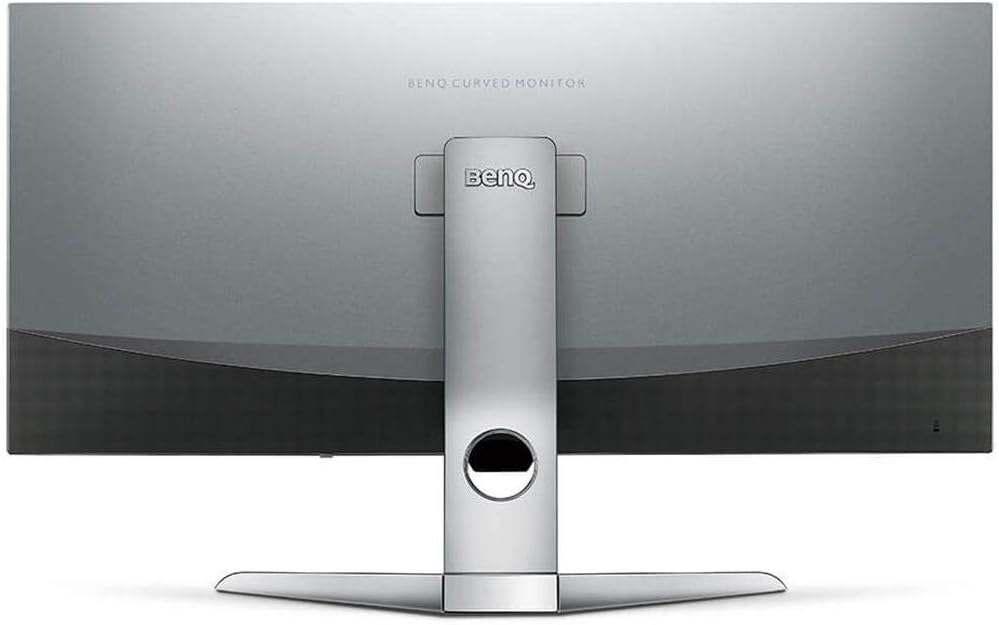
Слика 2: Заден дел view of the monitor displaying the connectivity ports.
2. Ракување со мониторот
2.1 Вклучување/исклучување
Press the power button, usually located on the bottom right side of the monitor, to turn it on or off. The power indicator light will illuminate when the monitor is active.
2.2 Навигација на екранот (OSD)
Use the joystick or buttons located on the monitor's underside to navigate the On-Screen Display (OSD) menu. This menu allows you to adjust various settings such as brightness, contrast, color modes, and input sources.
2.3 Display Features and Eye-Care Technology
The BenQ EX3501R incorporates several technologies designed to enhance viewing experience and reduce eye strain:
- Brightness Intelligence Plus (B.I.+): This patented technology automatically senses ambient lighting conditions and adjusts the screen's brightness and color temperature to provide optimal viewing comfort and protect your eyes during extended use.
- Ниско сино светло: Filters out harmful blue light emissions to reduce eye fatigue. Multiple levels of blue light reduction are available.
- ZeroFlicker™: Eliminates screen flickering at all brightness levels, further reducing eye strain and discomfort.
- HDR (висок динамички опсег): Offers enhanced brightness and contrast, bringing greater detail and vibrancy to HDR video content.
Видео 1: Оверview of BenQ's Eye-Care technology, including Low Blue Light, ZeroFlicker, and Brightness Intelligence Plus, demonstrating how these features work to reduce eye strain and adjust screen settings automatically based on ambient light.
2.4 Резолуција и брзина на освежување
The monitor features a QHD (3440x1440) resolution and a 100Hz refresh rate, providing a smooth and detailed visual experience. The 21:9 ultrawide aspect ratio offers ample screen space for multitasking, such as viewing multiple documents side-by-side without needing a second monitor.
2.5 AMD FreeSync
For a fluid gaming experience, the monitor supports AMD FreeSync technology, which synchronizes the monitor's refresh rate with your graphics card's frame rate to eliminate screen tearing and stuttering.
3. Одржување
3.1 Чистење на мониторот
To maintain optimal performance and appearance, regularly clean your monitor:
- Екран: Нежно избришете го екранот со мека крпа што не остава влакненца. За тврдокорни дамки, користете раствор за чистење специфичен за мониторот нанесен на крпата, а не директно на екранот.
- Надворешност: Use a soft, dry cloth to wipe dust and debris from the monitor casing and stand.
Avoid using abrasive cleaners, waxes, or solvents as they can damage the monitor's surface.
3.2 Општи совети за нега
- Не ги блокирајте отворите за вентилација на мониторот.
- Избегнувајте да го ставате мониторот на директна сончева светлина или во близина на извори на топлина.
- Внимателно ракувајте со мониторот за да спречите физичко оштетување.
4 Смена на проблеми
If you encounter issues with your BenQ EX3501R monitor, refer to the following common troubleshooting steps:
4.1 No Display or Black Screen
- Осигурајте се дека кабелот за напојување е безбедно поврзан и со мониторот и со штекерот.
- Проверете дали видео кабелот (HDMI, DisplayPort или USB-C) е цврсто поврзан и со мониторот и со компјутерот.
- Проверете дали е избран точниот влезен извор во OSD менито на мониторот.
- Рестартирајте го компјутерот.
4.2 Flickering or Unstable Image
- Ensure the ZeroFlicker™ feature is enabled in the OSD menu.
- Проверете дали има лабави врски на видео кабелот.
- Ажурирајте ги драјверите за графичка картичка до најновата верзија.
- If using AMD FreeSync, ensure it is properly configured in your graphics card settings.
4.3 Color or Brightness Issues
- Прилагодете ги поставките за осветленост, контраст и боја преку менито на екранот.
- Enable or disable Brightness Intelligence Plus (B.I.+) to see if it resolves the issue.
- Извршете ресетирање на фабричките поставки преку менито на OSD.
5. Спецификации
Key technical specifications for the BenQ EX3501R monitor:
| Карактеристика | Спецификација |
|---|---|
| Големина на екранот | 35 инчи |
| Максимална резолуција на екранот | 3440 x 1440 Pixels (QHD Ultrawide) |
| Сооднос на аспект | 21:9 |
| Стапка на освежување | 100 Hz |
| Искривување | 1800R |
| Тип на панел | VA (вертикално порамнување) |
| Поврзување | USB-C, HDMI, DisplayPort |
| Посебни карактеристики | AMD FreeSync, Brightness Intelligence Plus, Low Blue Light, ZeroFlicker |
| Тежина на ставката | 21.3 фунти |
| Димензии на производот | 6.88 x 3.47 x 12.93 инчи |
6. Гаранција и поддршка
6.1 Гаранција за производот
The BenQ EX3501R monitor typically comes with a 3-year manufacturer's warranty. Please refer to the warranty card included in your product packaging for specific terms and conditions, or visit the official BenQ webсајт за детални информации за гаранцијата.
6.2 Поддршка за корисници
For further assistance, technical support, or warranty claims, please contact BenQ customer service. You can find contact information and support resources on the official BenQ webсајт: www.benq.com/en-us/support.html
Ask a question about this manual
Ask about setup, troubleshooting, compatibility, parts, safety, or missing instructions. Manuals+ will review the question and use this page’s manual context to help answer it.