
1. Вовед
Thank you for choosing the MAJORITY Snowdon Bluetooth Soundbar. This manual provides essential information for the safe and efficient operation of your device. Please read it thoroughly before use and retain it for future reference.

Image: The MAJORITY Snowdon Soundbar, a sleek black unit, is shown with its remote control. Key features like Bluetooth connectivity, 120 Watts power output, and 2.1 audio channels are highlighted.
2. Информации за безбедност
Ве молиме почитувајте ги следните безбедносни мерки:
- Не го изложувајте уредот на дожд, влага или екстремни температури.
- Обезбедете соодветна вентилација; не блокирајте никакви отвори за вентилација.
- Користете го само адаптерот за напојување испорачан со уредот.
- Не обидувајте се сами да го отворите или поправите уредот. За сите сервиси обратете се на квалификуван персонал.
- Држете го уредот подалеку од извори на топлина како што се радијатори, грејни тела, шпорети или други апарати што произведуваат топлина.
3. Содржина на пакетот
Проверете дали сите артикли се присутни во пакувањето:
- MAJORITY Snowdon Soundbar
- Далечински управувач
- Адаптер за напојување
- 3.5мм аудио кабел (AUX кабел)
- RCA кабел
- Упатство за употреба
- Wall Mounting Screws and Plugs (for optional wall installation)

Image: A clear layout of the MAJORITY Snowdon Soundbar and its accessories. The soundbar is positioned at the top, with the remote control, RCA cable, AUX cable, power adapter, and user manual arranged below it.
4. Производот завршиview
4.1 Front and Top Panel Controls
- МОЌНОСТ: Притиснете за да го вклучите или исклучите уредот.
- ИЗВОР: Press to cycle through input modes (Bluetooth, Optical, AUX, RCA).
- VOL+: Зголемете ја јачината на звукот.
- VOL-: Намалете ја јачината на звукот.
- СПАР: Притиснете и задржете за да започнете со Bluetooth спарување.
- ЛИНИЈА ВО: 3.5mm AUX input port.
4.2 Приклучоци на задниот панел
- ОПТИЧКИ ВО: За поврзување со уреди преку оптички кабел.
- DC 18V: Приклучок за влез на напојување.
- L/R RCA: For connecting to devices via RCA cables.

Image: A close-up of the rear panel of the soundbar, clearly displaying the various input ports including AUX, Optical, and RCA connections, along with the DC 18V power input.
5. Поставување
5.1 Поставување
The soundbar can be placed on a flat surface in front of your TV or wall-mounted.
- Поставување на маса: Position the soundbar on a stable, flat surface directly below your television.
- Монтирање на ѕид: Use the provided screws and plugs to securely mount the soundbar to a wall. Ensure the wall can support the weight of the soundbar.

Image: The MAJORITY Snowdon Soundbar is shown mounted on a wall directly beneath a television, demonstrating its wall-mountable capability in a home environment.
5.2 Поврзување со напојување
- Connect the power adapter to the DC 18V input port on the rear of the soundbar.
- Приклучете го адаптерот за напојување во ѕиден штекер.
5.3 Аудио врски
Изберете еден од следниве методи за поврзување на вашиот аудио извор:
5.3.1 Bluetooth конекција
- Притиснете го МОЌ button on the soundbar or remote to turn it on.
- Притиснете го ИЗВОР button repeatedly until 'BT' (Bluetooth) mode is selected. The indicator light will flash.
- On your device (e.g., smartphone, tablet), enable Bluetooth and search for 'MAJORITY Snowdon'.
- Select 'MAJORITY Snowdon' to pair. Once connected, the indicator light will stop flashing.

Image: The MAJORITY Snowdon Soundbar is depicted alongside a smartphone, which shows a music player interface and a prominent 'Bluetooth 5.0' graphic, illustrating wireless connectivity.
5.3.2 Оптичко поврзување
- Connect one end of an optical cable to the OPTICAL OUT port on your TV or audio device.
- Поврзете го другиот крај со ОПТИЧКИ ВО порта на лентата за звук.
- Притиснете го ИЗВОР button on the soundbar or remote until 'OPT' (Optical) mode is selected.
5.3.3 AUX конекција
- Connect one end of the 3.5mm audio cable to the headphone jack or AUX OUT port on your device.
- Поврзете го другиот крај со ЛИНИЈА ВЛЕЗ порта на лентата за звук.
- Притиснете го ИЗВОР button on the soundbar or remote until 'AUX' mode is selected.
5.3.4 RCA Connection
- Connect the red and white plugs of the RCA cable to the corresponding audio output ports on your TV or audio device.
- Поврзете го другиот крај од RCA кабелот со L/R RCA input ports on the soundbar.
- Притиснете го ИЗВОР button on the soundbar or remote until 'RCA' mode is selected.
6. Упатства за работа
6.1 Вклучување/исклучување
Притиснете го МОЌ копчето на саундбарот или на далечинскиот управувач за да го вклучите или исклучите уредот.
6.2 Избор на извор
Притиснете го ИЗВОР button on the soundbar or remote control to switch between input modes: Bluetooth, Optical, AUX, and RCA.
6.3 Контрола на јачината на звукот
Користете го VOL+ и VOL- buttons on the soundbar or the volume buttons on the remote control to adjust the audio level.
6.4 Функции на далечинскиот управувач
The included remote control provides convenient access to all soundbar functions:
- Моќност: Turn the soundbar on or off.
- Извор: Select input mode.
- Јачина на звук нагоре/намалување: Прилагодете го нивото на јачина на звук.
- Исклучи звук: Исклучете го звукот или исклучете го.
- Пушти/Пауза: Control media playback in Bluetooth mode.
- Претходна/Следна песна: Skip tracks in Bluetooth mode.
- Режими на EQ: Select preset equalizer settings (e.g., Music, Movie, News).
7. Одржување
За да се обезбеди долготрајност и оптимални перформанси на вашиот саундбар:
- Чистење: Use a soft, dry cloth to clean the exterior of the soundbar. Do not use liquid cleaners or abrasive materials.
- Складирање: Доколку го складирате саундбарот подолг временски период, исклучете го од струја и складирајте го на ладно и суво место.
- Избегнувајте опструкции: Ensure no objects block the speaker grilles or ventilation openings.
8 Смена на проблеми
Доколку наидете на проблеми со вашиот саундбар, погледнете ги следните вообичаени проблеми и решенија:
| Проблем | Можна причина | Решение |
|---|---|---|
| Нема моќ | Кабелот за напојување не е поврзан; Приклучокот за напојување не е активен | Проверете го поврзувањето на кабелот за напојување; обидете се со друг штекер |
| Нема звук | Incorrect input source selected; Volume too low; Audio cable not connected properly | Select correct input source; Increase volume; Reconnect audio cables securely |
| Спарувањето со Bluetooth не успеа | Саундбарот не е во режим на спарување; Уредот е предалеку; Пречки | Ensure soundbar is in BT pairing mode; Move device closer; Turn off other Bluetooth devices |
| Искривен звук | Јачината на звукот е превисока; лош квалитет на аудио изворот; лабава кабелска врска | Reduce volume; Try a different audio source; Check cable connections |
9. Спецификации
| Карактеристика | Детал |
|---|---|
| Име на моделот | Snowdon |
| Бренд | МНОЗИНСТВО |
| Излезна моќност | 120 вати |
| Звучни канали | 2.1 (with integrated subwoofer) |
| Технологија за поврзување | Bluetooth, AUX, Optical, RCA |
| Bluetooth верзија | 5.0 |
| Димензии (Д x Д x В) | 81 cm x 8.3 cm x 8.3 cm |
| Тежина | 1.2 килограми |
| Фреквентен одговор | 18 KHz |
| Контролен метод | Далечински управувач |
| Материјал | Пластика |
| Боја | Црното |
| Тип на монтирање | Монтирање на ѕид |
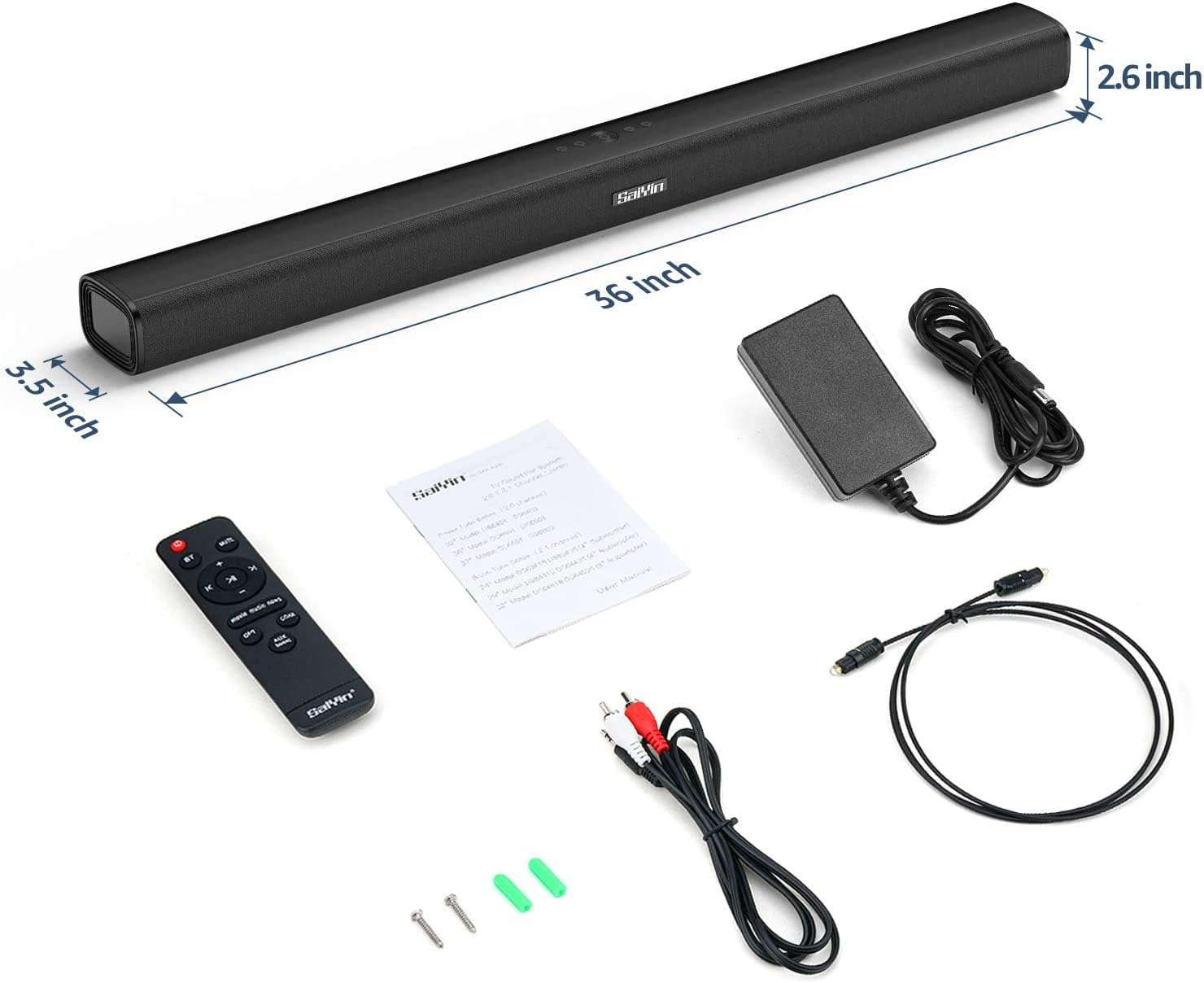
Image: The MAJORITY Snowdon Soundbar is displayed with its accessories, including the remote, power adapter, and various cables. Dimensions are overlaid on the image, showing the soundbar's length as 36 inches (approximately 91.4 cm), depth as 3.5 inches (approximately 8.9 cm), and height as 2.6 inches (approximately 6.6 cm).

Слика: Детална view of the soundbar's internal speaker component, emphasizing its 120W power output and Xtra Bass technology for enhanced low-frequency audio.
10. Гаранција и поддршка
10.1 Информации за гаранцијата
The MAJORITY Snowdon Soundbar comes with a 3 години продолжена гаранција. Please retain your proof of purchase for warranty claims. For specific terms and conditions, refer to the warranty card included in your package or visit the official MAJORITY webсајт.
10.2 Поддршка за корисници
For technical assistance, troubleshooting beyond this manual, or warranty inquiries, please contact MAJORITY customer support through their official webстраницата или информациите за контакт наведени во документацијата за вашиот производ.