
dl R1051-WHT-DE
Упатство за користење на Mini dl DAB и FM дигитално радио
Model: R1051-WHT-DE
Вовед
This user manual provides detailed instructions for the operation and maintenance of your Mini dl DAB and FM Digital Radio. Please read this manual thoroughly before using the device to ensure proper functionality and to maximize your listening experience.
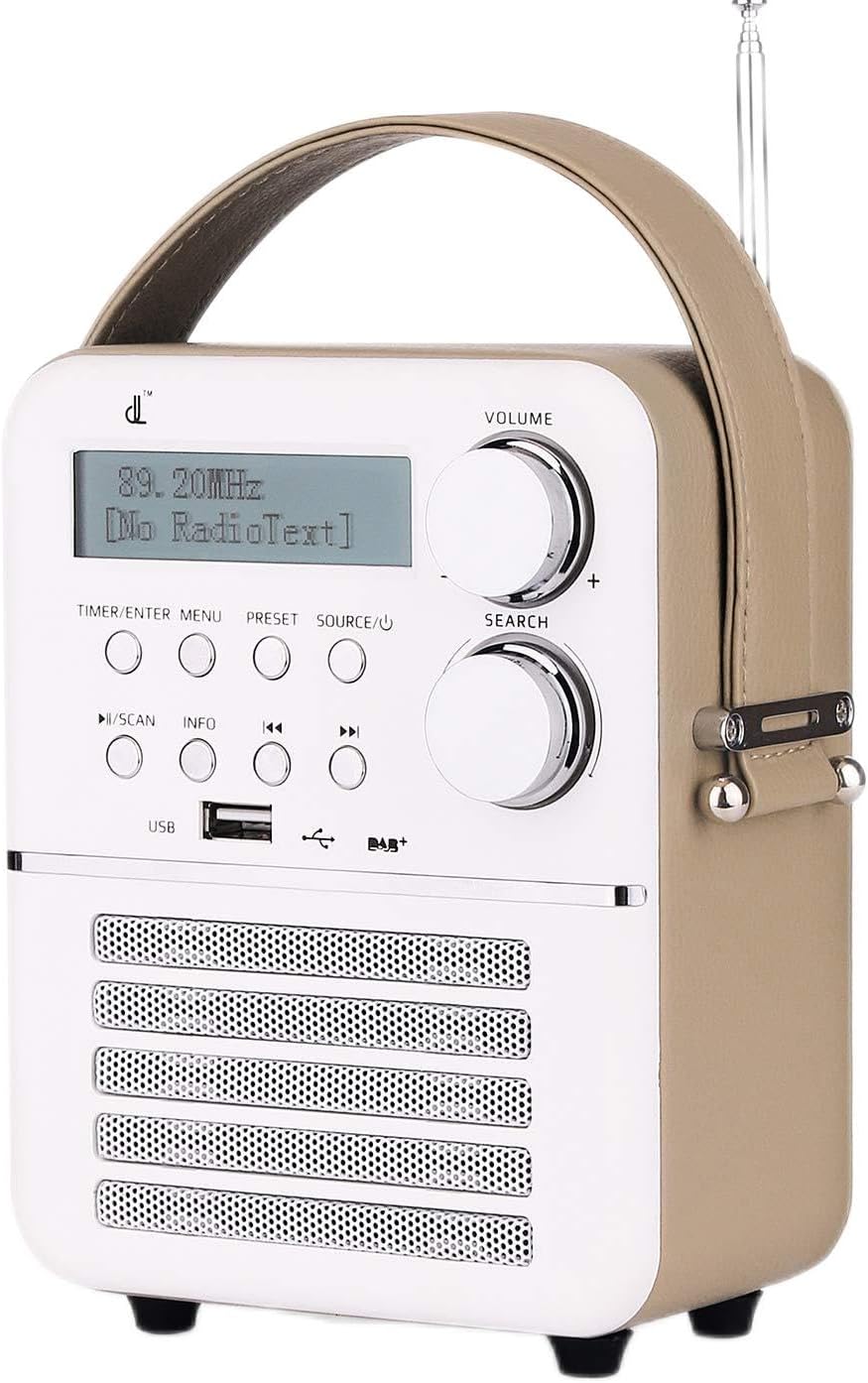
Слика 1: Предна страна view of the Mini dl DAB and FM Digital Radio.
Содржина на пакетот
По отварањето на пакувањето, проверете дали сите артикли наведени подолу се присутни и во добра состојба:
- 1 x Mini dl DAB and FM Digital Radio
- 1 x адаптер за напојување
- 1 x Упатство за употреба (овој документ)

Figure 2: Included accessories: the radio unit, power adapter, and an indication of the built-in battery.
Поставување
Вклучување и полнење
The radio features a built-in rechargeable battery (1800mAh) for portable use. Before first use, it is recommended to fully charge the battery.
- Connect the provided power adapter to the DC 5V port located on the back of the radio.
- Приклучете го адаптерот за напојување во стандарден ѕиден штекер.
- The radio will begin charging. A full charge takes approximately 30 minutes, providing up to 4 hours of standby time.
- За да го вклучите радиото, притиснете и држете го копчето SOURCE/Power копче.
Подесување на антената
For optimal radio reception, extend the telescopic antenna located on the top-rear of the unit. Adjust its position for the best signal quality.

Слика 3: Заден дел view of the radio, highlighting the DC 5V port, AUX IN, and antenna connection point.
Упатства за работа
Контролите се завршениview
The radio features intuitive controls on its front panel:

Слика 4: Контроли и дисплеј на предниот панел.
- Копче за ВОЛУМ: Ротирајте за да ја прилагодите јачината на звукот.
- Копче за пребарување: Rotate to navigate menus or tune frequencies. Press to confirm selections.
- TIMER/ENTER MENU Button: Access timer settings or enter the main menu.
- Копче PRESET: Access or save preset radio stations.
- SOURCE/Power Button: Short press to cycle through input sources (DAB, FM, Bluetooth, USB, AUX). Long press to power on/off.
- PLAY/SCAN Button: Play/pause media or initiate a scan for radio stations.
- Копче ИНФО: Прикажува дополнителни информации за моменталната станица или песна.
- Копчиња за ПРЕСКОКНИ (<< / >>): Navigate between tracks or adjust frequency/station.
- USB порта: За поврзување на USB уреди за складирање за репродукција на медиуми.
DAB Digital Radio Operation
- Притиснете го ИЗВОР копчето додека не се прикаже „DAB“.
- If this is the first time using DAB, or if you wish to rescan, press the ИГРАЈ/СКЕНИРАЈ button to initiate an automatic scan for DAB stations. The radio will display "Scanning..." and show progress.
- Once the scan is complete, the radio will list available stations. Use the ПРЕБАРУВАЊЕ копче или ПРЕСКОКНЕТЕ копчиња за навигација низ списокот со станици.
- Притиснете го ПРЕБАРУВАЊЕ копчето за да изберете станица.
- To save a preset: Tune to the desired station, then long press the ПОСТАВЕНИ копче. Користете го ПРЕБАРУВАЊЕ knob to select a preset number, then press the ПРЕБАРУВАЊЕ копчето за потврда.
- To recall a preset: Short press the ПОСТАВЕНИ копчето, а потоа користете го ПРЕБАРУВАЊЕ копчето за да ја изберете саканата претходно поставена поставка.
Работа на FM радио
- Притиснете го ИЗВОР копчето додека не се прикаже „FM“.
- To auto-scan for FM stations, long press the ИГРАЈ/СКЕНИРАЈ button. The radio will scan and save available stations.
- To manually tune, short press the ПРЕСКОКНЕТЕ копчиња за фино подесување на фреквенцијата.
- Saving and recalling FM presets follows the same procedure as DAB presets.
Bluetooth режим
- Притиснете го ИЗВОР button until "Bluetooth" or "BT" is displayed. The radio will enter pairing mode, indicated by a flashing Bluetooth icon or "Pairing" message on the display.
- On your external device (smartphone, tablet, etc.), enable Bluetooth and search for available devices.
- Select "dl Radio" or a similar name from the list of devices.
- Once paired, the radio will confirm the connection, and you can play audio from your device through the radio.
Репродукција преку USB
- Insert a USB flash drive containing MP3, MP4, or WAV audio files into the USB port on the front of the radio.
- Притиснете го ИЗВОР копчето додека не се прикаже „USB“.
- The radio will automatically begin playing the first compatible audio file.
- Користете го ИГРАЈ/СКЕНИРАЈ button to play/pause, and the ПРЕСКОКНЕТЕ копчиња за навигација помеѓу песните.
Режим AUX
- Connect an external audio device (e.g., MP3 player, CD player) to the AUX IN port on the back of the radio using a 3.5mm audio cable (not included).
- Притиснете го ИЗВОР копчето додека не се прикаже „AUX“.
- Audio from the connected device will now play through the radio's speakers. Control playback from the external device.
Alarm and Timer Functions
The radio supports dual alarms, snooze, and a sleep timer.
- Поставување аларми: Притиснете го TIMER/ENTER MENU button. Navigate to "Alarm Setup" using the ПРЕБАРУВАЊЕ knob and press to select. Follow the on-screen prompts to set Alarm 1 and Alarm 2, including time, alarm source (DAB/FM/USB/BT/AUX or buzzer), and volume.
- Функција за одложување: When an alarm sounds, press any button (except power) to activate snooze. The alarm will temporarily stop and sound again after a set interval.
- Тајмер за спиење: Притиснете го TIMER/ENTER MENU button. Navigate to "Sleep Timer" and select the desired duration (e.g., 15, 30, 60 minutes). The radio will automatically turn off after the set time.
Одржување
Чистење
To clean the radio, use a soft, dry cloth. Do not use abrasive cleaners, waxes, or solvents as they may damage the finish. Ensure no liquids enter the device.
Нега на батерии
- Избегнувајте често целосно празнење на батеријата.
- If storing the radio for an extended period, charge the battery to approximately 50% and store in a cool, dry place. Recharge every few months to prevent deep discharge.
- Не ја изложувајте батеријата на екстремни температури.
Складирање
When not in use, store the radio in a dry environment, away from direct sunlight and extreme temperatures. Keep it away from dust and moisture.
Решавање проблеми
Доколку наидете на проблеми со вашето радио, погледнете ги следните вообичаени проблеми и решенија:
| Проблем | Можна причина | Решение |
|---|---|---|
| Нема струја / Радиото не се вклучува. | Батеријата е празна или адаптерот за напојување не е правилно поврзан. | Connect the power adapter and allow the battery to charge. Ensure the power outlet is functional. |
| Слаб радио прием (DAB/FM). | Антената не е проширена или сигналот е слаб. | Целосно извлечете ја и прилагодете ја телескопската антена. Обидете се да го преместите радиото на друга локација. Извршете ново скенирање на станици. |
| Bluetooth не се поврзува. | Radio not in pairing mode, or device is too far. | Ensure the radio is in Bluetooth mode and "Pairing" is displayed. Move your device closer to the radio. Forget the device on your phone and try pairing again. |
| No sound from USB playback. | Неподдржано file format or corrupted files. | Обезбедете files are MP3, MP4, or WAV format. Try a different USB drive or different audio files. |
| Alarm volume too loud/soft. | Alarm volume not set correctly during setup. | Re-enter alarm setup via the TIMER/ENTER MENU button and adjust the alarm volume setting. |
Спецификации
| Бренд | dl |
| Модел | R1051-WHT-DE |
| Димензии на производот | 13 x 18 x 25.8 cm (5.1 x 7.1 x 10.2 инчи) |
| Тежина на ставката | 880 g (1.94 lbs) |
| Хардверски интерфејс | USB |
| Технологија на тјунер | DAB, FM |
| Дополнителни карактеристики | Bluetooth, USB Playback, AUX Input, Alarm, Timer |
| Извор на енергија | Battery Powered (Built-in Lithium-ion) |
| Вклучена батерија | Да |
| Вкупно USB порти | 1 |
| Поддржани радио опсези | 2 bands (DAB, FM) |
| Поддржани типови медиуми | MP4, MP3, WAV |
| влез интерфејс | Копчиња |

Слика 5: Димензии на производот за референца.
Гаранција и поддршка
Информации за гаранцијата
Specific warranty details for the Mini dl DAB and FM Digital Radio are typically provided within the physical user manual included in the product packaging or on the manufacturer's official website. Please refer to those sources for comprehensive warranty terms and conditions.
Поддршка за корисници
For further assistance, technical support, or inquiries not covered in this manual, please contact the manufacturer or your point of purchase. Keep your purchase receipt and product model number (R1051-WHT-DE) ready when contacting support.