
Вовед
This manual provides instructions for the Insignia NS-PNKNUM19 Wired Numeric Keypad. This device is designed to enhance data entry for accounting functions and spreadsheet applications on both Mac and PC computers. It features a standard numeral arrangement and responsive keys for efficient operation.
Информации за безбедност
Please read these safety instructions carefully before using your new numeric keypad to prevent damage to the device or injury to yourself.
- Do not expose the keypad to water or excessive moisture.
- Избегнувајте екстремни температури.
- Do not attempt to disassemble or repair the keypad yourself. Refer all servicing to qualified personnel.
- Keep the keypad away from strong magnetic fields.
- Користете само со компатибилни уреди како што е наведено во ова упатство.
Содржина на пакетот
- Insignia NS-PNKNUM19 Wired Numeric Keypad
- Водич за брзо поставување (не е вклучен во ова дигитално упатство)

Image: The Insignia NS-PNKNUM19 Wired Numeric Keypad shown in its retail packaging, highlighting the product and its simple design.
Карактеристики
- 19 Клучеви: Offers a comfortable and complete numeric typing experience.
- USB интерфејс: Enables a simple wired connection to your computer.
- Компатибилен со PC и Mac: Designed for use with both Windows and macOS operating systems.
- Plug-and-play: Не е потребна инсталација на драјвер за повеќето оперативни системи.
- LED индикатор: An LED light indicates when the keypad is connected and active.
Поставување
Setting up your Insignia NS-PNKNUM19 Wired Numeric Keypad is a straightforward process.
- Поврзете ја тастатурата: Locate an available USB port on your computer (PC or Mac). Plug the USB connector of the numeric keypad into the USB port.
- Системско препознавање: Вашиот компјутер треба автоматски да ги детектира и инсталира потребните драјвери. Ова е уред „вклучи и пушти“, така што обично не е потребна рачна инсталација на драјвери.
- Потврдете ја врската: An LED indicator on the keypad will illuminate, confirming that the device is connected and ready for use.
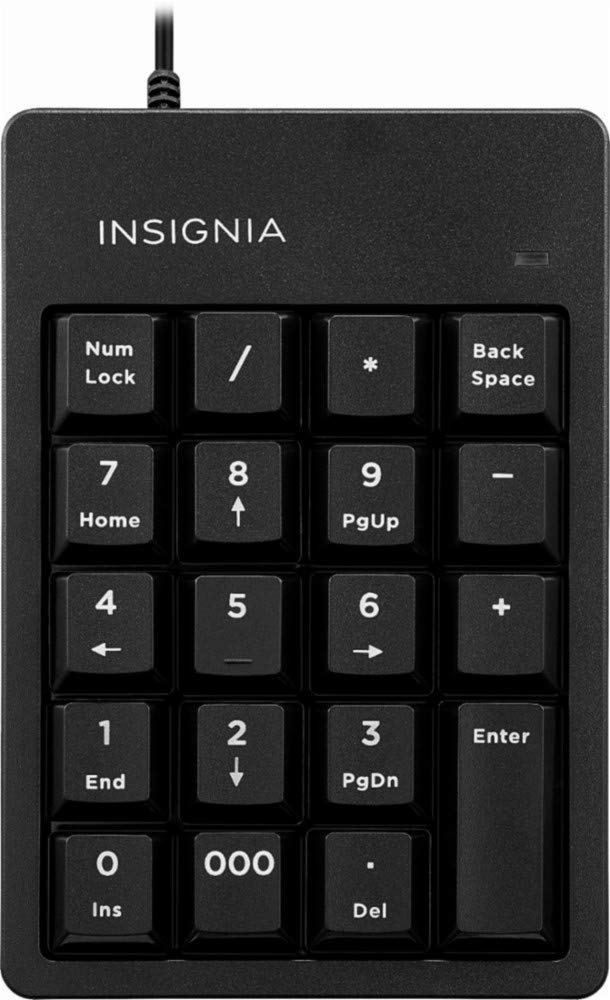
Image: The Insignia NS-PNKNUM19 Wired Numeric Keypad, showing its 19 keys and the attached USB cable ready for connection.
Упатства за работа
Once connected, the numeric keypad functions similarly to the numeric section of a full-sized keyboard.
- Нумерички влез: Press the number keys (0-9) to input numerical data.
- Arithmetic Operators: Use the +, -, *, and / keys for basic arithmetic operations.
- Децимална точка: The '.' key allows for decimal input.
- Внесете клуч: Functions as a standard Enter key.
- Num Lock: The "Num Lock" key toggles the numeric function of the keys. When Num Lock is active (indicated by the LED), the keys function as numbers. When Num Lock is off, some keys may perform alternative functions like Home, End, PgUp, PgDn, or arrow navigation, depending on the application.
- Заден простор: Го брише знакот лево од курсорот.
- Del (Delete): Deletes the character to the right of the cursor or selected text.
- 000 клуч: Provides quick input for three zeros.
Одржување
To ensure the longevity and optimal performance of your numeric keypad, follow these simple maintenance guidelines:
- Чистење: Користете мека, сува крпа без влакненца за чистење на површината на тастатурата. За тврдокорна нечистотија, малкуampen the cloth with water or a mild, non-abrasive cleaner. Avoid spraying liquids directly onto the keypad.
- Складирање: Кога не ја користите, чувајте ја тастатурата на чиста и сува средина, подалеку од директна сончева светлина и екстремни температури.
- Ракување: Избегнувајте испуштање на тастатурата или нејзино изложување на силни удари, што може да ги оштети внатрешните компоненти.
Решавање проблеми
If you encounter issues with your Insignia NS-PNKNUM19 Wired Numeric Keypad, refer to the following common solutions:
| Проблем | Решение |
|---|---|
| Keypad is not recognized by the computer. |
|
| Копчињата не реагираат или пишуваат неточни знаци. |
|
| LED indicator is off. |
|
Спецификации
| Број на модел: | NS-PNKNUM19 |
| Бренд: | Ознаки |
| Поврзување: | Wired USB (standard USB-A connector) |
| Број на клучеви: | 19 |
| Компатибилност: | PC, Mac |
| Боја: | Црното |
| Опис на тастатура: | Ергономски |
| Димензии (приближно): | 25.9 x 14.9 x 3.9 см (Димензии на пакетот) |
| Тежина (приближно): | 156 гр |
Гаранција и поддршка
Insignia products are manufactured to high quality standards. For specific warranty information, please refer to the warranty card included with your purchase or visit the official Insignia website. For technical support or customer service, please contact Insignia customer support through their official channels.
Manufacturer Contact Information: Peachtree City, GA 30269, US