
Вовед
Thank you for choosing the SIMOLIO Kids Wireless Headphones Model JH-711. This manual provides essential information for the proper setup, operation, and maintenance of your headphones. Please read it carefully to ensure safe and optimal use.
Карактеристики на производот
- 3-Level Volume Limiting: Protects children's hearing with switchable volume limits (75dB for toddlers, 85dB for kids, 94dB for adults). This feature is active in both wired and wireless modes.
- Изолација на бучава: Over-ear design provides passive noise reduction, helping to block external sounds for improved listening focus.
- Wireless & Wired Modes: Offers Bluetooth connectivity for wireless use and includes a 3.5mm audio cable for wired connection when the battery is depleted or for non-Bluetooth devices.
- Вграден микрофон: Enables hands-free calling and voice chat.
- Audio Sharing Port: Allows another headphone to connect and share audio from the same device.
- Durable & Flexible Design: Constructed with memory stainless steel strips in the headband for impressive durability and flexibility, designed to withstand active use. Earmuffs feature an anti-shedding design.
- Преклоплив и компактен: Easy to fold and store in the included EVA carrying case, ideal for travel and school.
- Долг век на батеријата: До 15 часа играње со едно полнење.

The headphones feature a 3-level volume limiter to protect hearing, adjustable for toddlers, kids, and adults.
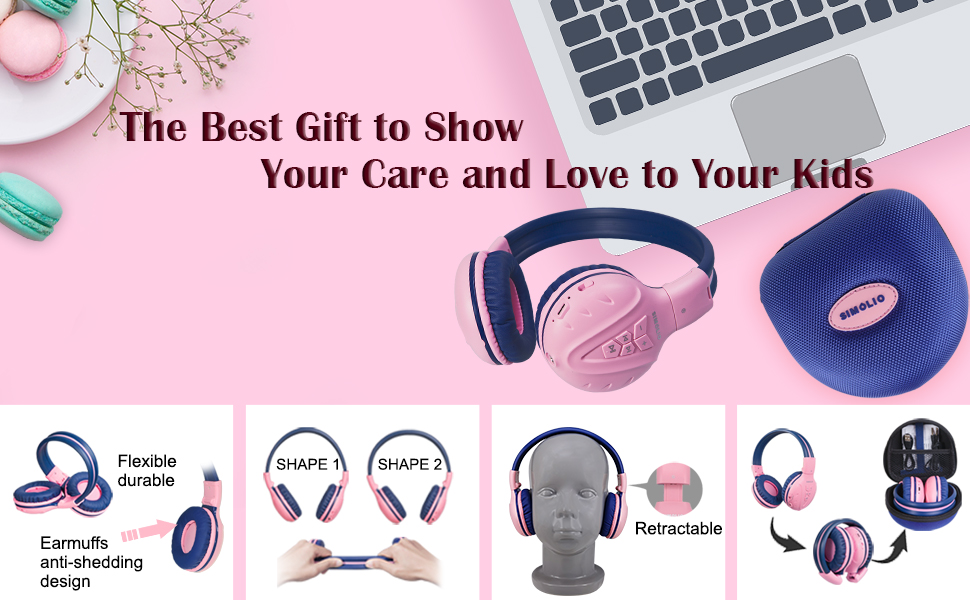
The flexible and durable design allows the headphones to withstand bending and twisting.
Што има во кутијата
Пакетот ги вклучува следните ставки:
- SIMOLIO Kids Wireless Headphones JH-711
- Кабел за полнење (USB)
- AUX Cable (3.5mm audio cable)
- Упатство за употреба
- Carrying EVA Case
Поставување
1. Полнење на слушалките
Before first use, fully charge the headphones. Connect the provided USB charging cable to the charging port on the headphones and to a USB power source (e.g., computer, wall adapter). The LED indicator will show charging status and turn off when fully charged.
2. Bluetooth спарување
- Проверете дали слушалките се исклучени.
- Press and hold the Multi-Function Button (MFB) until the LED indicator flashes blue and red alternately, indicating pairing mode.
- На вашиот уред (паметен телефон, таблет итн.), овозможете Bluetooth и пребарајте достапни уреди.
- Select "SIMOLIO JH-711" from the list of devices.
- Откако ќе се поврзе, LED индикаторот полека ќе трепка сино.
3. Врска во жичен режим
To use the headphones in wired mode, connect one end of the 3.5mm AUX cable to the audio jack on the headphones and the other end to the audio output of your device. The headphones will automatically switch to wired mode, even if the battery is dead.

The headphones support both wireless Bluetooth mode and wired mode via the included AUX cable.
4. Volume Limiter Adjustment
Locate the 3-level volume limiter switch on the headphones. Adjust the switch to the desired maximum volume level:
- 75dB (S): Recommended for toddlers or very quiet environments.
- 85dB (M): Recommended for children in general listening environments.
- 94dB (L): Recommended for adults or noisy environments.

Adjust the physical switch to select the appropriate volume limit.
5. Using the Sharing Port
The headphones feature an additional sharing jack on the right side. To share audio, plug another headphone into this port. This allows two users to listen to the same audio source simultaneously.

Connect another headphone to the sharing port to share audio with a friend.
Упатства за работа
1. Вклучување/исклучување
- Вклучување: Притиснете и држете го MFB приближно 3 секунди додека не светне LED индикаторот.
- Исклучено: Притиснете и држете го MFB приближно 3 секунди додека LED индикаторот не се исклучи.
2. Репродукција на музика
- Пушти/Пауза: Кратко притиснете го MFB.
- Следна песна: Кратко притиснете го копчето „+“.
- Претходна песна: Кратко притиснете го копчето „-“.
- Јачина на звук нагоре: Долго притиснете го копчето „+“.
- Намалување на јачината на звукот: Долго притиснете го копчето „-“.
3. Управување со повици
Кога е поврзано преку Bluetooth:
- Одговори/заврши повик: Кратко притиснете го MFB.
- Одбијте го повикот: Долго притиснете го MFB.

Вградениот микрофон овозможува разговори без користење на рацете.
Одржување
- Чистете ги слушалките со мека, сува крпа. Не користете абразивни средства за чистење или растворувачи.
- Избегнувајте изложување на слушалките на екстремни температури, влажност или директна сончева светлина.
- Store the headphones in the provided EVA carrying case when not in use to protect them from dust and damage.
- Не обидувајте се да ги расклопите или модифицирате слушалките, бидејќи тоа ќе ја поништи гаранцијата и може да предизвика оштетување.

The headphones fold compactly and fit into the included EVA case for easy storage and transport.
Решавање проблеми
| Проблем | Можна причина | Решение |
|---|---|---|
| Слушалките не се вклучуваат. | Слаба батерија. | Наполнете ги слушалките целосно. |
| Не може да се спари преку Bluetooth. | Слушалките не се во режим на спарување; Bluetooth-от на уредот е исклучен; премногу далеку од уредот. | Проверете дали слушалките се во режим на спарување (трепка црвено/сино). Вклучете го Bluetooth на уредот. Приближете ги слушалките до уредот (во рамките на 9 метри). |
| Нема звук во безжичен режим. | Јачината на звукот е прениска; не е поврзано; на уредот е избран неправилен аудио излез. | Increase headphone and device volume. Re-pair headphones. Check device audio settings. |
| Нема звук во жичен режим. | AUX cable not fully inserted; cable damaged; device volume too low. | Ensure AUX cable is securely connected at both ends. Try a different AUX cable. Increase device volume. |
Спецификации
| Карактеристика | Детал |
|---|---|
| Име на моделот | Kids Bluetooth Headphones JH-711 |
| Технологија за поврзување | Безжичен (Bluetooth), жичен (3.5 mm приклучок) |
| Bluetooth верзија | 4.0 |
| Опсег на Bluetooth | 9 метри |
| Контрола на бучава | Звучна изолација |
| Чувствителност | 94 dB (макс) |
| Траење на батеријата | 15 часа |
| Време на полнење | 3 часа |
| Тежина на ставката | 187 грама (6.6 унци) |
| Димензии на производот | 5.51 x 3.15 x 5.31 инчи |
| Материјал | Nylon, Stainless Steel (headband) |
| Материјал на кутијата за носење | ЕВА |
| Посебни карактеристики | 3 Adjustable Volume Limited, Microphone, Durable, Flexible, Foldable, Wired & Wireless, Share Port, EVA Case |
Официјално видео за производот
Ова видео нуди визуелен прегледview of the SIMOLIO Bluetooth Headphones for Kids with Case JH-711, demonstrating its features and functionality.
Гаранција и поддршка
SIMOLIO products are designed for quality and reliability. For specific warranty information, please refer to the warranty card included with your product or visit the official SIMOLIO website. If you encounter any issues or require technical assistance, please contact SIMOLIO customer support through their official channels.