
1. Вовед
This manual provides essential instructions for the installation, operation, and maintenance of your FSP iFP600 Uninterruptible Power Supply (UPS). Please read this manual thoroughly before installing or operating the unit to ensure proper function and safety. The FSP iFP600 is designed to provide reliable power backup and surge protection for your electronic devices.

Слика 1.1: напред view of the FSP iFP600 UPS, showcasinнеговиот компактен дизајн и интегриран LCD екран.
2. Инструкции за безбедност
Please adhere to these important safety guidelines during installation, operation, and maintenance of the UPS:
- Не го отворајте UPS-от casing. Внатре нема делови што може да ги сервисира корисникот. За секое сервисирање обратете се кај квалификуван сервисер.
- Do not connect appliances that could overload the UPS, such as laser printers, vacuum cleaners, or heaters.
- Осигурајте се дека UPS-от е поврзан со заземјен штекер за наизменична струја.
- Избегнувајте поставување на UPS-от на директна сончева светлина, во близина на извори на топлина или во средини со прекумерна прашина, влажност или корозивни супстанции.
- Position the UPS in a well-ventilated area to prevent overheating.
- In case of fire, use a dry chemical extinguisher. Water can be hazardous.
- The battery inside the UPS is not user-replaceable. Battery replacement should only be performed by qualified personnel.
3. Производот завршиview
The FSP iFP600 UPS provides reliable power protection for your critical electronics. It features a compact design and an intuitive LCD display for monitoring status.
3.1 Содржина на пакетот
По отварањето на пакувањето, проверете дали сите компоненти се присутни и неоштетени:
- FSP iFP600 UPS Unit
- Упатство за употреба (овој документ)
- Кабел за напојување
- USB комуникациски кабел
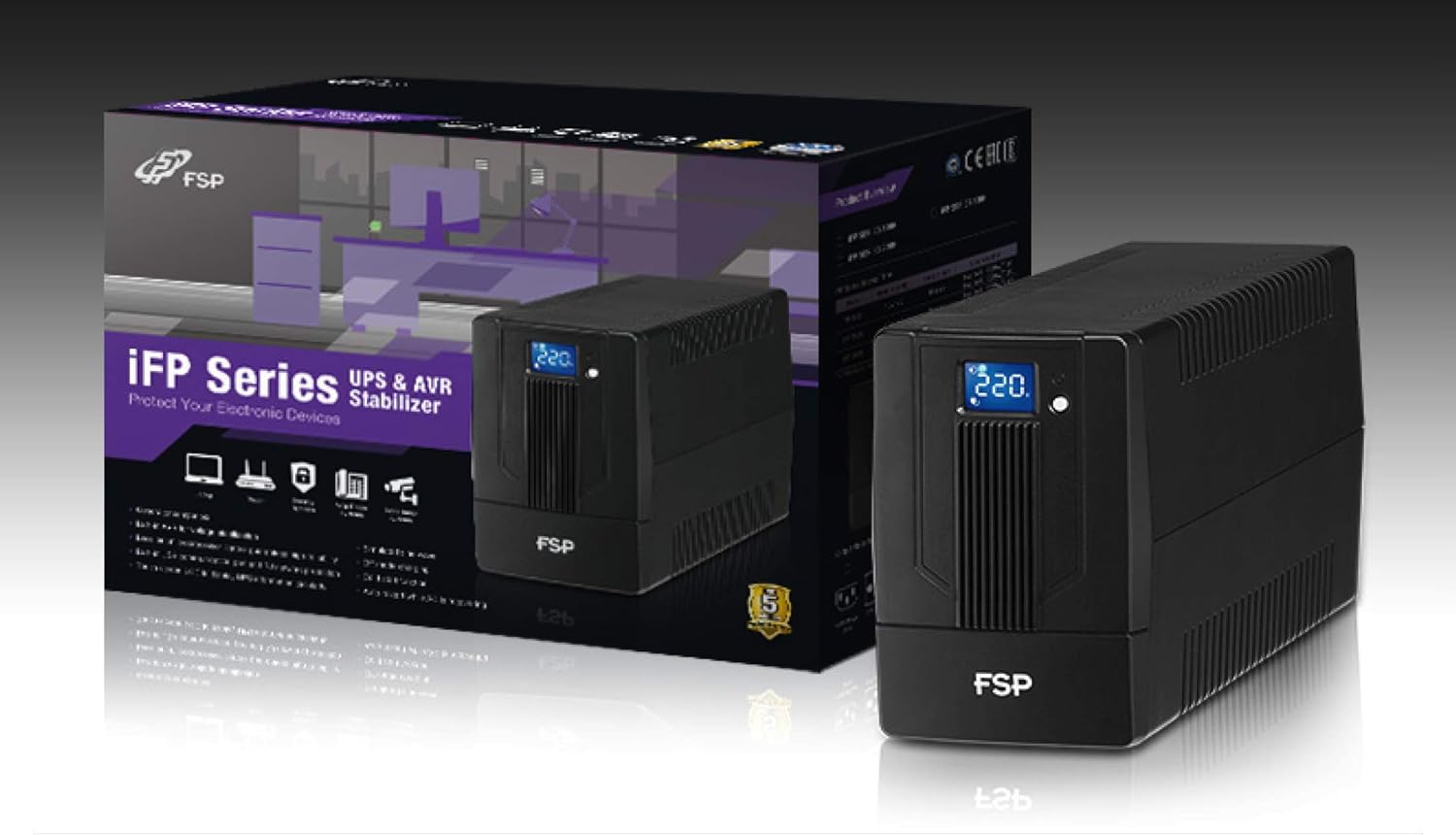
Image 3.1: The FSP iFP600 UPS shown alongside its retail packaging, illustrating the product's presentation.
3.2 Компоненти на задниот панел
Familiarize yourself with the connections on the rear panel of the UPS:

Слика 3.2: Детално view of the FSP iFP600 UPS rear panel, highlighting connection points.
- Продажни места: Two SCHUKO type outlets for connecting protected equipment.
- AC влез: Connects the UPS to the main utility power.
- Fuse/Breaker: Overcurrent protection for the UPS.
- USB комуникација: Port for connecting to a computer for monitoring and management.
- Combo RJ11/RJ45 Surge Protection: Provides surge protection for telephone/network lines.
4. Поставување и инсталација
Follow these steps to set up your FSP iFP600 UPS:
- Отпакување: Внимателно извадете го UPS-от од пакувањето. Проверете дали има оштетувања при транспортот.
- Поставување: Place the UPS on a flat, stable surface in a clean, cool, and well-ventilated area. Ensure adequate clearance around the unit for airflow.
- Почетно полнење: Connect the UPS to a standard grounded AC outlet using the provided power cord. Allow the unit to charge for at least 4-6 hours before initial use to ensure optimal battery performance. The UPS will charge whether it is turned on or off.
- Опрема за поврзување: Plug your computer, monitor, and other critical electronic devices into the UPS outlets (A). Do not connect surge suppressors or power strips to the UPS outlets.
- USB комуникација (опционално): Connect the USB cable from the UPS USB port (D) to your computer's USB port to enable power management software features (software not included, typically downloaded from manufacturer's webстраница).
- RJ11/RJ45 Protection (Optional): For surge protection of your telephone or network line, connect the incoming line to the 'IN' port of the Combo RJ11/RJ45 (E) and connect the 'OUT' port to your device.
5. Упатства за работа
5.1 Вклучување/исклучување
- За вклучување: Притиснете го и држете го копчето за вклучување на предната плоча приближно 2 секунди додека не слушнете звучен сигнал и LCD екранот не светне.
- За исклучување: Press and hold the power button for approximately 2 seconds until you hear a beep and the LCD display turns off.
5.2 Информации за LCD екранот
The FSP iFP600 features an LCD display that provides real-time status information. The display is touch-sensitive for navigating information.

Image 5.1: The LCD display of the FSP iFP600 UPS, indicating voltage output and its touch-screen functionality.
The LCD display typically shows:
- Влез волуменtage
- Излез Voltage
- Ниво на полнење на батеријата
- Ниво на оптоварување
- Operating Mode (e.g., AC mode, Battery mode)
- Warning/Fault Indicators
5.3 Battery Mode Operation
When the utility power fails or fluctuates outside acceptable limits, the UPS will automatically switch to battery mode. During battery mode, the UPS will provide power to connected equipment from its internal battery. An audible alarm will sound to indicate battery operation.
6. Одржување
Proper maintenance ensures the longevity and reliability of your UPS.
- Чистење: Користете мека, сува крпа за чистење на надворешноста на UPS-от. Не користете течни или аеросолни средства за чистење.
- Нега на батеријата: To maximize battery life, ensure the UPS is connected to AC power and fully charged. If the UPS is stored for an extended period, recharge it every three months to prevent battery degradation.
- Замена на батерија: The internal battery (12V / 7Ah x1) is not user-serviceable. Battery replacement should only be performed by FSP-certified service personnel or a qualified technician. Incorrect battery replacement can pose a risk of explosion or injury.
- Складирање: Store the UPS in a cool, dry place with adequate ventilation. Ensure the battery is fully charged before storage.
7 Смена на проблеми
Refer to the following table for common issues and their solutions. If the problem persists, contact FSP support.
| Симптом | Звучен аларм | Можна причина | Решение |
|---|---|---|---|
| UPS operating on battery power | Бипови на секои 10 секунди | Utility power failure or fluctuation | Save work and shut down equipment if power outage is prolonged. UPS will return to AC mode when power is restored. |
| Предупредување за слаба батерија | Звучи секоја секунда | Battery charge is critically low | Immediately save work and shut down connected equipment. |
| Состојба на преоптоварување | Звучи секоја 0.5 секунда | Connected equipment exceeds UPS capacity | Disconnect non-essential equipment until the alarm stops. Ensure total load is within UPS capacity. |
| Дефект на UPS-от | Континуирано пипкање | Внатрешен дефект или дефект | Turn off the UPS and disconnect it from the AC outlet. Contact FSP technical support. |
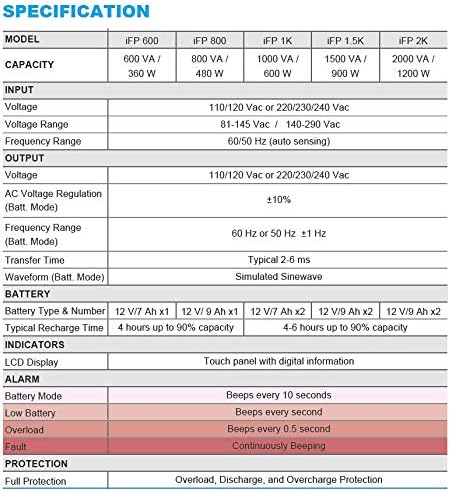
Image 7.1: Excerpt from the FSP iFP series specification table, detailing alarm indicators and their meanings.
8. Спецификации
Detailed technical specifications for the FSP iFP600 UPS:
| Карактеристика | Спецификација |
|---|---|
| Модел | iFP 600 |
| Капацитет | 600 VA / 360 W |
| Влез волуменtage | 110/120 Vac or 220/230/240 Vac |
| Влез волуменtagе опсег | 81-145 Vac / 140-290 Vac |
| Опсег на влезна фреквенција | 60/50 Hz (автоматско сензорирање) |
| Излез Voltage | 110/120 Vac or 220/230/240 Vac |
| AC Voltagд Регулација (Бат. режим) | ± 10% |
| Output Frequency Range (Batt. Mode) | 60 Hz or 50 Hz ±1 Hz |
| Време на трансфер | Типични 2-6 ms |
| Брановидна форма (режим на летви) | Симулиран син бран |
| Тип и број на батерија | 12V / 7Ah x1 |
| Типично време на полнење | 4 часа капацитет до 90%. |
| Индикатори | LCD Display (Touch panel with digital information) |
| Заштита | Overload, Discharge, and Overcharge Protection |
| Тежина на ставката | 9.24 фунти (4.2 кг) |
| Димензии на производот (ДxШxВ) | 11.81 x 3.98 x 5.59 инчи |
| Боја | Црното |
| Материјал | Метал |
9. Гаранција и поддршка
FSP products are designed for reliability and performance. For warranty information, please refer to the warranty card included with your product or visit the official FSP website. For technical support, troubleshooting assistance, or service inquiries, please contact FSP customer service through their official channels.
Можете да најдете повеќе информации и ресурси за поддршка на FSP Store on Amazon.