
1. Вовед
This manual provides instructions for the proper setup, operation, and maintenance of your Mitel Cordless Headset and DECT Module Bundle. This bundle is designed to enhance communication efficiency by providing wireless freedom for users of compatible Mitel IP phones.
Компатибилност на производот: This bundle is compatible with Mitel 5330e, 5340e, and 5360e IP phones.
2. Содржина на пакетот
Before proceeding with the setup, ensure all components are present in your package:
- Mitel Cordless Headset
- Mitel DECT Module (Model 50005712)
- Држач за полнење на слушалки
- Headband, Battery, and Earhook accessories for the headset
- Connecting cables for the DECT Module

Figure 2.1: Included Headset Accessories (Headband, Battery, Earhook)
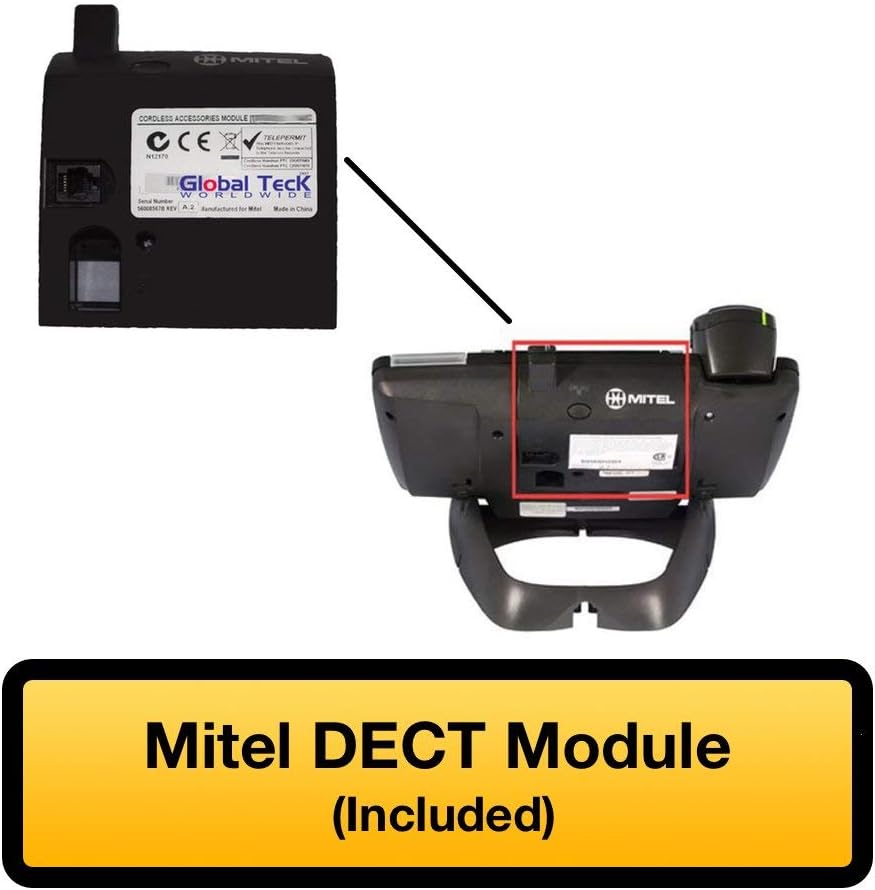
Figure 2.2: Mitel DECT Module
3. Упатства за поставување
3.1. Installing the DECT Module
- Locate the accessory port on the back of your compatible Mitel IP phone (5330e, 5340e, or 5360e).
- Carefully align the Mitel DECT Module with the accessory port and slide it into place until it clicks securely.
- Connect the provided cable from the DECT Module to the headset charging cradle.

Figure 3.1: Mitel IP Phone with DECT Module Installed

Figure 3.2: DECT Module with Cable Connection
3.2. Полнење на слушалките
Place the cordless headset into the charging cradle. Ensure the headset is properly seated and the charging indicator light illuminates. A full charge provides approximately 8 hours of talk time and 43 hours of standby time.
3.3. Pairing the Headset with the DECT Module
The headset and DECT module are typically pre-paired. If re-pairing is necessary:
- Осигурајте се дека слушалките се наполнети и вклучени.
- Locate the Cordless Module pairing button on the DECT Module (refer to Figure 3.3).
- Press and hold the pairing button on the DECT Module until the indicator light begins to flash.
- Follow the headset's specific pairing instructions, usually involving pressing a button on the headset. The indicator lights on both devices will confirm successful pairing.

Figure 3.3: DECT Module Features - Pairing Button and Cradle Cable
4. Упатства за работа
4.1. Носење на слушалките
The headset can be worn in an over-the-head style using the included headband for comfort and stability.

Figure 4.1: Over-the-Head Wearing Style
4.2. Управување со повици
- Иницирај повик: Press the call button on the headset. Dial the number using your Mitel IP phone.
- Одговори на повикот: When an incoming call rings, press the call button on the headset.
- Крај на повикот: Press the call button on the headset to terminate an active call.
- Контрола на јачината на звукот: Use the volume controls on the headset or your Mitel IP phone to adjust audio levels.
The integrated functionality of the Cordless (DECT) Headset eliminates the need for a handset lifter, allowing direct call control from the headset.
4.3. LED индикатори
The headset features LED indicators that provide status information, such as power, charging status, and call activity. Refer to the headset's specific user guide for detailed indicator meanings.
5. Одржување
To ensure the longevity and optimal performance of your Mitel Cordless Headset and DECT Module:
- Чистење: Use a soft, dry cloth to clean the headset and DECT module. Avoid using harsh chemicals or abrasive materials.
- Складирање: When not in use, store the headset in its charging cradle to maintain battery life.
- Нега на батеријата: Avoid fully discharging the headset battery frequently. Charge it regularly.
6 Смена на проблеми
If you encounter issues with your Mitel Cordless Headset and DECT Module, try the following:
- No Audio/Cannot Hear: Ensure the headset is powered on and properly paired. Check the volume settings on both the headset and the Mitel IP phone.
- Не можам да воспоставувам/примам повици: Verify the DECT Module is securely connected to the IP phone. Confirm the headset is paired and within range.
- Слушалките не се полнат: Ensure the headset is correctly seated in the charging cradle and the cradle cable is connected to the DECT module. Check for any obstructions on the charging contacts.
- Пречки: Оддалечете се од други безжични уреди што можат да предизвикаат пречки.
- Повторно спарување: If connection issues persist, attempt to re-pair the headset with the DECT module as described in Section 3.3.
7. Спецификации
| Карактеристика | Спецификација |
|---|---|
| Име на моделот | Mitel Cordless Headset |
| Број на модел на ставка | 50005712 |
| Технологија за поврзување | Безжичен |
| Технологија на безжична комуникација | DECT |
| Компатибилни уреди | Mitel Phones (5330e, 5340e, 5360e) |
| Живот на батеријата (време за разговор) | 8 часа |
| Живот на батеријата (време на подготвеност) | 43 часа |
| Тип на контрола | Контрола на медиуми, далечински управувач |
| Материјал | Метал, пластика |
| Боја | Црна/Сребрена |
| Тежина на ставката | 16 унци (1 фунта) |
| Димензии на производот | 8.6 x 5.2 x 5 инчи |
| UPC | 751889011785 |
| Производител | Мител |
8. Гаранција и поддршка
8.1. Обновена гаранција на Amazon
This product is part of the Amazon Renewed program. If you are not satisfied with your purchase, renewed products are eligible for replacement or refund under the Amazon Renewed Guarantee. Please refer to Amazon's official Renewed program terms for full details.
8.2. Техничка поддршка
For technical assistance or further inquiries, Global Teck's US-based support specialists are available to help. Contact information can typically be found on your purchase documentation or the Global Teck webсајт.