
1. Вовед
This manual provides detailed instructions for the installation, operation, and maintenance of your Lapetus 4-channel 1080N Hybrid 5-in-1 AHD DVR. This Digital Video Recorder is designed for comprehensive surveillance, supporting multiple camera technologies including Analog, HD-TVI, CVI, AHD, and wired IP cameras. It features H.265+ video compression for efficient storage and offers various recording and remote viewспособности за работа.
Клучни карактеристики:
- 5-in-1 Hybrid Compatibility: Supports CVBS, AHD, TVI, CVI, and wired IP cameras.
- 1080N Resolution: Обезбедува јасна и детална видео-фудбаtage.
- H.265+ видео компресија: Advanced compression technology for reduced storage space and improved efficiency compared to H.264.
- Откривање на движење: Configurable motion detection zones and real-time alerts.
- Далечински ViewИНГ: Пристап до храна во живо и снименаtage via smartphone, tablet, or PC using the XMEYE app.
- Повеќе режими на снимање: Continuous, scheduled, and motion-triggered recording options.


2. Што има во кутијата
Upon unboxing your Lapetus DVR, please verify that all the following components are included:
- Lapetus 4CH 1080N Hybrid 5-in-1 AHD DVR Unit
- Адаптер за напојување
- USB глушец
- Упатство за употреба (овој документ)
- Mounting Screws for HDD (if applicable)

3. Поставување
3.1 Инсталација на хардвер
Follow these steps to connect your DVR to a monitor and input devices:
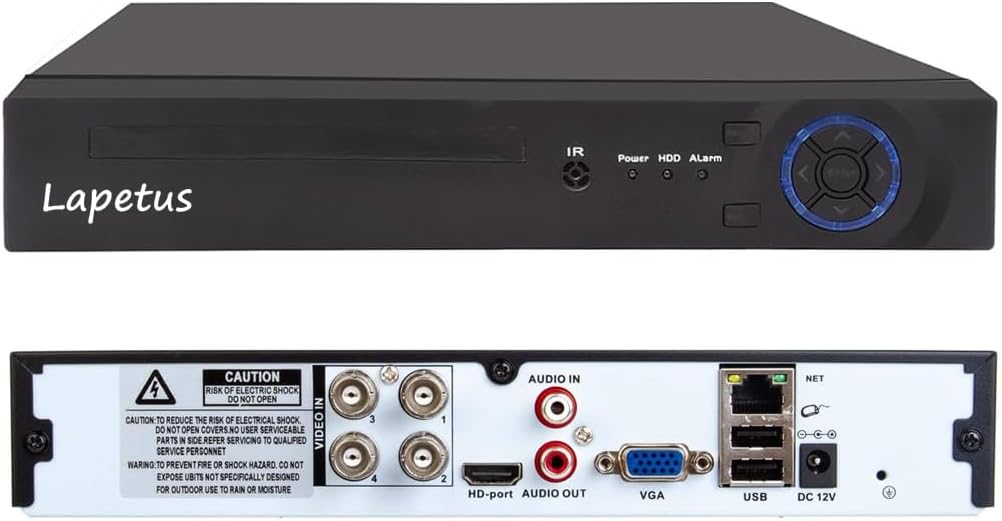
- Connect your monitor to the DVR using either the HDMI or VGA port.
- Plug the USB mouse into one of the USB ports on the back of the DVR.
- Connect the power adapter to the DVR's DC 12V input and then to a power outlet.
- Connect your surveillance cameras to the 'VIDEO IN' BNC ports on the back of the DVR. Ensure each camera is also powered.
- For remote access, connect an Ethernet cable from the DVR's LAN port to your router.
3.2 Инсталација на хард диск
The DVR unit does not include a hard drive. A hard drive is required for recording and playback. It is recommended to use a surveillance-grade HDD. Make sure to turn off the DVR before installing or replacing the hard drive.
- Unscrew the top cover of the DVR unit.
- Connect the SATA data cable and power cable from the DVR to the corresponding ports on the hard drive.
- Secure the hard drive to the bottom of the DVR casing using the provided screws.
- Вратете го горниот капак и прицврстете го со завртки.
3.3 Почетна конфигурација
Upon first power-up, the DVR will guide you through an initial setup wizard. This typically includes:
- Избор на вашиот претпочитан јазик.
- Setting the date and time, including time zone.
- Creating a strong password for the administrator account.
- Configuring network settings (DHCP is usually enabled by default).
- Adjusting display resolution to match your monitor (e.g., 1920x1080).
3.4 Поставување на мобилна апликација
За да се овозможи далечинско viewing, download and configure the XMEYE mobile application:
- Scan the QR code displayed on your DVR's monitor or search for "XMEYE" in your device's app store (iOS App Store, Андроид АПК).
- Install and open the XMEYE app. Register a user account and log in.
- Tap the "+" icon to add a new device. Scan the QR code on your DVR's monitor or manually enter the device's serial number.
- Once successfully connected, you can view live feeds and manage your DVR remotely.

4. Работење
4.1 Во живо View
After successful setup, the DVR will display live feeds from connected cameras on your monitor. You can switch between single-camera view, мрежа со повеќе камери view (e.g., 1+7, 2+2), and customize the display layout using the mouse.
4.2 Снимање и репродукција
The DVR supports various recording methods and allows for easy playback of recorded footage.
- Континуирано снимање: Снимки 24/7.
- Закажано снимање: Поставете специфични времиња за снимање.
- Снимање на откривање на движење: Снима само кога ќе се открие движење, заштедувајќи простор за складирање.
To play back footage, access the playback menu, select the desired date and camera, and use the timeline to navigate through recordings. Options for fast forward, fast retreat, and single-frame play are available.

4.3 Детекција на движење
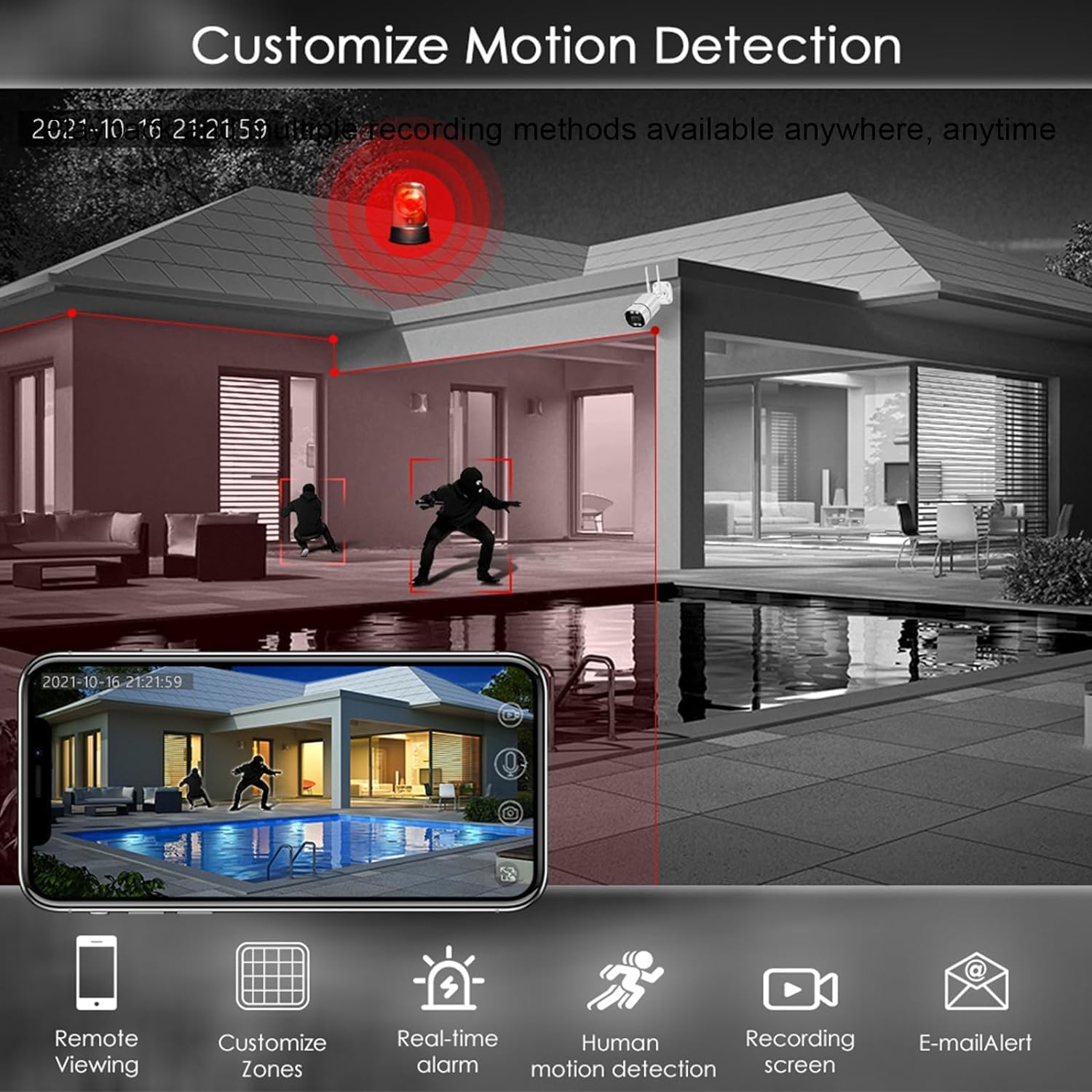
Configure motion detection settings to enhance security and optimize storage:
- Прилагодете ги зоните: Дефинирајте специфични области во рамките на камерата view за детекција на движење.
- Real-time Alarm: Receive instant alerts when motion is detected.
- Детекција на човечко движење: Напредна детекција за минимизирање на лажни аларми.
- Известување преку е-пошта: Receive notifications via email.
4.4 Далечински управувач Viewинг
Utilize the XMEYE mobile app to view your camera feeds and recorded footage from anywhere with an internet connection. The app provides a user-friendly interface for managing your surveillance system on the go.
5. Одржување
5.1 Општо одржување
- Keep the DVR unit in a well-ventilated area to prevent overheating.
- Regularly clean the exterior of the DVR with a soft, dry cloth.
- Осигурете се дека сите приклучоци на кабли се безбедни.
5.2 Управување со складирање
Periodically check the hard drive status and free space. If the hard drive becomes full, older footage will be overwritten unless configured otherwise. You can format the hard drive through the DVR's system settings if needed.
6 Смена на проблеми
- Нема видео излез: Check monitor cable connections (HDMI/VGA) and ensure the monitor is set to the correct input. Verify DVR power.
- Нема снимање: Ensure a hard drive is installed and properly formatted. Check recording schedules and motion detection settings.
- Далечински Viewпроблеми со: Verify the DVR has an active internet connection (LAN cable connected to router). Ensure the XMEYE app is correctly configured and the device is added.
- Лош квалитет на сликата: Check camera connections. Ensure the DVR's display resolution matches your monitor's capabilities.
- DVR Not Powering On: Check the power adapter and power outlet.
7. Спецификации
- Број на модел: LT-6704NS
- Број на канали: 4
- Видео компресија: H.265 +
- Влези за видео: CVBS, AHD, TVI, CVI, Wired IP
- Видео излези: hdmi, vga
- Аудио влезови: RCA
- USB порти: Да
- Мрежен интерфејс: LAN (Етернет)
- Напојување: DC 12V
- Димензии: 13.8 x 10.9 x 3 инчи
- Тежина на ставката: 2.49 фунти
8. Гаранција и поддршка
For warranty information and technical support, please refer to the documentation provided with your purchase or contact Lapetus customer service. Protection plans may be available for extended coverage.