
1. Вовед
Thank you for choosing the SUNSHINE P-1503T Analog Power Supply. This manual provides essential information for the safe and efficient operation, setup, maintenance, and troubleshooting of your device. Please read this manual thoroughly before using the product and keep it for future reference.
The SUNSHINE P-1503T is a versatile 15-volt, 3-amp analog power supply designed primarily for mobile phone maintenance. It features touch-sensitive controls and includes two USB ports for convenient mobile testing and charging.
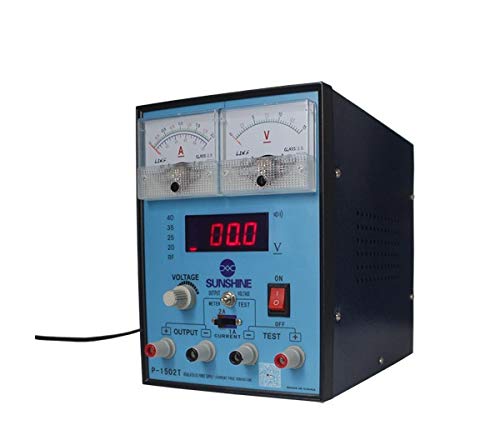
Слика 1: Предна страна view of the SUNSHINE P-1503T Analog Power Supply. This image shows the device's display, control knobs, and output terminals, including the two USB ports.
2. Информации за безбедност
ПРЕДУПРЕДУВАЊЕ: Непочитувањето на овие безбедносни упатства може да резултира со електричен удар, пожар или сериозни повреди.
- Секогаш поврзувајте го напојувањето со заземјен електричен штекер.
- Не ракувајте со уредот на влажно или damp услови.
- Обезбедете соодветна вентилација за да спречите прегревање. Не блокирајте ги отворите за вентилација.
- Не го отворајте casing од напојувањето. Внатре нема делови што може да ги сервисира корисникот. За секое сервисирање обратете се кај квалификуван персонал.
- Избегнувајте допирање на излезните терминали кога уредот е вклучен.
- Disconnect the power cord from the outlet before cleaning or if the device will not be used for an extended period.
- Користи само наведениот влезен волуменtage (15 Volts) as indicated on the device.
3. Поставување
3.1 Отпакување
- Carefully remove the power supply from its packaging.
- Inspect the device for any signs of damage during transit. If damaged, do not use and contact your supplier.
- Ensure all accessories are present (e.g., power cord, test leads if included).
3.2 Поврзување со напојување
- Place the power supply on a stable, level surface with adequate ventilation.
- Connect the provided power cord to the power input socket on the rear of the device.
- Вклучете го другиот крај од кабелот за напојување во соодветен заземјен електричен штекер.
4. Упатства за работа
4.1 Вклучување/исклучување
- To power on the device, press the power switch located on the front panel. The display will illuminate.
- За да го исклучите, повторно притиснете го прекинувачот за вклучување.
4.2 Adjusting Output
The P-1503T is an analog power supply, typically meaning voltage and current are set via rotary knobs.
- Користете го Voltage Копче за прилагодување за да ја поставите саканата излезна јачина на звукtage. Monitor the voltage приказ.
- Користете го Копче за тековно прилагодување to set the desired current limit. Monitor the current display.
- The device emits a sound upon touch, indicating interaction with its controls.
4.3 Користење на USB порти
The power supply features two USB ports on the front panel:
- USB Port 1 (Mobile Testing): Connect a mobile device here for diagnostic purposes. This port is designed to provide stable power for testing mobile phone circuits.
- USB Port 2 (Mobile Charging): Connect a mobile device here for charging. This port delivers power suitable for recharging mobile phone batteries.
Note: Always ensure the output voltage and current settings are appropriate for the device being connected to prevent damage.
5. Одржување
5.1 Чистење
- Ensure the power supply is turned off and disconnected from the main power outlet before cleaning.
- Користете мека, сува крпа за да ја избришете надворешноста на уредот.
- Do not use liquid cleaners, aerosols, or solvents, as these may damage the casing или внатрешни компоненти.
- Држете ги отворите за вентилација чисти од прашина и остатоци.
5.2 Складирање
When not in use, store the power supply in a cool, dry place, away from direct sunlight and extreme temperatures.
6 Смена на проблеми
| Проблем | Можна причина | Решение |
|---|---|---|
| Уредот не се вклучува. |
|
|
| Нема излез волtagе/струја. |
|
|
| USB портите не работат. |
|
|
7. Спецификации
| Карактеристика | Детал |
|---|---|
| Бренд | СОНЦЕ |
| Модел | P-1503T |
| Компатибилни уреди | Мобилен телефон |
| Тип на конектор | ATX |
| Форма фактор | ATX |
| Метод на ладење | Воздух |
| Максимален влезен волtage | 15 волти |
| Минимален влезен волуменtage | 15 волти |
| Производител | СОНЦЕ |
| System Bus Connector Type | Конектор 2 |
| Извор на енергија | Надворешен |
| ASIN | B0847QS2FX |
8. Гаранција и поддршка
This product is covered by a standard manufacturer's warranty. Please refer to the warranty card included with your purchase for specific terms and conditions. For technical support, service, or warranty claims, please contact your retailer or the manufacturer directly.
For the latest information and support, please visit the official SUNSHINE webсајт (доколку е достапен).