
1. Производот завршиview
The Cecotec Conga 1090 Connected Force is a versatile 4-in-1 robot vacuum cleaner designed to sweep, vacuum, mop, and scrub your floors. It features intelligent navigation, app control, and compatibility with voice assistants for a comprehensive cleaning experience.

Image 1.1: The Conga 1090 Connected Force robot vacuum cleaner, showcasing its sleek design, accompanying smartphone application interface, and compatibility with Alexa and Google Assistant.
Клучни карактеристики:
- Функционалност 4-во-1: Мете, правосмукалка, крпи и трие истовремено.
- iTech Smart 2.0 навигација: Intelligent navigation system for efficient cleaning paths.
- Контрола на апликацијата: Управувајте со режимите на чистење, распоредот, вшмукувањето и нивоата на триење од вашиот паметен телефон.
- Компатибилност со гласовниот асистент: Работи со Amazon Alexa и Google Assistant за контрола без раце.
- Turbo Mode on Carpets: Automatically increases suction power on carpets for deeper cleaning.
- BestFriend Care System: Includes a special silicone brush designed for pet hair.
- Повеќе начини на чистење: Auto, Edges, Manual, Room, Spiral, and Return to Home.
- Програмирачки: Schedule cleaning sessions 24/7.
- Долг век на батеријата: До 160 минути континуирано чистење.
- Високоефикасен филтер: Captures allergens and fine dust particles.
2. Водич за поставување
2.1 Распакување и проверка на компонентите
Внимателно отстранете ги сите компоненти од пакувањето. Проверете дали се присутни сите ставки наведени подолу:
- Cecotec Conga 1090 Connected Force Robot Vacuum Cleaner
- Полнач и адаптер за напојување
- Multifunction Brush (bristles and silicone)
- BestFriend Care Silicone Brush
- 4 странични четки
- Mixed Tank (solids and liquids)
- Mop and Mop Pad
- Филтер со висока ефикасност
- Водич за инструкции
2.2 Поставување на базата за полнење
Поставете ја базата за полнење покрај ѕид на отворено место, осигурувајќи се дека нема пречки во рамките на 1 метар (3 стапки) од страните и 2 метри (6 стапки) пред базата. Поврзете го адаптерот за напојување со базата за полнење и вклучете го во штекер.
2.3 Почетно полнење
Place the robot vacuum cleaner onto the charging base. Ensure the charging contacts on the robot align with those on the base. The robot will begin charging automatically. For optimal battery life, fully charge the robot before its first use (approximately 3-4 hours).
2.4 Преземање апликации и поврзување со Wi-Fi
- Download the official Cecotec Conga app from your smartphone's app store (Google Play Store or Apple App Store).
- Open the app and follow the on-screen instructions to create an account and add your Conga 1090 Connected Force robot.
- During the connection process, ensure your smartphone is connected to a Wi-Fi мрежа од 2.4 GHz. The robot is not compatible with 5GHz networks. If you experience connection issues, verify that your router's 2.4GHz Wi-Fi channel is enabled at 20Hz (in addition to 40Hz if applicable).
- Once connected, you can control the robot and access all its features via the app.

Image 2.1: Controlling the robot vacuum cleaner using the dedicated smartphone application.
2.5 Поставување гласовен асистент (опционално)
За интегрирање со Amazon Alexa или Google Assistant:
- Отворете ја апликацијата Alexa или Google Home на вашиот паметен телефон.
- Одете во делот „Вештини“ или „Работи со Google“.
- Пребарај за 'Cecotec Conga' and enable the skill/service.
- Link your Cecotec account when prompted.
- You can now use voice commands to start, stop, or send the robot back to its charging base.
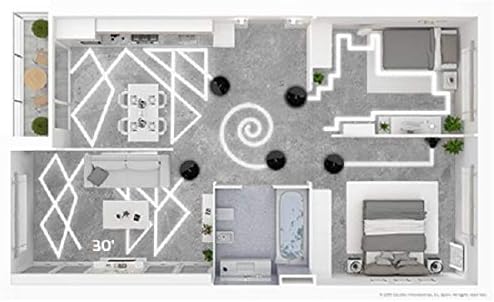
Image 2.2: The robot vacuum cleaner integrated with smart home voice assistants.
3. Упатства за работа
3.1 Започнување и прекинување на чистењето
- Преку роботско копче: Press the main power button on the robot once to start cleaning in Auto mode. Press again to pause. Hold to send it back to the charging base.
- Преку апликација: Open the Conga app, select your robot, and tap 'Clean' or choose a specific cleaning mode.
- Преку гласовна команда: Use your configured voice assistant (e.g., "Alexa, tell Conga to start cleaning").
3.2 Режими на чистење
The Conga 1090 Connected Force offers 6 cleaning modes:
- Автоматски: The robot intelligently cleans the entire floor area.
- Рабови: Чисти по должината на ѕидовите и рабовите на мебелот.
- Прирачник: Контролирајте го движењето на роботот рачно преку апликацијата.
- Соба: Чисти одредена просторија или област.
- Спирала: Чисти концентрирана површина во спирален модел.
- Врати се дома: Роботот се враќа на својата база за полнење.

Image 3.1: Visualization of different cleaning patterns the robot can perform.
3.3 Adjusting Suction and Scrubbing Levels
Through the Conga app, you can select from three power levels (Eco, Normal, Turbo) for vacuuming and three scrubbing levels for mopping, adapting to different floor types and cleaning needs.
3.4 Закажување чистење
Use the app to set up daily or weekly cleaning schedules. The robot will automatically start cleaning at the programmed times.
4. Одржување
Редовното одржување обезбедува оптимални перформанси и го продолжува животниот век на вашата роботска правосмукалка.
4.1 Празнење на резервоарот за прашина
After each cleaning cycle, or when indicated by the app, remove the dust tank and empty its contents into a waste bin. Clean any debris from the tank and filter compartment.
4.2 Четки за чистење
- Multifunction Brush / BestFriend Care Brush: Remove the main brush from the robot. Use the included cleaning tool to cut and remove any tangled hair or fibers.
- Странични четки: Periodically check side brushes for wear or entanglement. Remove any debris and replace worn brushes as needed.

Image 4.1: The robot vacuum cleaner's main brush engaging with a carpeted surface.
4.3 Чистење на филтри
Tap the high-efficiency filter gently to remove dust. Do not wash the HEPA filter with water, as this can damage it. Replace the filter every 3-6 months, depending on usage.
4.4 Cleaning the Mop and Water Tank
After mopping, remove the mop pad and wash it thoroughly. Empty any remaining water from the mixed tank and allow it to air dry before reinserting. Clean the water outlet ports on the tank to prevent blockages.
4.5 Сензори за чистење
Wipe the robot's sensors (anti-drop sensors, obstacle detection sensors) with a clean, dry cloth to ensure accurate navigation.
5 Смена на проблеми
If you encounter issues with your Conga 1090 Connected Force, refer to the following common solutions:
- Роботот не се полни: Ensure the charging base is plugged in and the robot's charging contacts are clean and properly aligned with the base.
- Роботот не се поврзува со Wi-Fi: Verify your Wi-Fi network is 2.4GHz. Check router settings to ensure the 2.4GHz channel is enabled at 20Hz. Restart both the robot and your router.
- Лоши перформанси за чистење: Empty the dust tank, clean all brushes, and check the filter for blockages. Ensure sensors are clean.
- Роботот често се заглавува: Clear obstacles from the cleaning area. Ensure cables, loose rugs, or small items are removed.
- Невообичаени звуци: Check main and side brushes for tangled hair or debris. Inspect wheels for obstructions.
For persistent issues, consult the full instruction manual or contact Cecotec customer support.
6. Спецификации
| Карактеристика | Спецификација |
|---|---|
| Бренд | Цекотек |
| Број на модел | Conga 1090 Connected Force |
| Боја | Црното |
| Димензии на производот (Д x Ш x В) | 32.5 x 32.5 x 7.5 cm |
| Капацитет на резервоарот за прашина | 500 милилитри |
| Voltage | 14.4 волти |
| Материјал | Пластика |
| Ниво на бучава | 64 dB |
| Компатибилност | Amazon Echo, Google Home, паметни телефони |
| Тежина на ставката | 4.1 килограми |
| Тип на филтер | ХЕПА |
| Траење на батеријата | До 160 минути |
| Тип на контрола | Контрола на апликацијата |
7. Гаранција и поддршка
For warranty information, please refer to the documentation included with your product or visit the official Cecotec website. For technical support or service inquiries, please contact Cecotec customer service through their official channels.