
Вовед
Welcome to your new Gembird GHS-U-5.1-01 USB 5.1 Surround Headset. This manual provides essential information for setup, operation, and maintenance to ensure optimal performance and an immersive audio experience.
Содржина на пакетот
Пакетот треба да ги содржи следните ставки:
- Gembird GHS-U-5.1-01 USB 5.1 Surround Headset

Image: Retail packaging for the Gembird GHS-U-5.1-01 USB 5.1 Surround Headset, showing the headset inside a clear window.
Производот завршиview
The Gembird GHS-U-5.1-01 is a USB headset designed for immersive audio experiences with 5.1 surround sound. It features an adjustable microphone, built-in volume control, comfortable ear pads, and an adjustable headband for extended use.
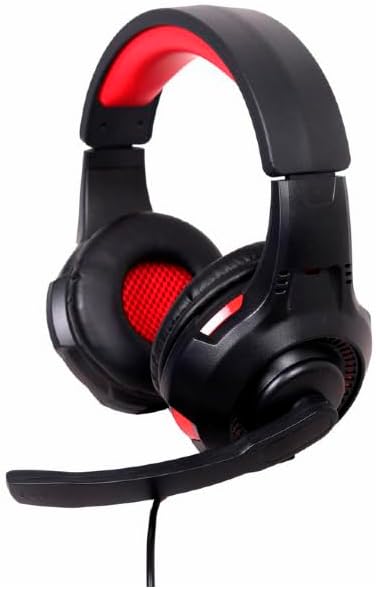
Слика: Под агол view of the Gembird GHS-U-5.1-01 USB 5.1 Surround Headset, showcasing its black and red design with the microphone boom extended.

Слика: напред view of the Gembird GHS-U-5.1-01 USB 5.1 Surround Headset, highlighting the adjustable headband and earcups.

Image: Close-up of the in-line control unit for the Gembird GHS-U-5.1-01 headset, showing volume up/down and microphone mute buttons.
Поставување
Поврзување на слушалките
The Gembird GHS-U-5.1-01 headset connects via a standard USB port.
- Пронајдете достапна USB порта на вашиот компјутер.
- Вклучете го USB конекторот на слушалките во USB-портата.
- Вашиот оперативен систем треба автоматски да ги открие и инсталира потребните драјвери. Овој процес може да потрае неколку моменти.
- Once installed, the headset will be ready for use as an audio input and output device.
Audio Settings Configuration
For optimal 5.1 surround sound experience, you may need to configure your computer's audio settings.
- Windows: Go to "Sound Settings" (right-click speaker icon in taskbar) > "Sound Control Panel" > "Playback" tab. Select the Gembird headset, click "Configure," and choose "5.1 Surround."
- MacOS: Go to "System Preferences" > "Sound" > "Output" tab. Select the Gembird headset.
Упатства за работа
Контрола на јачината на звукот
The headset features an in-line remote control for easy volume adjustment.
- Користете го "+" копче за зголемување на јачината на звукот.
- Користете го „-“ копче за намалување на јачината на звукот.
Употреба на микрофон
The adjustable microphone boom allows for precise positioning.
- Position the microphone approximately 1-2 inches from your mouth for clear voice capture.
- Use the microphone mute button on the in-line remote to toggle the microphone on or off.
Прилагодување за удобност
Adjust the headband to fit comfortably on your head. The ear pads are designed for extended use.
Одржување
To ensure the longevity and performance of your headset, follow these maintenance guidelines:
- Чистење: Use a soft, dry cloth to wipe the headset. Do not use harsh chemicals or abrasive cleaners.
- Складирање: Store the headset in a clean, dry place away from extreme temperatures.
- Грижа за кабел: Избегнувајте остри свиткувања или прекумерно влечење на USB кабелот за да спречите оштетување.
Решавање проблеми
No Sound or Microphone Not Working
- Проверете ја USB конекцијата: Ensure the USB connector is fully inserted into the port. Try a different USB port.
- Проверете ги нивоата на јачина на звук: Verify that the volume on the in-line control, your computer's system volume, and application-specific volumes are not muted or set too low.
- Проверете ги поставките за аудио: Confirm that the Gembird headset is selected as the default playback and recording device in your computer's sound settings.
- Рестартирајте го компјутерот: Sometimes a simple restart can resolve driver or software conflicts.
Проблеми со квалитетот на звукот
- Ажурирање на возачот: Ensure your operating system drivers are up to date.
- Квалитет на изворот: Poor audio quality may stem from the audio source itself. Test with different audio files или апликации.
Спецификации
| Име на моделот | GHS-U-5.1-01 |
| Поврзување | Жичен USB |
| Форма фактор | На уво |
| Боја | Црното |
| Материјал | Aluminum (Enclosure) |
| Тежина | 0.4 килограми |
| Дополнителни карактеристики | Adjustable microphone boom, Built-in volume control, Comfortable ear pads, Adjustable headband |
Информации за гаранцијата
This Gembird headset comes with a 24 Month Manufacturer Guarantee. Please retain your proof of purchase for warranty claims. For detailed warranty terms and conditions, refer to the documentation provided with your product or contact Gembird customer support.
Поддршка
If you encounter issues not covered in this manual or require further assistance, please visit the official Gembird website or contact their customer support for technical assistance.