
Вовед
This manual provides detailed instructions for the installation, operation, maintenance, and troubleshooting of the HP ProDesk 400 G3 MS-7957 motherboard. Please read this manual thoroughly before proceeding with any installation or operation to ensure proper functionality and safety.
Информации за безбедност
Always observe the following safety precautions to prevent damage to the motherboard or injury to yourself:
- Исклучете го напојувањето од ѕидниот штекер пред да инсталирате или отстраните било кои компоненти.
- Wear an anti-static wrist strap or frequently touch a grounded metal object to discharge static electricity before handling the motherboard.
- Држете ја матичната плоча за нејзините рабови за да избегнете допирање на чувствителните компоненти.
- Обезбедете соодветна вентилација во куќиштето на компјутерот за да спречите прегревање.
- Држете ја матичната плоча подалеку од влага и екстремни температури.
Производот завршиview
The HP ProDesk 400 G3 MS-7957 is a MicroATX motherboard designed for Intel processors with an LGA 1151 socket. It supports DDR4 RAM and features a B250 chipset, offering a reliable foundation for desktop computing.
Клучни карактеристики
- Compatible CPU Brand: Интел
- Тип на штекер: LGA 1151/Socket H4
- Форма фактор: MicroATX
- В/И конектори: Ethernet (RJ-45), USB 2.0, USB 3.0, VGA, DisplayPort, HD Audio Jack
Идентификација на компоненти
Familiarize yourself with the layout of the motherboard to facilitate proper installation and connection of components.

Слика 1: Аголна view of the HP ProDesk 400 G3 MS-7957 motherboard. This image highlights the CPU socket (LGA 1151), four DDR4 RAM slots, PCIe slots, and various headers for front panel connections and storage devices.
Поставување и инсталација
Пред да започнете
- Осигурајте се дека куќиштето на вашиот компјутер е компатибилно со форм-факторот MicroATX.
- Gather all necessary components: CPU, RAM, CPU cooler, power supply, storage devices, and graphics card (if not using integrated graphics).
- Prepare your workspace by ensuring it is clean, well-lit, and static-free.
Инсталација на матична плоча
- Install the CPU into the LGA 1151 socket. Carefully align the CPU with the socket's notch and gently lower it into place. Close the retention arm.
- Нанесете термичка паста на процесорот и инсталирајте го ладилникот на процесорот според упатствата на производителот.
- Install the DDR4 RAM modules into the designated slots. Ensure they are fully seated until the clips lock into place.
- Mount the motherboard into the computer case using the appropriate standoffs and screws.
- Поврзете го главниот 24-пински ATX конектор за напојување и 4-пинскиот или 8-пинскиот конектор за напојување на процесорот од напојувањето со матичната плоча.
- Install any expansion cards (e.g., graphics card) into the PCIe slots.

Слика 2: Под агол од горе надолу view of the HP ProDesk 400 G3 MS-7957 motherboard. This perspective provides a clear view of the processor socket, memory slots, and the layout of the various internal connectors and components.
Поврзување периферни уреди
- Connect SATA storage devices (HDDs/SSDs) to the SATA ports on the motherboard.
- Connect front panel headers (power button, reset button, USB ports, audio jacks) to their respective pins on the motherboard. Refer to your case manual for specific pin assignments.
- Connect external peripherals such as monitor, keyboard, mouse, and Ethernet cable to the rear I/O panel.
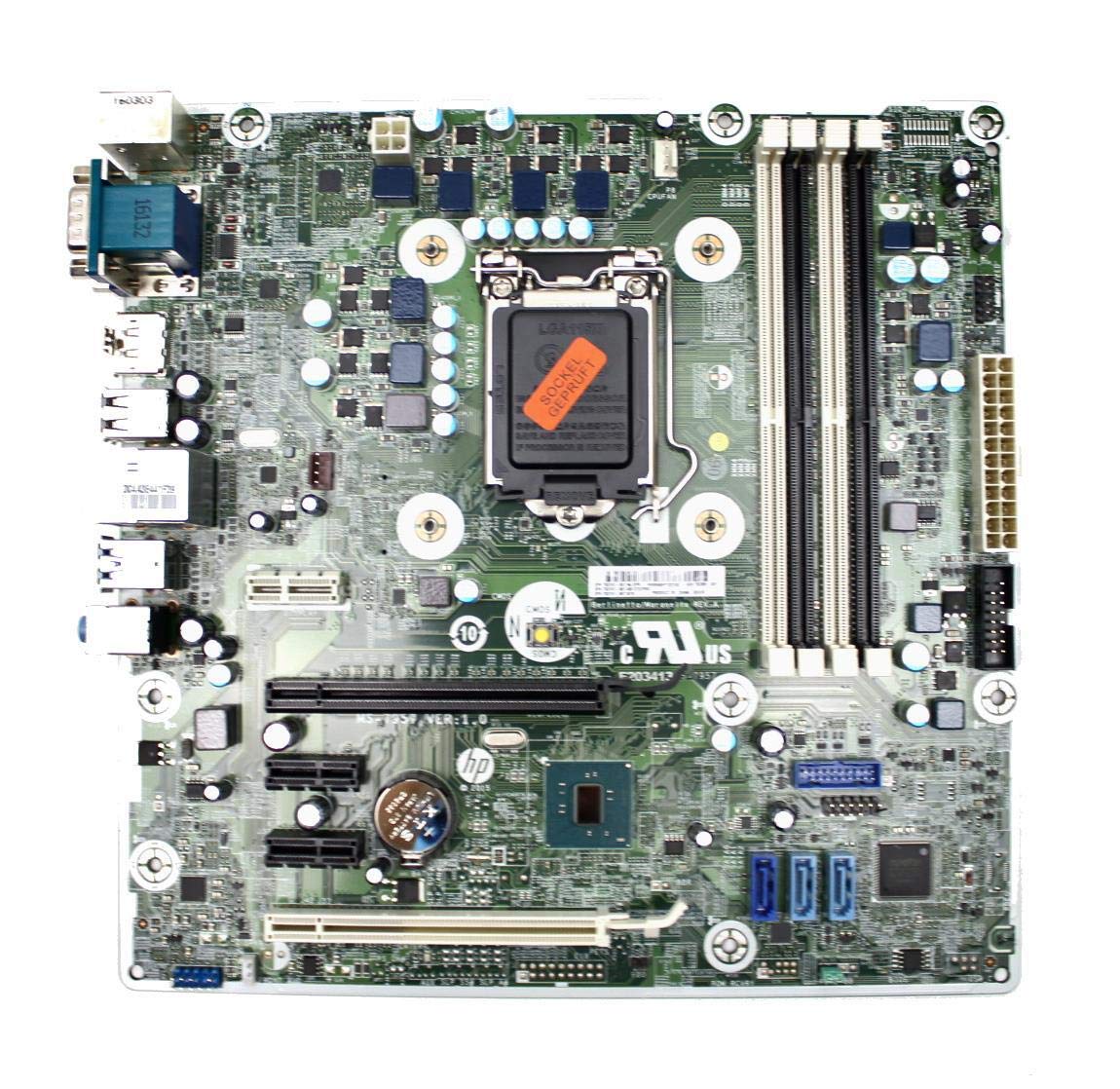
Figure 3: Rear I/O panel of the HP ProDesk 400 G3 MS-7957 motherboard. This image displays the available external connectivity options, including PS/2 ports, serial port, VGA, DisplayPort, USB 2.0, USB 3.0, Ethernet (RJ-45), and HD audio jacks.
Упатства за работа
Почетно вклучување
After all components are installed and connected, connect the power cable to the power supply and press the power button on your computer case. The system should initiate the boot process.
Конфигурација на BIOS/UEFI
За да пристапите до алатката за поставување BIOS/UEFI, притиснете го назначеното копче (најчесто) Дел, F2, F10, или F12) during the initial boot sequence. Here you can configure boot order, system time, and other hardware settings.
Инсталација на драјвери
After installing your operating system, it is crucial to install the latest drivers for your motherboard's chipset, integrated graphics, audio, and network adapter. These drivers can typically be found on the HP support website or the chipset manufacturer's webсајт.
Одржување
- Чистење: Редовно чистете ја прашината од матичната плоча и компонентите со компримиран воздух. Пред чистење, проверете дали системот е исклучен од струја и исклучен од струја.
- Ажурирања на BIOS/UEFI: Periodically check for BIOS/UEFI updates from HP's official support website. Updates can improve stability, compatibility, and performance. Follow update instructions carefully to avoid system damage.
- Ажурирања на возачот: Keep all system drivers updated to ensure optimal performance and compatibility with new software and hardware.
Решавање проблеми
Овој дел нуди решенија за вообичаени проблеми со кои може да се соочите:
- Без моќност: Check all power connections, including the 24-pin ATX and CPU power cables. Ensure the power supply is switched on and the wall outlet is functional.
- Нема приказ: Verify that your monitor is connected to the correct video output (VGA or DisplayPort) and is powered on. Reseat the graphics card (if applicable) and RAM modules.
- Нестабилност на системот/Паднувања: This could be due to overheating, faulty RAM, or outdated drivers. Check CPU and GPU temperatures, run memory diagnostic tools, and update drivers.
- Периферни уреди не се откриени: Ensure the peripheral is properly connected. Try a different port or update the relevant drivers.
- Проблеми со BIOS/UEFI: If you encounter issues after changing BIOS settings, try resetting the CMOS by removing the CMOS battery for a few minutes or using the clear CMOS jumper (refer to motherboard diagram for location).
Спецификации
| Карактеристика | Спецификација |
|---|---|
| Бренд | HP |
| Сокет на процесорот | LGA 1151 |
| Компатибилни уреди | Десктоп компјутер |
| RAM технологија | DDR4 |
| Компатибилни процесори | Intel Core i3-6xxx, Intel Core i5-6xxx, Intel Core i7-6xxx, Intel Core i3-7xxx, Intel Core i5-7xxx, Intel Core i7-7xxx, Intel Core i3-8xxx, Intel Core i5-8xxx, Intel Core i7-8xxx |
| Тип на чипсет | Интел Б250 |
| Платформа | Windows |
| Име на моделот | MS-7957 |
| Модел на процесорот | Core i3 (Note: Supports i3, i5, i7 as listed above) |
| Тип на главен приклучок за напојување | 24 пински |
| Интерфејс за графичка картичка | PCI Express |
| Достапни мемориски слотови | 4 |
| Total SATA Ports | 6 |
| Вкупно USB порти | 2 (Note: Refers to internal headers, rear I/O has more) |
| Вкупно етернет порти | 1 |
| Total PCIe Ports | 3 |
| Производител | Computer Store Berlin (Reseller/Supplier) |
| Број на дел | 4061435962741 |
| ASIN | B08CS13PTQ |
Гаранција и поддршка
Овој производ доаѓа со а 1 година гаранција од датумот на купување. Оваа гаранција ги покрива дефектите на материјалите и изработката при нормална употреба.
For technical support, warranty claims, or further assistance, please contact your point of purchase or refer to the official HP support resources for the ProDesk 400 G3 series.