
Axis Communications Q1615-LE Mk III
AXIS Q1615-LE Mk III Network Camera User Manual
Model: Q1615-LE Mk III | Brand: Axis Communications
Вовед
The AXIS Q1615-LE Mk III is a high-performance 2-megapixel outdoor network camera, engineered to deliver exceptional imaging and video quality. This model integrates advanced hardware and processing capabilities, making it an ideal platform for analytics powered by artificial intelligence (AI) and deep learning. Its robust design ensures reliable operation in diverse outdoor environments.
Клучни карактеристики
- Powerful AI with Deep Learning: Equipped with a dual chipset (Axis ARTPEC and DLPU) for advanced AI-based object classification.
- Granular Object Classification: Distinguishes between various vehicle types (bikes, cars, buses, trucks) and humans, reducing false alarms.
- Support for 3rd-Party AI Applications: Open Axis platform allows integration of tailor-made AI applications.
- Edge-Based Processing for Scalability: Analytics run directly on the camera, reducing server load, improving speed, and lowering costs.
- Premium Axis Q-line Camera Features: Includes high-quality imaging, OptimizedIR (up to 60m/196ft) for clear night vision, and robust outdoor ratings (IP66, IP67, NEMA 4X).
Информации за безбедност
Please read all safety instructions carefully before installation and operation. Failure to follow these instructions may result in injury, damage to the product, or voiding of the warranty.
- Електрична безбедност: Installation must be performed by qualified personnel in accordance with all local and national electrical codes. Ensure power is disconnected before any installation or maintenance.
- Монтирање: The camera must be securely mounted to a surface capable of supporting its weight. Use appropriate fasteners for the mounting surface.
- Еколошки услови: While designed for outdoor use, avoid exposing the camera to extreme conditions beyond its specified operating temperature and humidity ranges.
- Чистење: Користете само мека, гamp cloth for cleaning. Avoid abrasive cleaners or solvents that could damage the camera's finish or lens.
Содржина на пакетот
Проверете дали сите елементи се присутни во пакувањето пред да продолжите со инсталацијата:
- AXIS Q1615-LE Mk III Network Camera
- AXIS T94Q01A Wall Mount
- Водич за инсталација
- Resistorx T20 Tool
- Sunshield Connector Kit
- Windows Decoder 1-user License
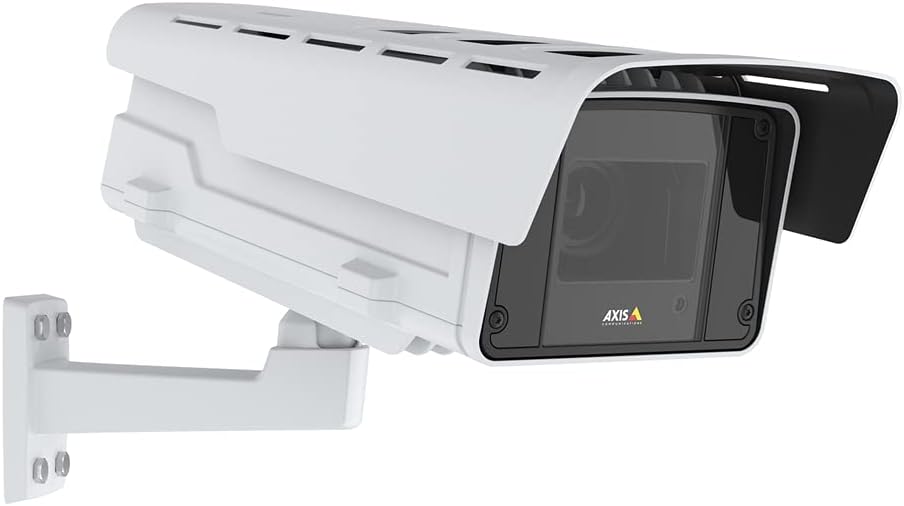
Figure 1: AXIS Q1615-LE Mk III Network Camera with included wall mount.
Поставување
Монтирање на камерата
- Изберете локација: Изберете соодветна надворешна локација која го обезбедува посакуваното поле на view and is within reach of power and network connections. Ensure the mounting surface is sturdy.
- Прикачете го ѕидниот држач: Use the included AXIS T94Q01A Wall Mount. Securely fasten the mount to the chosen surface using appropriate screws (not included, typically).
- Attach Camera to Mount: Align the camera with the wall mount and secure it using the provided hardware. Adjust the camera's angle for optimal viewинг.
- Install Sunshield: Attach the sunshield using the Sunshield Connector Kit to protect the lens from direct sunlight and reduce glare.
Вклучување
The AXIS Q1615-LE Mk III camera can be powered via Power over Ethernet (PoE) or a DC power supply.
- Поврзување PoE: Connect an Ethernet cable from a PoE-enabled switch or injector to the camera's Ethernet port. This provides both power and network connectivity.
- DC напојување: If not using PoE, connect a compatible DC power adapter (not included) to the camera's DC input port.
Мрежна врска
Connect the camera to your network using a standard Ethernet cable. For initial setup, it is recommended to connect the camera directly to a computer or a local network segment where you can easily discover its IP address.
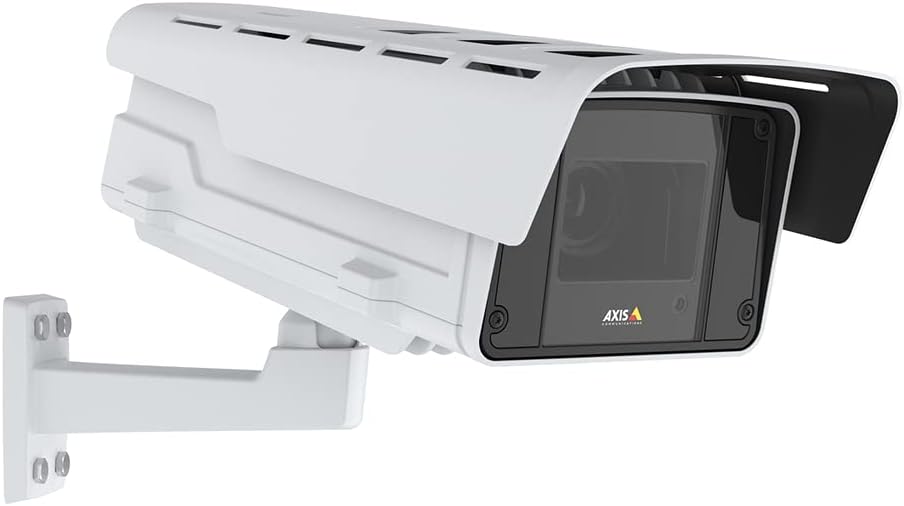
Слика 2: Страна view of the camera illustrating potential mounting and connection points.
Упатства за работа
Accessing the Camera Interface
- Откријте ја камерата: Use the AXIS IP Utility or AXIS Device Manager software to discover the camera on your network and find its IP address.
- Најавете се: Отвори a web browser and enter the camera's IP address. Log in using the default credentials (typically username 'root' and password 'pass' for first-time setup, which you will be prompted to change).
Configuring Video Settings
Once logged in, navigate to the 'Video' or 'Stream' settings to adjust parameters such as resolution, frame rate, compression, and image quality. The camera supports 1080p video capture resolution.
Using Object Analytics
The AXIS Q1615-LE Mk III features powerful AI-based object analytics. Access the 'Analytics' section in the camera's web interface to configure detection zones, set up rules for different object types (e.g., cars, bikes, humans), and define actions to be triggered upon detection (e.g., send notifications, record video).
Одржување
Чистење
Редовното чистење помага во одржувањето на оптимален квалитет на сликата и го продолжува животниот век на камерата.
- Објектив: Нежно избришете го објективот со мека крпа што не остава влакненца. За тврдокорна нечистотија, користете раствор за чистење објективи наменет за оптички површини.
- Домување: Clean the camera housing with a soft, damp крпа. Избегнувајте употреба на груби хемикалии или абразивни материјали.
Ажурирања на фирмверот
Periodically check the Axis Communications website for firmware updates. Keeping your camera's firmware up-to-date ensures access to the latest features, performance improvements, and security patches. Follow the instructions provided by Axis for the update process.
Решавање проблеми
Овој дел нуди решенија за вообичаени проблеми со кои може да се соочите.
- Без моќност:
- Verify that the PoE switch/injector is powered on and functioning correctly.
- Доколку користите DC адаптер, проверете дали е правилно поврзан и дека обезбедува точен напон.tage.
- Проверете го Ethernet кабелот за оштетување или лабави врски.
- Нема мрежна конекција:
- Осигурајте се дека Ethernet кабелот е безбедно поврзан на двата краја.
- Check network switch/router status.
- Verify the camera's IP address and network settings are correct and not conflicting with other devices.
- Temporarily disable any firewall on your computer during initial setup.
- Лош квалитет на сликата:
- Исчистете ја леќата на камерата.
- Adjust focus settings in the camera's web interface (Auto Focus is available).
- Check lighting conditions. Ensure OptimizedIR is enabled for low-light environments.
- Adjust video resolution and compression settings.
- False Alarms from Analytics:
- Refine detection zones and sensitivity settings in the analytics configuration.
- Осигурајте се дека камерата view is clear of obstructions that might trigger false detections.
- Update camera firmware to the latest version for improved analytics performance.
For more detailed troubleshooting or issues not covered here, please refer to the comprehensive support documentation on the Axis Communications webстраницата или контактирајте ја нивната техничка поддршка.
Спецификации
| Карактеристика | Спецификација |
|---|---|
| Име на моделот | Q1615-LE Mk III |
| Внатрешна/надворешна употреба | На отворено |
| Резолуција за снимање видео | 1080 стр |
| Ефективна сепак резолуција | 2 MP |
| Технологија за поврзување | Ethernet, Wi-Fi (Wireless Communication Technology) |
| Извор на енергија | DC |
| Ватtage | 11 вати |
| Оценка за меѓународна заштита | IP67 |
| Димензии на ставката L x Ш x В | 27.5 x 11.5 x 11 инчи |
| Тежина на ставката | 20.1 фунти |
| Максимална брзина на блендата | 1/125000 - 2 Seconds |
| Тип на фокус | Автоматски фокус |
| Технологија на слаба осветленост | Ден/ноќ |
| Тип на сигнализација | Само движење |
| Вклучени компоненти | AXIS T94Q01A Wall Mount, Installation Guide, Q1615-LE Mk III Network Camera, Resistorx T20 Tool, Sunshield Connector Kit, Windows Decoder 1-user License |
Гаранција и поддршка
Информации за гаранцијата
The AXIS Q1615-LE Mk III Network Camera comes with a 5-годишна гаранција од производителотВе молиме задржете го доказот за купување за гаранциски барања. Гаранцијата ги покрива дефектите во материјалите и изработката при нормална употреба.
Техничка поддршка
For technical assistance, product registration, or to download the latest software and documentation, please visit the official Axis Communications website. Their support resources include FAQs, troubleshooting guides, and contact information for direct technical support.
Webсајт: www.axis.com
Ask a question about this manual
Ask about setup, troubleshooting, compatibility, parts, safety, or missing instructions. Manuals+ will review the question and use this page’s manual context to help answer it.