
Вовед
This manual provides comprehensive instructions for the Lexmark MS431dw Monochrome Laser Printer. It covers setup, operation, maintenance, and troubleshooting to ensure optimal performance and longevity of your device. The Lexmark MS431dw is designed for efficient monochrome printing, offering speeds up to 40 pages per minute and automatic duplex printing.

Слика: напред-десно view of the Lexmark MS431dw Monochrome Laser Printer.
Поставување
1. Отпакувајте го печатачот
Carefully remove the printer from its packaging. Ensure all packing materials, tapes, and protective films are removed from the exterior and interior of the printer. Retain the packaging for future transport if needed.
2. Инсталирање на касетата со тонер
- Отворете го предниот капак на печатачот.
- Remove the new toner cartridge from its packaging and gently shake it to distribute the toner.
- Insert the toner cartridge into the designated slot until it clicks into place.
- Затворете го предниот капак.
3. Ставање хартија
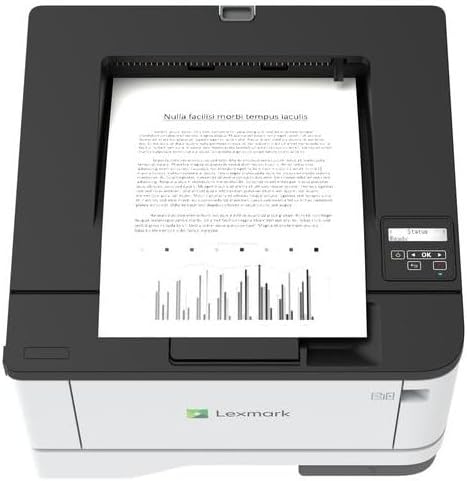
Слика: Горе view of the Lexmark MS431dw with paper loaded in the input tray.
Open the paper tray and adjust the paper guides to fit the size of your paper. Load the paper stack into the tray, ensuring it is flat and below the maximum fill line. Close the paper tray. The printer supports various media types, including card stock.
4. Поврзување на енергија
Поврзете го кабелот за напојување со приклучокот за напојување на печатачот, а потоа со заземјен електричен штекер.
5. Connecting to a Network/Computer
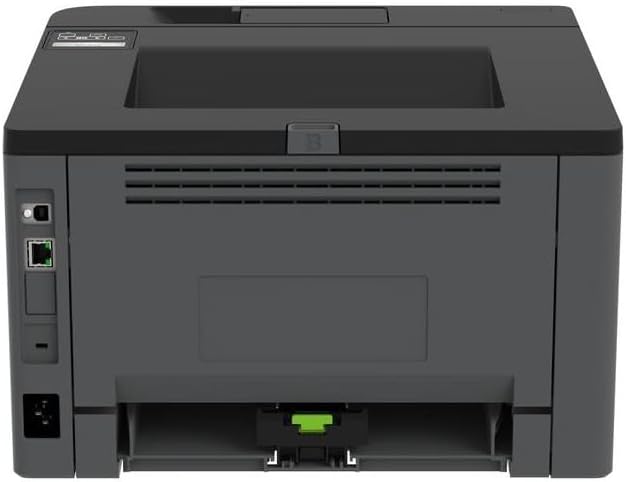
Слика: Заден дел view of the Lexmark MS431dw, highlighting the Ethernet and power connection ports.
The Lexmark MS431dw supports Ethernet connectivity. Connect an Ethernet cable from your network router or switch to the Ethernet port on the back of the printer. For direct connection to a computer, use a USB cable (not included) if available, or configure network printing.
6. Инсталација на драјвери
Turn on the printer. Insert the driver CD (if provided) into your computer, or download the latest drivers from the official Lexmark support webстраница. Следете ги упатствата на екранот за да ја завршите инсталацијата на драјверот.
Упатства за работа
1. Контролен панел е надview

Слика: Горе view of the Lexmark MS431dw, showing the printer's control panel with display and buttons.
The control panel features a display screen and navigation buttons (Up, Down, OK, Back) to access printer settings, status, and functions. Refer to the on-screen menus for specific options.
2. Основно печатење
- Проверете дали печатачот е вклучен и поврзан со вашиот компјутер или мрежа.
- Отворете го документот што сакате да го испечатите на вашиот компјутер.
- Изберете Печати од менито на апликацијата (на пр. File > Печати).
- Choose the Lexmark MS431dw from the list of available printers.
- Adjust print settings as desired (e.g., number of copies, paper size).
- Кликнете Печати.
3. Автоматско двострано печатење
The MS431dw supports automatic two-sided (duplex) printing. To enable this feature:
- In the print dialog box on your computer, navigate to the printer properties or preferences.
- Look for an option related to "Two-sided printing" or "Duplex printing."
- Select the desired duplex option (e.g., long-edge binding, short-edge binding).
- Потврдете го вашиот избор и продолжете со печатење.
Одржување
1. Замена на касетата со тонер
When the toner level is low, the printer's display will indicate a warning. To replace the cartridge:
- Проверете дали печатачот е вклучен.
- Отворете го предниот капак.
- Отстранете ја старата касета со тонер со влечење.
- Unpack a new Lexmark-compatible toner cartridge and gently shake it.
- Вметнете го новиот кертриџ додека не се заклучи на своето место.
- Затворете го предниот капак.
2. Чистење на печатачот
Редовното чистење помага во одржувањето на квалитетот на печатењето и го продолжува животниот век на печатачот.
- Надворешност: Избришете ги надворешните површини со мека, гamp, крпа без влакненца. Не користете абразивни средства за чистење или растворувачи.
- Внатрешност: Periodically open the front cover and gently remove any dust or paper debris from accessible areas using a dry, lint-free cloth. Avoid touching the fuser unit.
Решавање проблеми
This section addresses common issues you might encounter. For more detailed troubleshooting, refer to the Lexmark support webсајт.
1. Заглавување на хартија
- If a paper jam occurs, the printer display will show an error message indicating the location of the jam.
- Carefully open the indicated covers or trays.
- Нежно повлечете ја заглавената хартија во правец на патеката на хартијата. Избегнувајте кинење на хартијата.
- Close all covers and trays. The printer should resume printing.
2. Лош квалитет на печатење
- Избледени отпечатоци: The toner cartridge may be low. Replace it if necessary.
- Линии или точки: Clean the printer's interior as described in the Maintenance section. Ensure the toner cartridge is properly seated.
- Празни страници: Verify the toner cartridge is installed correctly and has toner. Check printer drivers and print settings.
3. Проблеми со поврзувањето
- Печатачот не е пронајден: Ensure the Ethernet cable is securely connected to both the printer and the network. Verify network settings on the printer and computer.
- Офлајн статус: Check the printer's power and network connection. Restart both the printer and your computer.
Спецификации
| Карактеристика | Детал |
|---|---|
| Број на модел | 29S0110 |
| Технологија на печатење | Ласерски |
| Излез на печатач | Монохроматски |
| Максимална брзина на печатење (монохроматски) | До 40 стр./мин. (страници во минута) |
| Технологија за поврзување | Етернет |
| Специјална карактеристика | Auto-Duplex (Automatic Two-sided Printing) |
| Максимален капацитет на влезен лист | 900 листови |
| Print Media Support | Card stock, Plain paper |
| Тежина на ставката | 9300 грама (приближно 20.5 фунти) |
| Ватtage | 570 вати |
| UPC | 734646695558 |
Белешка: Спецификациите може да се променат без претходна најава.
Гаранција и поддршка
Информации за гаранцијата
Your Lexmark MS431dw printer is covered by a standard manufacturer's warranty. For specific terms, conditions, and duration of your warranty, please refer to the documentation included with your product or visit the official Lexmark webстраница. Зачувајте го доказот за купување за гаранциски побарувања.
Поддршка за корисници
For technical assistance, driver downloads, or further support, please visit the official Lexmark support portal.
Visit the Lexmark Store for Support