
Casio DH-12ET
Casio DH-12ET Desktop Calculator User Manual
Model: DH-12ET
Вовед
This manual provides detailed instructions for the proper use and maintenance of your Casio DH-12ET Desktop Calculator. Please read this manual thoroughly before using the calculator to ensure optimal performance and longevity.

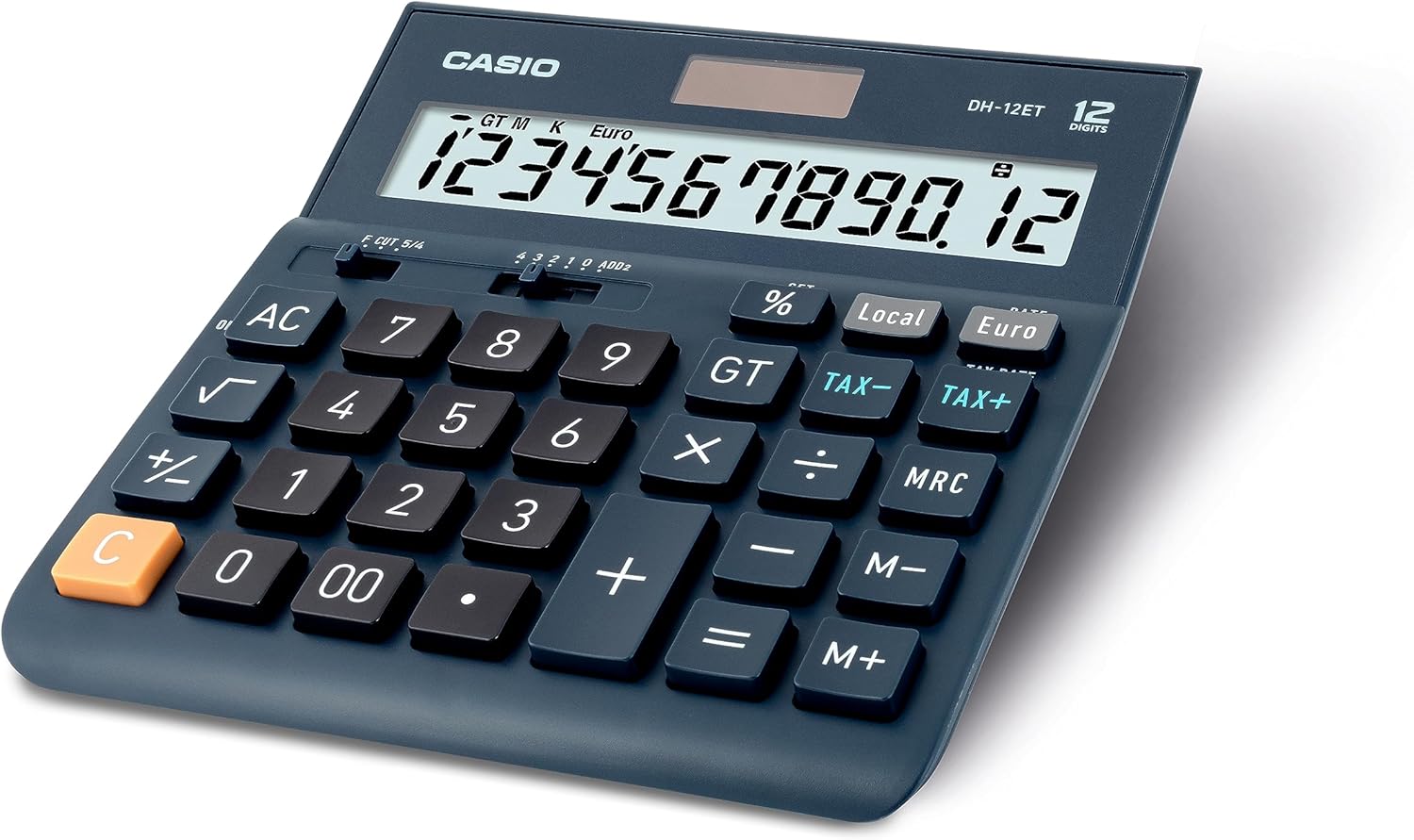
Слика 1: Предна страна view of the Casio DH-12ET Desktop Calculator, showing the display and key layout.
Карактеристики на производот
The Casio DH-12ET is a versatile 12-digit desktop calculator designed for various business and personal calculations. Key features include:
- 12-цифрен LCD дисплеј: Clear display with calculation command indicators and thousands separators.
- Пресметка на данок: Dedicated functions for easy and quick calculation of tax additions or subtractions.
- Конверзија на валута: Ability to convert amounts between two currencies after setting an exchange rate.
- Professional Percentage Пресметка: Determine percentage increase and decrease with separate display of calculated values.
- Mark Up Function: Quickly determine margins and markups.
- Square Root Function: Calculate square roots.
- Промена на знак (+/-): Easily switch between positive and negative values.
- Total Sum Memory (GT): Automatically stores the sum of all calculation results.
- 3-Key Memory: Independent memory functions (M+, M-, MRC) for storing and recalling values.
- Solar/Battery Operated: Dual power source for reliable operation.
- Автоматско исклучување: Го заштедува траењето на батеријата со исклучување по 6 минути неактивност.
- Memory Protection Battery: Retains stored data (e.g., currency rates, tax rates) during power loss or battery change.
- Гумени стапала: Обезбедува стабилност на површините.
Поставување
Напојување
The Casio DH-12ET calculator operates on a dual power system: solar power and a single LR44 button cell battery. The solar panel provides power in well-lit environments, while the battery acts as a backup in low light conditions or when the solar power is insufficient. The battery also serves as a memory protection battery.
Инсталација/Замена на батерија
Калкулаторот доаѓа со една претходно инсталирана батерија LR44. Ако екранот стане затемнет или не реагира при слаба осветленост, можеби ќе треба да се замени батеријата.
- Осигурајте се дека калкулаторот е свртен ИСКЛУЧЕНО.
- Пронајдете го преградата за батерии на задната страна од калкулаторот.
- Користејќи мал шрафцигер, извадете ја завртката што го прицврстува капакот на преградата за батерии.
- Carefully remove the old LR44 battery.
- Insert a new LR44 battery with the positive (+) side facing upwards.
- Вратете го капакот на преградата за батерии и прицврстете го со завртката.
Забелешка: Dispose of used batteries according to local regulations. Do not expose batteries to excessive heat or fire.
Упатства за работа
Основни пресметки
- Додаток: Внесете го првиот број, притиснете +, внесете го вториот број, притиснете =.
- Одземање: Внесете го првиот број, притиснете -, внесете го вториот број, притиснете =.
- Множење: Внесете го првиот број, притиснете x, внесете го вториот број, притиснете =.
- Поделба: Внесете го првиот број, притиснете ÷, внесете го вториот број, притиснете =.
- Јасен внес: Притиснете C to clear the last entered number.
- Сè е чисто: Притиснете AC to clear all entries and reset the calculator.
Пресметка на данок
The calculator allows for easy addition or subtraction of a pre-set tax rate.
- Одредување на даночната стапка:
- Притиснете AC и држете го % key until "SET" appears on the display.
- Притиснете ДАНОЧНА СТАПКА (which is the ДАНОК+ клуч).
- Enter the desired tax rate (e.g., 8 for 8%).
- Притиснете % to confirm and save the tax rate.
- Додавање данок: Внесете го износот, потоа притиснете ДАНОК+. The display will show the amount with tax added.
- Одземање на данок: Enter the amount with tax, then press ДАНОК-. The display will show the original amount before tax.

Слика 2: Steps for changing the tax rate on the Casio DH-12ET calculator.
Конверзија на валута
The calculator supports conversion between a local currency and a foreign currency (e.g., Euro).
- Setting the Exchange Rate:
- Притиснете AC и држете го % key until "SET" appears.
- Притиснете СТАПКА (which is the евра клуч).
- Enter the exchange rate (e.g., 1.25 if 1 Local unit = 1.25 Euro).
- Притиснете % to confirm and save the rate.
- Converting Local to Foreign: Enter the local amount, then press евра.
- Converting Foreign to Local: Enter the foreign amount, then press Локално.
Персенtagд Пресметки
- Calculate Percentage of a Number: Внесете број, притиснете x, внесете процентtagвредност e, притиснете %. (e.g., 100 x 15 % = 15)
- Add Percentage: Внесете број, притиснете +, внесете процентtagвредност e, притиснете %. (e.g., 100 + 15 % = 115)
- Subtract Percentage: Внесете број, притиснете -, внесете процентtagвредност e, притиснете %. (e.g., 100 - 15 % = 85)
Функции на меморија
- М+: Ја додава прикажаната вредност во меморијата.
- М-: Ја одзема прикажаната вредност од меморијата.
- MRC:
- Притиснете еднаш за да ја повикате вредноста зачувана во меморијата.
- Press twice to clear the memory (M indicator disappears).
- GT (Голем Вкупно):
- Automatically accumulates results of calculations (e.g., after pressing = or %).
- Притиснете GT за да се прикаже вкупниот износ.
- Притиснете AC to clear the grand total memory.
Други функции
- √ (Квадратен корен): Enter a number, then press √ to calculate its square root.
- +/- (Промена на знакот): Го менува знакот на прикажаниот број од позитивен во негативен или обратно.
- Decimal Selector (F CUT 5/4, 4 3 2 1 0 ADD2):
This slider switch controls the decimal point and rounding settings:
- F (лебдечки): Decimal point floats, displaying all digits.
- ИСЕЧЕЊЕ: Truncates results to the specified number of decimal places.
- 5/4: Rounds results to the specified number of decimal places (standard rounding).
- 4, 3, 2, 1, 0: Specifies the number of decimal places (e.g., '2' for two decimal places).
- ДОДАТОК 2: Автоматски додава две децимални места за пресметки на валути.
Одржување
Чистење
To clean the calculator, wipe it gently with a soft, dry cloth. For stubborn dirt, slightly dampen the cloth with water and a mild detergent, then wipe dry immediately. Do not use strong solvents, abrasive cleaners, or spray cleaners directly onto the calculator.
Складирање
Store the calculator in a cool, dry place away from direct sunlight, extreme temperatures, and high humidity. If storing for an extended period, it is recommended to remove the battery to prevent leakage.
Решавање проблеми
- Екранот е затемнет или празен:
- Осигурајте се дека калкулаторот е на добро осветлено место за сончева енергија.
- Check the battery. Replace the LR44 battery if it is depleted.
- Неточни резултати од пресметката:
- Притиснете AC to clear all previous calculations and memory.
- Verify the decimal selector switch setting.
- Check if any memory functions (M, GT) are active and interfering.
- Копчињата не реагираат:
- Ensure the calculator is powered on.
- Исчистете ги околу копчињата за да ги отстраните сите остатоци.
- If the issue persists, try replacing the battery.
Спецификации
| Карактеристика | Детал |
|---|---|
| Модел | DH-12ET |
| Приказ | 12-цифрен LCD екран |
| Извор на енергија | Solar / 1 x LR44 Battery (included) |
| Димензии (Д x Ш) | 15.9 cm x 15.1 cm (6.26 во x 5.94 инчи) |
| Тежина | 180 грама |
| Материјал | Пластика, гума |
| Автоматско исклучување | Approximately 6 minutes of inactivity |
Слика 3: Страна view of the Casio DH-12ET calculator with approximate dimensions.
Гаранција и поддршка
For information regarding warranty coverage, service, or technical support for your Casio DH-12ET Desktop Calculator, please refer to the warranty card included with your product or visit the official Casio website for your region. Contact details for customer service are typically available on the manufacturer's webсајт.
Официјален претставник на Касио Webсајт: www.casio.com
Ask a question about this manual
Ask about setup, troubleshooting, compatibility, parts, safety, or missing instructions. Manuals+ will review the question and use this page’s manual context to help answer it.