
Вовед
The Extreme Networks AP310i is an enterprise-grade wireless access point designed for high-efficiency Wi-Fi connectivity. Based on a system-on-a-chip (SoC) with two built-in dual-band 2x2 radios, it provides effective value with Wi-Fi 6 (802.11ax) technology. This access point delivers data rates of up to 2.4 Gb/s concurrently in both the 2.4 GHz and 5 GHz bands, making it suitable for organizations requiring robust and high-performance wireless solutions without compromising on budget.
Key features include dual-radio 802.11ax 2x2:2 technology, RF monitoring, integrated BLE and Zigbee for IoT connectivity, and programmable radios for flexible deployment.
Поставување и инсталација
Proper installation is crucial for optimal performance of your AP310i access point. This section outlines the general steps for setting up the device.
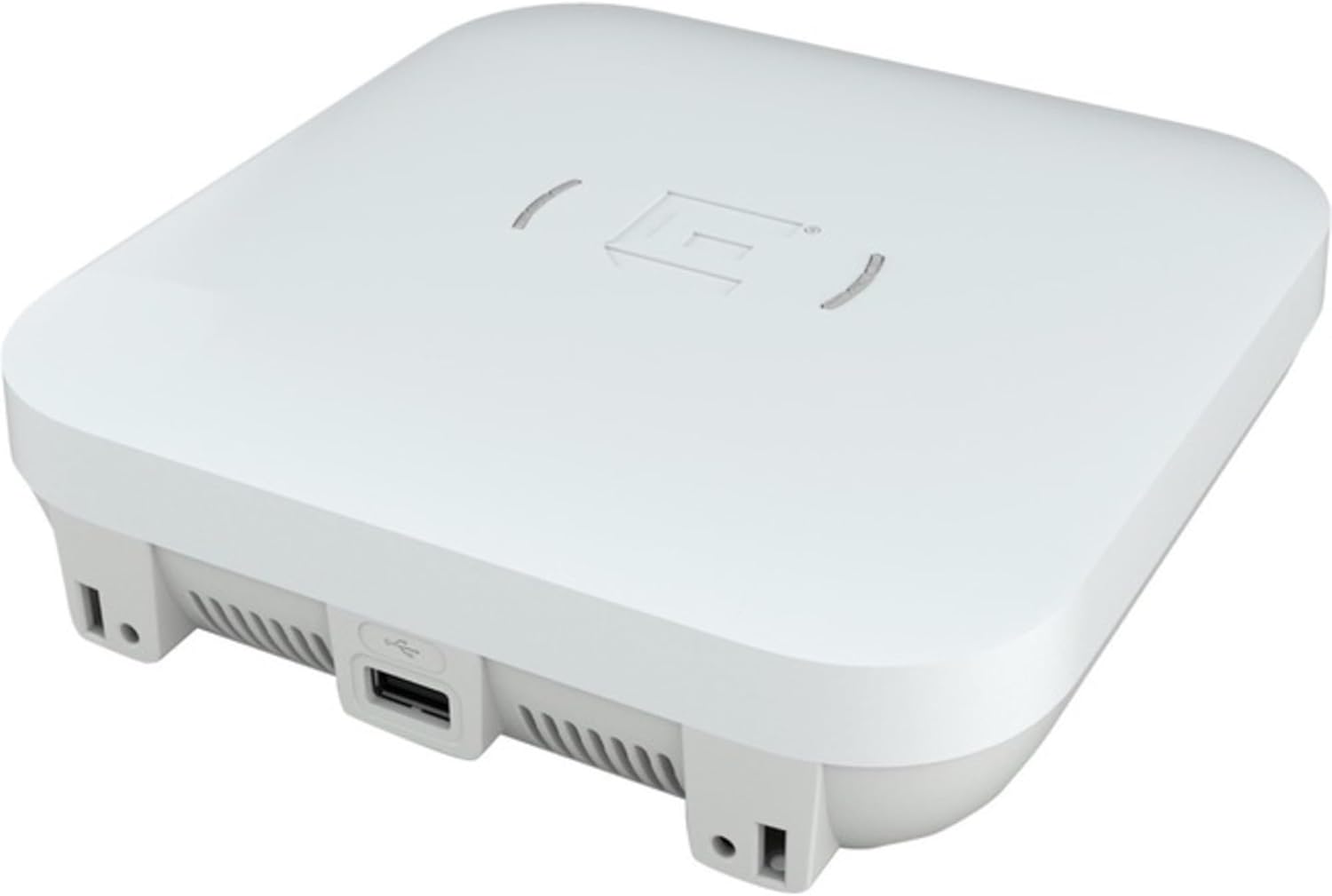
Слика 1: Extreme Networks AP310i Wireless Access Point. The image displays the white, square-shaped access point from a slightly elevated side angle, revealing a USB 3.0 Type-A port on one side and ventilation grilles along the bottom edge. The top surface features a subtle Extreme Networks logo.
- Отпакувајте го уредот: Carefully remove the AP310i from its packaging. Verify all components are present.
- Монтирање (опционално): The AP310i is designed for indoor use. It can be placed on a flat surface or mounted on a wall or ceiling using appropriate mounting hardware (sold separately). Ensure the mounting location provides clear line-of-sight for optimal wireless coverage.
- Поврзување за напојување: The AP310i supports Power over Ethernet (PoE) via its 1000Base-T RJ-45 ports. Connect an Ethernet cable from a PoE-enabled switch or PoE injector to one of the RJ-45 ports on the access point. This will provide both power and network connectivity. The device has an operational power consumption of 14 watts.
- Мрежна конекција: Connect the AP310i to your network infrastructure via the Ethernet ports. The device features two 1000Base-T (PoE) RJ-45 interfaces.
- Почетна конфигурација: Refer to the Extreme Networks documentation for detailed instructions on initial network configuration, including IP address assignment, SSID setup, and security settings (WPA3 encryption, etc.). This typically involves accessing the device's web interface or using Extreme Networks management software.
Ракување со пристапната точка
Once installed and configured, the AP310i operates as a central hub for your wireless network. It supports various wireless protocols and features to ensure efficient data transfer.
- Работа со двоен опсег: The access point concurrently operates on both 2.4 GHz and 5 GHz Wi-Fi bands, supporting IEEE 802.11a/b/g/n/ac Wave 2/ax standards. This allows for flexible client connectivity and optimized performance.
- Wi-Fi 6 (802.11ax) технологија: Leveraging Wi-Fi 6, the AP310i provides enhanced capacity, efficiency, and performance in dense environments through technologies like Orthogonal Frequency Division Multiple Access (OFDMA) and 2x2:2 MU-MIMO.
- Integrated BLE and Zigbee: The integrated Bluetooth Low Energy (BLE) and Zigbee radios enable the access point to support Internet of Things (IoT) applications and location-based services.
- Безбедност: The device supports WPA3 encryption and features like Cellular Coexistence Filter (CCF) to ensure secure and reliable wireless communication.
- Следење: RF monitoring capabilities allow for better network management and optimization.
Одржување
Regular maintenance helps ensure the longevity and optimal performance of your AP310i access point.
- Ажурирања на фирмверот: Periodically check the Extreme Networks support webстраница за ажурирања на фирмверот. Ажурирањето на фирмверот ви гарантира дека ги имате најновите функции, безбедносни закрпи и подобрувања на перформансите.
- Физичко чистење: Gently clean the exterior of the access point with a soft, dry cloth. Do not use liquid cleaners or aerosols. Ensure ventilation grilles are free from dust accumulation to prevent overheating.
- Еколошки услови: Ensure the access point is operating within its specified environmental conditions (temperature, humidity) to prevent damage.
Решавање проблеми
This section provides solutions to common issues you might encounter with your AP310i access point.
- Уредот не се вклучува:
- Verify the Ethernet cable is securely connected to a PoE-enabled port on your switch or PoE injector.
- Ensure the PoE source is active and providing sufficient power (IEEE 802.3af/at compliant).
- Пробајте друг етернет кабел или PoE порт.
- Нема мрежна конекција:
- Check the status indicators on the access point (if available) for network activity.
- Confirm the Ethernet cable is properly connected to your network infrastructure.
- Verify network settings (IP address, gateway, DNS) are correctly configured on the access point.
- Ensure there are no IP conflicts on your network.
- Лоши перформанси на безжичната мрежа:
- Проверете за извори на пречки (на пр., други безжични уреди, микробранови печки, безжични телефони).
- Осигурајте се дека пристапната точка е централно лоцирана и не е попречена од физички бариери.
- Verify that the correct Wi-Fi channels are selected and optimized for your environment.
- Confirm that client devices are compatible with 802.11ax and operating on the appropriate band (2.4 GHz or 5 GHz).
- Не може да се пристапи до интерфејсот за управување:
- Осигурајте се дека вашиот компјутер е на истиот мрежен сегмент како и пристапната точка.
- Verify the IP address of the access point and your computer's network settings.
- Обидете се да го исчистите кешот на прелистувачот или да користите друг прелистувач.
- If all else fails, a factory reset might be necessary (refer to Extreme Networks documentation for the procedure, as this will erase all configurations).
For more advanced troubleshooting or persistent issues, please refer to the official Extreme Networks support documentation or contact their technical support.
Спецификации
| Карактеристика | Детал |
|---|---|
| Бренд | Екстремни мрежи |
| Број на модел | AP310i-FCC |
| ASIN | B08RWCLJ2W |
| UPC | 644728355105 |
| Тип на вмрежување | Безжична пристапна точка |
| Технологија за поврзување | Безжичен |
| Протокол за врска со податоци | IEEE 802.11a, IEEE 802.11b, IEEE 802.11g, IEEE 802.11n, IEEE 802.11ac Wave 2, IEEE 802.11ax |
| Бендови за Wi-Fi | 2.4 GHz, 5 GHz (Dual Band) |
| Стапка на пренос на податоци | Up to 2.4 Gbps (802.11ax) |
| Antenna Form Factor | Internal, Omni-directional |
| Моќност преку етернет (PoE) | PoE (IEEE 802.3af/at compliant) |
| Power Consumption Operational | 14 вати |
| Interfaces Provided | 2 x 1000Base-T (PoE) - RJ-45, 1 x USB 3.0 - Type A |
| IoT Communications Technology | Zigbee, Bluetooth Low Energy (LE) |
| Алгоритам за шифрирање | WPA3 |
| Chassis Ruggedized Design | Затворен |
| Боја | Бело |
| Димензии на производот | 6 x 6 x 2 инчи |
| Материјал на случајот | Метал |
Гаранција и поддршка
For detailed warranty information, including terms and conditions, please refer to the official Extreme Networks warranty statement available on their website. Extreme Networks provides technical support for their products.
For technical assistance, product documentation, software downloads, and frequently asked questions, please visit the official Extreme Networks support portal. You can typically find support contact information (phone, email, chat) on their webсајт.
Важно: Always ensure you are using official Extreme Networks resources for support and documentation to guarantee accurate and up-to-date information.