
Вовед
The Sharkoon Skiller SGK30 is a mechanical gaming keyboard designed for performance and durability. It features customizable RGB lighting, N-Key rollover, and a 1000Hz polling rate for responsive gameplay and typing. This manual provides essential information for setting up, operating, and maintaining your keyboard.

Image: Sharkoon Skiller SGK30 Mechanical Gaming Keyboard banner displaying the product name and type.
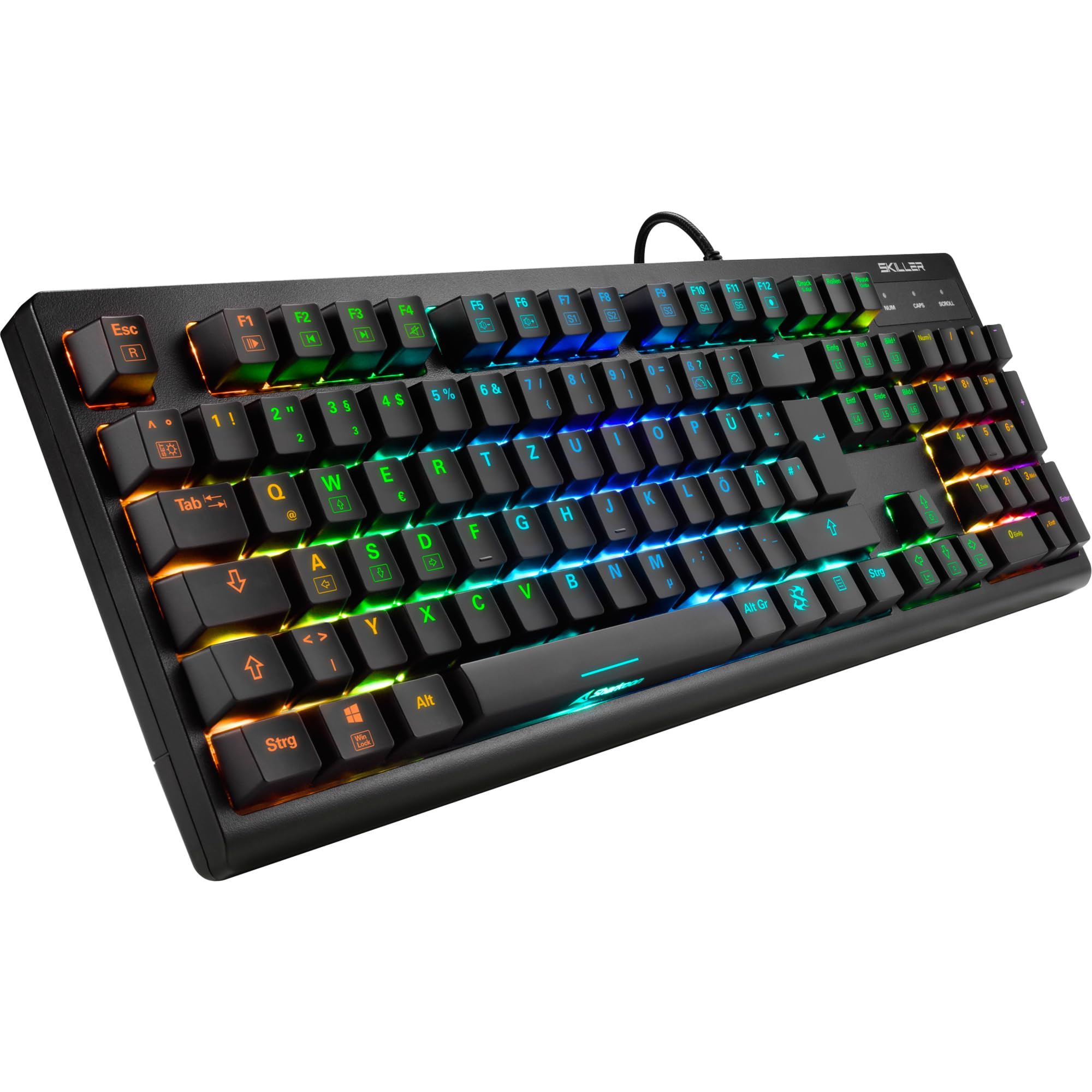
Слика: Од горе надолу view of the Sharkoon Skiller SGK30 mechanical gaming keyboard, showcasing неговиот целосен распоред и живописно RGB позадинско осветлување.
Производот завршиview Видео
Видео: Официјален производ завршенview of the Sharkoon Skiller SGK30 Mechanical Gaming Keyboard, demonstrating its features, RGB lighting effects, and mechanical switches.
Поставување
Follow these steps to set up your Sharkoon Skiller SGK30 keyboard:
- Отпакувајте ја тастатурата: Carefully remove the keyboard and the included USB cable from its packaging.
- Поврзете се со компјутер: Plug the Micro USB end of the cable into the keyboard's port and the standard USB-A end into an available USB port on your computer.
- Инсталација на драјвери: The keyboard is plug-and-play. Your operating system (Windows 10 or later recommended) should automatically detect and install the necessary drivers.
- Инсталација на софтвер (опционално): For advanced customization of RGB lighting and key assignments, download the official Sharkoon software from the manufacturer's webсајт.

Image: The Sharkoon Skiller SGK30 keyboard positioned on a desk, ready for connection.
Упатства за работа
Основни клучни функции
The Sharkoon Skiller SGK30 features a standard layout with additional function keys accessible via the FN клуч.
- FN + F1-F12: Access multimedia controls (e.g., play/pause, volume up/down, mute).
- FN + Windows клуч: Lock/unlock the Windows key to prevent accidental presses during gaming.
- Превртување на клучот N: All keys are registered simultaneously, ensuring every keystroke is detected, even during rapid input.
RGB контрола на осветлување
The keyboard offers extensive RGB lighting customization. Use the following combinations to adjust lighting effects:
- FN + Insert/Home/Page Up/Delete/End/Page Down: Прелистувајте низ разни однапред програмирани светлосни ефекти.
- FN + Arrow Keys (Up/Down): Adjust brightness levels of the lighting.
- FN + Arrow Keys (Left/Right): Прилагодете ја брзината на динамичките ефекти на осветлување.
- Custom Illumination: Use the dedicated software for advanced per-key lighting customization.

Слика: Крупен план view of the keyboard keys highlighting the adjustable RGB illumination capabilities.
Прилагодување на софтвер
For advanced settings, macro programming, and detailed RGB customization, download and install the Sharkoon Skiller SGK30 software from the official Sharkoon webстраница. Софтверот ви овозможува да:
- Креирајте и зачувајте професионално осветлување по нарачкаfiles.
- Program macros for specific keys.
- Прераспореди ги клучните функции.

Image: A screenshot showing the graphical user interface of the Sharkoon Skiller SGK30 customization software, illustrating various options for lighting and key remapping.
Одржување
Правилното одржување гарантира долготрајност и перформанси на вашата тастатура:
- Чистење: Use a soft, dry cloth to wipe the surface of the keyboard. For deeper cleaning, use compressed air to remove dust and debris from between the keycaps.
- Отстранување на капачето на копчето: If necessary, keycaps can be carefully removed using a keycap puller (not included) for thorough cleaning of the switches. Reinstall keycaps by pressing them firmly onto the switch stems.
- Избегнувајте течности: Не ја изложувајте тастатурата на течности. Во случај на истурање, веднаш исклучете ја тастатурата и оставете ја целосно да се исуши пред повторно да ја поврзете.
- Складирање: Чувајте ја тастатурата на ладно и суво место, подалеку од директна сончева светлина и екстремни температури.

Слика: Крупен план view of the mechanical switches on the Sharkoon Skiller SGK30 keyboard, illustrating their design for durability and ease of maintenance. Note: This model is available with Red switches, while the image shows Blue switches.
Решавање проблеми
If you encounter issues with your Sharkoon Skiller SGK30 keyboard, refer to the following common solutions:
| Проблем | Можна причина | Решение |
|---|---|---|
| Тастатурата не реагира | Лабава USB конекција, неисправен USB порт, проблем со драјверот. |
|
| RGB осветлувањето не работи или е неправилно | Lighting settings incorrect, software conflict. |
|
| Клучевите не се регистрираат | Прашина/остатоци под капачето на копчето, неисправен прекинувач. |
|
Спецификации
| Карактеристика | Детал |
|---|---|
| Бренд | Шаркун |
| Број на модел | 4044951030026 |
| Тип на тастатура | Механичка тастатура за игри |
| Тип на прекинувач | Red Switch (Blue switches are also available for this model series) |
| Поврзување | Микро USB |
| Стапка на анкети | 1000 Hz |
| Превртување на клучот N | Поддржано |
| RGB осветлување | Customizable RGB |
| Оперативен систем | Windows 10 (и компатибилен со други верзии на Windows) |
| Димензии (ДxШxВ) | 44 x 14.4 x 3.5 cm |
| Тежина | 867 гр |
Што има во кутијата
The Sharkoon Skiller SGK30 package includes:
- Sharkoon Skiller SGK30 Mechanical Gaming Keyboard
- USB кабел
Гаранција и поддршка
За информации за гаранцијата и техничка поддршка, ве молиме погледнете го официјалниот Sharkoon webлокација или контактирајте го вашиот локален продавач. Зачувајте го доказот за купување за гаранциски барања.
Забелешка: Спецификациите и карактеристиките на производот може да се променат без претходна најава.