
Вовед
Thank you for choosing the Newskill Manticore Gaming PC Case. This manual provides essential information for the proper installation, operation, and maintenance of your new PC chassis. Please read these instructions carefully before beginning the assembly process to ensure optimal performance and longevity of your components.
Производот завршиview
The Newskill Manticore is an ATX mid-tower gaming PC case designed for high-performance builds. It features a mesh front panel for superior airflow, a tempered glass side panel to showcase your components, and four pre-installed 120mm ARGB fans for effective cooling and customizable aesthetics.
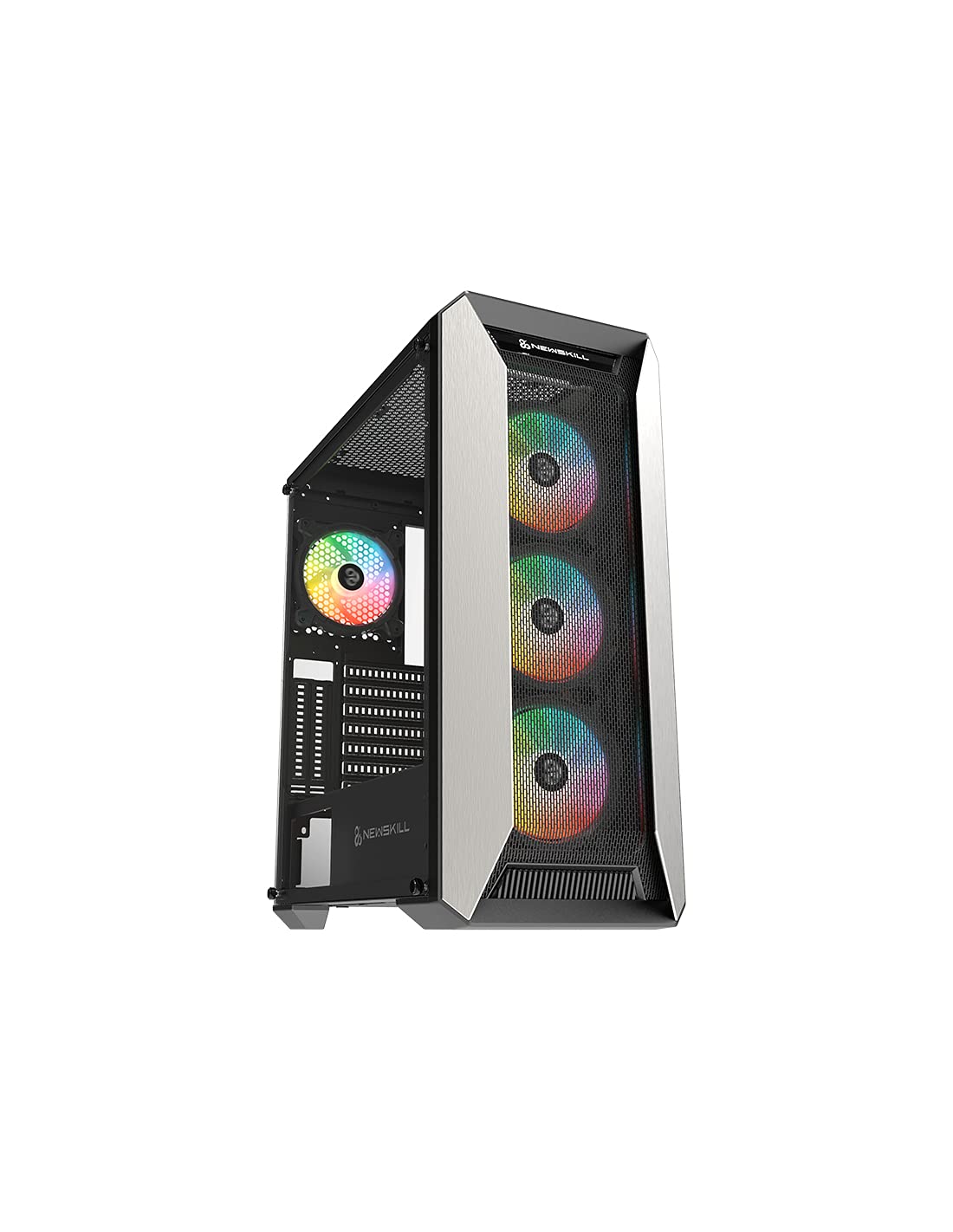
Слика 1: Предна страна view of the Newskill Manticore Gaming PC Case, highlighting the mesh front and tempered glass side panel.
Клучни карактеристики:
- ATX Mid-Tower compatibility
- Mesh front panel for optimized airflow
- Странична плоча од калено стакло
- Four pre-installed 120mm ARGB fans
- Two removable dust filters
- USB 3.0 connectivity on the front panel
Поставување и инсталација
1. Отпакување
Carefully remove the PC case from its packaging. Inspect for any damage that may have occurred during shipping. Retain the packaging for future transport or warranty claims.
2. Идентификација на компоненти
Before installation, familiarize yourself with the case components and included accessories:
- Newskill Manticore PC Case
- Accessory box (screws, cable ties, standoffs)
- Упатство за употреба (овој документ)
3. Инсталација на матична плоча
- Отстранете ја страничната плоча од калено стакло со одвртување на палците-завртки.
- Install the necessary motherboard standoffs into the motherboard tray.
- Carefully place your ATX motherboard onto the standoffs, aligning the screw holes.
- Прицврстете ја матичната плоча со приложените завртки.
4. Инсталација на единица за напојување (PSU)
- Лоцирајте го местото за монтирање на напојувањето на долниот дел од задната страна на куќиштето.
- Slide your PSU into position from the rear of the case.
- Secure the PSU with screws from the exterior rear of the case.
5. Инсталација на диск за складирање
The case supports various storage configurations. Refer to your specific drive type for mounting instructions (e.g., 2.5" SSDs, 3.5" HDDs).
6. Инсталација на графичка картичка и картичка за проширување
Remove the necessary PCIe slot covers and install your graphics card or other expansion cards, securing them with screws.
7. Приклучоци на предниот панел
Connect the front panel cables (USB 3.0, HD Audio, Power Switch, Reset Switch, Power LED, HDD LED) to the corresponding headers on your motherboard. Consult your motherboard manual for exact pin layouts.
8. Управување со кабли
Користете ги отворите за насочување на каблите и точките за врзување зад фиоката на матичната плоча за управување со каблите. Ова го подобрува протокот на воздух и естетиката.
Упатства за работа
Вклучување/исклучување
Press the power button located on the top panel of the case to turn on your system. To shut down, use the operating system's power-off function or press and hold the power button for several seconds for a forced shutdown (not recommended for regular use).
ARGB контрола на осветлување
The pre-installed ARGB fans can be controlled via your motherboard's ARGB software (if compatible) or a dedicated ARGB controller (if included or purchased separately). Refer to your motherboard or controller manual for specific instructions on changing lighting effects and colors.
Одржување
Чистење на филтерот за прав
The Newskill Manticore includes two removable dust filters (typically located on the top and bottom/front). Regularly clean these filters to maintain optimal airflow and prevent dust buildup inside your PC. Gently slide them out, clean with water and mild soap, or use a vacuum cleaner, and ensure they are completely dry before re-inserting.
Надворешно чистење
Избришете ги надворешните површини со мека, гamp крпа. Избегнувајте абразивни средства за чистење или растворувачи кои би можеле да ја оштетат завршната обработка или каленото стакло.
Решавање проблеми
Нема моќ
- Проверете дали напојувањето е правилно поврзано со ѕидниот штекер и вклучено.
- Verify all power cables from the PSU are correctly connected to the motherboard and components.
- Проверете ги врските на прекинувачот за напојување на предниот панел со матичната плоча.
Вентилаторите не се вртат / ARGB не свети
- Confirm fan power cables are securely connected to the motherboard or fan controller.
- Check ARGB connections to the motherboard's ARGB header or dedicated controller.
- Ensure ARGB software or controller settings are correctly configured.
Poor Airflow / Overheating
- Редовно чистете ги филтрите за прашина.
- Ensure no obstructions are blocking air intake or exhaust vents.
- Verify all fans are spinning correctly and oriented for optimal airflow.
For further assistance, please contact Newskill support.
Спецификации
| Карактеристика | Детал |
|---|---|
| Име на моделот | Мантикор |
| Број на модел | 1102 |
| Тип на случај | Mid Tower |
| Компатибилност со матична плоча | ATX |
| Димензии (Д x Ш x В) | 60 x 60 x 85 cm |
| Тежина | 1 кг |
| Материјал | Калено стакло, метал |
| Метод на ладење | Air (4x 120mm ARGB fans included) |
| Предни влезни порти | USB 3.0, Audio Jacks, Power, Reset |
| Филтри за прашина | 2 (отстранлив) |
| Препорачана употреба | Играње |
Информации за гаранцијата
The Newskill Manticore PC Case comes with a 2-годишна гаранција од производителот. This warranty covers defects in materials and workmanship under normal use. It does not cover damage caused by misuse, accident, modification, or unauthorized repair. Please retain your proof of purchase for warranty claims.
Поддршка и контакт
For technical support, troubleshooting assistance, or warranty inquiries, please visit the official Newskill website or contact their customer service department. You can find contact information on the Newskill webсајт: www.newskillgaming.com