
Saooer BLUE 20A
Saooer 20A Solar Charge Controller User Manual
Model: BLUE 20A
Вовед
This manual provides essential information for the safe and efficient operation of your Saooer 20A Solar Charge Controller. This intelligent regulator is designed to manage the working of solar panels and batteries in a solar system, featuring dual USB ports for mobile device charging. It is compatible with 12V and 24V systems and includes multiple protection functions to ensure system efficiency and prolong battery lifespan.

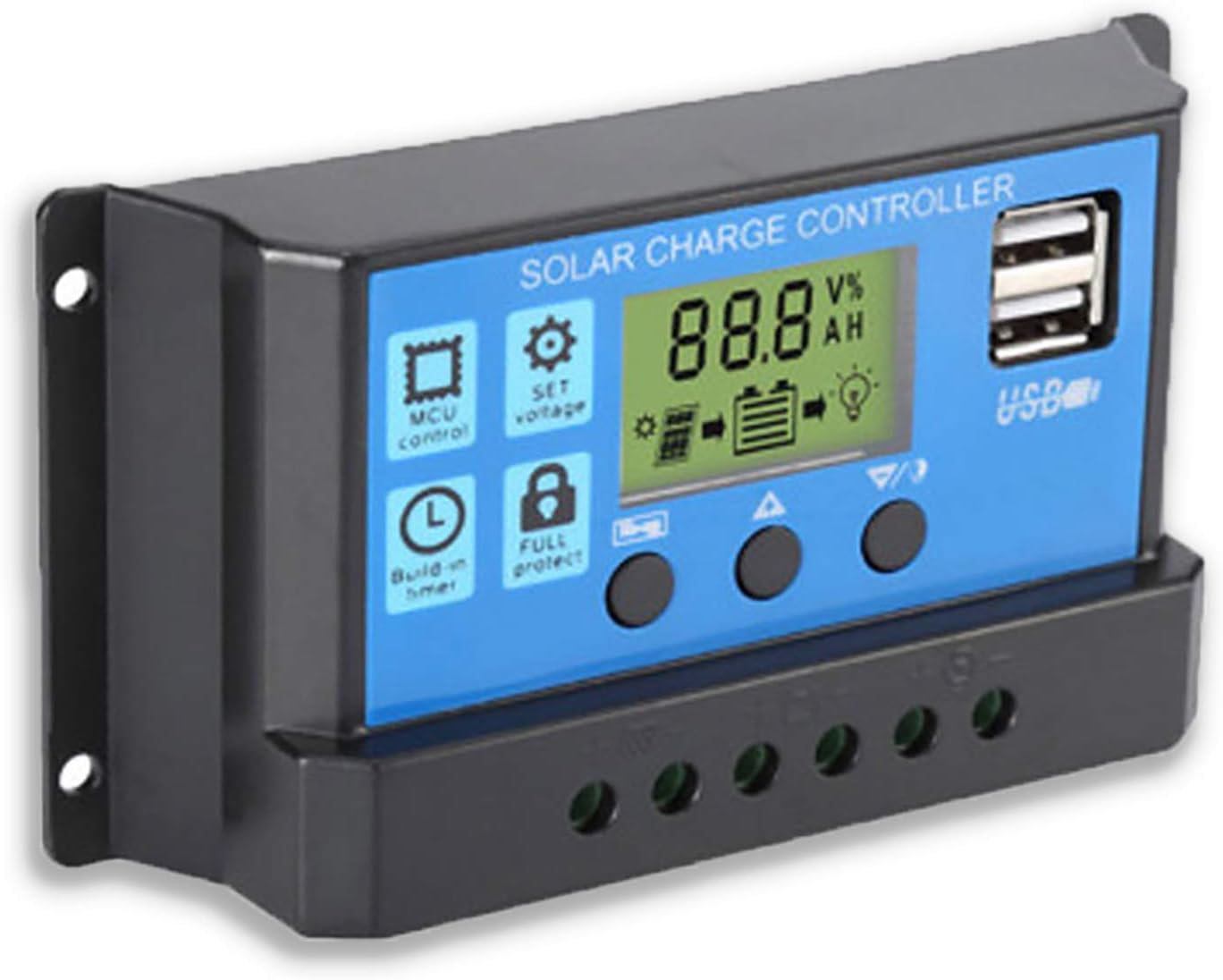
Слика 1: Предна страна view of the Saooer 20A Solar Charge Controller.
Инструкции за безбедност
- Ensure all connections are correct before powering on the controller. Incorrect wiring can damage the device or connected components.
- The controller is designed for indoor use or in a protected environment. Avoid exposure to direct sunlight, high temperatures, or moisture.
- Не обидувајте се сами да го расклопите или поправите контролерот. Обратете се кај квалификуван персонал за сервис.
- Да се чува подалеку од дофат на деца.
- This controller is only suitable for lead-acid batteries: OPEN, AGM, GEL. Do not use with other battery types like Lithium-ion or LiFePO4, as this may cause damage or safety hazards.
- Always connect the battery first, then the solar panel, and finally the load. When disconnecting, reverse the order: disconnect the load, then the solar panel, and finally the battery.
Карактеристики на производот
- Автоматски системски волуменtagд Идентификација: Автоматски го детектира системскиот напон од 12V/24Vtage.
- PWM Charging: Efficient Pulse Width Modulation charging mode.
- Двоен USB приклучок: Provides 5V/2A output for charging mobile devices.
- LCD дисплеј: Clear display of status and data, allowing for convenient mode switching and parameter configuration.
- Повеќекратни заштитни функции: Includes short-circuit protection, open-circuit protection, reverse protection, and over-load protection.
- Прилагодливи параметри: User-adjustable charge and discharge parameters.
- Температурна компензација: Automatic temperature compensation for optimal charging.
Поставување и инсталација
Follow these steps carefully to install your solar charge controller. Incorrect installation can lead to damage or malfunction.
- Подготовка на жици: Ensure all wires are properly stripped and have appropriate connectors if necessary. Use wires of sufficient gauge for your system's current.
- Поврзете ја батеријата: Connect the battery to the charge regulator first. Observe correct polarity (+ to + and - to -). The controller will automatically recognize the battery voltage (12V или 24V).
Слика 2: Страна view showing the connection terminals for battery, solar panel, and load.
- Поврзете го соларниот панел: Connect the solar panel to the solar charge controller. Ensure correct polarity.
- Поврзете го товарот: Connect the consumer or load to the charge controller regulator. Ensure correct polarity.
Важна забелешка: Always connect the battery first, then the solar panel, and finally the load. When disconnecting the controller, please remove the solar panel, then the load, and finally the battery. This sequence helps the controller recognize the battery voltage correctly and prevents damage.
Упатства за работа
LCD дисплеј и копчиња

Слика 3: Аголна view showing the LCD display and control buttons.
The controller features an LCD display and three buttons for operation:
- Копче за мени: Used to cycle through display modes and enter parameter setting mode.
- Копче горе: Се користи за зголемување на вредностите или навигација нагоре во менијата.
- Долу копче: Се користи за намалување на вредностите или навигација надолу во менијата.
Режими на прикажување
Press the Menu button to cycle through the following display modes:
- Батерија Voltagд (V)
- Соларен панел Voltagд (V)
- Струја на вчитување (A)
- Battery Temperature (°C)
- Струја на полнење (A)
- Струја на празнење (A)
- Load Working Mode (24H, 0-23H, 0H)
Поставки за параметри
To enter parameter setting mode, press and hold the Menu button for 5 seconds. Use the Up and Down buttons to adjust values, and the Menu button to confirm and move to the next parameter. Press and hold Menu again to exit setting mode.
| Параметар | Опис | Default (12V) | Range (12V) |
|---|---|---|---|
| Б01/Б02/Б03 | Battery Type Selection (B01=Lead-acid, B02=Lithium Ion, B03=LiFePO4) | B01 | N/A |
| Charge Off Voltage | Voltage at which charging stops | 14.4V | 13.0V - 15.0V |
| Испуштање Повторно поврзување Волуменtage | Voltage at which load reconnects after low voltagд исклучи се | 12.6V | 11.0V - 13.5V |
| Волумен на запирање на празнењеtage | Voltage at which load disconnects to protect battery | 10.7V | 9.0V - 11.5V |
| Load Working Time | Timer for load output (24H, 0-23H, 0H) | 24 ч | N/A |
Note: For 24V systems, multiply the 12V values by two.
Одржување
- Редовна инспекција: Периодично проверувајте ги сите жичени врски за затегнатост и корозија.
- Чистота: Чувајте го контролерот чист и без прашина. Користете сува крпа за чистење.
- Вентилација: Обезбедете соодветна вентилација околу контролерот за да спречите прегревање.
- Здравје на батеријата: Монитор батерија voltage and health regularly. Replace batteries as needed.
Решавање проблеми
| Проблем | Можна причина | Решение |
|---|---|---|
| Контролерот не се вклучува / LCD екранот е празен | Battery not connected or reverse polarity; Battery voltagе премногу ниско. | Check battery connections and polarity. Ensure battery has sufficient charge. |
| Соларниот панел не ја полни батеријата | Solar panel not connected or reverse polarity; Insufficient sunlight; Damaged solar panel. | Check solar panel connections and polarity. Ensure panel is in direct sunlight. Test solar panel output. |
| Товарот не работи | Load not connected or reverse polarity; Battery voltage too low (low voltage disconnect); Overload protection activated. | Check load connections and polarity. Charge battery. Reduce load or check for short circuit. |
| USB-портите не се полнат | Волумен на батеријаtage too low; Device not compatible; Faulty USB cable. | Ensure battery is charged. Try a different device or cable. |
| Controller gets hot | Overload; Poor ventilation. | Reduce load. Ensure controller has adequate airflow and is not in an enclosed space. |
Спецификации
| Карактеристика | Детал |
|---|---|
| Модел | СИНА 20А |
| Систем Voltage | 12V / 24V Автоматско |
| Максимална струја на полнење/празнење | 20 А |
| USB излез | Dual USB, 5V/2A (Max) |
| Компатибилност со тип на батерија | Lead-acid (OPEN, AGM, GEL) |
| Димензии на производот | 5.12 x 2.76 x 1.5 инчи (приближно 133 мм x 70 мм x 38 мм) |
| Тежина на ставката | 5 унци |
| Приказ | LCD екран |
| Работна температура | -35°C до +60°C |

Figure 4: Product dimensions of the solar charge controller.
Гаранција и поддршка
For warranty information or technical support, please contact the manufacturer, Saooer, through their official channels. Refer to your purchase documentation for specific warranty terms and contact details.
Производител: Saooer
ASIN: B095764VB7
UPC: 605832982977
Можете да ја посетите Saooer Store on Amazon за повеќе информации или за контакт со поддршката.