
Вовед
Thank you for choosing the PILOT 720p Vehicle Dash Cam. This manual provides detailed instructions for the proper installation, operation, and maintenance of your new dash camera. Please read this manual thoroughly before use to ensure optimal performance and longevity of the device.
This dash cam is designed to record video footage while driving, offering features such as 720p HD resolution, a wide viewing angle, motion detection, and loop recording. It comes with an 8GB Micro SD card and a universal window mount for convenient setup.
Содржина на пакетот
Ве молиме проверете дали сите артикли наведени подолу се вклучени во вашиот пакет:
- Dash Cam Unit
- 8 GB Micro SD картичка
- Монтирање на чаши за вшмукување
- USB полнач за автомобил
- USB Charger and Sync Cable
- Упатство за употреба (овој документ)
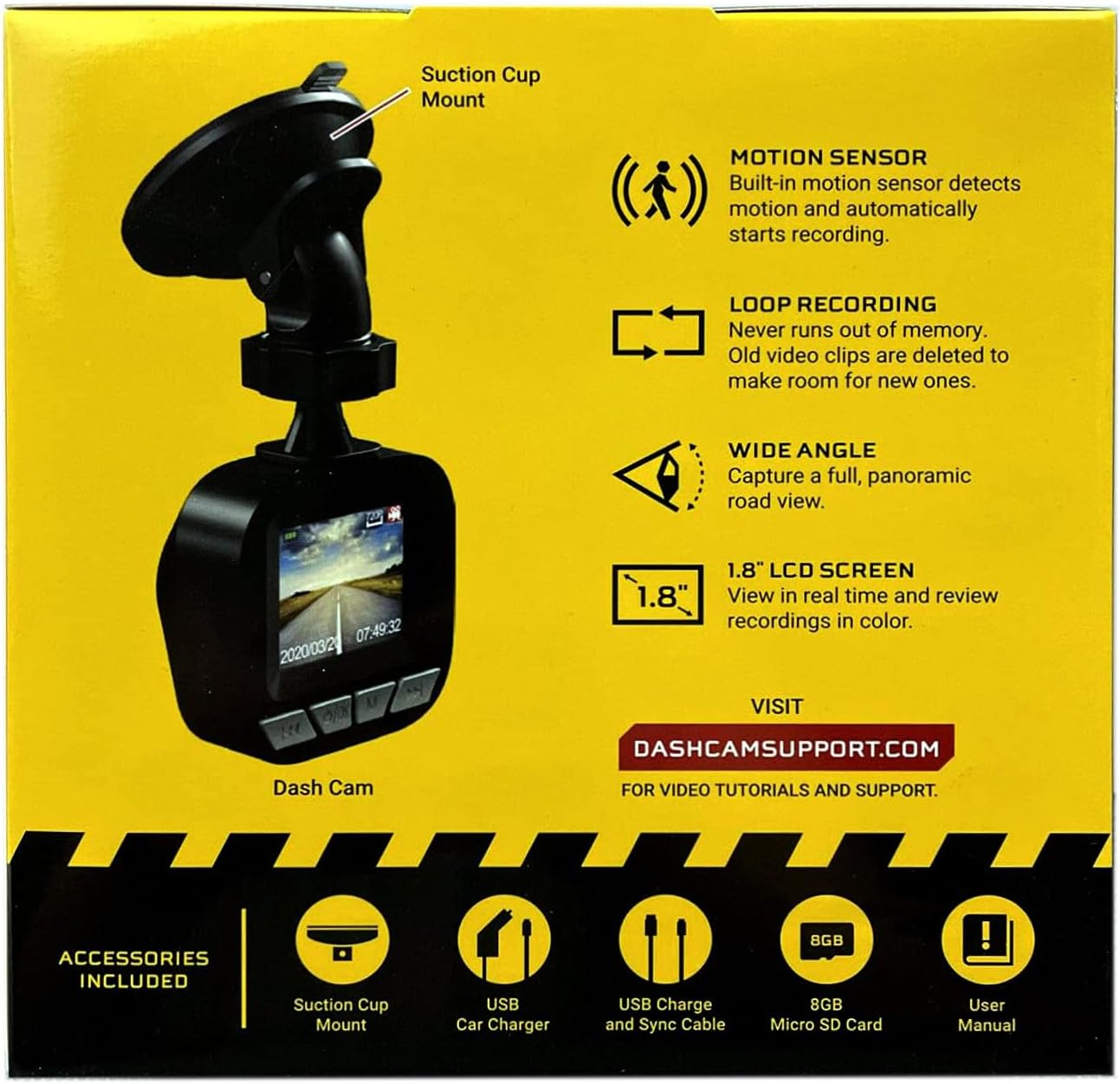
Image: The dash cam unit, suction cup mount, USB car charger, USB charge and sync cable, 8GB Micro SD card, and user manual are shown, along with a summary of key features like motion sensor, loop recording, wide angle, and 1.8" LCD screen.
Карактеристики на производот
- Резолуција: 720p HD видео снимање.
- Големина на екранот: 1.8-inch LCD display for real-time viewвклучување и репродукција.
- Viewагол: Wide-angle lens to capture a broad road view.
- Сензор за движење: Built-in sensor detects motion and automatically initiates recording.
- Снимање на јамка: Automatically overwrites older video clips when the memory card is full, ensuring continuous recording.
- Микрофон: Вградено за снимање аудио.
- Складирање: Supports Micro SD cards up to 32GB (8GB card included).
- Моќност: Built-in rechargeable Lithium-ion battery and USB 2.0 port for charging.
Водич за поставување
1. Вметнување на Micro SD-картичката
Locate the Micro SD card slot on the side or bottom of the dash cam. Gently insert the included 8GB Micro SD card into the slot until it clicks into place. Ensure the card is inserted correctly to avoid damage. The dash cam supports cards up to 32GB.
2. Монтирање на Dash Cam
- Clean the desired area on your vehicle's windshield where you intend to mount the dash cam. Ensure the surface is dry and free of dust.
- Прикачете го држачот за вакуум на единицата за брегаста табла.
- Цврсто притиснете ја вакуумската чаша на шофершајбната и свртете ја рачката за да ја прицврстите на место.
- Прилагодете го аголот на цртичката за да обезбедите јасна view of the road ahead, avoiding any obstructions.

Слика: Крупен план view of the front of the PILOT dash cam, showing the camera lens and the "PILOT" brand logo. This illustrates the main unit for mounting.
3. Поврзување на енергија
Connect the USB car charger to your vehicle's 12V power outlet (cigarette lighter socket). Then, connect the USB charger and sync cable from the car charger to the USB port on the dash cam. The dash cam will typically power on automatically when the vehicle starts and power is supplied.
Упатства за работа
Вклучување/исклучување
- Автоматски: The dash cam will power on and begin recording automatically when connected to a power source and the vehicle ignition is turned on. It will power off automatically when the vehicle is turned off and power is disconnected.
- Прирачник: To manually power on or off, press and hold the power button (usually located on the side or bottom of the unit) for a few seconds.
Режими на снимање
- Снимање со континуиран циклус: The dash cam records video in continuous loops (e.g., 1, 3, or 5-minute segments). When the Micro SD card is full, the oldest unlocked files will be overwritten by new recordings. This ensures you always have the most recent footage.
- Снимање на откривање на движење: When enabled in the settings, the dash cam will automatically start recording if it detects motion in front of the camera while the vehicle is parked and the dash cam is powered on. This feature is useful for monitoring your vehicle when stationary.
Viewинг Снимки
The 1.8-inch LCD screen allows you to view живеј фаоtagе и реview recorded videos directly on the device. Use the navigation buttons (typically labeled 'Menu', 'Up', 'Down', 'OK') to browse through the menu options and playback recorded files. Refer to the on-screen interface for specific navigation prompts.
Датум и време Свamp
Ensure the date and time are set correctly in the dash cam's settings menu. This is crucial for accurate record-keeping of video footage.
Одржување
- Чистење на објективот: Regularly clean the camera lens with a soft, lint-free cloth to ensure clear video quality. Avoid abrasive materials or harsh chemicals.
- Управување со SD картички: It is recommended to format the Micro SD card periodically (e.g., once a month) within the dash cam's settings menu. This helps maintain card performance and prevents data corruption. Back up any important footage пред форматирање.
- Нега на батеријата: The built-in Lithium-ion battery is primarily for emergency recording and saving settings. For continuous operation, keep the dash cam connected to the vehicle's power supply. Avoid exposing the device to extreme temperatures for extended periods.
- Ажурирања на фирмверот: Check the manufacturer's support webсајт (DASHCAMSUPPORT.COM) periodically for any available firmware updates to improve performance and add new features.
Решавање проблеми
| Проблем | Можно решение |
|---|---|
| Камерата на таблата не се вклучува. |
|
| Dash cam turns off frequently during driving. |
|
| Видео фудtage е заматено или нејасно. |
|
| Dash cam is not recording. |
|
Спецификации
| Карактеристика | Детал |
|---|---|
| Резолуција | 720p HD |
| Големина на екранот | 1.8 инчи |
| Viewинголен агол | Wide Angle (135 Degrees Field Of View) |
| Сензор за движење | Вграден |
| Снимање на јамка | Вграден |
| Микрофон | Вграден |
| USB порта | USB 2.0 |
| Батерија | Вграден литиум-јон на полнење |
| Поддршка за мемориска картичка | Micro SD up to 32GB (8GB included) |
| Тежина на ставката | 8 унци |
| Технологија за поврзување | USB |
| Тип на монтирање | Монтирање на прозорецот |
Поддршка
For additional assistance, video tutorials, or further support, please visit the official support webсајт:
Please have your product model information ready when contacting support.